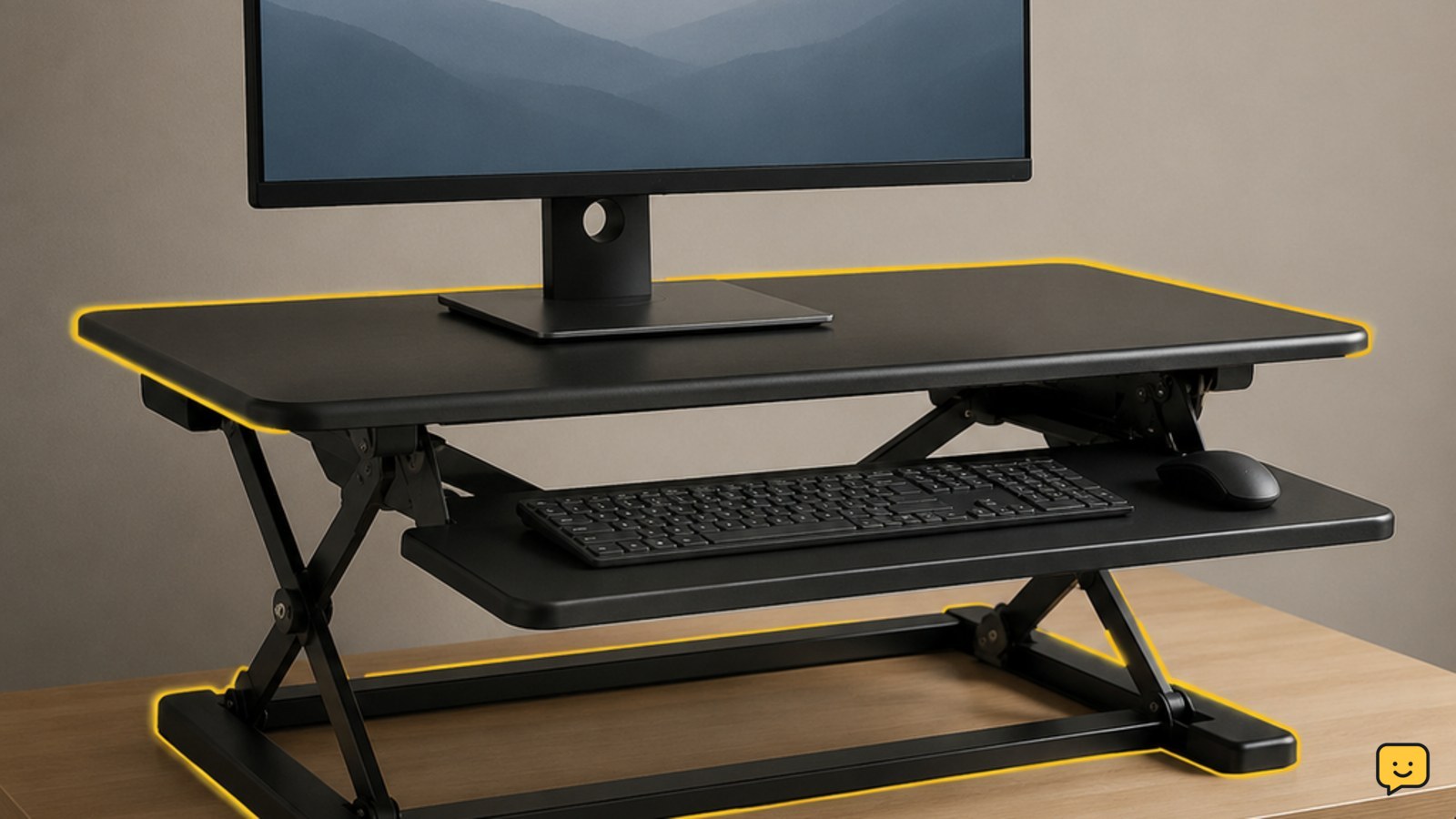
A riser desk is a height-adjustable platform that sits on top of a desk you already own. It raises your monitor, keyboard, and mouse so you can alternate between sitting and standing. It is also called a desk riser, desk converter, or standing desk converter. Unlike a full standing desk, it does not replace the original desk.
For more help with this topic, use the Career Workplace guides.
What a riser desk changes
A riser desk changes the height of your work equipment while leaving the original desk in place. The platform may use a manual lift, crank, gas-spring mechanism, or motor, depending on the model. VersaDesk describes a desk riser as a height-adjustable work surface that lifts a monitor, keyboard, and mouse from an existing desk.
The main benefit is flexibility: you can work seated, raise the platform, and work standing without buying or installing a full-height-adjustable desk. The trade-off is that the original desktop still occupies the same floor space, and the platform adds weight and height to that surface.
“Riser desk,” “desk riser,” “desk converter,” and “standing desk converter” are commonly used for this type of equipment. A fixed desk shelf is different because it stays at one height. The VersaDesk guide makes this distinction: a riser adjusts, while a shelf is set in place.
Choose the riser type that fits your equipment
The right riser desk depends on how much equipment you need to lift and how often you expect to change positions. A compact platform may suit a laptop and compact keyboard. A wider platform may be necessary for a monitor, keyboard, mouse, and accessories. A heavier setup requires particular attention to the stated load limit and platform stability.
- Choose manual adjustment when you want a simpler platform and do not need frequent height changes.
- Choose powered adjustment when repeated changes are central to your workflow and a nearby power connection is practical.
- Choose a fixed shelf instead when you only need to raise a screen or organize equipment at one height. A shelf usually does not provide a standing transition.
- Choose a full standing desk when you need the entire desktop to move, have a large or heavy arrangement, or need more open legroom beneath the work surface.
These choices are practical fit decisions, not guarantees of comfort. Compare the platform dimensions and capacity with your actual equipment before buying.
Set up the platform without creating a hazard
Safe riser desk setup means the platform is centered, stable, within its load limit, and free to move through its full range.
- Place the riser on a solid, level part of the desk. Keep its feet or base fully supported rather than partly overhanging the edge.
- Put the heaviest equipment in the position shown by the manufacturer. Keep monitors and stands centered instead of loading one side.
- Route display, keyboard, mouse, charging, and power cables so they have enough slack at the highest and lowest positions.
- Raise and lower the empty or lightly loaded platform slowly during the first check. Watch for contact with shelves, wall-mounted items, lamps, or the desk edge.
- Add the remaining equipment and repeat the movement check. Tighten or assemble components only as the instructions specify.
Success means the platform moves through its intended range without catching, tipping, scraping, or pulling a cable. If it catches, lower it carefully, remove the obstruction, and do not continue until the cause is clear.
Verify the working position at sitting and standing height
A riser desk is correctly positioned when the screen, input devices, and nearby work area remain usable in both positions. Adjust the platform in small movements and check each position rather than setting it once by appearance.
- At seated height, confirm that the keyboard and mouse are reachable without lifting your shoulders or stretching forward.
- At standing height, confirm that the screen remains easy to view and that the keyboard and mouse are still close enough for relaxed arm positioning.
- Check that the platform does not block the desk edge, drawers, or your available legroom.
- Type, use the mouse, and read for a few minutes in each position. Notice pressure, strain, cable pulling, wobble, or awkward reaching.
If the screen feels right but the keyboard is too high or low, the riser may not provide enough separate adjustment for your equipment. Lower the platform and reassess rather than forcing an uncomfortable position. Persistent pain, numbness, or weakness is a reason to stop and seek professional medical advice.
Know when a riser desk is the wrong solution
A riser desk may not suit a setup that is too heavy, too wide, too crowded, or dependent on equipment that cannot move safely with the platform.
Consider a full standing desk if the platform leaves too little room for your legs, cannot support your equipment, or makes cable routing difficult. Consider a fixed monitor shelf if you only need screen elevation and will not alternate between sitting and standing. Consider a laptop stand and separate keyboard if your main issue is laptop screen height rather than a changing work surface.
Do not solve a capacity or stability problem by adding improvised blocks, stacking furniture, or exceeding the product’s specifications. If the platform remains unstable after correct placement and assembly, stop using it and consult the manufacturer or return instructions.
Frequently asked questions
Is a riser desk the same as a standing desk?
No. A riser desk sits on top of an existing desk and moves only the raised platform. A standing desk is a complete desk whose work surface, and usually its legs, adjust in height. A riser takes less furniture replacement to install, but it can provide less open space and less capacity for large equipment.
Can a riser desk hold two monitors?
Some riser desks can hold two monitors, but the answer depends on the model’s platform size, weight limit, and monitor arrangement. Check the manufacturer’s specifications for the combined weight of both monitors and their stands or arms. Stop if the loaded platform tilts, wobbles, or cannot move smoothly.
Does a riser desk work with a laptop?
Yes. A riser desk can raise a laptop for standing work, although extended laptop use may require a separate keyboard and mouse for a more flexible setup. Confirm that the laptop and accessories fit within the platform’s usable area and load limit before adjusting the height.
What is the difference between a desk riser and a desk shelf?
A desk riser changes height, while a desk shelf stays fixed once placed. Choose a shelf when you need a permanent screen-elevation or storage surface. Choose a riser when you want to move the work surface between seated and standing positions.