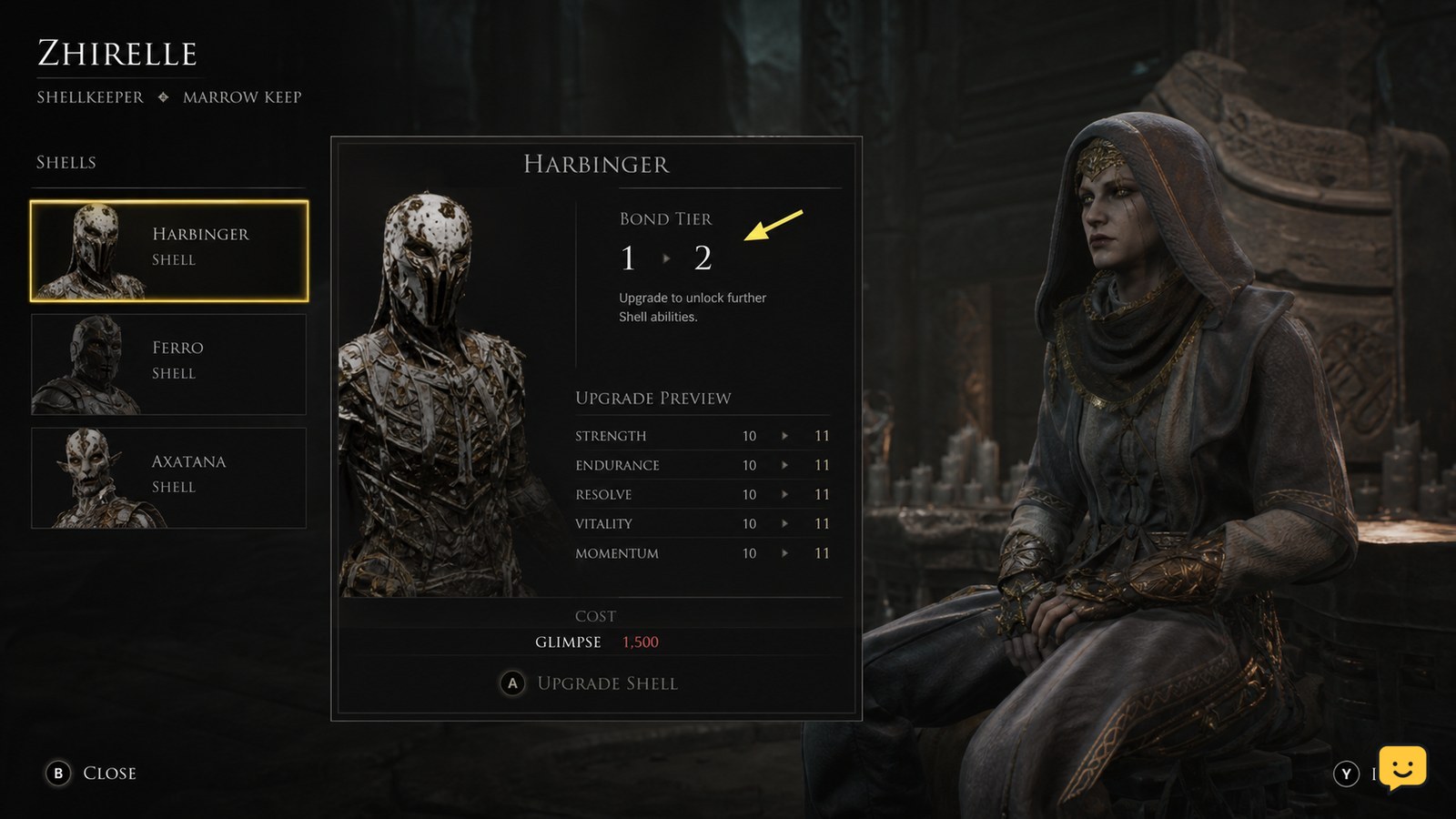
To upgrade Shell stats in Mortal Shell II, visit Zhirelle, the Shellkeeper at Marrow Keep, select the Shell you want to improve, and spend Glimpse to raise its Bond Tier. Check the upgrade panel before confirming: it should show the cost, next Bond Tier, and affected attributes or effects. This guidance applies to the documented beta system, not Mortal Shell Legacy.
For more help with this topic, use the Mortal Shell II guides.
Check that your version uses Bond Tier upgrades
Mortal Shell II Shell stat upgrades use the documented Bond Tier system at Zhirelle in Marrow Keep. Fextralife’s Mortal Shell 2 upgrade guide identifies Marrow Keep as the point where leveling becomes available, while AltChar describes Shell upgrades through Zhirelle using Glimpse and Bond Tiers I through IV.
This is version-sensitive information from Mortal Shell II beta coverage. Before farming resources or changing your build, open Marrow Keep and confirm that Zhirelle offers a Shell screen with Bond Tier and Glimpse requirements. If those labels are missing, stop here and follow the upgrade instructions displayed by your game instead.
Do not apply this route to the original Mortal Shell, often called Legacy. Its Shell progression is mechanically separate, so matching names alone do not make menus, currencies, or upgrade results interchangeable.
Go to Zhirelle in Marrow Keep
Zhirelle is the required Shellkeeper for the documented Mortal Shell II stat-upgrade path. Travel to Marrow Keep, interact with Zhirelle, and look for the Shell selection or progression interface rather than the weapon-forging interface.
- Choose the Shell whose attributes you want to raise.
- Open its progression details.
- Find the current Bond Tier and the next available tier.
- Read the displayed Glimpse cost and upgrade effect before confirming.
If the Shell you want is not available in the interface, leave without spending Glimpse. First confirm that you have found and selected that Shell correctly.
Select the Shell before spending Glimpse
Bond Tier progress belongs to the Shell selected at Zhirelle, so verify its name before you confirm an upgrade. The available evidence describes spending Glimpse to increase a Shell’s Bond Tier from I to IV. It does not support assuming that a purchase improves every Shell at once.
Check the selected portrait, name, current tier, and next-tier effect. If the panel changes when you switch Shells, treat each Shell’s upgrade path as separate unless your in-game screen explicitly states otherwise. This avoids investing Glimpse into a Shell you do not intend to use.
Need to change to the Shell you plan to build around first? This guide explains how to switch Shells at Marrow Keep before you commit resources.
Need to change to the Shell you plan to build around first? This guide explains how to switch Shells at Marrow Keep before you commit resources.
Raise the next Bond Tier and inspect the effect
Spend Glimpse only on the next displayed Bond Tier after checking the effect shown in Zhirelle’s panel. Select the available tier, confirm the purchase, then remain on the screen long enough to verify that the tier indicator advances and the listed upgrade is marked obtained.
Use the in-game description as the authority for the exact stat or effect. Available beta sources confirm that Bond Tier upgrades develop a Shell, but they do not provide a stable, complete list of every attribute change for every Shell. Avoid relying on a generic health, stamina, damage, or defense order unless your current panel specifically names that result.
For Shell-specific effects that appear beside or after progression purchases, see Shell ability progression requirements and meet the conditions shown for that ability.
For Shell-specific effects that appear beside or after progression purchases, see Shell ability progression requirements and meet the conditions shown for that ability.
Verify that the stat upgrade applied
A successful Shell upgrade shows a higher Bond Tier and an updated state for the purchased upgrade on Zhirelle’s screen. Check these items before leaving Marrow Keep:
- The selected Shell still matches the one you intended to upgrade.
- The Bond Tier has increased or the next tier has become the new available purchase.
- Your Glimpse total has decreased by the displayed cost.
- The upgrade effect is no longer presented as unpurchased.
If the screen shows the purchase but you cannot identify a changed combat value, check whether the upgrade grants an ability, passive effect, or requirement rather than a plainly numbered attribute. The panel’s own wording is the safest confirmation.
Fix a Shell upgrade that is unavailable or blocked
A blocked Shell upgrade usually means the selected Shell, required Glimpse amount, or version-specific progression condition does not match the panel. Use the symptom below to choose the next action.
| What you see | Likely cause | Safe next action |
|---|---|---|
| The next tier is shown but cannot be purchased. | You do not have the required Glimpse. | Gain more Glimpse, return to Zhirelle, and recheck the displayed cost. |
| The wrong Shell appears in the upgrade screen. | Your active or selected Shell is different. | Change Shell selection at Marrow Keep, then reopen progression. |
| No Bond Tier or Glimpse option appears. | Your build may use a changed interface or a different version. | Stop using beta-specific instructions and follow the progression labels present in your game. |
| The Shell cannot be entered or used. | The issue may be Shell revival rather than stat progression. | Resolve the Shell state before attempting an upgrade. |
If a downed Shell prevents you from continuing, check the steps to restore a Shell after it is downed. Do not repeatedly spend resources or reload solely to force a missing upgrade prompt; missing interface elements are a stop condition until you confirm your version’s current system.
Frequently asked questions
What currency upgrades Shell stats in Mortal Shell II?
Glimpse is the currency documented for raising Shell Bond Tiers at Zhirelle in Marrow Keep. Check the cost on the current in-game panel before confirming, because beta-era requirements and interface details can change between versions.
Do Shell upgrades apply to every Shell at once?
No confirmed source says that one Bond Tier purchase upgrades every Shell. Treat upgrades as Shell-specific when Zhirelle’s panel requires you to select a Shell and displays that Shell’s own tier or effect. Confirm the selected name before spending Glimpse.
What is the highest documented Shell Bond Tier?
The documented beta coverage describes Bond Tiers I through IV. If your game displays additional tiers, different labels, or no tier system, use the progression screen in your installed version as the current authority.
Can I upgrade Shell stats at the Tarforge?
No. The available Mortal Shell II guides distinguish Shell progression at Zhirelle in Marrow Keep from weapon upgrading at the Tarforge. Use Zhirelle for the Shell’s Bond Tier screen and the Tarforge for applicable weapon improvements.