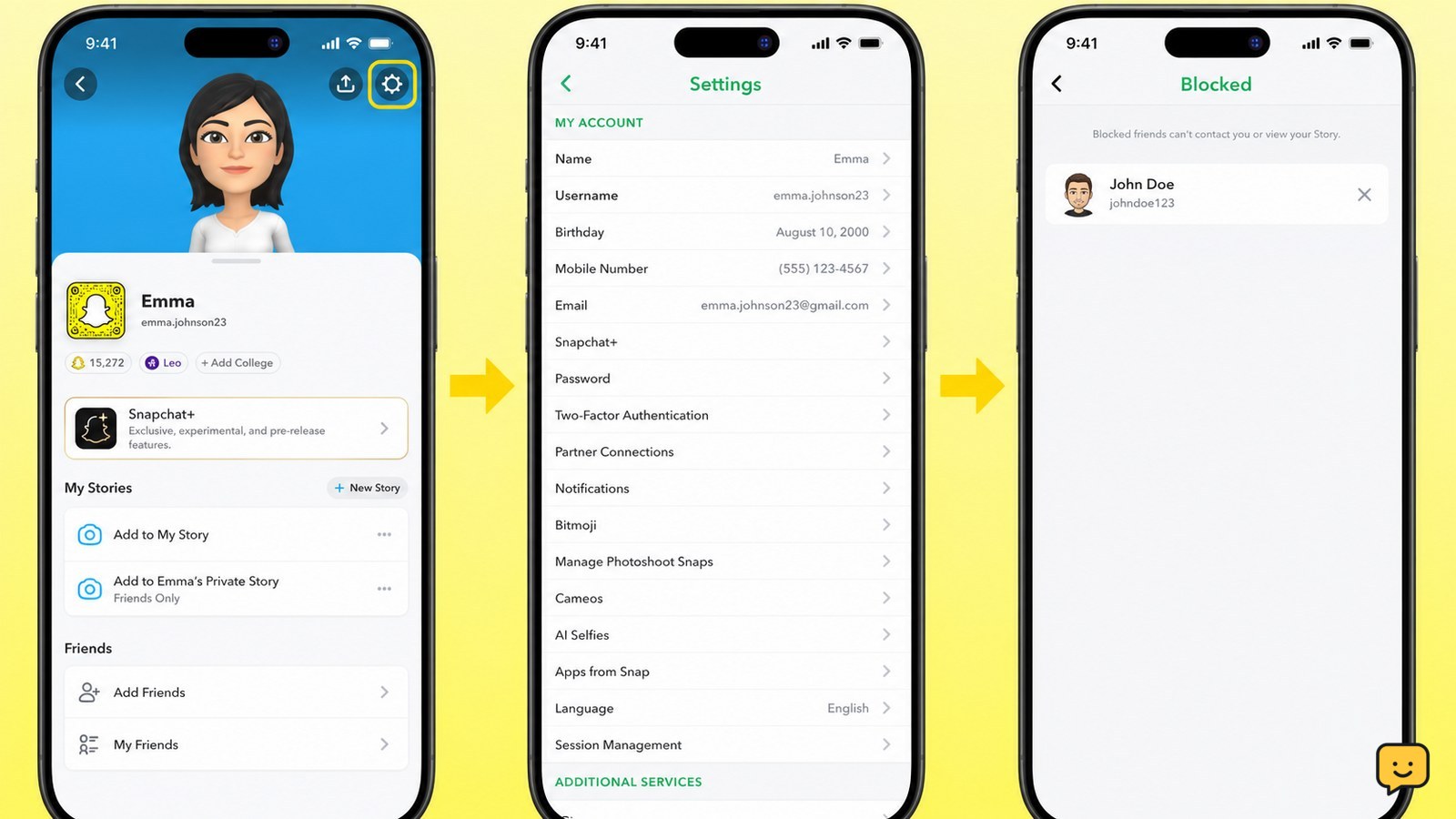
To unblock someone on Snapchat, open Snapchat, tap your profile icon, tap the Settings gear, scroll to Blocked, then tap the X beside the person’s name and confirm if prompted. Their name should disappear from the blocked list. Unblocking allows them to contact you and view content according to your privacy settings, so verify the account before confirming.
For more help with this topic, use the Privacy Online Safety guides.
Open the Blocked list in Snapchat Settings
Snapchat keeps blocked accounts in the app’s Settings under Blocked. Open Snapchat, tap your profile icon at the top of the screen, and tap the gear icon to open Settings.
- Scroll down through Settings.
- Tap Blocked.
- Review the names shown in the list before making a change.
Snapchat’s Support instructions use this Profile icon, Settings, and Blocked path. Menu placement can vary slightly after an app update, but the relevant control should remain in account or privacy settings.
Tap X beside the person’s name
To unblock the selected Snapchat user, tap the X beside their name in the Blocked list. Confirm the action if Snapchat displays a confirmation prompt.
Check the username carefully first. Display names can be similar, and unblocking the wrong account can allow that person to send Snaps or Chats and view Stories and Charms, as Snapchat Support explains.
Verify the unblock and check whether you need to add them again
A successful unblock is visible immediately when the person’s name disappears from the Blocked list. Reopen the list or scroll through it once more to confirm that the intended username is no longer present.
Unblocking removes the block; it does not guarantee that the person will appear in your Friends list. If you want to reconnect, search for their username from Snapchat’s search screen and send a friend request when the profile is available. They may need to accept before normal friend-based features return.
If the person can contact you after the change, your privacy settings still determine which messages, Snaps, or Stories they can access. Review those settings before sharing anything personal.
If you also need to remove content that remains visible on your profile, use this guide to delete a Snapchat Story before reconnecting.
If you need to remove visible content before reconnecting, use this guide to delete a Snapchat Story.
What to do if Blocked or X is missing
If Snapchat does not show Blocked or an X beside the name, first confirm that you are signed in to the correct Snapchat account and that the app is up to date.
- Close and reopen Snapchat, then return to Profile and Settings.
- Scroll carefully through the settings categories instead of searching for the person in Chats.
- Check the spelling of the username and look again in the Blocked list.
- If the list still does not show the account, stop rather than installing an unofficial tool or entering your Snapchat password on another website.
A missing name may mean that the account is not blocked on the account you opened, or that the profile is no longer available. Snapchat’s official Support page is the safest next stop when the current app does not expose the control.
Decide whether unblocking is safe
Unblock the person only if you are comfortable restoring possible contact. Snapchat states that an unblocked Snapchatter can send you Snaps and Chats and view your Stories and Charms, subject to the privacy settings on your account.
If the original block involved abuse, impersonation, phishing, threats, or persistent unwanted messages, do not unblock the account just to test whether it behaves differently. Keep the block in place and use Snapchat’s in-app safety or reporting controls when available. If you already entered your password into an unofficial service, stop using it, change your Snapchat password through the official app or site, and review account security activity.
Frequently asked questions
Will someone know that I unblocked them on Snapchat?
Snapchat does not send a stated unblock notification in the supplied Support instructions. The person may still notice later if your profile becomes searchable or they can contact you again. If you do not want renewed contact, leave the account blocked instead of relying on notification behavior.
Can I unblock someone if I cannot find their username?
You can unblock only an account that appears in your Blocked list. Open Profile, Settings, and Blocked, then check the usernames there. If the person is absent, confirm the account you are using and the spelling of the username. Do not use an outside service to search or change Snapchat account settings.
Does unblocking automatically add the person back as a friend?
No automatic friend restoration is guaranteed. After unblocking, search for the person’s username and send a friend request if their profile is available. The person may need to accept before friend-based communication and visibility return.
What can an unblocked person do on Snapchat?
An unblocked person may be able to send you Snaps and Chats and view your Stories and Charms, subject to Snapchat’s current privacy settings. Review who can contact you and who can view your content before sharing anything sensitive.