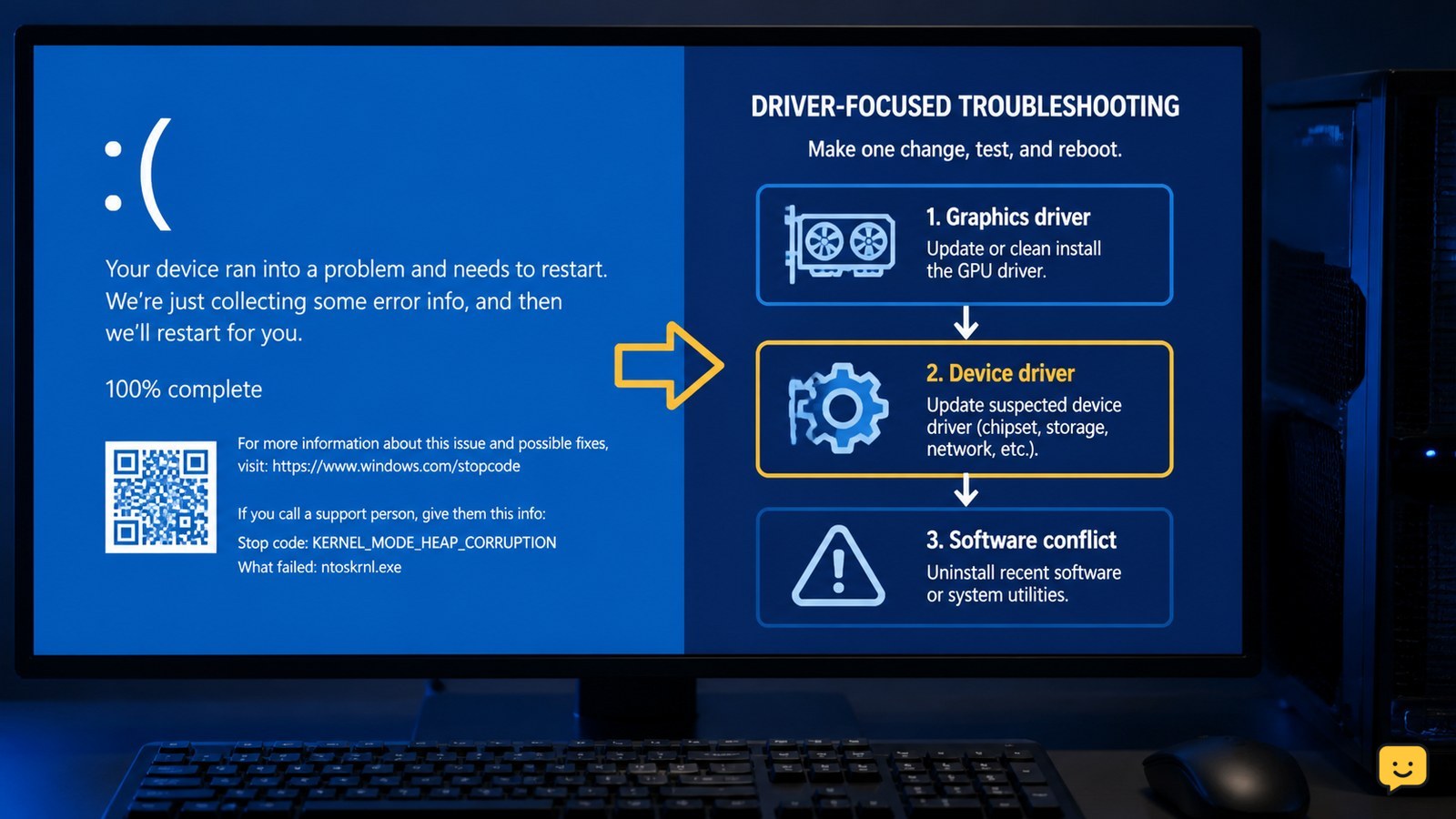
Kernel mode heap corruption is a Windows blue-screen error usually investigated through graphics and other device drivers or software conflicts. Start by recording the stop code, then update or cleanly reinstall the graphics driver, update other device drivers, and remove recently added conflicting software. Restart and test after each change; persistent crashes require repair or hardware support, not endless driver changes.
Check the stop code and crash pattern first
Windows KERNEL_MODE_HEAP_CORRUPTION identifies a system-level memory-management failure, but the stop code alone does not name the faulty component. Before changing settings, record whether the crash happens during gaming, video playback, startup, sleep, or when a particular device is connected.
Use the timing as a decision point: a crash that began after a graphics update points first to the graphics driver, while a crash that began after new peripheral software or hardware points to that recent change. If the same stop code appears in different situations, continue with the driver checks below rather than assuming the game or app is the root cause.
Fix the graphics driver before changing many settings
The graphics driver is the first driver to investigate when kernel mode heap corruption appears during games, 3D applications, video playback, or display changes. Driver Easy’s troubleshooting guidance specifically lists uninstalling graphics-card drivers as a possible fix for this error.
- Open the installed-apps or device-management area in Windows and identify the graphics adapter currently in use.
- Remove the graphics driver or graphics software package using the normal Windows or manufacturer uninstall process.
- Restart the computer.
- Install the current driver supplied by the graphics-card or computer manufacturer, choosing the driver for your exact Windows version and graphics model.
Verify the result by repeating the activity that previously caused the crash. A successful check is a normal restart and stable use without another blue screen. If the crash returns immediately after the replacement driver, record the driver version and continue to the next section instead of repeating the same installation.
Update other device drivers linked to the crash
Windows kernel mode heap corruption can also be investigated through non-graphics device drivers, especially when the crash follows a new peripheral, dock, storage device, network adapter, or chipset update. Driver Easy recommends updating device drivers as part of its troubleshooting sequence.
- List hardware added or updated shortly before the first crash.
- Check the computer manufacturer’s support page for matching chipset, storage, network, Bluetooth, and peripheral drivers.
- Update one related driver at a time and restart after each change.
- Test the computer after each restart so you know which change affected the result.
If one update makes the crashes worse, return to the manufacturer’s previous stable driver when that option is provided, or remove the recently added device and test again. Do not install a driver that is not listed for the exact computer model or hardware.
Remove recent software conflicts and overlays
Recently installed software can conflict with a kernel-level driver and trigger KERNEL_MODE_HEAP_CORRUPTION, particularly software that adds graphics overlays, hardware monitoring, peripheral controls, or security filtering. The cited troubleshooting guidance includes resolving software conflicts rather than changing only the driver.
- Review programs installed or updated just before the crashes began.
- Temporarily uninstall the most recently added hardware utility, overlay, tuning tool, or peripheral-control package.
- Restart Windows and repeat the activity that normally triggers the blue screen.
- Reinstall only software that is still needed, using a current version from its official publisher.
If removing one program stops the crashes, the result identifies a strong software lead. If uninstalling recent software changes nothing, restore the hardware you disconnected earlier one item at a time and test after each connection.
Verify stability and choose repair when fixes fail
A Windows computer is not repaired until it can restart, sign in, and complete the previously failing task without another KERNEL_MODE_HEAP_CORRUPTION stop. Test three separate states: a normal restart, ordinary desktop use, and the workload that originally caused the crash.
If the blue screen has stopped, keep the recorded stop code, driver version, and successful change in case the problem returns. If crashes continue after the graphics driver, related device drivers, and recent conflicting software have been addressed, the cause may require Windows recovery, memory or hardware diagnostics, or a qualified repair service. Back up important files before recovery or component replacement.
If Windows cannot remain running, use its recovery environment only to protect data and repair startup. Do not continue normal-use testing on a machine that is losing files, restarting in a loop, or showing signs of physical overheating.
Frequently asked questions
Is kernel mode heap corruption caused by a virus?
Not necessarily. The error is commonly investigated through graphics drivers, other device drivers, and software conflicts; it does not by itself prove malware. If the crash began after installing a driver, game utility, overlay, or peripheral tool, remove that recent change first. Use trusted security software separately if you also see unknown programs, browser changes, or unusual account activity.
Why does kernel mode heap corruption happen while gaming?
Gaming heavily uses the graphics driver and related hardware-control software, so a crash during a game makes the graphics driver the first practical check. Cleanly remove and reinstall the correct manufacturer driver, then disable or remove recently added overlays and tuning utilities. If the crash remains across different games, investigate other device drivers or hardware rather than blaming one game.
Should I replace my RAM for this blue screen?
Do not replace RAM based only on the KERNEL_MODE_HEAP_CORRUPTION message. First check the graphics driver, recently updated device drivers, and software conflicts. If the crash persists after those changes, memory or other hardware diagnostics may be appropriate. Back up important files and use a qualified technician if the computer crashes during startup or cannot complete a diagnostic safely.
What if Windows keeps restarting before I can troubleshoot?
Stop normal testing if Windows cannot stay running long enough to sign in or back up files. Disconnect recently added peripherals, then use Windows recovery options to reach a repair or safe-start environment. If the restart loop continues, prioritize data recovery and professional repair. Avoid repeatedly installing drivers or deleting system files while the computer is unstable.
For more help with this topic, use the Computers Internet guides.