Survive until an Exfil opportunity appears—current specialist documentation places the first standard prompt at round 11—then accept it, move immediately to the marked extraction area, and eliminate every required enemy before the timer expires. Keep one strong weapon, full armor, and emergency equipment ready. Success is confirmed only when the extraction sequence completes; reaching the zone alone isn’t enough.
Browse more Call of Duty: Black Ops 7 guides
Check whether the Exfil opportunity is active
Black Ops 7 Zombies makes the first standard Exfil opportunity available after you survive to round 11, according to Gamer Guides’ current Zombies overview. Watch for the on-screen Exfil notification rather than assuming extraction is available whenever you want to leave.
The notification should give you an action or interaction to begin the attempt. In co-op, also watch for any squad confirmation displayed by the HUD. Do not continue fighting on the opposite side of the map while that decision is pending.
If no notification appears at the expected point, finish the current round and check the HUD again. A custom, objective-based, or map-specific mode may use different extraction conditions. Stop if the interface shows no Exfil option; do not waste resources searching for an interaction that the current mode has not enabled.
Prepare your weapon, armor, and escape route
A successful Black Ops 7 Zombies Exfil starts before you activate the objective. The timed encounter can fail if you enter it with weak damage, broken armor, an empty magazine reserve, or an unopened route between your position and the extraction marker.
- Upgrade one dependable weapon. Prioritize the gun you can use while moving and controlling groups rather than spreading resources across several weak weapons.
- Repair or replace damaged armor. Full protection gives you room to survive contact while repositioning inside the extraction area.
- Refill ammunition. Check both the loaded magazine and reserve count. The final clear is a poor time to discover that your main weapon is nearly empty.
- Carry emergency equipment. Save an explosive, crowd-control item, or defensive ability for enemies that block the objective rather than spending everything during the preceding round.
- Open the route. Pay for any normal doors between you and the probable extraction side of the map before starting the timer.
Do not activate Exfil if the preceding round has left you unable to repair, reload, or regroup. Surviving longer is safer than committing to an extraction attempt you are not equipped to finish.
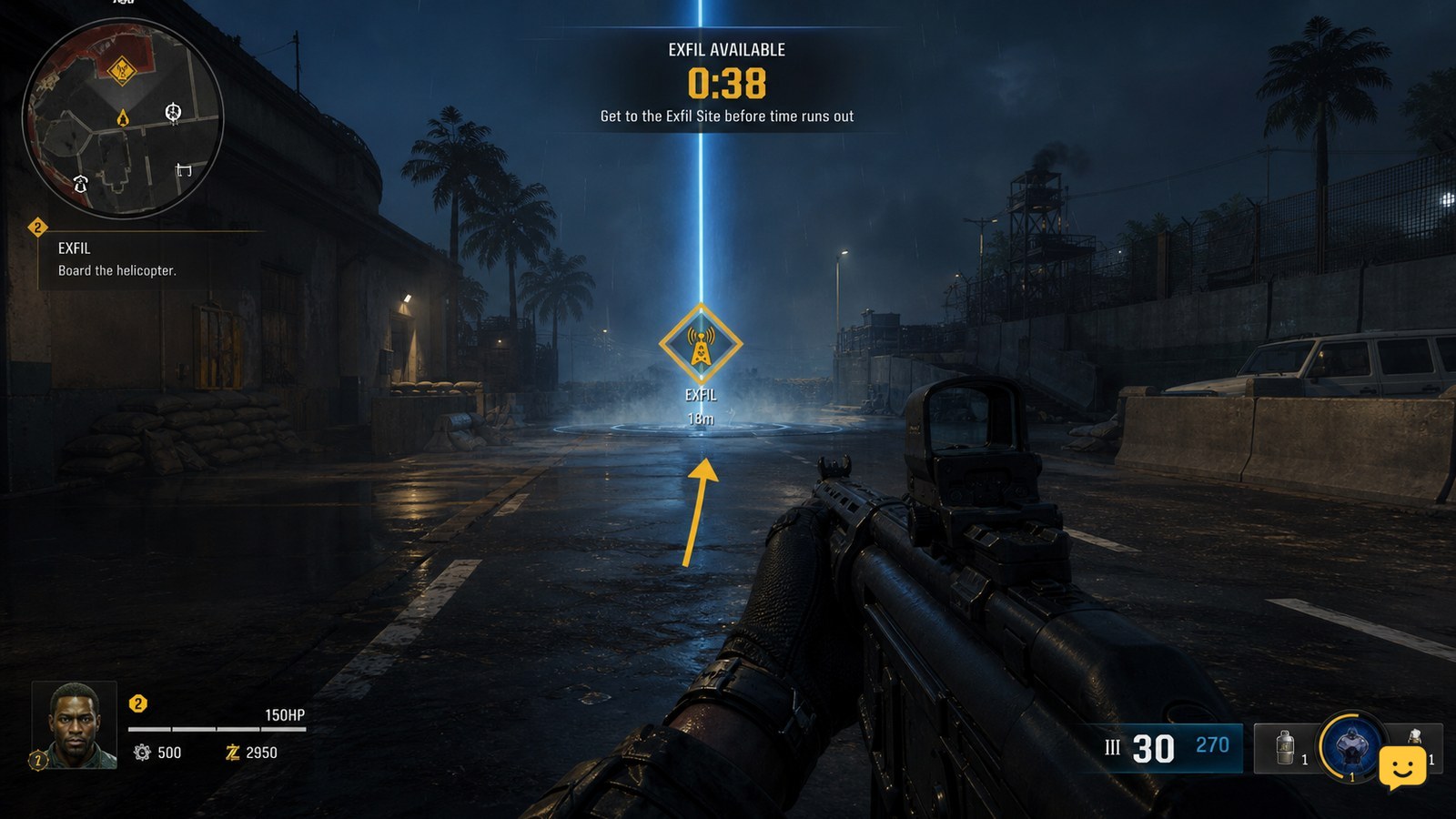
Activate Exfil and read the new HUD objective
Activating Exfil changes the immediate goal from surviving rounds to completing the extraction instructions shown on the HUD. Accept the prompt, then identify the objective marker, countdown, and any required enemy or target information before moving.
- Use the interaction or confirmation displayed by the Exfil notification.
- Wait for the extraction objective and marker to appear.
- Ping the destination in co-op if the game allows it, especially when teammates are facing different directions.
- Start moving as soon as the route is clear; do not stay behind to collect ordinary drops or finish optional purchases.
The observable checkpoint is a new extraction objective on the HUD. If accepting the prompt produces no marker, timer, or instruction, remain in a safe area and recheck the interface. Do not run toward a remembered location unless the current match confirms it.
Reach the marked extraction area without stalling
The Exfil marker is the priority once the timed objective begins. Take the shortest open route that you can survive, but avoid stopping in narrow doorways or allowing the squad to split across several paths.
Kill only the enemies that physically block movement during the approach. Fighting every trailing zombie away from the extraction area consumes time without advancing an objective that must be completed at the destination. Use movement tools and defensive equipment to break through congested passages.
In co-op, move as one group whenever practical. A player who arrives alone can become surrounded while the rest of the team is still crossing the map. If somebody goes down far behind the group, compare the remaining time with the distance before attempting a rescue. Stop the rescue if it would make the extraction objective impossible for everyone.
You have reached the correct place when the HUD marker centers on the area and the extraction objective begins responding to your actions. If nothing changes, check whether the marker is above, below, or beyond your current position rather than assuming the zone is broken.
Clear every required target before time expires
Reaching the Black Ops 7 Zombies extraction area does not complete Exfil by itself. You must satisfy the active combat objective before the countdown ends, which normally means eliminating the enemies or priority target required by the HUD.
- Group enemies in open space. Keep moving around the usable edge of the area instead of standing at the extraction point and becoming surrounded.
- Remove dangerous targets first. Prioritize any enemy that can pin, interrupt, or rapidly damage players.
- Use saved equipment on dense groups. The purpose is to reduce the remaining objective quickly, not to preserve items for a round that you intend to leave.
- Check the objective after each wave. A remaining counter, marker, or named target indicates that the clear is incomplete.
- Search the perimeter only when progress stops. A required enemy may be outside your immediate view or approaching through a nearby route.
If the HUD names a specific target, treat that target as mandatory even when ordinary zombies remain nearby. Follow the displayed objective rather than relying on instructions from another map or mode.
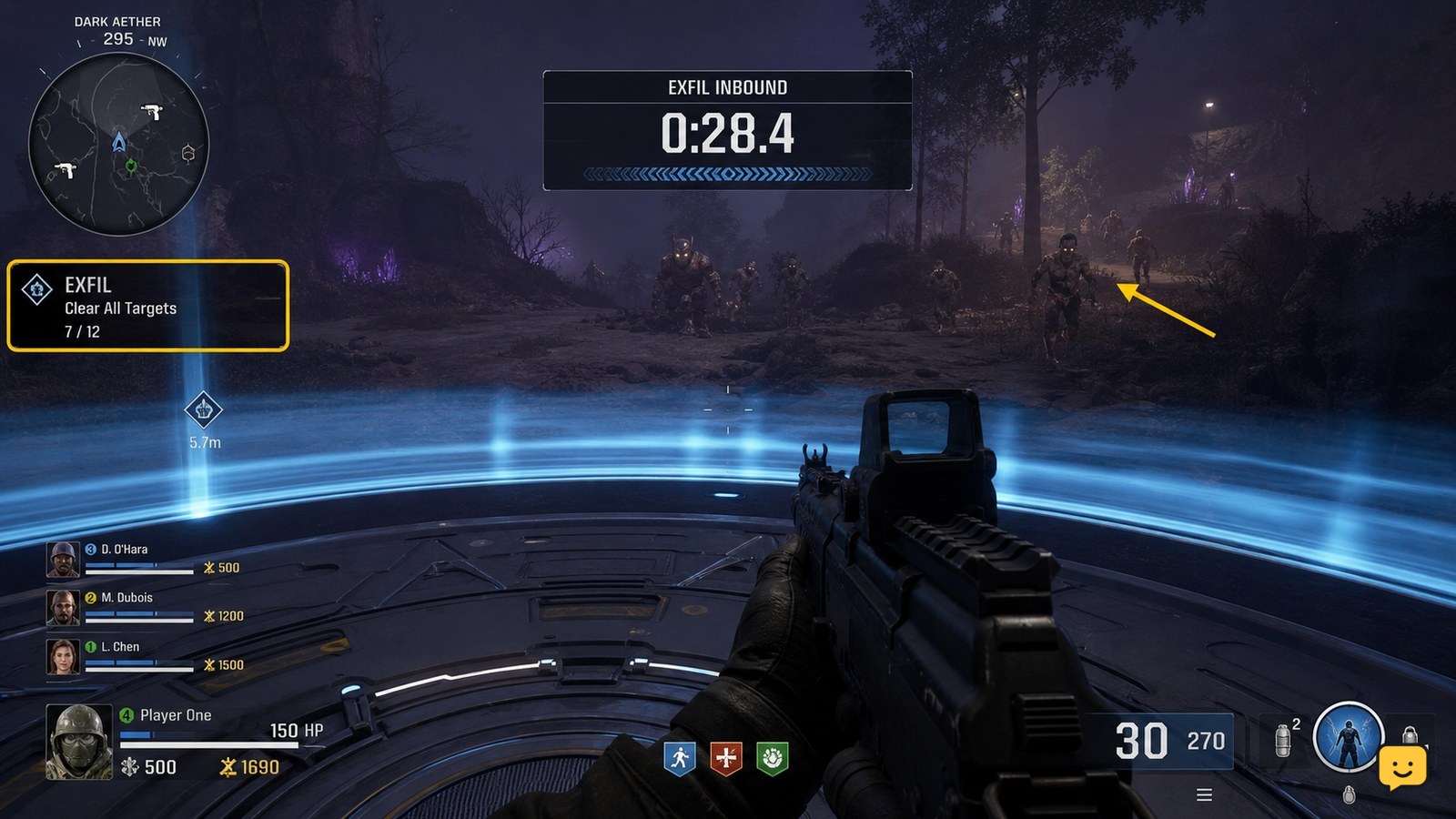
Verify the extraction sequence before relaxing
A successful Exfil is confirmed by the completed extraction sequence and its resulting match screen, not by entering the marked area or reducing the enemy count to nearly zero. Continue moving, fighting, and following interaction prompts until control transitions out of the encounter.
Watch for three observable checks: the required-enemy objective is complete, the countdown has not reached zero, and the extraction sequence has started. If the interface presents a final boarding or entry prompt, use it immediately instead of searching for drops.
Do not assume a cinematic beginning means every player is safe if the HUD still accepts movement or interaction. Follow the last displayed instruction until the game confirms completion. If the timer expires first or the screen marks the objective failed, the Exfil did not succeed.
Fix the failure that stopped your Exfil
Most failed Exfil attempts can be traced to activation timing, route delay, incomplete target clearing, or insufficient damage. Match the visible symptom to the safest correction before trying again.
| Visible symptom | Likely cause | Next action |
|---|---|---|
| No Exfil prompt appears | The opportunity is not active, the round is incomplete, or the mode uses different rules | Finish the current round and follow only the extraction instructions shown by that mode |
| The squad reaches the area with little time left | Exfil was started before regrouping or opening the route | Prepare near an open route and activate only when the squad can move immediately |
| The counter stops with one or more targets remaining | A required enemy is outside the main group or approaching from another path | Scan the marker boundary and follow any enemy or priority-target indicator |
| Enemies survive despite constant fire | Weapon damage or ammunition reserves are inadequate | Delay the next attempt until one weapon is upgraded and fully supplied |
| A teammate is downed repeatedly in the zone | The group is stationary or reviving without controlling nearby enemies | Create space first, then revive only when the remaining time makes recovery practical |
| The area is clear but extraction does not complete | A final target or interaction is still required | Read the active HUD objective and use the displayed interaction instead of leaving the zone |
Frequently asked questions
Can you Exfil before round 11 in Black Ops 7 Zombies?
The first standard Exfil opportunity is documented at round 11. If an earlier option appears in a specific mode or map, follow that match’s HUD instructions because its extraction structure may differ from the standard round-based flow.
What should I spend resources on before starting Exfil?
Spend resources on immediate survival and damage: your primary weapon, armor, ammunition, and useful equipment. Avoid optional purchases that leave you unable to repair armor or refill the weapon you need for the timed enemy clear.
Is Exfil easier solo or with a squad?
Solo removes coordination delays, while a squad provides more damage and revive capacity. In co-op, the main risk is separation: activate only after everyone is ready and close enough to reach the extraction marker together.
Why does Exfil fail when the extraction area looks empty?
A required enemy, priority target, or final interaction may still be active. Check the HUD counter and objective marker, then scan the edge of the area and nearby approach routes. Visual calm does not confirm completion.
Should I attempt Exfil with low ammunition?
No, not unless the current objective is already nearly complete. The extraction encounter requires fast target clearing under a countdown, so low reserve ammunition can turn an otherwise manageable fight into an automatic failure.