In Black Ops 7, weapon attachments come from progressing the specific weapon they belong to. Use that weapon in a mode that grants weapon progression, then check its Gunsmith or progression screen for the next attachment reward. After Weapon Prestige becomes available, use its permanent attachment option only after confirming the selected item.
Browse more Call of Duty: Black Ops 7 guides
Level the weapon that owns the attachment
Black Ops 7 ties ordinary attachment rewards to the weapon they are designed for. Select the weapon in your loadout, then use that same weapon in a playable mode that grants weapon progression. General account level, operator challenges, and unrelated weapon levels do not replace the weapon-specific requirement.
Use the weapon often enough to produce a visible progression change. If the weapon level does not move after a completed match, check the end-of-match results before assuming the attachment system is broken. A mode, playlist, or progression restriction may be affecting the reward.
Check the weapon progression screen for the next reward
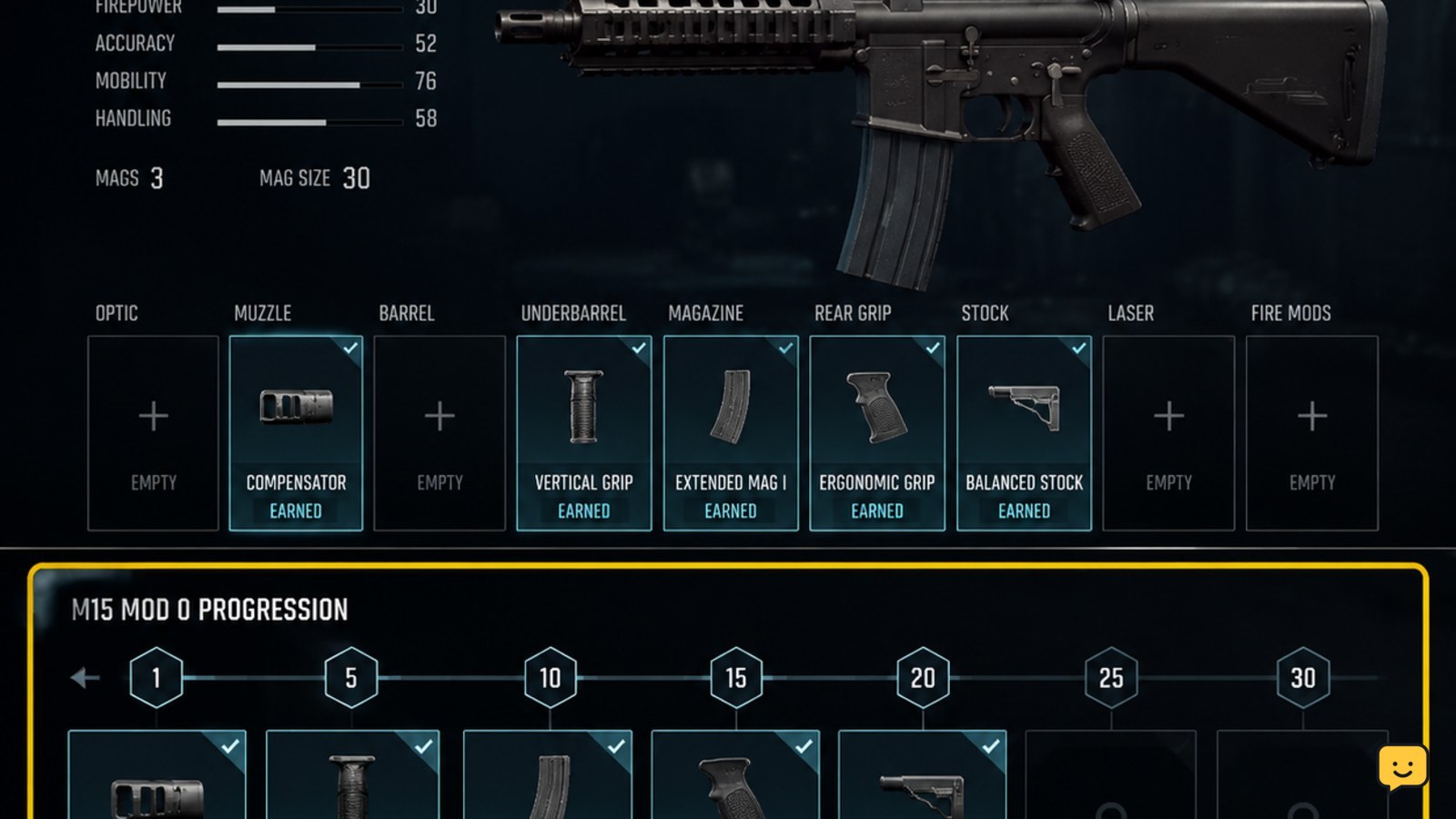
From the loadout or Gunsmith area, select the weapon and open the screen that lists its progression rewards. Look for the attachment name, its required weapon level, and its current state. The useful distinction is whether the item is locked, earned, or equipped.
If the attachment is still locked, return to the match and continue earning progression with that weapon. If it is earned but not installed, the reward has been received; you only need to equip it through the appropriate Gunsmith slot.
Equip the earned attachment in Gunsmith
Open the weapon’s Gunsmith configuration, choose the attachment slot, and select the newly earned item. Confirm that the attachment appears in the active build rather than only in the reward list. The loadout should show the attachment as selected before you leave the screen.
If the attachment does not appear in the slot, check three details: you selected the same weapon that earned it, the slot accepts that attachment type, and the weapon is saved to the intended loadout. A reward can be available in progression without being installed in every custom build.
Use Weapon Prestige for a permanent attachment choice
Weapon Prestige is a separate progression decision from earning attachments normally. When the weapon reaches the required prestige state and the game presents a permanent attachment option, select the exact weapon attachment you want to preserve. Community gameplay references describe this option as a way to keep one attachment available permanently instead of waiting for its normal weapon-level requirement again.
Do not spend the choice from a video, guide, or remembered menu path alone. The item name and confirmation state must be visible in your current game. If no permanent attachment option appears, the weapon may not meet the requirement, the feature may be unavailable in that progression state, or the current interface may use different wording.
Verify the attachment before entering a match
Return to the complete loadout and inspect the weapon preview or attachment list. The selected attachment should remain visible after leaving Gunsmith. Entering a match is the final check: confirm that the weapon has the intended configuration when the match loadout is shown.
If it disappears, rebuild the loadout from the weapon’s own Gunsmith screen and save it again. If the weapon level, earned reward, and saved attachment all disagree, do not spend another permanent unlock. Record the visible states, close and reopen the game, then recheck the same weapon.
What to do if an attachment stays locked
First, compare the locked requirement with the weapon’s current level. If the requirement is higher, keep leveling that weapon. If the requirement is complete but the item remains locked, leave the progression screen, reopen the weapon, and check the post-match reward record.
Also confirm that you are not viewing a blueprint, alternate weapon variant, or different weapon family. Older Call of Duty attachment advice may mention an Armory or challenge route, but the available evidence does not establish that as the durable Black Ops 7 path. Use only a menu option that is present in your current build.
Stop if the game still shows conflicting states after reopening the weapon. Do not repeatedly prestige or spend a permanent choice to force a missing reward.
Frequently asked questions
Do I need to level the exact weapon to get its attachments?
Yes. Ordinary attachment rewards are tied to the specific weapon shown in the progression screen. Leveling another rifle, submachine gun, or account rank does not normally complete that weapon’s attachment requirement.
Can Weapon Prestige permanently unlock an attachment?
It can provide a permanent attachment choice when the weapon reaches the relevant prestige state and the game displays that option. Confirm the attachment name and final confirmation screen before spending it, because the choice should be treated as limited.
Why did I earn an attachment but not see it in my loadout?
An earned reward may not be equipped automatically. Reopen the same weapon in Gunsmith, select the correct attachment slot, and save the loadout. If it is still missing, verify that you did not switch to a blueprint or a different weapon variant.
Does account level unlock weapon attachments?
Account level can affect access to broader loadout content, but it does not replace the weapon-specific progression shown for an attachment. Check the individual weapon’s reward track to identify the remaining requirement.