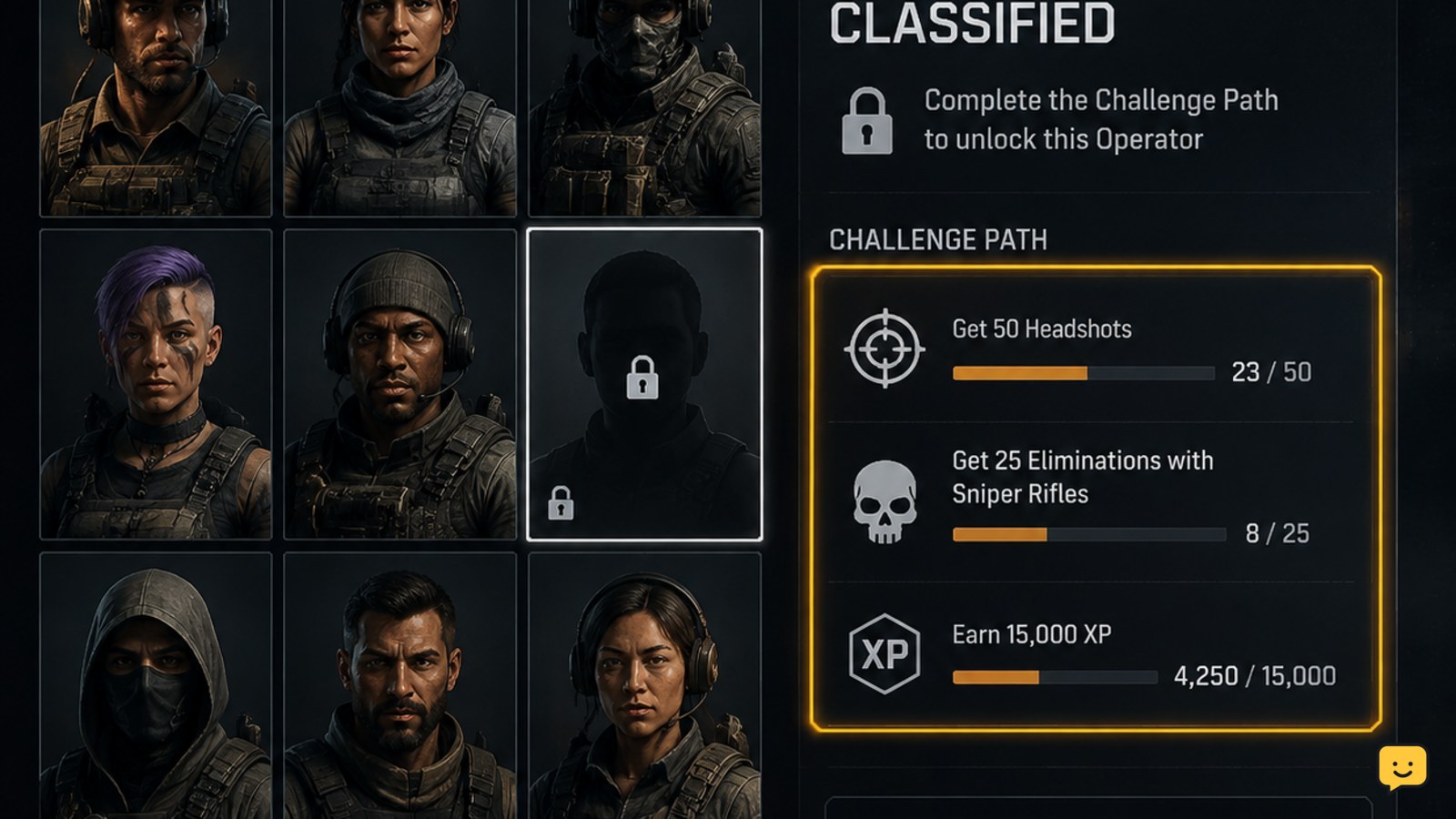
To unlock additional operators in Black Ops 7, open the Operators menu, select a locked character, and read the requirement shown on that operator’s challenge card. Complete the objective in the eligible mode, then return to the menu and confirm the operator changes to available. If progress does not move, check the exact challenge wording and mode restriction first.
Browse more Call of Duty: Black Ops 7 guides
Find the operator’s active requirement
Open the Operators section from the main multiplayer interface and select a locked operator. The card should identify the action required to earn that character. Read every part of the text, including the number of actions, the match type, and whether the objective must be completed in one mode.
Do not use a general list as a substitute for the in-game card. IGN’s Black Ops 7 operator guide records launch operators and their factions, but the menu attached to your account is the safer checkpoint for the requirement currently being displayed.
Complete the listed challenge in its eligible mode
Start the mode named on the operator card and work toward that objective. If the card allows any mode, ordinary public matches can contribute; if it names a specific playlist or activity, progress from another mode may not count.
- Select the locked operator and note the exact objective.
- Enter the eligible mode with a loadout that supports the task.
- Complete the objective rather than leaving as soon as a partial condition is met.
- Finish the match when the challenge requires match completion, then return to the Operators menu.
Community reports describe a progression pattern involving several challenge objectives followed by wins in any permitted mode. Treat that as a possible displayed path, not a universal rule: the operator’s own challenge card determines whether wins, objectives, or both are required.
Verify the operator changed to available
After meeting the requirement, reopen the operator card. A successful unlock should remove the lock state or otherwise mark the character as available for selection. Select the operator and confirm that the game lets you place the character in the relevant operator slot.
If the card still shows incomplete progress, compare the post-match result with the original wording. A task can fail to count when it was completed in the wrong mode, when the required match was not finished, or when the objective needed multiple completed actions rather than a single attempt.
Fix missing progress or a delayed reward
When the objective appears complete but the operator is still locked, leave the menu and reopen it once. Then restart the game if the status has not refreshed. Check the operator card again after signing back in; do not repeat unrelated matches until the requirement is visible.
If progress remains unchanged, capture the displayed challenge text and compare it with the mode you played. A challenge that says “wins,” for example, should not be treated as a general match-count objective. Likewise, a requirement tied to a specific activity will not necessarily advance from standard multiplayer.
There is no reliable basis here for claiming that every operator can be earned through one shared shortcut. If the card names a purchase, a platform entitlement, or another account-specific condition instead of a gameplay challenge, follow that displayed condition and stop using the challenge route.
Keep the route evergreen
For a durable unlock path, prioritize operators whose cards show permanent gameplay challenges. Avoid treating limited-time seasons, events, promotional bundles, or launch-only lists as the general answer to how operators are unlocked. The available roster and challenge text may change, but the verification method stays the same: select the operator, read the active requirement, complete it in the eligible mode, and confirm the unlocked state in the menu.
Frequently asked questions
Where do I see an operator’s unlock challenge in Black Ops 7?
Open the Operators menu and select the locked character. The operator card displays the requirement and any relevant mode condition. Use that card instead of relying on an older roster list.
Can I unlock operators by playing any Black Ops 7 mode?
Only when the operator’s card permits any mode. If it names a specific playlist or activity, play that mode and finish the match when required. Progress from another mode may not count.
Why is my Black Ops 7 operator challenge not progressing?
Check the exact objective, eligible mode, and match-completion requirement. A partial action, an ineligible mode, or an unfinished match can leave the tracker unchanged. Reopen the card after the match to verify the status.
What should I do if the challenge is complete but the operator is locked?
Leave and reopen the Operators menu, then restart the game once if the status does not refresh. If it remains locked, compare the card’s condition with your result before playing more matches.