Share Focus Status means your iPhone can tell people in compatible apps, especially Messages, that your notifications are currently silenced by a Focus such as Do Not Disturb, Work, or Study. It does not show your notifications, messages, location, or exact activity. Contacts may still be able to notify you for urgent matters.
For more help with this topic, use the Writing Communication guides.
What Share Focus Status tells other people
Share Focus Status tells a compatible app that your notifications are silenced. In Messages, another person may see a notice such as “notifications silenced” when they contact you, depending on the conversation and app support. The notice communicates availability; it does not disclose the contents of your notifications or messages.
It does not automatically share your location, calendar, screen, Focus schedule, or reason for using Focus. It also does not mean that every app or contact can see your status. Apple describes this as a status that compatible apps can use, so the visible result depends on the app and its support for Focus.
When the status appears and what it means
Share Focus Status matters only while a Focus is active and notifications are being silenced. If no Focus is active, there may be no status to share. Turning on the setting does not turn on Do Not Disturb, Work, Study, or another Focus by itself.
For example, if you activate a Work Focus during a meeting, a compatible messaging app may indicate that notifications are silenced. That is not a promise that you will never receive an alert. Focus settings can allow selected people or apps through, and some urgent-message options may still permit an alert.
In a workplace or study group, treat the notice as a useful availability signal rather than proof that someone is ignoring a message. Use a normal follow-up channel for deadlines, and reserve urgent contact options for genuinely urgent matters.
Find the Share Focus Status setting on iPhone
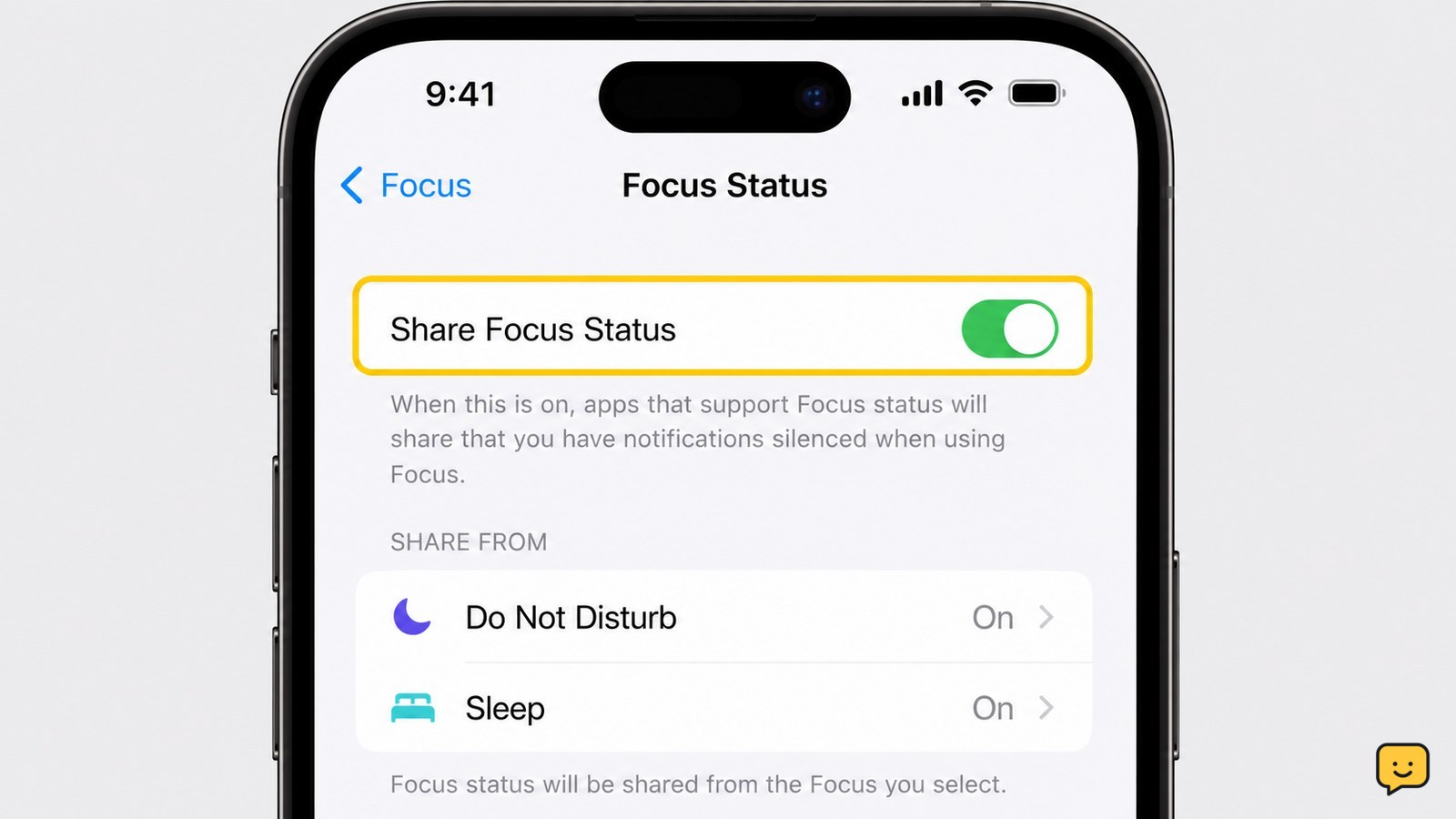
You can control Share Focus Status from the iPhone Focus settings.
- Open Settings.
- Tap Focus.
- Tap Focus Status.
- Turn Share Focus Status on or off.
Apple’s iPhone User Guide places this control under Focus Status. If you want to change how a particular Focus handles alerts, return to Settings > Focus, choose the Focus, and review its allowed people, allowed apps, and notification options separately. Those controls determine which alerts can still reach you; Share Focus Status determines whether compatible apps can communicate that notifications are silenced.
Verify whether sharing is working
The clearest check is to activate a Focus and inspect the supported conversation from another account or device.
- Open Control Center, tap Focus, and activate a Focus.
- Ask a trusted contact using a compatible app to send a message.
- Check whether the conversation shows a notifications-silenced notice.
- Turn the Focus off and confirm that the notice no longer represents an active silenced state.
Do not use the absence of a notice as proof that the setting failed. The app may not support Focus Status, the other device may use a different platform, the status may be delayed, or the conversation may not display it in that context. Verification should use a trusted contact and should not involve sharing private messages or account details.
What to do if contacts cannot see your status
If a compatible conversation does not show the status, first confirm that a Focus is active and that Settings > Focus > Focus Status > Share Focus Status is on. Then check whether the app and conversation support Focus Status. This is a reasonable troubleshooting step because the setting has no visible effect when no Focus is silencing notifications.
Next, close and reopen the messaging app, check for an iOS or app update, and test with one trusted contact. Avoid repeatedly changing unrelated notification settings, because that can alter which alerts you receive without fixing status sharing.
If the control is unavailable, greyed out, or repeatedly returns to its previous state, the iPhone may be supervised by an employer or school. Do not bypass management controls. Ask the administrator which settings are permitted, or contact Apple Support if the phone is personally owned and unmanaged.
Choose the right privacy setting for work or study
Turn Share Focus Status off when you do not want compatible apps to communicate that your notifications are silenced. Leave it on when a general availability signal helps coworkers, classmates, or friends understand why you may respond later.
Either choice leaves your Focus controls intact. With sharing off, you can still use Focus to silence notifications. With sharing on, you can still decide which people and apps are allowed through. If a message is time-sensitive, state your expected response time or provide an approved urgent-contact method rather than relying only on the shared status.
Frequently asked questions
Can people see which Focus I am using?
Usually, no. Share Focus Status communicates that notifications are silenced through a compatible app, but it does not generally reveal whether you are using Work, Study, Do Not Disturb, or another Focus. The exact wording and visibility depend on the app’s implementation and the conversation.
Does Share Focus Status mean someone blocked me?
No. A notifications-silenced notice normally means the person has an active Focus or another notification-silencing state. It does not indicate that you are blocked, that the person has read your message, or that they are refusing to respond.
Can someone still contact me when Share Focus Status is on?
Yes. Share Focus Status does not block messages or calls. Focus settings may allow selected people or apps through, and supported urgent-contact options may still produce an alert. The sender may see that notifications are silenced, but delivery and response depend on the person’s other settings.
How do I stop sharing Focus Status without turning off Focus?
Open Settings, tap Focus, tap Focus Status, and turn off Share Focus Status. Your active Focus can continue silencing notifications, but compatible apps should no longer be told to display that availability signal.