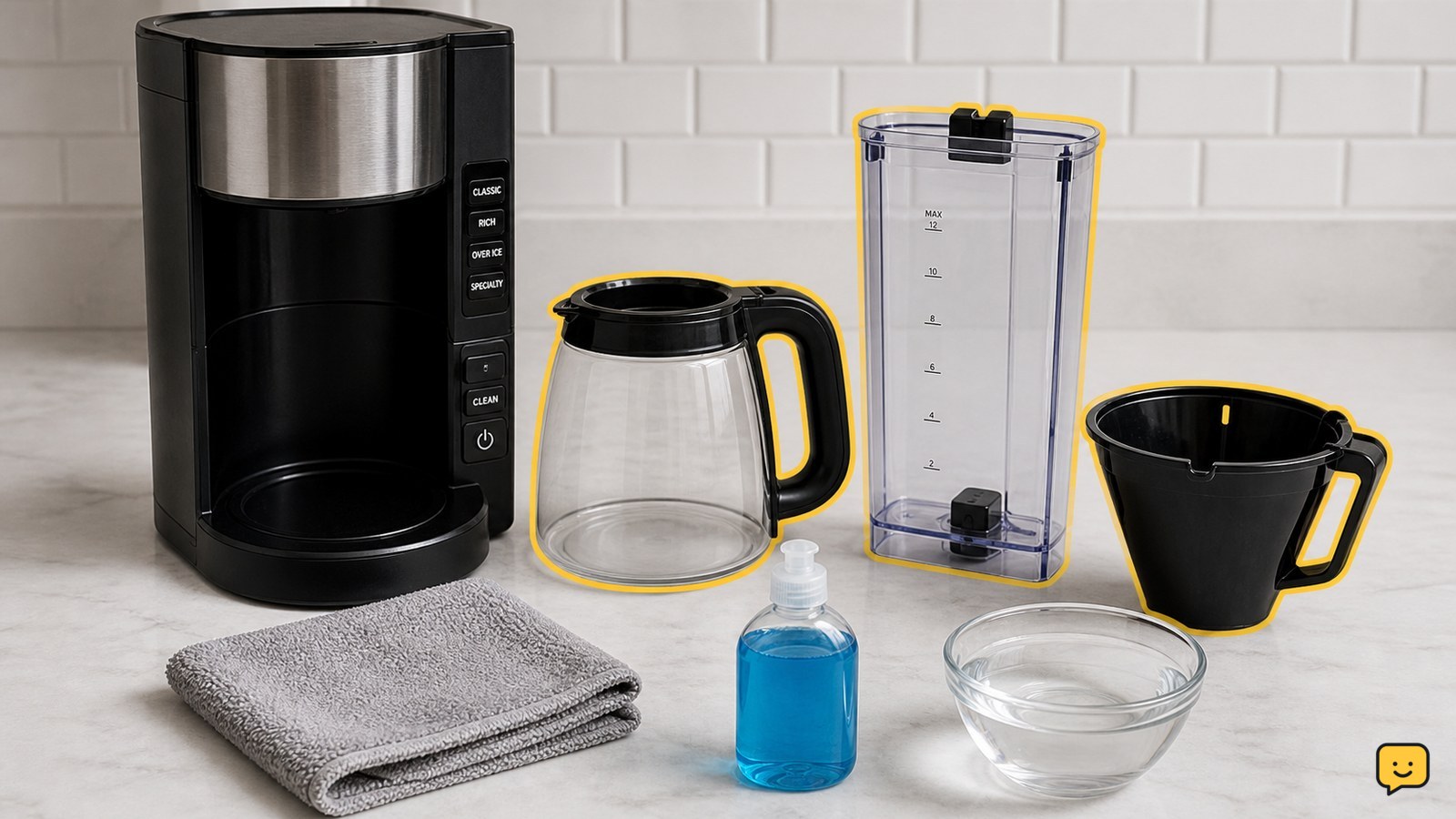
To clean a Ninja coffee maker, unplug and empty it, remove and wash the removable water reservoir, carafe, brew basket, and filter holder, then wipe the machine. Run the built-in Clean or descale cycle using only the cleaner and fill level specified for your model. Finish with fresh-water rinse cycles until no cleaner smell remains.
Check which Ninja cleaning cycle applies
The correct Ninja cleaning method depends on the coffee maker series, so identify the model before choosing a cleaner or button sequence. Ninja’s official support materials separate instructions for series such as the CFP200, CFP300, and CFP400 DualBrew machines, while its CM400 materials describe cleaning and descaling for that series.
Look for the model label on the rear, underside, side, or original documentation. Then use the matching manufacturer instructions for the Clean or descale cycle. A button labeled Clean, a descale prompt, and the required solution can differ between models.
Wash the removable Ninja coffee maker parts
The removable Ninja coffee maker parts should be emptied, washed, rinsed, and dried before the internal cleaning cycle.
- Remove the water reservoir, lid, carafe, brew basket, filter holder, and any removable brew-through or pod components included with your model.
- Discard used grounds and rinse coffee residue from each part.
- Wash the parts with warm water and mild dish soap unless the model instructions specify a different care method.
- Use a soft sponge or cloth rather than abrasive scouring pads, which can damage surfaces.
- Rinse thoroughly so soap cannot enter the next brew, then leave the parts to air-dry or dry them with a clean towel.
Keep the electrical base out of the sink and away from running water. Wipe the exterior, control area, warming plate, and the area around the brew outlet with a damp cloth, then dry them.
Run the model-specific Clean or descale cycle
A Ninja coffee maker cleans its internal water path through the model’s documented Clean or descale cycle, not by washing the electrical base or opening the housing.
- Reassemble the clean, dry parts and place the empty carafe in its normal position.
- Fill the reservoir with the manufacturer-approved cleaning solution and water at the stated level. Do not guess the ratio from another Ninja model.
- Press the documented Clean or descale control and allow the full cycle to finish. Do not interrupt power unless the instructions tell you to cancel the cycle.
- When the cycle ends, empty the carafe and discard the used solution. Do not drink it or use it for coffee.
Ninja’s official cleaning materials cover model-specific descaling procedures for DualBrew and Specialty Coffee Maker lines. If your machine has no Clean control or the display instructions are unclear, stop and use the model manual rather than improvising a cycle.
Flush the Ninja coffee maker with fresh water
Fresh-water rinsing removes remaining cleaner from the Ninja coffee maker’s reservoir, tubing, brew basket, and carafe.
- Rinse the reservoir and carafe thoroughly.
- Fill the reservoir with fresh drinking water only.
- Run the manufacturer-specified rinse cycle, or run a water-only brew cycle if the model instructions direct you to do so.
- Empty the carafe after each rinse and repeat until the water is clear and there is no cleaner smell or taste.
- Wash the carafe and brew basket again if residue or odor remains.
Do not add coffee grounds during rinsing. The first post-cleaning brew should be made only after the water path is free of cleaner odor and the removable parts are clean.
Verify the next brew and handle cleaning failures
A successfully cleaned Ninja coffee maker produces clear rinse water, no chemical odor, and a normal water flow without leaks.
Run a water-only test if you are unsure. Check that the reservoir drains, the carafe receives the water, and the machine does not leak around the reservoir, brew basket, or carafe. If water flow is weak, the Clean indicator remains on, or the machine stops early, repeat only the documented cleaning or rinse cycle for your model.
If the problem remains after the approved cycle, do not open the housing, force valves, or scrape internal passages. Record the model number and displayed error, then contact Ninja or SharkNinja support. Persistent leaks, electrical odors, smoke, or repeated circuit trips are stop conditions, not cleaning problems to troubleshoot at home.
Frequently asked questions
Can you clean a Ninja coffee maker with vinegar?
Only use vinegar if the instructions for your exact Ninja model allow it. Cleaning formulas and cycle requirements vary by series, so an approved Ninja descaling solution or the manufacturer-specified cleaner is the safer choice. Never mix vinegar with another cleaner, and always complete the required fresh-water rinses before brewing.
How do you clean the water reservoir on a Ninja coffee maker?
Remove the reservoir and lid, empty any remaining water, and wash both with warm water and mild dish soap. Rinse until no soap remains, dry the parts, and wipe the reservoir seat on the machine with a damp cloth. Do not immerse the coffee maker’s electrical base.
Why does the Clean light stay on after cleaning?
A Clean indicator may remain on when the documented cycle did not finish or the machine still needs its required rinse. Empty and rinse the reservoir, then repeat the exact Clean or descale procedure for the model. If the indicator remains after that procedure, use Ninja support instead of repeatedly adding cleaner.
How often should a Ninja coffee maker be cleaned?
Use the cleaning reminder or schedule stated for your model and clean removable parts regularly to prevent coffee residue. Run a descale or Clean cycle when the machine indicates it, flow slows, taste changes, or mineral deposits appear. Water hardness and frequency of use affect how soon descaling is needed.
For more help with this topic, use the Cooking Basics guides.