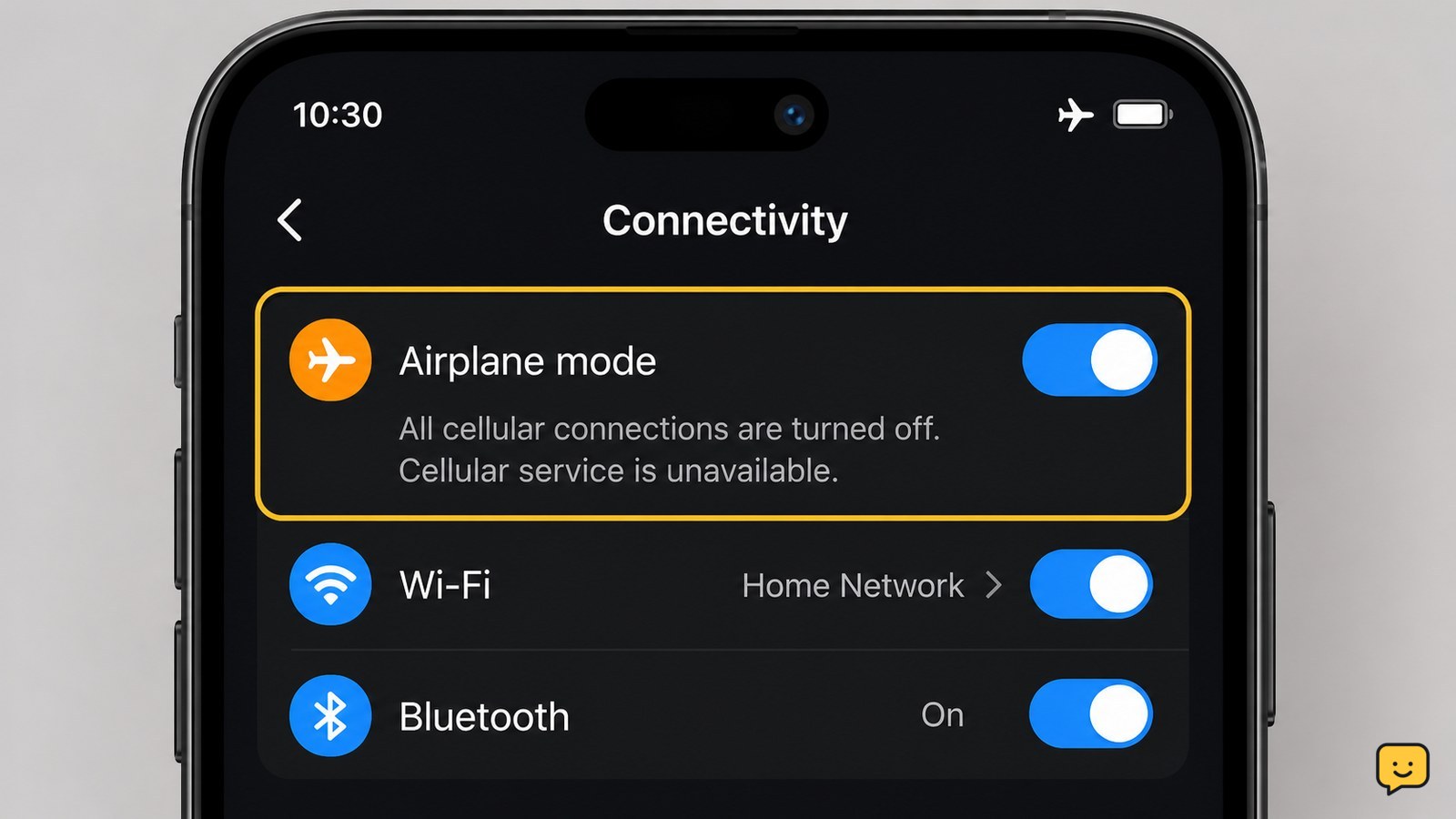
Airplane mode disables a phone’s cellular radio, so ordinary cellular calls, texts, and mobile data stop. The phone itself stays on, and downloaded content can still work. On many current phones, you can turn Wi-Fi or Bluetooth back on separately, but airplane mode does not guarantee every wireless feature is off on every model.
Browse more Mobile Devices guides
What airplane mode changes on a phone
Airplane mode turns off the phone’s cellular connection. As a result, normal cellular calls, SMS or MMS messages, and mobile data cannot use the carrier network while the setting is active. The phone remains powered on, so you can still open settings, use downloaded files, take photos, and use apps that do not need a connection.
HowStuffWorks describes the main purpose as disabling the cellular connection to reduce the risk of radio interference around aircraft systems. The exact behavior of Wi-Fi and Bluetooth depends on the phone and its software version, so check their icons after enabling the mode instead of assuming every radio changed state.
Turn on airplane mode and verify the result
On an iPhone or Android phone, the fastest method is usually the quick-controls panel: open Control Center or Quick Settings, then tap the airplane icon. You can also open Settings and search for Airplane Mode or Flight mode.
- Tap the airplane icon once.
- Wait a few seconds for the cellular signal indicator to disappear, change, or show that service is unavailable.
- Open a browser or another online app with Wi-Fi still off. A page that cannot load confirms that mobile data is not providing the connection.
- Check Wi-Fi and Bluetooth separately. If either remains enabled, its icon will still appear active.
If the cellular indicator does not change, close and reopen the quick-controls panel and confirm that the airplane icon is highlighted. If service still appears active, turn the mode off and use the manufacturer’s support guidance for your model.
Reconnect Wi-Fi or Bluetooth when permitted
Airplane mode can often be used with Wi-Fi or Bluetooth turned back on. This lets you connect to an aircraft’s approved Wi-Fi, browse through a local wireless network, or use permitted Bluetooth accessories while cellular service remains disabled.
- Enable airplane mode first.
- Open Control Center or Quick Settings again.
- Tap Wi-Fi or Bluetooth if that connection is allowed and needed.
- Confirm the desired network or accessory appears as connected.
The observable result should be a Wi-Fi or Bluetooth connection without a cellular signal returning. If tapping the control does nothing, the phone, carrier, operating system, or local rules may restrict that radio while airplane mode is active. Do not assume that a connected Wi-Fi symbol means cellular service has also returned.
Use airplane mode for weak signal and battery checks
Airplane mode can be a useful short test when a phone is repeatedly searching for a weak cellular signal. Turning the mode on pauses the cellular connection; turning it off later makes the phone search for service again. This can also reduce radio activity temporarily, although the battery benefit varies with signal strength, phone model, and what apps are running.
To test a connection problem, enable airplane mode, wait several seconds, then disable it. Check whether the signal indicator returns and whether a test call or mobile-data page works. If service remains unavailable, the problem may be coverage, an account or SIM issue, a carrier outage, or a device fault. Airplane mode does not repair any of those conditions.
What to do if calls, texts, or data still work
If calls or mobile data appear to work with airplane mode enabled, first verify that the airplane icon is active and that Wi-Fi is not carrying the test. A web page loading over Wi-Fi does not prove that cellular data is enabled.
Turn Wi-Fi off temporarily, then check the signal indicator and try a non-emergency mobile-data test. If cellular service is still available, disable airplane mode, restart the phone once, and test again. If the behavior continues, record the phone model and software version and contact the manufacturer or carrier. Do not repeatedly change network settings or erase the phone for this basic check.
Frequently asked questions
Does airplane mode turn off Wi-Fi?
Usually, airplane mode initially disables Wi-Fi, but many phones let you turn Wi-Fi back on afterward. Check the Wi-Fi icon instead of relying on the airplane symbol alone. If Wi-Fi is active, internet access may continue even though cellular data is disabled.
Can you receive calls or texts in airplane mode?
Not through the normal cellular network while airplane mode is active. Calls and carrier messages may arrive later after cellular service is restored. If Wi-Fi is manually enabled, some phones and carriers may support Wi-Fi calling or messaging, but that depends on the device, carrier, account, and settings.
Does airplane mode save battery?
It can reduce battery use when the phone has a weak signal and is repeatedly searching for a tower. The saving is not guaranteed because the screen, apps, Wi-Fi, Bluetooth, and other hardware may still consume power. For a clear comparison, test the phone under similar conditions with the same connections enabled.
Is airplane mode the same as turning off your phone?
No. Airplane mode keeps the phone powered on and leaves offline features available. Turning off the phone stops its operating system and wireless activity altogether. Choose airplane mode when you need the phone’s clock, downloaded content, camera, or other offline functions to remain available.