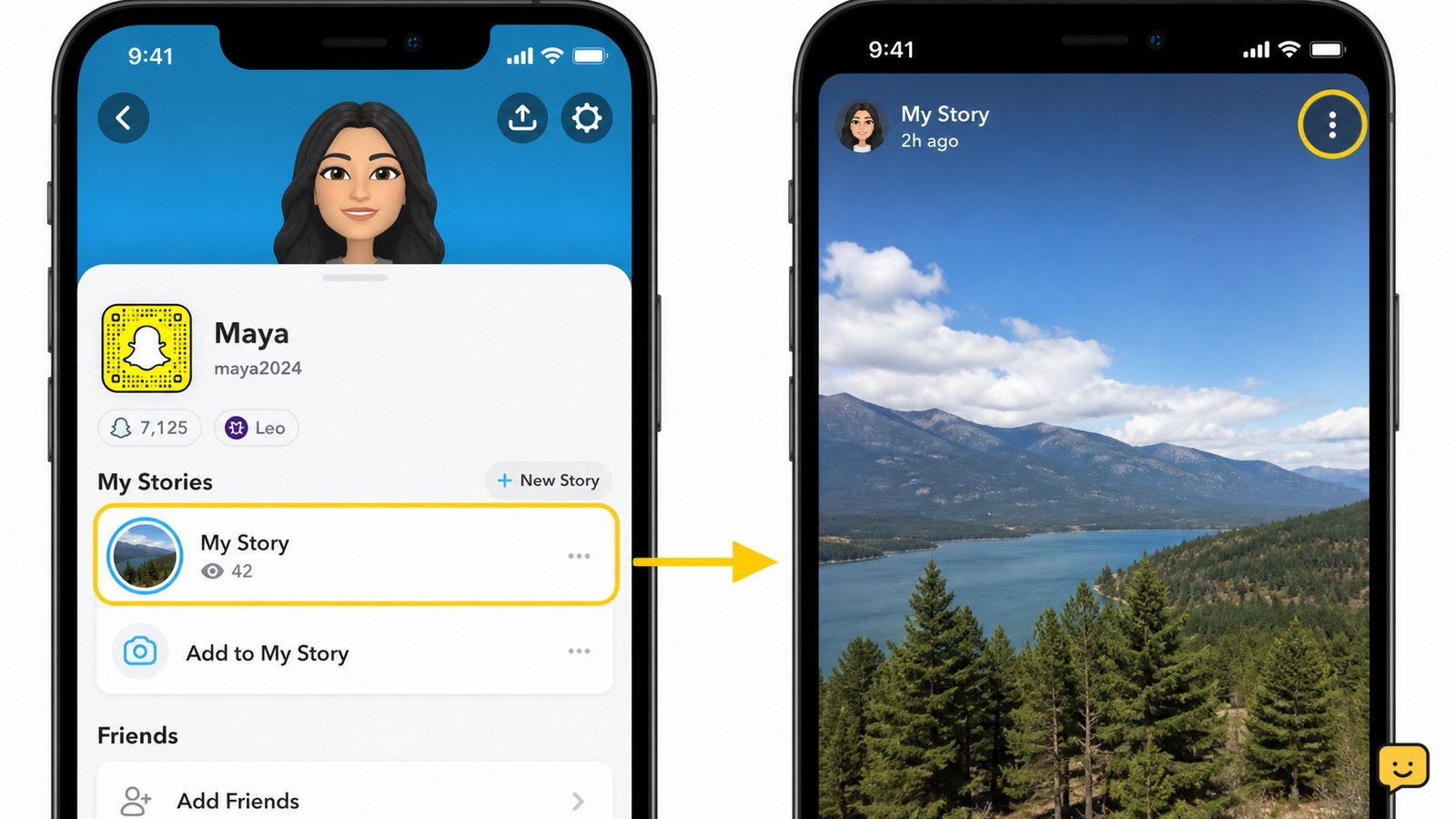
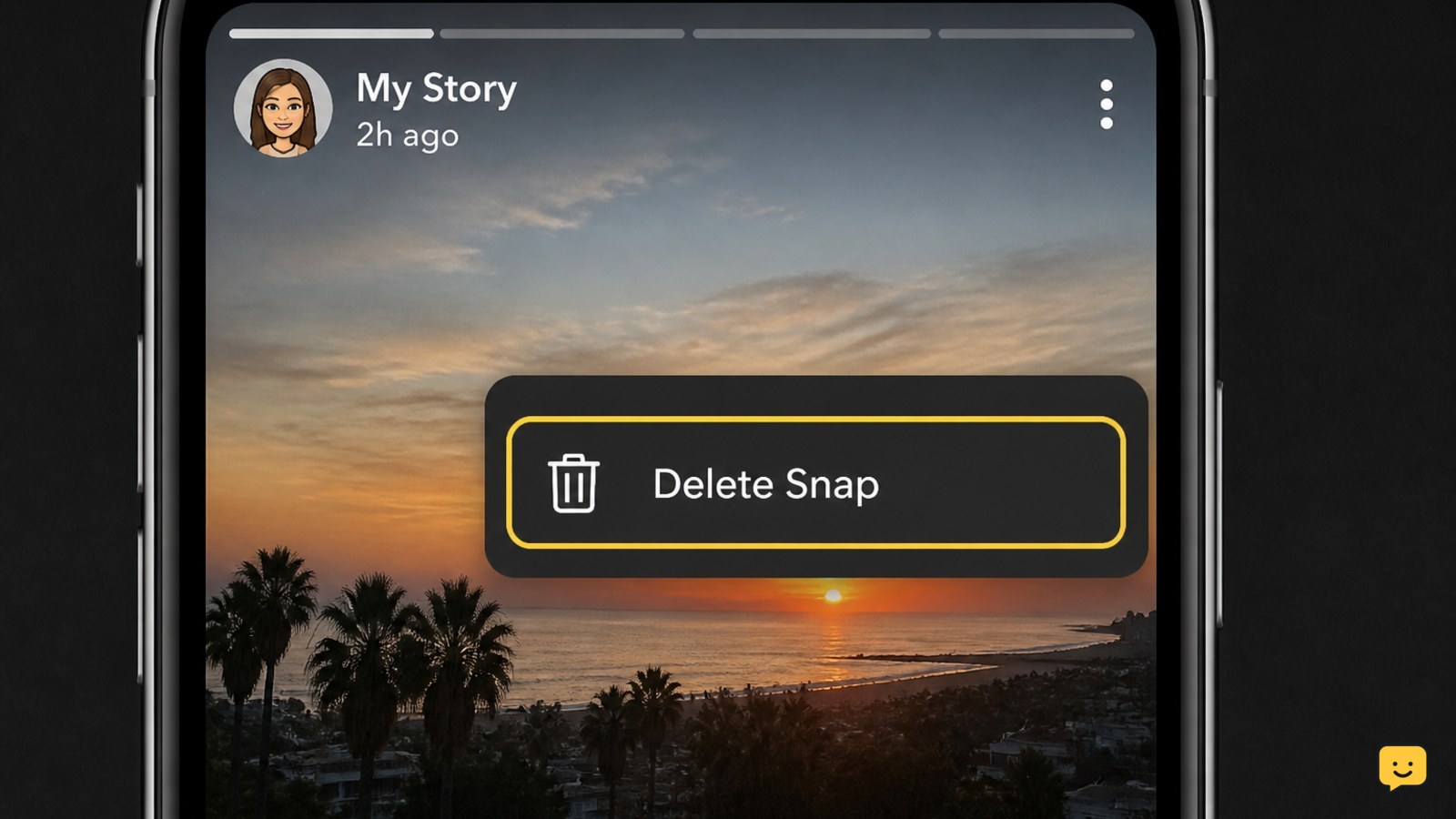
To delete a Story from Snapchat, open your profile or account screen, find My Stories, and tap My Story. Press and hold the individual Snap you want to remove, then tap Delete Snap and confirm if asked. Snapchat’s official instructions say a complete Story must be removed one Snap at a time.
Browse more Email & Social Accounts guides
Delete one Snap from My Story
Snapchat lets you remove an individual photo or video without deleting the other Snaps in your Story.
- Open Snapchat and tap your profile icon to reach your account screen.
- Find My Stories, then tap My Story to view the posted Snaps.
- Move to the individual Snap you want to remove.
- Press and hold that Snap.
- Tap Delete Snap.
- Confirm the deletion if Snapchat displays a confirmation request.
According to Snapchat Support, the deletion control applies to each individual Snap within My Story. Check the photo or video carefully before selecting Delete Snap, especially when the Story contains several similar posts.
Remove every Snap to delete the entire Story
An entire Snapchat Story is removed by deleting each Snap it contains.
- After deleting the first Snap, return to My Story.
- Open the next remaining Snap.
- Press and hold it, then select Delete Snap.
- Repeat the process until My Story contains no remaining photos or videos.
Snapchat Support specifically states that a complete Story must be deleted one Snap at a time. Do not stop after removing the first item unless that was the only Snap in the Story.
If you have several Story sections under My Stories, open each one separately. Removing content from one Story does not establish that every other Story section is empty.
Verify that the Story was deleted
A successful deletion leaves the selected Snap absent from My Story.
- Return to your profile or account screen.
- Open My Story again.
- Watch through the remaining items and confirm that the deleted Snap no longer appears.
- If you intended to remove the whole Story, confirm that there are no Snaps left under that Story.
For a single-Snap deletion, the other Story posts should remain available. For a full removal, My Story should no longer open to any of the deleted content.
If the deleted item still appears, close and reopen Snapchat once, confirm that the phone has a working internet connection, and check My Story again. If it remains present, repeat the official press-and-hold method on that individual Snap rather than repeatedly tapping the Story heading.
Fix a missing Delete Snap option
The Delete Snap option may be unavailable when you are not viewing an individual Snap that belongs to your account.
- Return to your own profile rather than the Stories or Discover feed.
- Open My Stories and select My Story.
- Display the exact Snap you posted, then press and hold directly on it.
- Check that you are signed in to the account that originally posted the Story.
You cannot use this method to remove another person’s Story. If the correct Snap is open but the option still does not appear, close and reopen the app. You can also check your phone’s official app store for a current Snapchat update.
If the control remains missing after reopening or updating the app, stop trying alternative websites or tools that request your Snapchat password. Use Snapchat’s official support site for account-specific help.
Protect your account if you did not post the Story
An unfamiliar Story on your Snapchat account can indicate that someone else accessed the account or used an already signed-in device.
- Delete the unfamiliar Story Snaps using the normal My Story method if you still control the account.
- Change the Snapchat password through the official app or website.
- Review available account or session information and remove access you do not recognize.
- Turn on two-factor authentication in Snapchat’s security settings.
- Check the email address and phone number connected to the account for unauthorized changes.
Do not provide a password or verification code to anyone offering to delete the Story for you. If you cannot sign in, use Snapchat’s official password-reset or account-recovery route rather than a third-party recovery service.
Stop if changing the password or recovery details would affect an account you do not own. Only the account owner should complete security and recovery actions.
Know what deleting a Story cannot reverse
Deleting a Snapchat Story removes the selected Snap from the active Story, but it should not be treated as a way to reverse earlier exposure.
Someone may have viewed the Snap before you deleted it. Do not assume removal can erase what another viewer remembers or any copy they may already have made.
If the Story included private information, remove every affected Snap, verify that My Story is empty, and secure the account if the post was unauthorized. For highly sensitive information such as passwords or recovery codes, change the exposed credential through the relevant official service instead of relying only on Story deletion.
Frequently asked questions
Can I delete one Snap without removing the rest of my Snapchat Story?
Yes. Open My Story, display the individual photo or video, press and hold it, and select Delete Snap. The other Snaps should remain in the Story, so reopen My Story afterward and confirm that only the intended item disappeared.
Why does My Story still appear after I deleted a Snap?
My Story can remain because it contains other Snaps. Open it and check every remaining photo or video. Snapchat requires you to delete each individual Snap before the entire Story is gone.
Can I delete someone else’s Snapchat Story?
No. The Delete Snap method applies to Snaps posted to your own Story. If someone else’s content violates Snapchat’s rules or creates a safety concern, use Snapchat’s available reporting controls rather than trying to access that person’s account.
What should I do if a deleted Snap still appears?
Reopen your profile and check My Story again after confirming that your phone is online. If the Snap remains, press and hold that specific item and select Delete Snap again. Contact official Snapchat Support if the control is missing or the removal repeatedly fails.
What if someone else posted the Story from my account?
Delete the unauthorized Snaps, then secure the account. Change your password through Snapchat, review any available session information, verify your recovery email and phone number, and enable two-factor authentication. Never share a verification code with someone claiming they can remove the post.