To write a bio for Instagram, state who you are, who you help or what you share, and what visitors should do next. Keep the bio within Instagram’s 150-character limit, use plain language, add one useful call to action, and check the live profile after saving to confirm the text and link appear correctly.
For more help with this topic, use the Email Social Accounts guides.
Check what your Instagram bio must communicate
An Instagram bio should quickly identify the account, explain its value, and give visitors a next action. Before writing, choose one primary audience and one main purpose instead of trying to describe everything.
A useful planning sentence is: “I am a [person, brand, or role] who shares [topic or benefit] for [audience].” For example, a home baker might start with “Small-batch cakes for Glasgow celebrations.” A photographer could write “Street portraits and photo tips from Melbourne.” These drafts are specific without making claims the profile cannot support.
Instagram’s official Help guidance says a profile bio can contain up to 150 characters. Treat that as a firm working limit, not a target to fill. Your first line should still make sense if the rest is shortened or hidden in a preview.
Draft the bio with a three-part formula
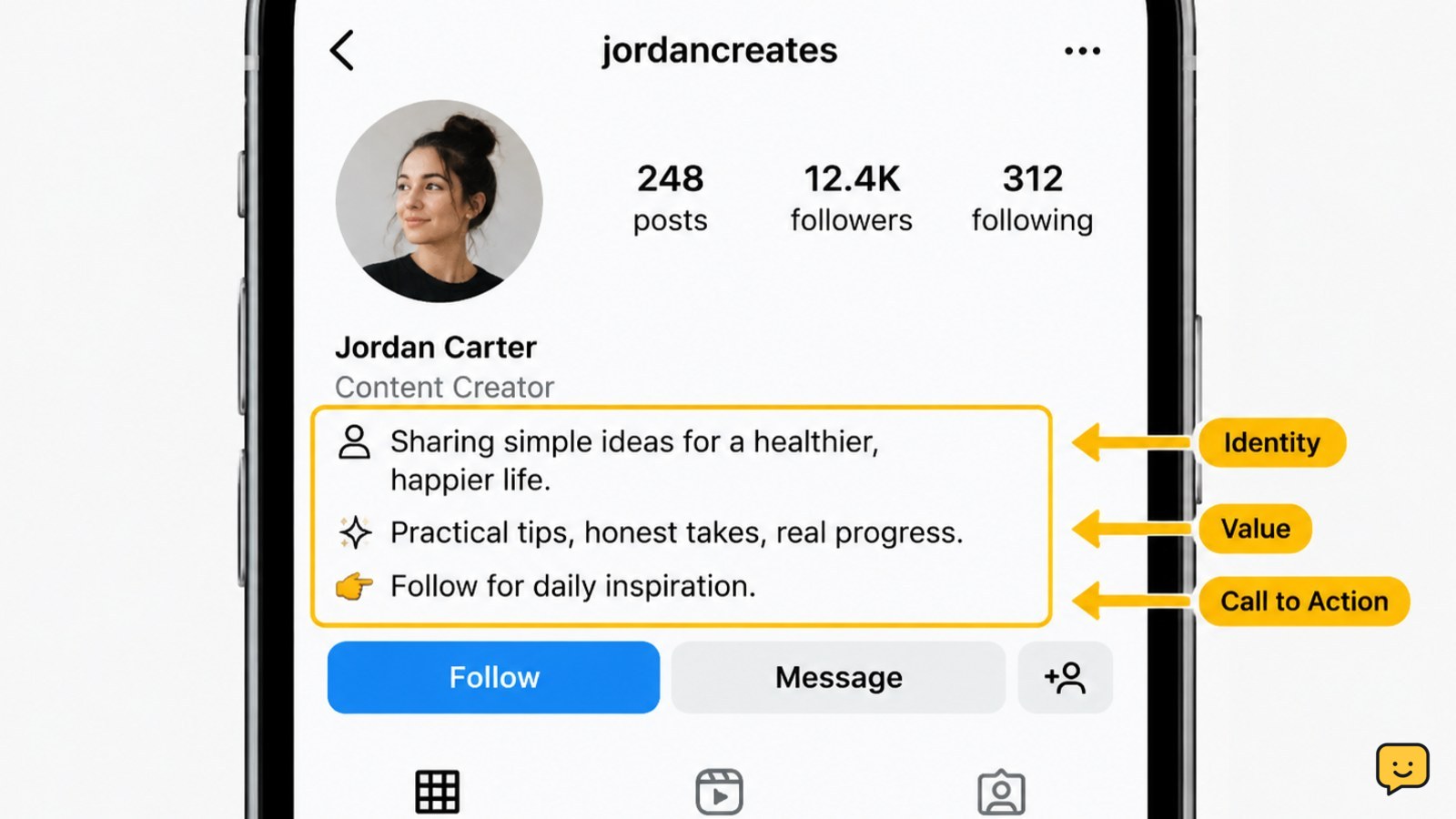
The clearest Instagram bio formula combines identity, value, and action: what you do, what visitors can expect, and what they should do next.
- Identify the account: Use a role, subject, location, or distinctive description. “Independent bookshop” is clearer than “living my best life.”
- State the value: Explain what you share, sell, teach, or document. “Reviews, reading lists, and author events” gives visitors a concrete reason to follow.
- Choose one action: Ask visitors to browse a link, send a message, book, shop, or follow for a defined type of content.
A finished example might be: “Independent bookshop | Reviews, reading lists, and local author events | Browse this month’s picks.” It tells visitors what the account is and what they can do next without relying on vague slogans.
Use the Instagram profile’s Name field for a concise name or role when appropriate, then reserve the bio for context and the next step. Creator-focused guidance from Keep Calm and Chiffon and Christine Blubaugh also separates the profile name or title from the explanatory bio copy.
Choose a call to action and link safely
A call to action works best when it matches the destination. Use “Shop the collection” for a store, “Book a consultation” for a booking page, “Read the latest guide” for an article, or “Message for availability” when direct contact is the real next step.
If your Instagram profile shows a website or links control, connect it to the page named in the bio. Check the address before publishing: it should use the expected domain, load securely, and not request an Instagram password or security code. Never place recovery codes, private contact details, or login instructions in a public bio.
Keep one primary action visible. Multiple competing instructions—such as “shop,” “email,” “watch,” and “book” in the same short bio—make it harder for a visitor to decide. If you need several destinations, use the profile’s available links feature or a trusted landing page, but label each destination plainly.
Edit the bio for clarity and character space
Instagram’s 150-character limit means every word should identify the account, explain its value, or support the chosen action. Remove greetings, repeated keywords, filler adjectives, and strings of symbols before cutting useful information.
Read the draft aloud once. Replace abstract phrases such as “content creator and dreamer” with observable details such as “Weekly budget recipes and grocery tips.” Use line breaks or one restrained emoji only when they improve scanning and do not replace essential words. Avoid excessive hashtags, all caps, or decorative characters that can make the profile harder to read.
Check names, locations, prices, dates, and claims separately. A bio that says “24/7 support,” “official,” or “guaranteed results” should be used only when the account can substantiate it. If the account is personal, consider whether public details could reveal a home address, daily routine, workplace, or other information you do not want strangers to see.
Save the profile and verify the public result
After entering the draft in Instagram’s profile editing screen, save the change and open the profile as a visitor would. Success means the intended bio text is visible, the line breaks are readable, and the call-to-action link or contact option opens the expected destination.
If Instagram will not save the bio, shorten it first and remove unusual symbols or unsupported formatting. If the text saves but looks crowded, cut the least useful phrase rather than shrinking readability with more emojis. If a link fails, copy the destination again from the trusted service and test it in a browser before restoring it.
Review the profile again after changing the account name, category, link, or contact method. Those changes can alter what visitors see alongside the bio, so the final check should cover the whole profile rather than the text alone.
Frequently asked questions
How long can an Instagram bio be?
An Instagram bio can be up to 150 characters, according to Instagram Help. Count spaces and punctuation as you edit. If Instagram rejects the draft, remove filler or combine short phrases until it saves.
What should the first line of an Instagram bio say?
The first line should identify the person, brand, topic, or result visitors can expect. Start with a specific role or subject, such as “Personal trainer for beginners” or “Local plant shop and care tips,” rather than a general slogan.
Should an Instagram bio include a call to action?
Yes, when visitors have a useful next step. Match the wording to the destination: use “Shop,” “Book,” “Read,” or “Message.” Choose one primary action so the profile does not split attention across several competing requests.
Can I include private information in an Instagram bio?
Avoid private information such as passwords, recovery codes, home addresses, personal phone numbers, or details that reveal your routine. Public contact details should be intentional, and every linked page should be checked before you publish it.