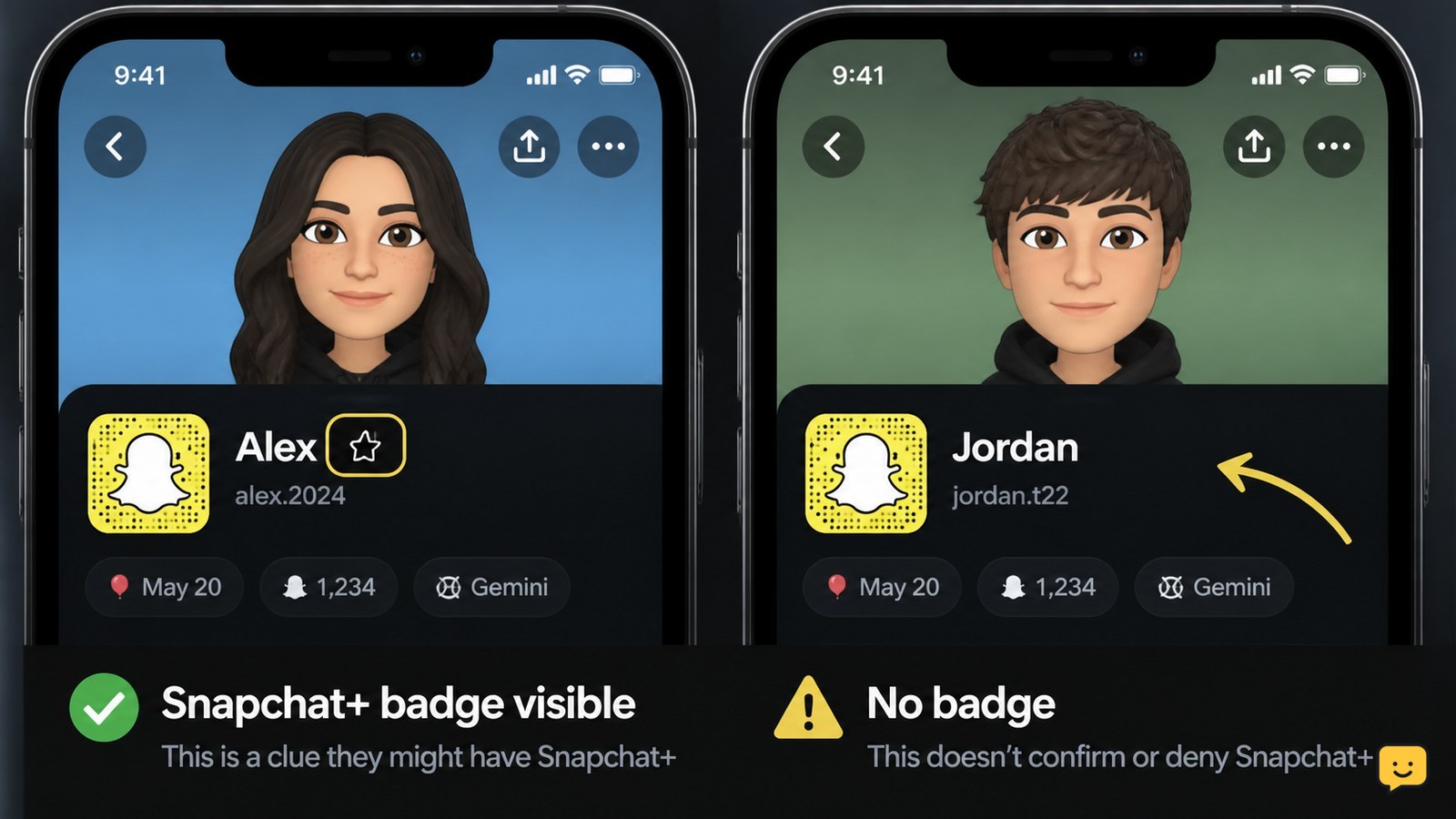
The clearest way to tell if someone has Snapchat+ is to open their Snapchat profile and look for a visible Snapchat+ badge, usually a star beside their display name. You may also notice Plus-related features such as unusual Story expiration settings or extra Snap replays. These clues are not conclusive because badges can be hidden, features change, and some effects may be available to non-subscribers. Asking the person is the only dependable confirmation.
Browse more Privacy & Online Safety guides
Check the profile for a visible Snapchat+ badge
A visible Snapchat+ badge is the strongest public clue that a profile may have an active Snapchat+ subscription. Open Snapchat, go to Chat or Search, and tap the person’s name or Bitmoji to view their profile. Look beside the display name for the Snapchat+ star badge.
If the badge is present, it is reasonable to say the profile is showing a Snapchat+ indicator at that moment. It still may not tell you the subscription’s billing status or renewal date. Snapchat’s interface and badge controls can vary by app version and account settings.
Verification: Leave the profile, reopen it, and check that the badge appears consistently. If it disappears after reopening, update Snapchat from the official app store and check again. Do not treat a temporary icon, Bitmoji effect, or profile theme as confirmation.
Compare visible features without treating them as proof
Snapchat+ can expose additional customization and interaction features, but another person’s use of one feature does not prove they pay for the subscription. Depending on the current app version, observable clues may include a non-default Story expiration choice, an extra replay of a Snap, or Snapchat+ profile and Bitmoji customization.
Check only what appears naturally in your own conversation or while viewing a public profile. For example, if a Story displays an unusual expiration period or the person replays a Snap more times than the free version normally permits, record that as a possible clue—not a diagnosis. Snapchat feature availability can change by region, plan, account, and release.
Failure path: If you cannot clearly identify the feature or it behaves differently on your phone, stop comparing screenshots from older videos. A visual effect may be part of a regular Snapchat update, a public lens, or a feature available outside Snapchat+.
Use a direct question when certainty matters
Asking the person directly is the only reliable way to confirm whether they have Snapchat+. A simple question such as “Do you use Snapchat+?” avoids guessing from private behavior or account changes.
If they show their own Snapchat+ settings screen voluntarily, the relevant confirmation must come from their device and account. Do not request a screen recording that includes email addresses, payment details, recovery information, or security codes.
Respect a refusal or an unclear answer. A Snapchat+ subscription is private account information, and ordinary profile viewing cannot provide a guaranteed third-party check.
Handle a missing or unclear badge safely
No visible badge does not prove that someone lacks Snapchat+. They may have disabled the badge, use an app version with different profile controls, or have access to a feature that is not visibly labeled.
First, confirm that you are viewing the correct profile and that your own Snapchat app is current. Then stop after one or two ordinary checks. Repeatedly opening someone’s profile, testing Snap replays, or comparing their activity with other users will not produce dependable confirmation.
If the question involves suspected impersonation, harassment, or account misuse, save the relevant username and message evidence and use Snapchat’s in-app reporting tools. Do not attempt to access the account or use a third-party lookup service.
Avoid Snapchat+ detector scams and account-access requests
There is no safe public tool that can guarantee another person’s Snapchat+ status without relying on information visible in Snapchat or the person’s own confirmation. Websites promising a hidden subscription check may be trying to collect your login details, payment information, or verification code.
Close any page that asks you to log in outside the official Snapchat app or Snapchat’s official support domain. If you already entered credentials into a suspicious page, stop using that page, change the exposed password, review active sessions, and enable two-factor authentication from Snapchat’s official settings.
Stop condition: Never continue a check that requires surveillance, credential sharing, unauthorized access, or a bypass of Snapchat privacy controls.
Frequently asked questions
Can you tell if someone has Snapchat+ without asking them?
You can sometimes spot a visible Snapchat+ badge or Plus-related behavior, but you cannot confirm the subscription reliably without the person’s confirmation. A missing badge is not proof that they do not subscribe, and individual features can change by version, region, or account settings.
What does the Snapchat+ star badge mean?
The Snapchat+ star badge is a public profile indicator that the user has chosen to display. Seeing it is the clearest ordinary clue that the account may have Snapchat+, but it does not reveal payment, renewal, or plan details.
Can someone hide their Snapchat+ badge?
Yes, a person may choose not to display a subscription badge, and Snapchat’s profile controls can vary by app version. That is why the absence of a star should be treated as inconclusive rather than evidence that the account uses the free plan.
Are Snapchat+ detector websites safe?
No trustworthy public detector can guarantee another user’s subscription status. Avoid sites or apps that request your Snapchat login, password, verification code, payment details, or device access. Those requests can be phishing or account-takeover attempts.