Reset the oil life light only after the correct oil and filter service. Turn the ignition on without starting the engine, open the vehicle or maintenance menu, choose Oil Life or Oil Life Reset, then confirm or hold OK. If your car has no menu option, follow the model-specific pedal or dashboard-button sequence in the owner’s manual.
Browse more Maintenance & Repair guides
Check whether the light is only an oil-change reminder
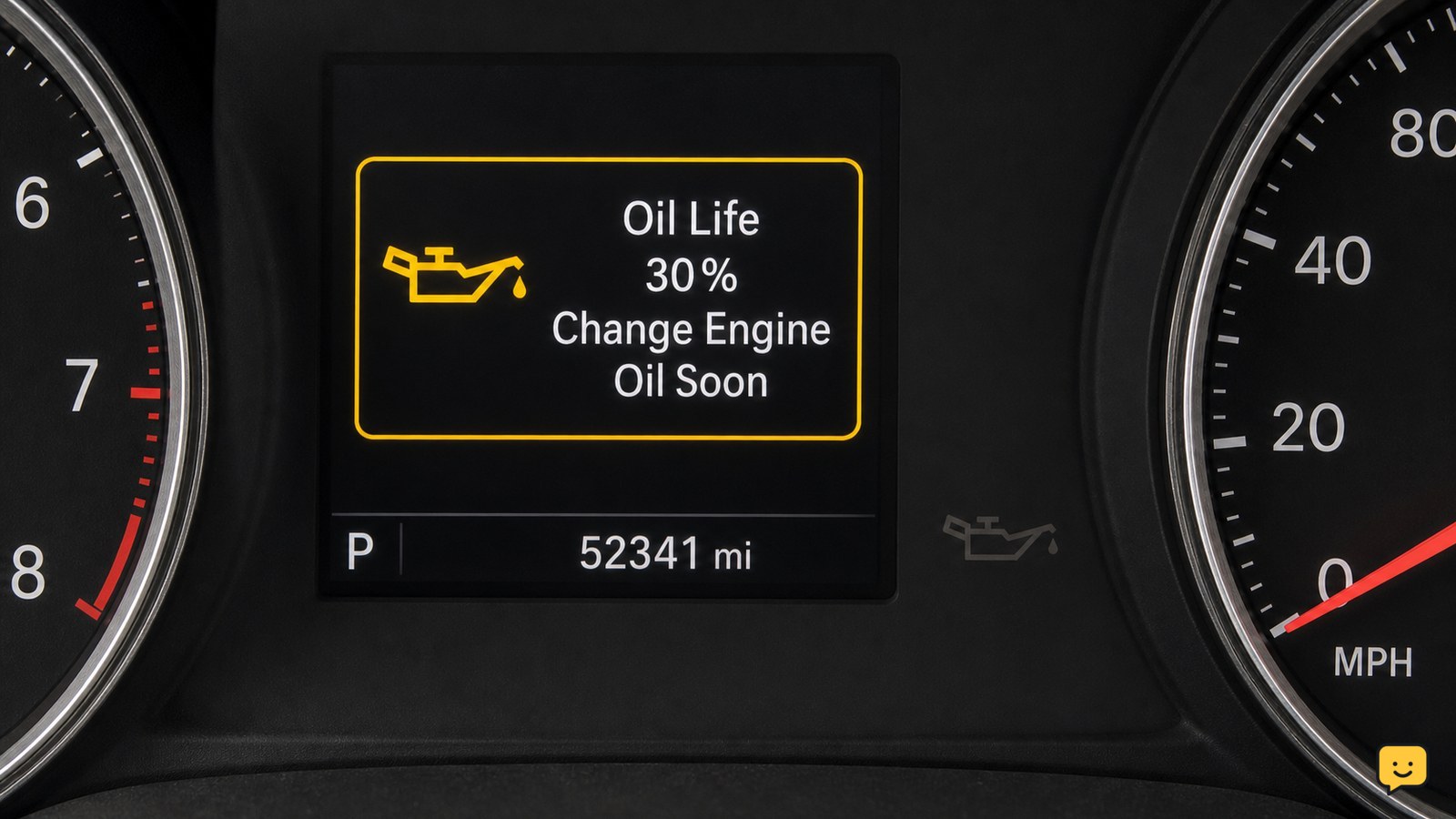
The oil-life light is usually a service reminder based on calculated oil-use conditions, not a direct measurement of engine oil pressure. A message such as “Change Engine Oil,” “Oil Life Low,” or a percentage reading can normally be reset after service.
A red oil-can symbol or an oil-pressure warning is different. If it stays on after the engine starts, turn the engine off and check the oil safely. Do not reset it and continue driving. ShowU’s guide to why an oil-pressure light comes on at idle covers the separate warning and its stop-driving risks.
Find the correct reset method for your car
Your car’s owner’s manual determines the applicable reset sequence. Common vehicles use either a driver-information display menu or a no-menu sequence involving the ignition, trip/reset button, accelerator pedal, or another dashboard control.
Keep the engine off unless the manual specifically says otherwise. Set the ignition to the position that powers the dashboard and displays accessory or service information. A Tires Plus procedure describes a common menu path through Settings, Vehicle, and Oil Life Reset, followed by an OK confirmation, but that path is not universal.
Reset the oil life through the dashboard menu
For cars with a maintenance menu, the reset normally follows this sequence:
- Switch the ignition on without starting the engine.
- Use the steering-wheel or instrument-panel controls to open Settings, Vehicle, Maintenance, or a similarly named menu.
- Select Oil Life, Oil Life Reset, Engine Oil Life, or the closest exact label shown for your vehicle.
- Choose Reset or Yes. Some systems require you to press and hold OK until the confirmation appears.
- Switch the ignition off, wait briefly, then turn it on again to check the stored reading.
The expected result is a new service interval or a high oil-life percentage rather than the previous low reading. Do not select a general “reset all” option if the menu separately lists other maintenance items.
Use the no-menu button or pedal sequence only from the manual
Older vehicles and some trims reset the reminder without an information-screen menu. The exact sequence can require a particular ignition position, a trip-meter button, repeated accelerator presses, or a timed hold. Small differences can prevent the reset or change another display setting.
Use the owner’s manual for the exact order and timing. Treat online videos as illustrations rather than universal instructions: the supplied video evidence describes procedures for particular vehicles and notes that variations exist. Stop if the oil-life display does not appear, the reset confirmation never arrives, or another warning begins flashing.
Verify the new oil-life reading before driving
A successful reset leaves the oil-life monitor at its normal starting value or shows a clear confirmation message. Turn the ignition off and on once more, then check that the oil-change reminder does not immediately return.
Record the service date, odometer reading, oil grade, and next due interval. The reset tracks the vehicle’s maintenance reminder; it does not replace checking the dipstick, inspecting for leaks, or following the manufacturer’s time and mileage interval. If the oil level is low, add the correct oil before driving and investigate any leak.
What to do if the reminder will not reset
If the reminder remains after the correct sequence, first confirm that the ignition is in the required position and that you selected the oil-life function rather than a different service item. Repeat the procedure once from the beginning, without starting the engine unless the manual instructs you to.
If the display still will not change, the procedure may not apply to your trim, the control input may be faulty, or the vehicle may require a scan-tool reset. Arrange service and provide the vehicle’s year, make, model, engine, mileage, and the exact message shown. Do not keep clearing the display to hide an unresolved warning.
Frequently asked questions
Will resetting the oil life light change the oil in my car?
No. Resetting only changes the maintenance reminder stored in the vehicle. It does not drain oil, replace the filter, correct a low oil level, or repair a leak. Reset it only after the required oil service is complete, then verify the dipstick and check beneath the vehicle for fresh leaks.
Can I reset the oil life light without changing the oil?
You can often perform the reset, but you should not do so as a maintenance practice. Clearing the reminder without servicing the engine makes the displayed interval unreliable and can cause the next oil change to be missed. If the reminder appeared unexpectedly, confirm the service history before resetting it.
Why is the oil life light still on after an oil change?
The reminder may still be active because the reset sequence was not completed, the ignition position was wrong, or the method does not match your vehicle’s trim. Check the owner’s manual and repeat the correct procedure once. If the message returns immediately, arrange diagnosis rather than repeatedly clearing it.
Is the oil life light the same as the oil-pressure warning light?
No. The oil-life light is a maintenance reminder, while the oil-pressure warning indicates a possible lubrication problem. If the oil-pressure warning stays on with the engine running, stop safely, switch off the engine, check the oil level, and arrange assistance if the warning or engine symptoms continue.