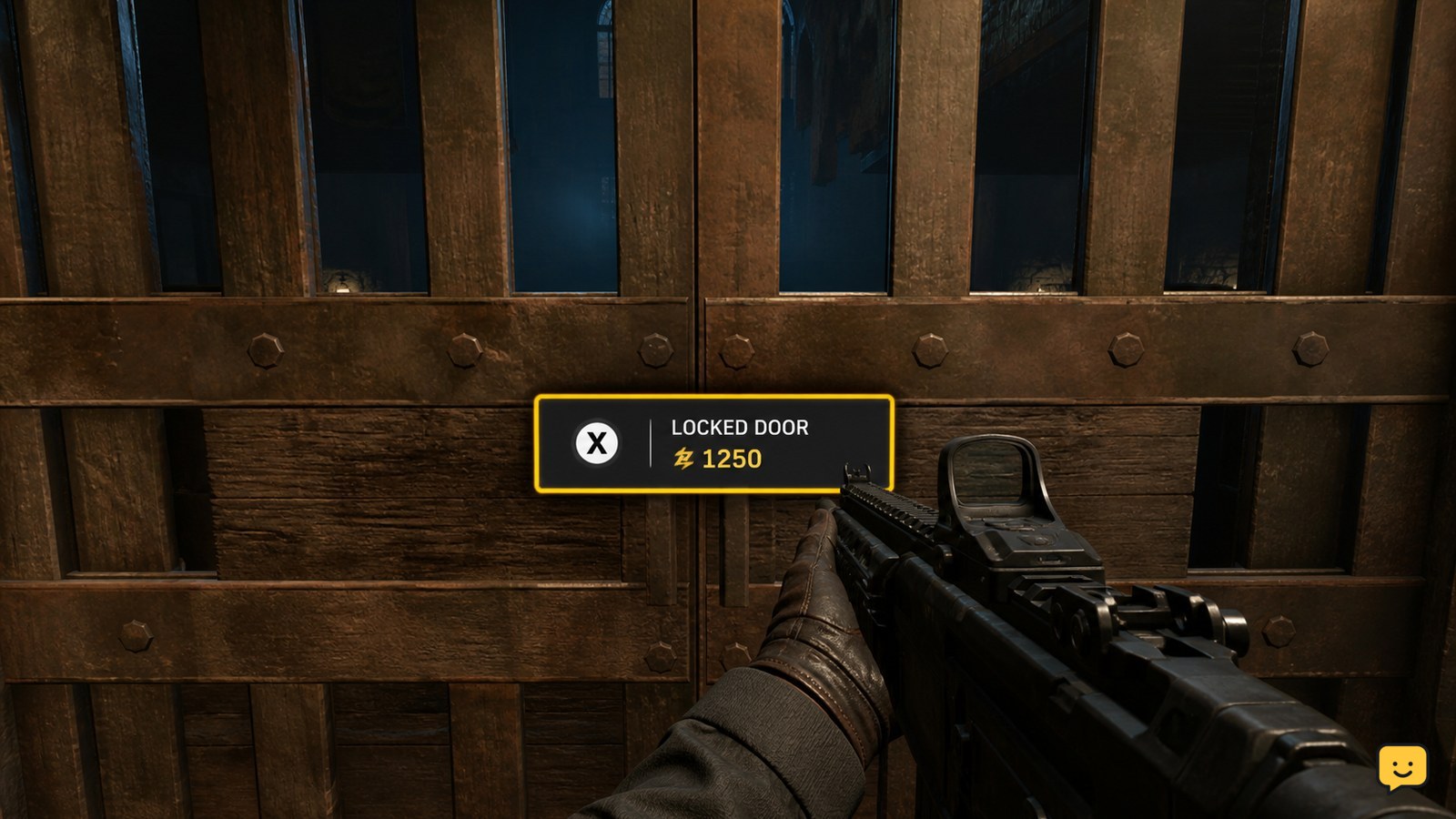
In Black Ops 7 Zombies, approach a locked door and check for an on-screen Essence purchase prompt. If it appears, earn enough Essence from kills, interact with the door, and confirm that the barrier opens. If you see only a padlock with no purchase prompt, stop spending points: that door may be tied to a quest or map objective instead.
Browse more Call of Duty: Black Ops 7 guides
Check whether the door accepts Essence
Black Ops 7 Zombies doors that can be bought with points display an on-screen Essence cost when you stand close enough to the barrier. Move directly toward the door, face the interaction point, and wait for the prompt to appear.
A visible padlock alone does not prove that Essence will open the route. Community reports describe separate locked doors around the map, while gameplay-guide coverage identifies at least one locked route that opens after earning enough Essence. Treat the prompt, not the appearance of the door, as the deciding check.
Earn Essence before confirming the purchase
To open an Essence-locked door, kill Zombies and collect the Essence they drop until your HUD shows at least the displayed cost. Clearing the current wave is a safer way to build the balance than standing beside the door while enemies are active.
- Leave enough room to retreat from the barrier.
- Defeat nearby Zombies and collect the dropped Essence.
- Return to the door and check that your balance meets the displayed price.
Do not confirm the interaction if the cost would leave you unable to buy ammunition or survive the next wave. Opening a route is useful only if you can safely use the space it reveals.
Pay at the door and verify the opened route
When the Essence prompt appears, hold the displayed interact control until the purchase completes. The expected result is that the barrier moves or disappears and the route behind it becomes physically accessible.
- Face the door or debris blocking the passage.
- Use the control shown beside the Essence price.
- Wait for the purchase animation or sound to finish.
- Walk through the newly opened passage.
Verify both changes before moving on: your Essence total should reflect the purchase, and the route should no longer block movement. A changed balance without an open passage is a failed result, so do not repeat the purchase immediately.
What to do if the door has no Essence prompt
If a locked door has no Essence cost when you approach it, do not treat it as a standard purchasable door. The available evidence distinguishes ordinary point-paid access from padlocked doors associated with map objectives or quest steps.
Check nearby rooms, objective markers, switches, and interactable items instead of repeatedly pressing the door control. A security-gate walkthrough and community reports point to objective-based access for some locked areas, but the supplied evidence does not establish one universal method for every Black Ops 7 Zombies map or door.
Stop searching for an Essence price when the prompt never appears after you have approached the correct side of the barrier. The door is outside this point-spending method unless the game later displays a purchase interaction.
Recover when Essence was spent but the route stays closed
If the game removes Essence but the door remains closed, first step back and inspect the entire barrier for a second opening or a different interaction point. Then confirm whether the balance changed and whether the door’s state changed after the animation finished.
If the route is still blocked, do not spend more Essence on the same barrier. Leave the area, survive the current wave, and return once it is safe. If the door remains unchanged and no objective marker explains it, record the map and match state before deciding whether to restart; the available sources do not confirm a universal recovery action for this failure.
Frequently asked questions
Can every locked door in Black Ops 7 Zombies be opened with Essence?
No. Only doors that display an Essence purchase prompt should be treated as point-paid access. A padlock without a cost may mark a quest, switch, security-gate, or other objective-based barrier. Do not spend Essence unless the game shows the price and interaction control.
Why does the locked door not show an Essence cost?
The door may not be purchasable yet, or it may require a nearby objective instead. Approach the correct side, check for an objective marker, and inspect nearby switches or interactable items. If no Essence prompt appears, stop trying to buy the door.
What should I do if I cannot afford the locked door?
Leave the barrier, defeat nearby Zombies, collect their Essence, and return when your HUD balance meets the displayed price. Keep enough resources for ammunition and survival before purchasing, because opening the route does not make the next area safe.
How can I tell whether the door opened successfully?
Check that your Essence total decreased by the displayed cost and that the physical barrier moved or disappeared. Walk through the passage to confirm access. If only the balance changed, do not purchase again; inspect the barrier from another angle and wait for the interaction to finish.