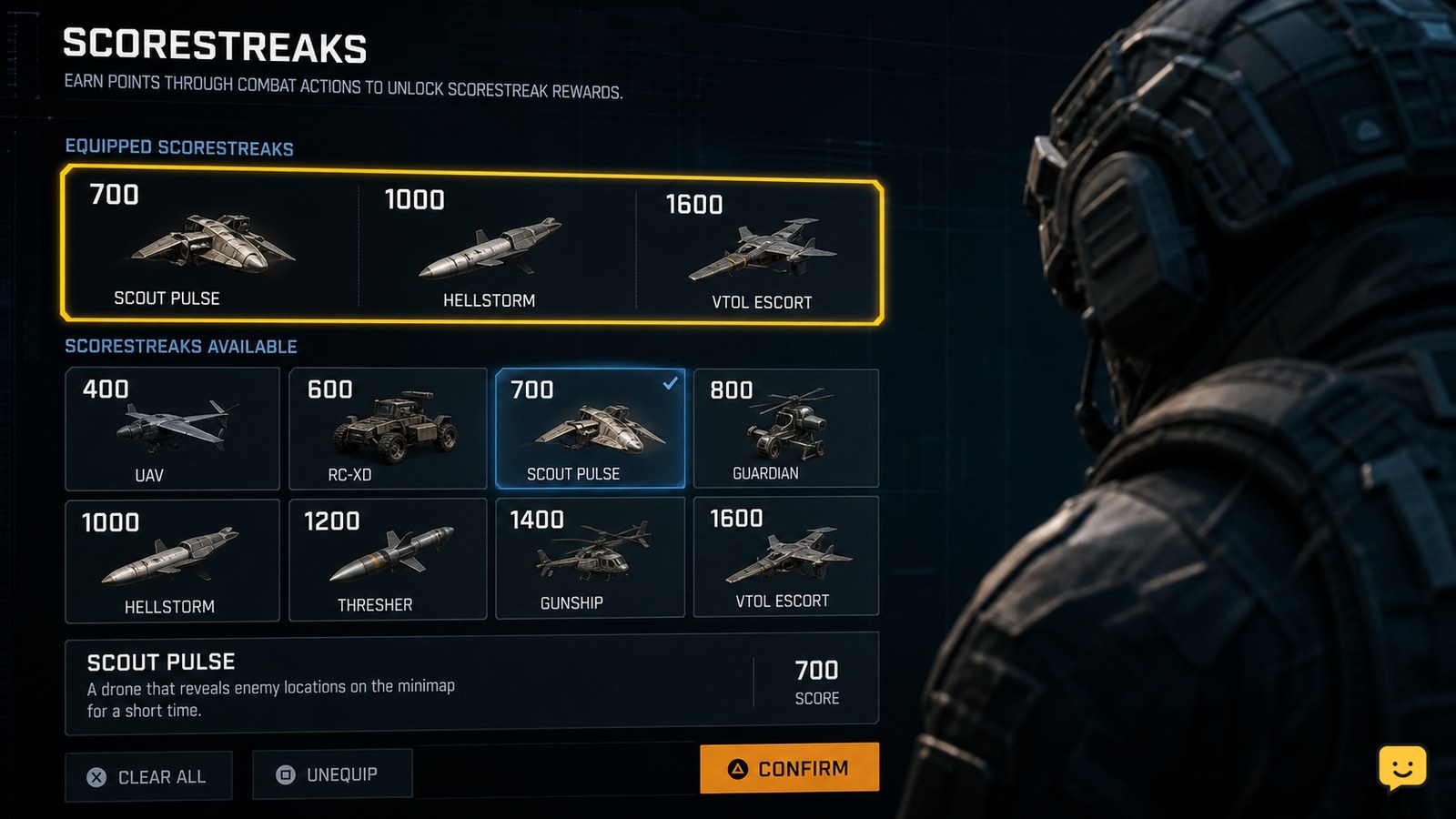
Open the multiplayer Scorestreaks setup screen, choose the available rewards for your three slots, and confirm the selection before entering a match. During play, earn score from kills, assists, objectives, and team actions. When a streak is ready, use the control shown beside its HUD icon; confirm the target or placement if the reward requires it.
Browse more Call of Duty: Black Ops 7 guides
Choose three Scorestreak rewards before matchmaking
Black Ops 7 multiplayer uses the Scorestreaks setup screen to determine which rewards can appear during a match. From the multiplayer menus, open the Scorestreaks section, select a reward for each available slot, and confirm the loadout before queuing.
Choose rewards that match how you earn score. A reconnaissance reward can support a team that is taking objectives, while a combat reward is more useful when you can consistently survive long enough to build a streak. SteelSeries identifies the UAV, Counter UAV, and HARP combination as a support-focused setup, but the best choice depends on the rewards currently available in your account and playlist.
Verify the setup: leave the menu and reopen it. Your selected rewards should still occupy their slots. If a slot is empty, greyed out, or replaced by a different item, do not assume the selection was saved.
Earn score through kills, assists, and objectives
Black Ops 7 multiplayer fills Scorestreak progress by awarding score during the match, not only from eliminations. Kills, assists, objective actions, and other team-support actions can contribute to the meter, although the exact value depends on the game mode and current rules.
Play toward the active objective instead of chasing isolated eliminations. Capturing, defending, or contesting an objective gives you a safer way to keep earning score while helping your team. Staying alive also matters: dying can interrupt your progress toward the next reward, so avoid forcing a fight when your current score is close to a useful streak.
Verify progress: watch the Scorestreak icons on the HUD. A reward that is not ready should show progress or remain unavailable. When its icon changes to a usable state, the match has registered enough score for that reward.
Activate a ready Scorestreak from the HUD
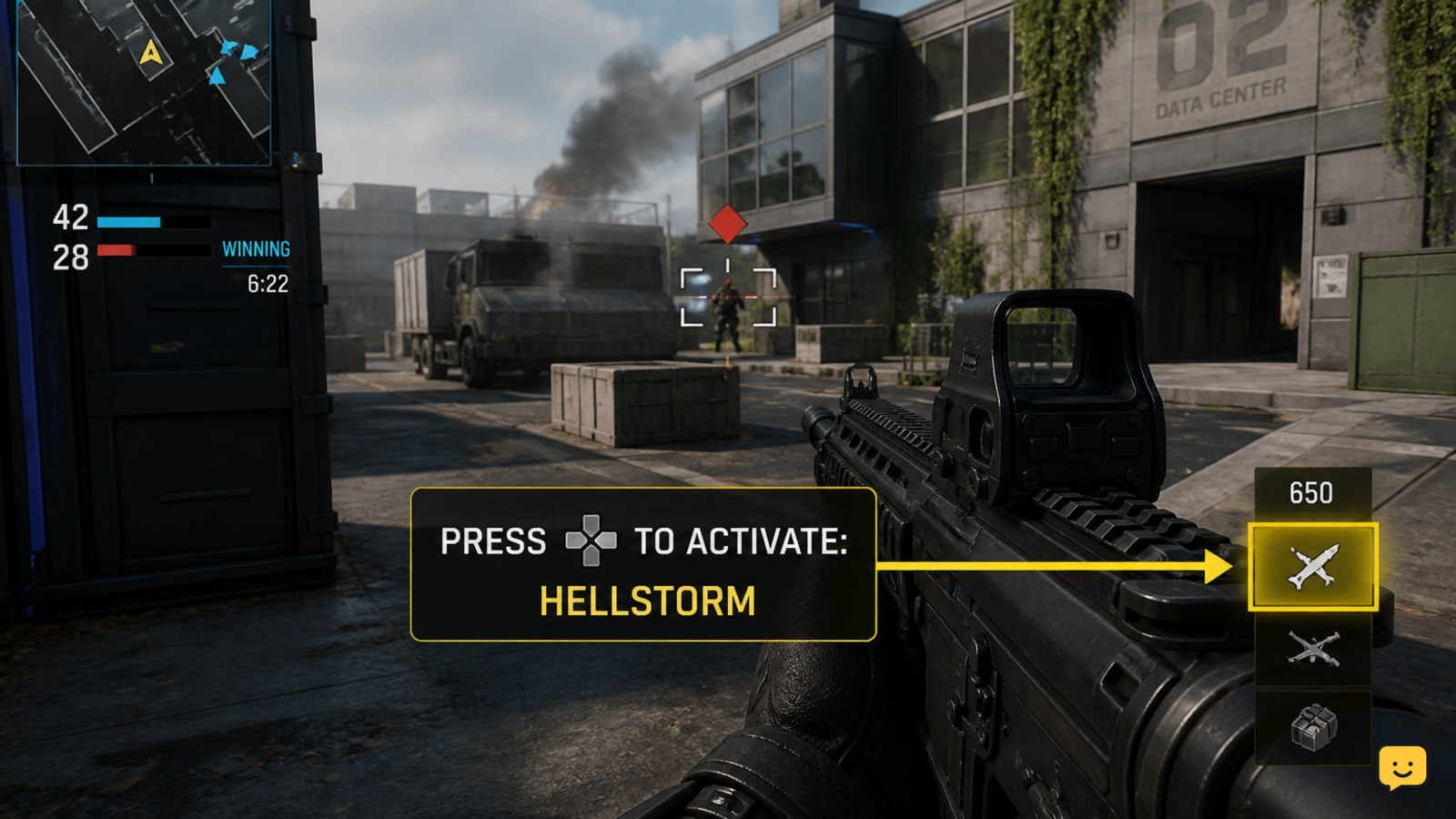
Black Ops 7 activates a multiplayer Scorestreak through the control prompt displayed beside the ready reward on your HUD. When the icon is available, press or hold the shown input rather than relying on a universal button, especially after changing your keybinds.
- Check that the reward icon is ready and that you are not inside a menu, respawn screen, or other state that blocks activation.
- Press the displayed Scorestreak input.
- If the reward opens a targeting view, placement screen, or confirmation prompt, choose the target and confirm it.
- Return to the match and check for the reward’s activation message, effect, equipment animation, or changed minimap state.
Gameplay references for Black Ops 7 show the basic process as earning a Scorestreak and then activating it from the multiplayer HUD. The exact input and confirmation behavior can vary by platform and control layout, so the prompt in your match is the controlling reference.
Spend support rewards when they help the objective
Use a ready support Scorestreak when your team can act on its information or disruption. A UAV-style reward is most valuable before a coordinated push, while a counter-recon reward is more useful when the opposing team is relying on visibility or map information.
Do not activate every reward immediately after it becomes ready. First check the scoreboard, objective state, and remaining match time. If your team is already clearing an area, a detection or disruption reward may be more useful just before the next capture or defense. If the round is nearly over, use the reward only when its effect can still influence the result.
Verify the result: look for the reward’s activation indicator and its expected match effect. If no indicator appears and the Scorestreak icon remains ready, the input may not have registered or the reward may require a target or confirmation.
Fix a Scorestreak that will not appear or activate
A missing or unusable Scorestreak usually comes from an unsaved selection, insufficient score, a mode mismatch, a blocked activation state, or a changed control binding.
- The reward is missing before the match: reopen the multiplayer Scorestreaks screen, select the reward again, confirm the loadout, and verify that the slot remains filled.
- The icon is visible but not ready: keep earning match score through objectives, assists, and eliminations. Do not expect the reward to activate until its HUD state changes.
- The icon is ready but nothing happens: use the displayed input again, then check whether a target or confirmation screen is waiting for input.
- The wrong button is shown: inspect the current keyboard or controller bindings and restore the Scorestreak action if it was cleared or reassigned.
- The reward works in one mode but not another: confirm that you equipped it for multiplayer. Zombies and other modes can use separate reward systems.
If the selection still disappears after restarting the game, stop changing individual streaks and check the game’s update status or official support channels. The available evidence does not establish a universal fix for a persistent account-side or interface bug.
Frequently asked questions
How many Scorestreaks can I equip in Black Ops 7 multiplayer?
The multiplayer setup uses three Scorestreak slots. Open the Scorestreaks screen before matchmaking and verify that each selected reward remains in its slot after you confirm the loadout.
Do kills give more Scorestreak progress than objectives?
The amount depends on the action and mode rules. Kills can provide score, but objectives, assists, and team-support actions also contribute. Check the HUD meter during a match rather than assuming one action always gives the most progress.
Why can I see a Scorestreak but not use it?
A visible icon may still be charging, or the reward may require an activation input, target, placement, or confirmation. Wait for the ready state, follow the HUD prompt, and check your bindings if the prompt does not respond.
Can I use multiplayer Scorestreaks in Zombies?
No. This guide applies to multiplayer Scorestreaks. Zombies has its own mode-specific systems, so a reward equipped for multiplayer may not appear in a Zombies match.