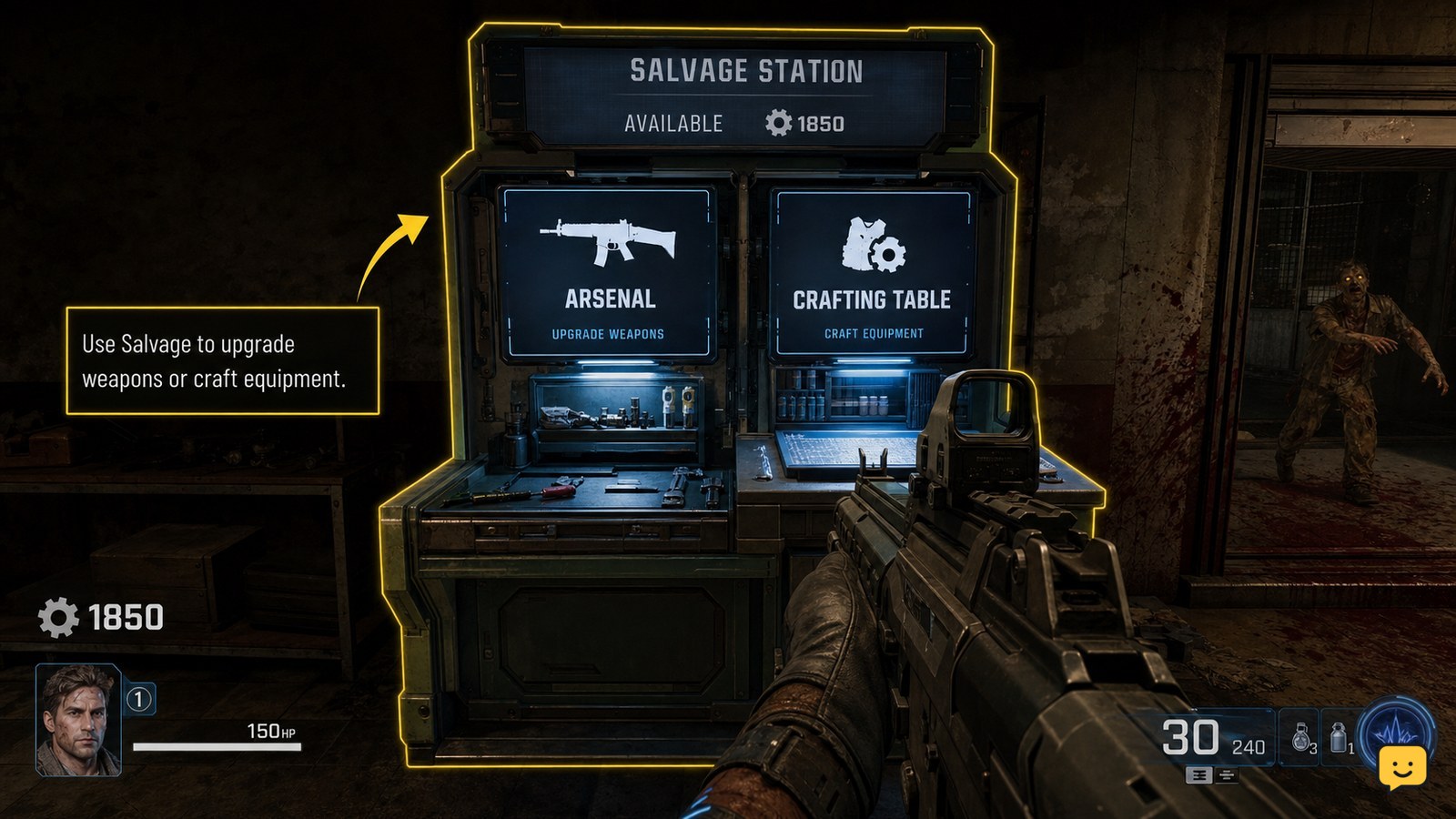
Spend Salvage at the Arsenal or Crafting Table, choosing the purchase that solves your current survival problem. Weapon upgrades and elemental mods offer durable combat value, while armor repairs or improvements protect you when damage is the main threat. Craft tactical or lethal equipment only when you need it immediately, and check the displayed Salvage cost before confirming.
Browse more Call of Duty: Black Ops 7 guides
Check whether the station uses Salvage
Salvage is spent through specific Zombies stations rather than through every purchase menu. The available evidence identifies the Arsenal for acquiring, repairing, or improving armor and the Crafting Table for tactical and lethal equipment. Approach the station, interact with it, and read the currency shown beside each option before confirming.
Keep Salvage separate from Essence. Essence is used for general match purchases such as Pack-a-Punch upgrades, while Salvage is tied to the station options that display it as the payment type. If the screen shows only Essence, stop and do not assume the purchase will use Salvage.
Choose weapon power when damage is the problem
Spend Salvage on a weapon-related upgrade when your current gun is struggling to keep pace with the round or stronger enemies. Community guides and current BO7 coverage describe Salvage as a resource for weapon upgrades and elemental modifications. Choose the option that improves the weapon you are actively carrying instead of spending on a backup you may not use.
Elemental modifications are a durable choice when the station offers one that fits your weapon and play style. They improve the weapon’s utility across later fights, whereas a tactical item solves only one immediate situation. Before confirming, check that the highlighted weapon is the intended one and that the Salvage total decreases only after the purchase succeeds.
Repair or improve armor before taking another risk
Use Salvage at the Arsenal when armor is damaged or when the available armor option directly improves your ability to survive incoming attacks. Armor is usually the better purchase when your weapon already handles the current enemies but damage is removing protection too quickly.
Open the armor option and verify the displayed result before paying. Look for the armor state or improvement reflected in the station interface after confirmation. If the armor value does not change, the purchase prompt closes unexpectedly, or the Salvage total remains unchanged, treat the transaction as incomplete and check the menu again rather than paying repeatedly.
Craft tactical or lethal equipment only for a clear need
The Crafting Table lets you use Salvage for listed tactical and lethal equipment. Craft an item when it supports the next objective, gives you a way out of a crowded area, or fills a missing part of your current loadout. This is a short-term purchase, so it should normally come after a needed weapon or armor improvement.
Do not craft simply because you have enough Salvage. First check your carried equipment and the immediate fight. If the item is already full, unavailable, or not useful for the encounter ahead, save the resource for the Arsenal instead. The exact options and costs must come from the table’s current list; do not rely on a remembered cost from another Zombies title.
Verify the purchase before leaving the station
After confirming any Salvage purchase, check three observable results: the Salvage balance changed by the displayed amount, the selected weapon or armor state updated, and the crafted equipment appeared in the expected inventory slot. If none of these changes occurs, the purchase did not complete.
When an option is missing, reopen the station once and confirm that you are using the correct station. If it is still absent, save your Salvage and continue the match rather than forcing a different purchase. Menus, available items, and costs can change with the current game build or station state, so publishable guidance should follow what the live interface actually lists.
Use this priority when several purchases are available
When you have several valid choices, use this order: first fix a weapon that cannot comfortably handle the current enemies; next repair or improve armor if incoming damage is the larger danger; then take an elemental modification or other lasting weapon improvement; finally craft tactical or lethal equipment for an immediate objective.
This is a decision rule, not a fixed spending requirement. Reverse the order when a specific encounter demands equipment or when armor is nearly gone. Stop spending once the next purchase does not solve a present problem, because unused Salvage can retain more value than a low-impact item.
Frequently asked questions
Can you spend Salvage at Pack-a-Punch in Black Ops 7 Zombies?
No. Pack-a-Punch uses Essence according to the available ShowU guidance, while Salvage is used through stations such as the Arsenal and Crafting Table. Check the currency displayed in the active menu before confirming any upgrade.
What is the best first Salvage purchase in Zombies?
The best first purchase depends on the immediate threat. Choose a weapon upgrade or elemental modification when damage is the issue. Choose armor repair or improvement when protection is failing. Craft equipment only when it solves a current objective or emergency.
Why is my Salvage purchase option missing?
First check that you are using the correct station and that the item is listed with a Salvage cost. If the option remains absent after reopening the menu, do not substitute an Essence purchase or rely on an older guide; station availability and costs can vary by game state or build.
How do I know whether a Salvage purchase worked?
Confirm that your Salvage balance changed, then check the related result: the weapon modification, armor state, or carried equipment. If the balance and item state are unchanged, the transaction did not complete.