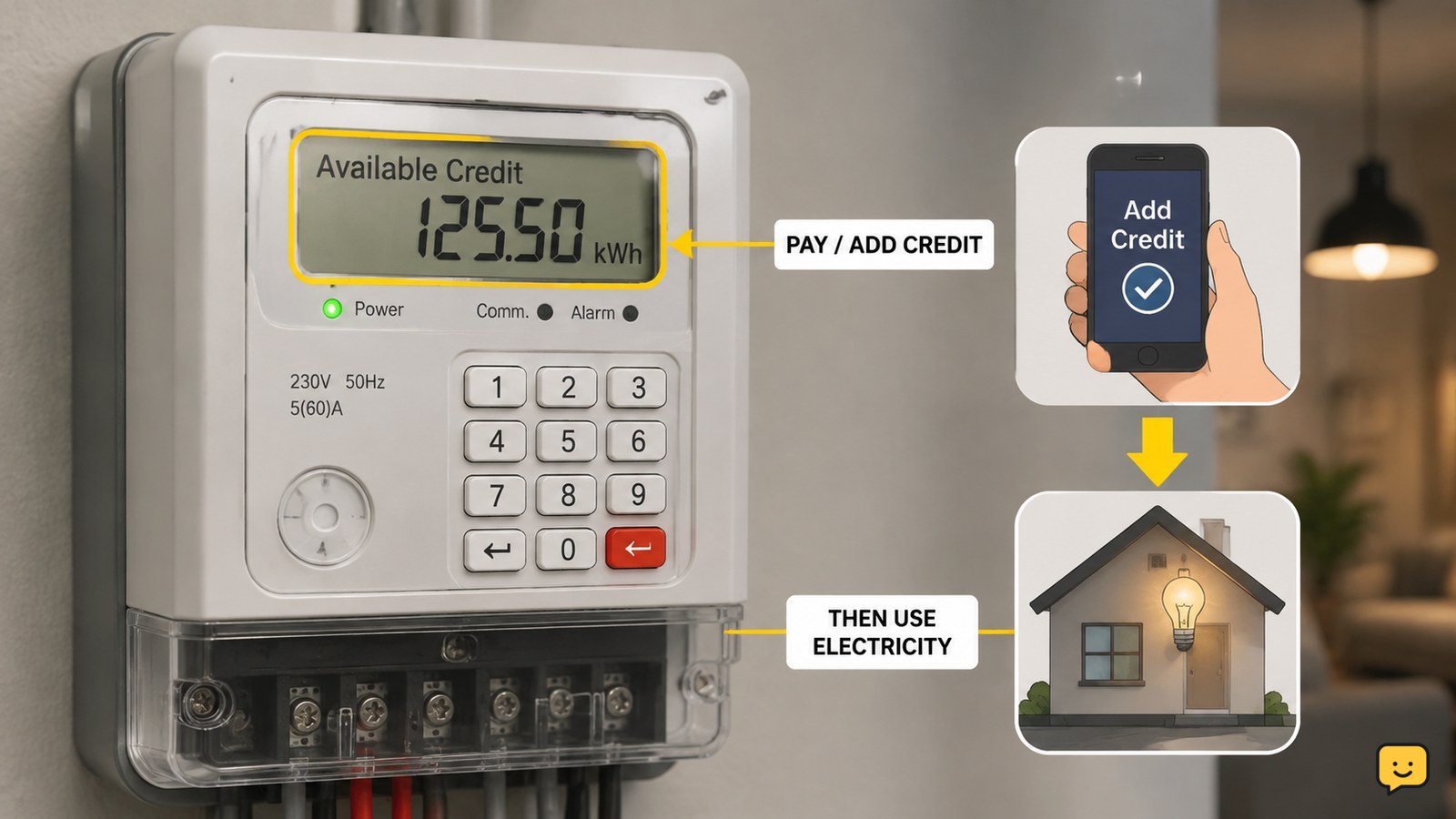
A prepaid meter is an electricity meter that requires you to pay for energy before you use it. You add credit through the method approved by your utility, and the meter deducts that credit as electricity is consumed. The display usually shows remaining credit or related information, but top-up methods and low-credit rules vary by provider.
For more help with this topic, use the Home Maintenance guides.
Check whether the device is a prepaid meter
A prepaid electricity meter normally requires credit to be added before electricity is consumed. The clearest signs are a balance display, low-credit warning, or provider instructions for adding energy credit.
Look for words such as credit, balance, remaining, or low on the screen. Some units also have buttons for viewing information. A meter that only records usage for a later bill is usually operating on a postpaid arrangement instead.
Do not rely on the appearance alone. Smart and conventional meters can look similar, and the billing arrangement is controlled by the utility account. Check your electricity agreement, welcome message, or provider account if the display is unclear.
Add electricity credit through the approved method
A prepaid meter receives payment before use, but the way credit reaches the meter depends on the utility and meter system. Common arrangements can include a provider-issued code, card, app, website, or account-linked top-up.
- Confirm that the top-up is for the correct property or meter number.
- Buy the required amount through the electricity provider or its approved payment channel.
- Follow the provider’s instructions to transfer the credit to the meter.
- Wait for the meter to accept the credit before disconnecting or leaving the unit.
Record the receipt, transaction number, or code until the balance updates. Never use a code intended for another meter, and do not enter random numbers when a top-up is rejected.
Compere describes prepaid electricity meters as systems that let users pay before consumption, similar to prepaid mobile service. Its guide also notes that connected meters may use communication methods such as Wi-Fi, 4G, or LoRaWAN in commercial and industrial settings; a household meter may use a different system.
Verify the balance and power after topping up
A successful prepaid-meter top-up should produce an accepted transaction, an increased credit balance, or both. Check the display or provider account immediately after adding credit.
- Compare the displayed meter number with the number used for the purchase.
- Check whether the credit balance has increased.
- Look for a warning or error message instead of assuming the payment worked.
- Switch on one ordinary appliance and confirm that power is available.
The balance may not appear instantly on every system. If payment is confirmed but the meter still shows the old balance, keep the receipt and use the provider’s support route. If the balance updates but the home remains without power, the problem may be separate from payment.
Know what low or empty credit means
Low credit means the prepaid balance is approaching zero; empty credit means the available balance has been used or the meter has reached a provider-defined limit. The exact warning, emergency reserve, and supply-restoration rules vary by utility.
Top up before the balance reaches zero when possible. If the supply stops, check the displayed message and confirm that the meter has accepted valid credit. Some systems may require an additional confirmation step, while others restore supply automatically.
If valid credit is visible but power does not return, check whether the home’s main breaker or consumer-unit switch has tripped without touching exposed electrical parts. If the breaker trips again, leave it off and contact a qualified electrician. A repeated trip can indicate a fault, not an empty balance.
Compare prepaid and postpaid electricity meters
A prepaid meter charges for electricity in advance, while a postpaid meter records consumption and the provider bills you later. The main difference is when payment occurs.
| Feature | Prepaid | Postpaid |
|---|---|---|
| Payment timing | Before use | After use |
| Usage feedback | Often shows remaining credit or related status | Usually shows readings used for billing |
| Supply risk | Credit can run low or expire under provider rules | Payment is normally handled through a later bill |
| Best first check | Confirm balance and top-up acceptance | Confirm meter reading and billing account |
Prepaid billing can make energy spending visible before the next bill, but it also requires monitoring the balance and following the provider’s top-up process. A postpaid arrangement may be simpler for households that do not want to manage credit in advance.
Choose the right next step when the meter does not work
The safest response depends on what the display and electricity supply are doing.
- Payment rejected: stop guessing, check the meter number and contact the provider if the details are correct.
- Credit accepted but no power: check for a tripped household breaker from a safe position, then contact the provider or an electrician if the supply remains off.
- Blank or frozen display: do not remove the cover; report the meter condition to the provider.
- Burning smell, heat, sparks, water, or damaged wiring: keep away, avoid operating the meter, and contact the appropriate emergency or electrical service.
These steps apply to household electricity meters in general. The provider’s instructions take priority for model-specific buttons, codes, emergency credit, and reconnection.
Frequently asked questions
Does a prepaid meter use electricity differently?
No. A prepaid meter measures electricity used by the home; its main difference is payment timing. You add credit before consumption, and the available balance is reduced as energy is used. The meter does not make appliances consume less electricity by itself.
How do I know how much credit is left?
Check the meter display or the utility account linked to the meter. Look for a balance, credit, or remaining-value screen. The label and button sequence vary by model, so use the provider’s instructions if the displayed figure is unclear.
What should I do if my prepaid top-up is rejected?
First confirm that the payment or code matches the correct meter number and that it came from an approved provider channel. Do not keep guessing codes. Save the receipt or transaction reference and contact the electricity provider if the information is correct but the meter still rejects it.
Can electricity stop when prepaid credit reaches zero?
Yes, supply may stop when available credit is exhausted, but the warning period, emergency credit, and reconnection process depend on the utility. Top up before the balance reaches zero and follow the meter or provider instructions if the supply stops.
Is a prepaid meter the same as a smart meter?
No. Prepaid describes how electricity is paid for, while smart usually describes the meter’s communication and measurement capabilities. A meter can be prepaid and smart, but the two terms do not mean exactly the same thing.