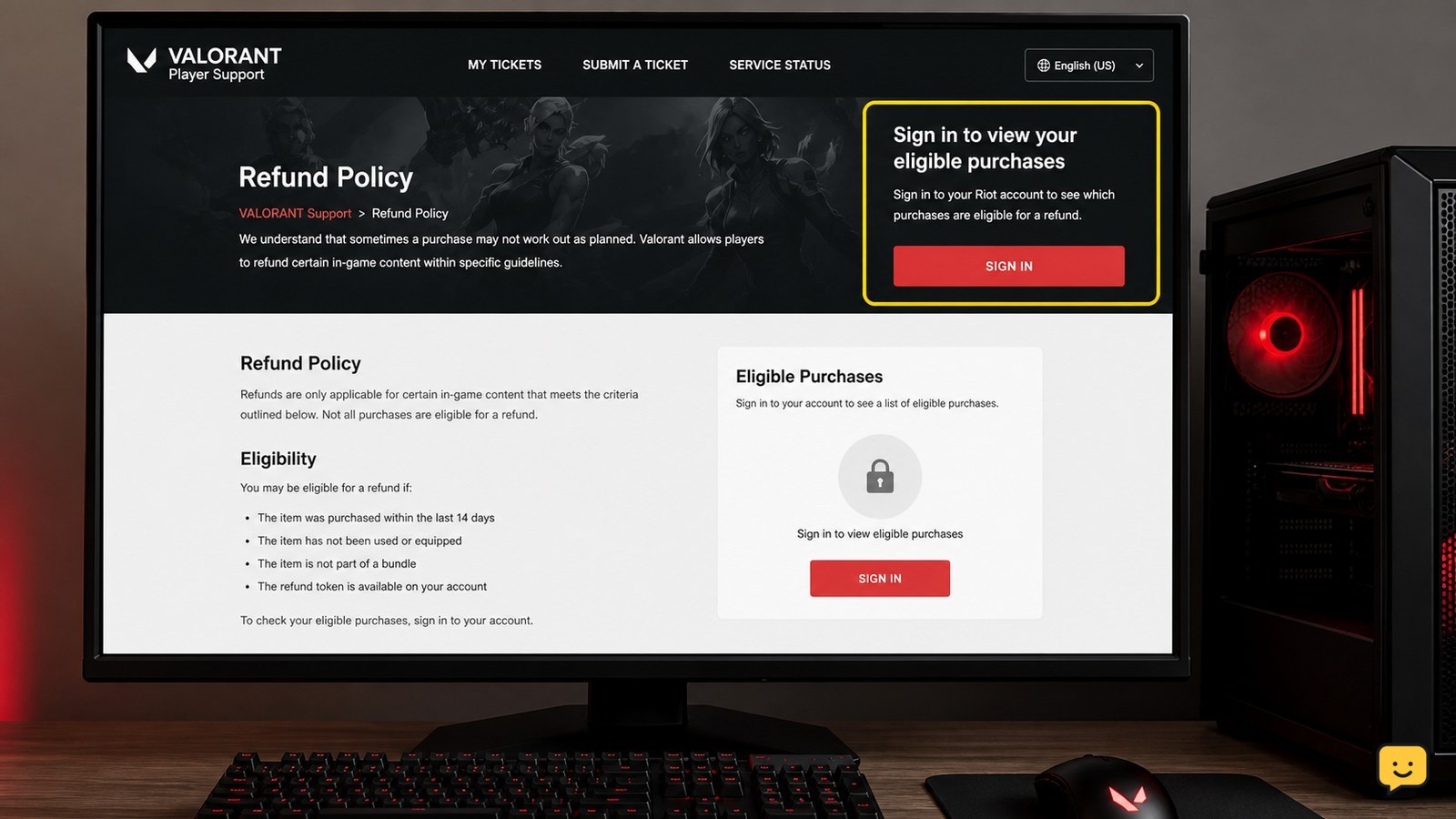
Open Riot’s official VALORANT refund page, sign in to the correct Riot account, and review the purchases listed as eligible. Select the unused weapon skin and submit the available refund request. Riot states that used or upgraded weapon skins, including weapon skin levels, cannot be refunded. Stop if the purchase does not appear as eligible.
Check that the weapon skin is still eligible
Riot’s current refund guidance distinguishes unused purchases from used or upgraded cosmetics. An unused weapon skin can be considered through the account’s eligible-purchase list, while an upgraded or used weapon skin cannot be refunded.
Before opening the request page, do not equip the skin in a match, use it in gameplay, or spend resources on its weapon skin levels. The safest checkpoint is simple: if you want the purchase refunded, leave it unchanged until Riot’s page shows whether it qualifies.
Stop here if the skin has already been used or upgraded. The standard refund route does not apply to that purchase.
Open Riot’s official refund page and sign in
Go to Riot’s VALORANT Player Support refund page. Use the sign-in control on that page and confirm that the displayed account is the one that purchased the skin.
Account verification matters because Riot uses the signed-in account to determine which purchases can be reviewed. If the page shows a different Riot account, sign out and return with the purchasing account. Do not submit a request from an account that did not make the purchase.
Successful verification means the refund page loads account-specific purchase information instead of only showing general support text.
Find the unused skin in the eligible-purchase list
After signing in, review the purchases Riot identifies as eligible for refunds. Look for the weapon skin by its listed purchase name and check that it is the item you intend to return.
If the skin appears, continue through the refund control shown for that purchase. Review the item and refund details before confirming; this prevents selecting a different cosmetic or submitting a request for the wrong transaction.
If the skin does not appear, do not treat that absence as a hidden button or temporary approval. Recheck the account and the skin’s status once. If it remains absent, the purchase is not available through the current self-service eligibility list.
Submit the refund request and verify the result
Use the refund option displayed beside the eligible unused weapon skin, then complete the page’s confirmation step. The exact controls may change as Riot updates its support site, so follow the current labels shown after sign-in rather than an older menu path.
Verification is complete only when the page displays a confirmation or otherwise removes the purchase from the available eligible actions. Record the item name and any confirmation details shown on screen.
If the request control fails, refresh the page and sign in again to the same Riot account. If the purchase still appears eligible but cannot be submitted, use Riot’s official support options from that page and include the item name and the error shown. Do not submit repeated requests for the same purchase while the first request is still processing.
Know when the standard refund route does not apply
Riot’s published guidance says upgraded or used weapon skins and weapon skin levels cannot be refunded. That limitation applies even when the cosmetic is no longer wanted, so contacting support should not be presented as a normal workaround for an ineligible item.
A purchase also falls outside this guide when it does not appear in the account-specific eligible list. In that case, check the purchasing account and the item status, then stop if both are correct. Only Riot can determine whether an unlisted transaction has another support path.
Never share your Riot password, payment details, or account-recovery codes in a public discussion or with another player while seeking help.
Frequently asked questions
Can I refund a VALORANT skin after using it once?
No through the standard refund process. Riot’s support guidance states that used weapon skins cannot be refunded. If the skin was equipped or used in gameplay, check the official refund page only for confirmation, then stop if it is not listed as eligible.
Can upgraded VALORANT weapon skins be refunded?
No. Riot specifically excludes upgraded weapon skins and weapon skin levels from refunds. Do not spend upgrade resources on a skin you may want to return; check its eligibility before making any changes.
What should I do if my unused skin is not listed?
Confirm that you signed in to the Riot account that made the purchase, then check the item’s name and status. If the unused skin still does not appear in Riot’s eligible-purchase list, the standard self-service refund route does not apply. Use only the official support options shown on Riot’s page.
Does Riot automatically refund every unused VALORANT skin?
No. An unused item must also appear as eligible on the signed-in account’s refund page. Unused status alone does not guarantee that the purchase can be refunded.
Browse more Valorant guides for help with this topic.