Mortal Shell II Resolve is earned through the active combat loop, then shown on the Resolve meter. Fight normally, watch for the meter to increase, and spend Resolve only after confirming the gain. Current evidence does not verify exact controls, fixed rewards, or a separate Resolve pickup, so stop before trusting advice carried over from the original Mortal Shell.
Browse more Mortal Shell II guides
Confirm the Resolve meter before fighting
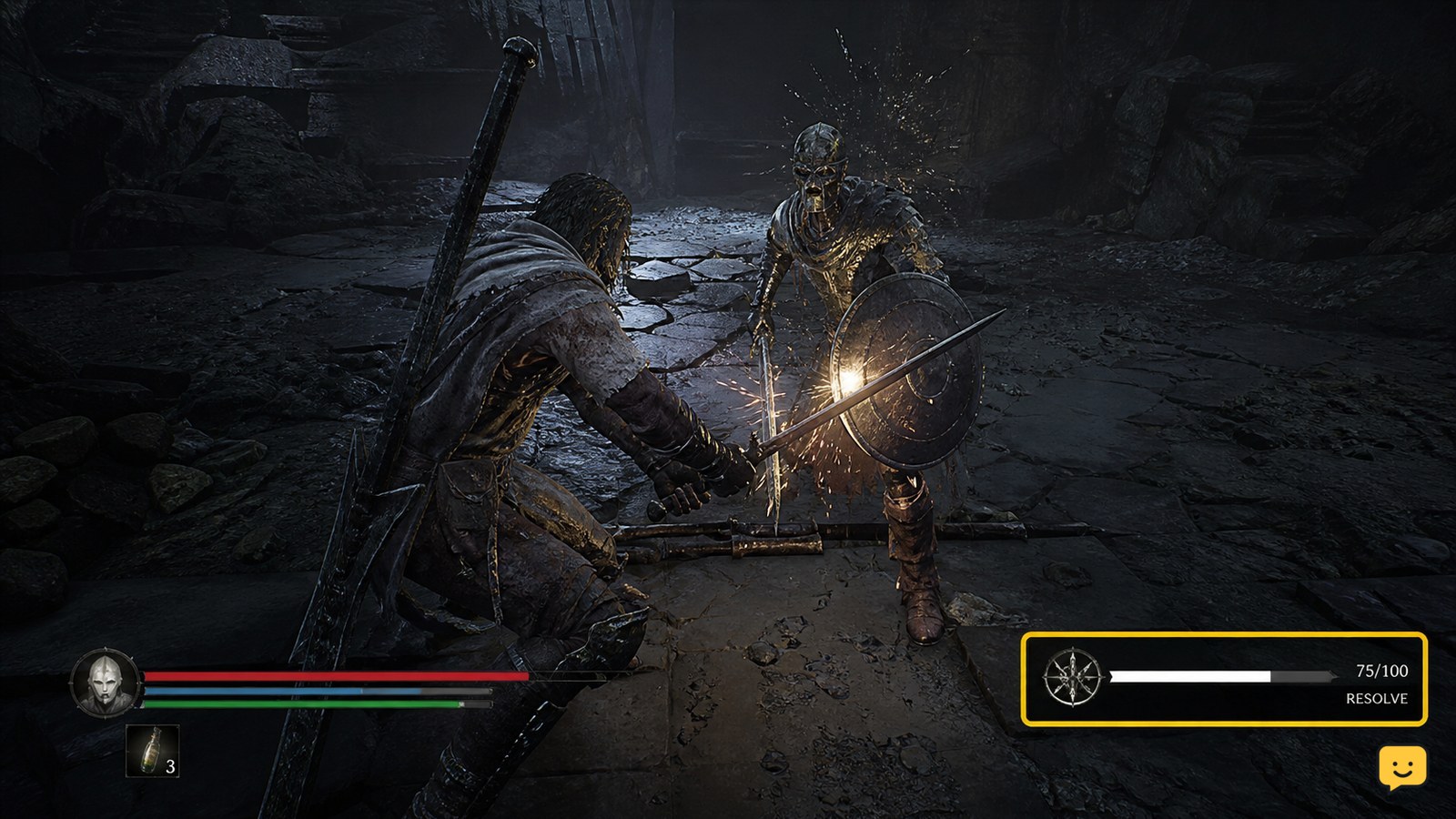
Start by locating the Resolve display on the in-game HUD. Record its state before entering combat: empty, partially filled, or already available to spend. This gives you a visible comparison point and prevents a delayed meter update from looking like a new reward.
The available Mortal Shell II gameplay evidence identifies Resolve as a combat resource and includes a dedicated explanation of how to obtain it. It does not provide a reliable control list, fixed amount per action, or universal early-game farming route. Those details should remain unclaimed until the game shows them.
Earn Resolve through completed combat actions
- Engage an ordinary enemy in an area where you can retreat safely.
- Use your normal attacks and defensive actions without spending Resolve immediately.
- After each completed exchange, check whether the Resolve meter has increased.
- Repeat only while the meter gives a visible increase and the encounter remains controlled.
This is the durable part of the method: Resolve should be treated as a resource built during play, not as currency that must be collected from an unverified location. The expected result is a higher visible meter after combat actions, followed by an available Resolve-powered effect when the game permits one.
Verify the gain before spending Resolve
Once the meter rises, wait until the encounter is safe and check the relevant ability or effect. Confirm three separate states: the Resolve meter has increased, the intended effect shows a cost or availability change, and using it consumes the expected amount. This separates genuine Resolve gain from ordinary damage numbers, health changes, or temporary combat feedback.
If the meter was already full, perform the check with a partially filled meter on a later encounter. A full display cannot show whether another action added Resolve, so it is a poor farming test.
Avoid carrying over original Mortal Shell parry advice
A Steam discussion for the original Mortal Shell describes parrying as a way to gain Resolve. That discussion is not evidence that the same rule applies to Mortal Shell II. Do not make parrying your primary farming method unless Mortal Shell II’s own HUD or tutorial confirms the gain.
The same caution applies to claims about Resolve bars, guaranteed parry rewards, special items, boss drops, or exact combat counts. Mortal Shell II may preserve familiar terminology while changing when the resource is awarded.
Fix missing Resolve gains without wasting progress
If the meter does not rise, first repeat the test with a different ordinary encounter and keep the HUD visible. If the second test also produces no change, check whether the game has introduced Resolve through a tutorial, ability, shell progression screen, or objective that has not yet been completed.
Then verify that you are looking at Resolve rather than another combat indicator. If the game still gives no visible confirmation, stop farming and record the encounter state before restarting the game or checking an official update. Do not spend materials or abandon a progression objective based only on a video title.
Use Resolve only after the meter confirms availability
When the meter visibly increases and an effect becomes available, spend Resolve for the combat situation that benefits from it rather than emptying the resource immediately. Preserve enough of the meter to compare future gains. This makes it easier to identify whether the resource is replenished by ordinary combat, a specific defensive action, or a progression unlock.
The method applies only when the current build displays Resolve as an active combat resource. If your HUD, tutorial, or ability screen uses different terminology or does not show the meter, stop and follow the on-screen instruction instead of applying this guide by analogy.
Frequently asked questions
Does parrying earn Resolve in Mortal Shell II?
It is not confirmed by the supplied Mortal Shell II evidence. A Steam discussion documents parry-based Resolve for the original Mortal Shell, but that mechanic should not be transferred automatically. Test parrying only if Mortal Shell II’s HUD visibly confirms a Resolve increase.
Is there a Resolve pickup or vendor in Mortal Shell II?
No separate Resolve pickup or vendor is established by the available evidence. Treat Resolve as a combat resource until the current game directly displays another source through its HUD, tutorial, quest objective, or item description.
How can I tell that I actually earned Resolve?
Check the Resolve meter before and after a completed combat exchange. A real gain should produce a visible increase or change in the Resolve display. If the meter is full, repeat the test with partial Resolve so another gain can be observed.
What should I do if Resolve never increases?
Test another ordinary encounter while keeping the HUD visible, then check whether a tutorial, shell progression requirement, or ability unlock controls access to Resolve. If the meter still does not change, stop farming and verify the current in-game instructions or update information before spending resources.