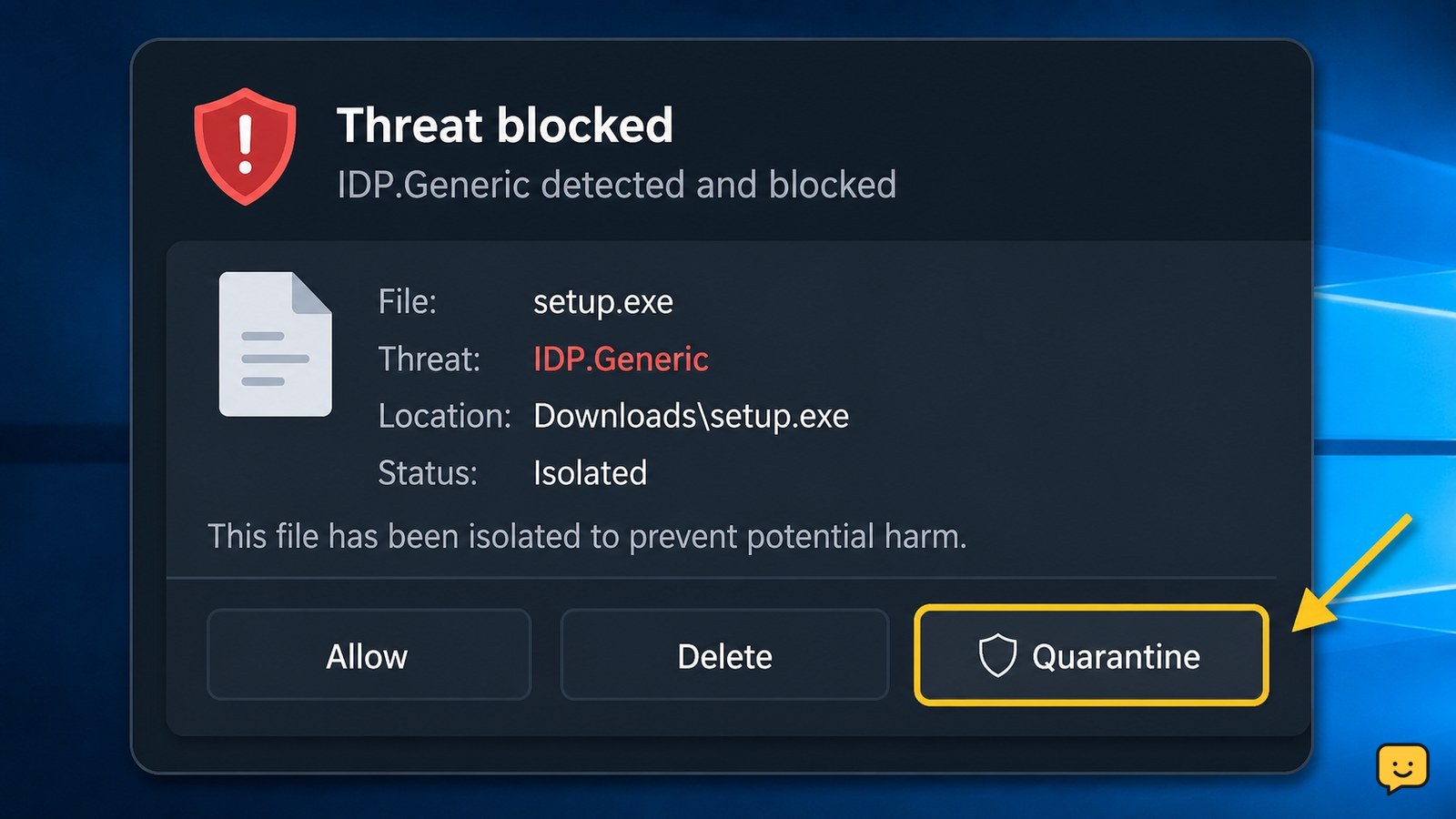
IDP.Generic is a broad antivirus detection label for a file that appears to behave like known malware. Do not open the flagged file or disable protection. Quarantine it, update the antivirus app, run another scan, and obtain a clean copy only from the official publisher. If the warning returns or the file was opened, stop using it and seek security support.
For more help with this topic, use the Computers Internet guides.
Check what the IDP.Generic warning identifies
IDP.Generic identifies a file that the antivirus considers suspicious, but the label alone does not prove which malware family is involved. A supplied AVG discussion describes the detection as a file that appears to exhibit behavior associated with known malware.
Record the exact file name, folder path, detection time, and application that created or downloaded it. A file inside a temporary download folder is handled differently from a file installed by a known business application, but neither should be opened while the warning is active.
Do not assume the alert is harmless because the file belongs to a game, utility, or software build. Generic detections can require additional verification, and the available evidence does not establish a universal false-positive rate.
Quarantine the flagged file before testing anything
Quarantining the flagged file is the safest first action because it isolates the item without requiring you to run it. Use the antivirus alert’s quarantine, remove, or resolve control; the exact label varies by product and version.
- Open the antivirus notification or detection history.
- Select the entry matching the recorded file name and location.
- Choose quarantine or remove, not allow, restore, or add exception.
- Restart the computer if the antivirus requests it.
- Run a full scan after the security app and its definitions finish updating.
Success means the detection no longer appears in the active-threat list and the full scan completes without identifying the same file. If the file cannot be quarantined, do not keep retrying it from Windows Explorer; disconnect from the network and contact the antivirus vendor or a qualified technician.
Verify the source before replacing or restoring the file
Only replace a quarantined file when you can obtain it from the official software publisher and the antivirus vendor has no active warning for that release. Do not download a replacement from a file-sharing site, an unsolicited message, or a search-result mirror.
- Check the publisher’s official download page or support channel for a newer installer or update.
- Read the publisher’s release notes or security notice for a matching file name and version.
- Download the replacement while antivirus protection remains enabled.
- Scan the replacement before opening or installing it.
If the clean download triggers IDP.Generic again, leave it quarantined. Treat that repeat detection as unresolved rather than disabling protection to complete the installation. Use the antivirus product’s official false-positive reporting process only after confirming that the download came from the genuine publisher.
What to do if you opened the file already
If you opened the flagged file before the warning appeared, isolate the computer and check for changes instead of relying on the alert label alone. Disconnect Wi-Fi or unplug Ethernet if the device shows suspicious activity, while leaving the antivirus installed and enabled.
- Run the antivirus product’s deepest available scan and allow it to remove or quarantine detections.
- Review recently installed applications, browser extensions, startup entries, and unexpected security-setting changes.
- From a separate trusted device, change passwords for email, financial, cloud-storage, and other important accounts if you entered them after opening the file.
- Contact your organization’s administrator or a reputable security professional if the scan finds more threats or the computer behaves abnormally.
Do not manually delete unfamiliar system files or use random cleanup commands. If important files were renamed, encrypted, or replaced, power down the affected computer after preserving any relevant alert details and seek incident-response help.
Decide when the warning may be a false positive
An IDP.Generic warning may be a false positive when a legitimate publisher confirms the exact file and the antivirus vendor accepts a report, but user confidence alone is not enough. A file that runs normally, has a familiar name, or came from a trusted colleague can still be unsafe.
Keep the item quarantined while you compare the publisher, download location, file version, and any available official integrity information. If those details do not match, delete the file and obtain software through a verified official channel. If the warning is tied to a workplace or school application, let the administrator coordinate any vendor review.
The safe success check is a vendor-supported resolution or a clean publisher-provided release that passes a fresh scan. Until then, do not restore the original file or create an antivirus exception.
Frequently asked questions
Is IDP.Generic always a virus?
No. IDP.Generic is a broad antivirus detection label, so it can identify malware or, in some cases, a legitimate file that resembles suspicious behavior. Keep the file quarantined until the publisher and antivirus vendor support its safety. Do not restore it merely because the program is familiar.
Should I disable antivirus protection to install a file flagged IDP.Generic?
No. Disabling protection removes the control that detected the risk. Look for an official publisher update, confirm the download source, and submit the exact file through the antivirus vendor’s official false-positive process if appropriate. Leave the flagged copy quarantined while the warning is unresolved.
What if IDP.Generic keeps detecting the same file?
Leave the file quarantined and stop attempting to run it. Downloading the same installer again from an unofficial mirror can repeat the problem. Update the antivirus app, run a full scan, and contact the software publisher or antivirus vendor with the file name, location, version, and detection details.
Can I delete a file that was quarantined as IDP.Generic?
Usually, deleting a quarantined file is appropriate when you no longer need the software and cannot verify its source. If it belongs to a work, school, backup, or business application, ask the administrator before permanently removing it. Never restore it just to test whether it works.