Facebook does not tell you directly when someone blocks you. Search for their profile, open an older profile link or tag, check whether they disappeared from your Friends list, and compare what another person can see. Several signs together suggest a block, but the same symptoms can also mean the account was deactivated, renamed, or restricted by privacy settings.
For more help with this topic, use the Privacy Online Safety guides.
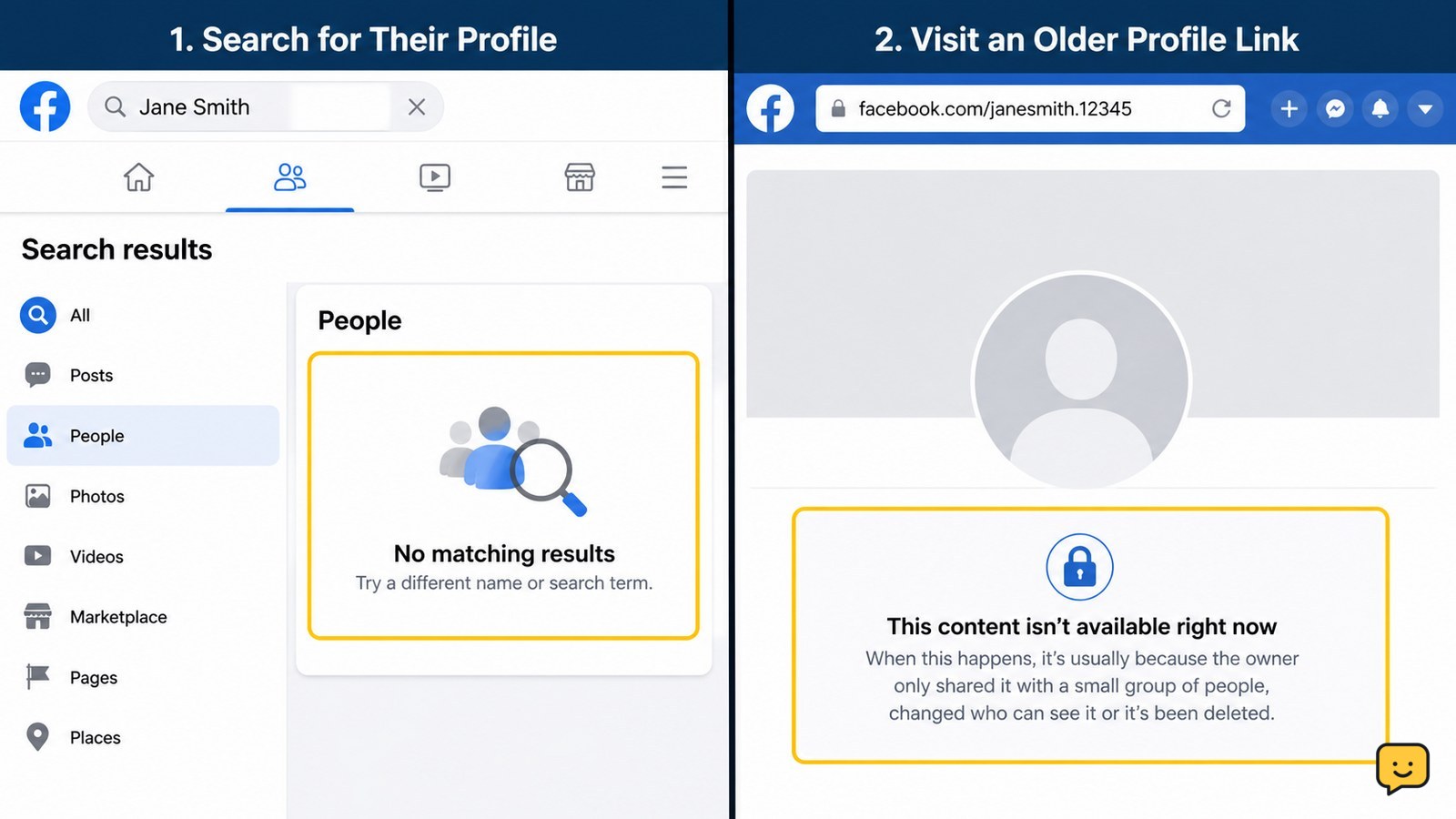
Search Facebook for the person’s profile
Facebook search is the quickest first check: if the person no longer appears when you search their exact name or username, blocking is possible but not proven.
- Open Facebook and use the main Search field.
- Enter the person’s full name, then try a known username or profile name variation.
- Check the People results, not only posts or pages.
Verify the result: confirm that you are searching from the account that previously interacted with the person. A missing result can also mean they changed their name, deleted or deactivated the account, adjusted discoverability, or Facebook is returning incomplete results.
If the profile appears normally, you probably have not been blocked from the main Facebook account. You may still be unfriended, restricted from some content, or blocked only in Messenger.
Open an older profile link or tag
An old Facebook profile URL, post tag, or comment gives you a second observable check: a profile that no longer opens for you while the link still identifies the person can indicate blocking.
- Open an older conversation, post, photo, notification, or saved link involving the person.
- Select their name or open the profile URL.
- Look for a normal profile page, or a generic message such as “This content isn’t available right now” or “This page isn’t available.”
HowSociable identifies these generic unavailable-page messages as a possible sign, but they are not unique to blocking. The same screen may appear after an account is deactivated, deleted, renamed, or made unavailable to your account.
Failure path: if the old link redirects to a different profile or shows a changed name, compare the profile photo, mutual friends, and prior conversation before drawing a conclusion. Do not assume a broken old URL means a block.
Check your Friends list and tagging options
If the person has disappeared from your Friends list and Facebook no longer lets you tag that profile, the combined change is stronger evidence than either clue alone.
- Open your profile and view your Friends list.
- Search the list for the person’s name.
- In a harmless draft post or comment, type @ followed by the person’s name and check whether their profile appears as a tag suggestion.
Business Insider lists disappearing from the Friends list and being unable to tag the person among the signs that may indicate a block. These checks still cannot distinguish blocking from unfriending, a renamed account, changed tag settings, or an unavailable profile.
Do not publish a test post just to check. Cancel the draft after viewing the suggestions. A missing tag suggestion is a clue, not confirmation.
Compare the profile from another person’s view
The most useful comparison is whether another trusted Facebook user can find and open the profile while you cannot.
- Ask one trusted person who is not involved in the dispute to search the exact name.
- Have them check whether a matching profile exists and whether the profile link opens for them.
- Compare only basic availability; do not ask them to copy private posts, photos, or contact details.
If the profile is visible to them but consistently unavailable to you, blocking becomes more likely. This is still an inference rather than a Facebook confirmation. If neither person can find the profile, the account may be deactivated, deleted, renamed, or disabled.
Privacy boundary: do not create another account or ask someone to impersonate you. Use one limited comparison, then stop.
Check Messenger separately from Facebook
Messenger behavior can help separate a messaging block from a full Facebook profile block, but message delivery alone is not a reliable test.
- Open your existing Messenger conversation with the person.
- Check whether their name and profile link still open normally.
- Note whether the conversation allows you to compose and send a message, or displays an unavailable-user or delivery error.
A person may block messages and calls without making the entire Facebook profile disappear, or they may block your Facebook account more broadly. An undelivered message can also result from a deactivated account, a connection problem, app errors, or changed Messenger settings.
Verification rule: treat Messenger as supporting evidence only. Combine it with profile search and the trusted comparison instead of sending repeated messages.
Choose the safest conclusion and next action
The safest conclusion is “likely blocked” only when several checks agree: you cannot find the profile, an old link is unavailable, the person is absent from your Friends list or tag suggestions, and a trusted person can still see the profile.
| What you observe | More likely explanation | Next action |
|---|---|---|
| You cannot find the profile, and nobody else can | Deactivated, deleted, renamed, or disabled account | Wait and recheck later; do not use a checker service. |
| You cannot find it, but a trusted person can | Blocking or account-specific visibility | Respect the boundary and stop testing. |
| The profile is visible, but you are no longer friends | Unfriended or privacy changes | Do not interpret this alone as blocking. |
| Facebook works poorly for several profiles | Search, app, browser, or connection problem | Refresh, try the website or app, and check Facebook’s service status before judging one account. |
Facebook’s own blocking controls are found under Settings & privacy and Settings, then the blocking controls, but your personal blocked list only shows people you blocked. It cannot confirm who blocked you.
Frequently asked questions
Does Facebook notify you when someone blocks you?
No. Facebook does not normally send a notification saying that another person blocked you. You have to compare visible account behavior, such as search results, profile access, tags, and Messenger availability. Because deactivation, deletion, renaming, privacy changes, and technical problems can look similar, no single clue proves a block.
Can you still see messages after someone blocks you on Facebook?
Sometimes. An existing Messenger conversation may remain visible even when you can no longer open the person’s profile or send a new message. Message history and delivery behavior vary depending on whether the person blocked Facebook, blocked Messenger, deactivated the account, or changed related settings. Treat Messenger as supporting evidence, not a confirmation.
What is the difference between being blocked and unfriended on Facebook?
If someone unfriends you, their profile may still appear in search and you may be able to open it, depending on privacy settings. If someone blocks you, the profile is commonly unavailable from your account and interactions such as tagging may fail. These are patterns, not guaranteed indicators, so compare the profile from a trusted person’s account without bypassing the person’s privacy.
Can a deactivated Facebook account look like a block?
Yes. A deactivated, deleted, renamed, or disabled account can disappear from search and make old links show an unavailable-page message. Ask one trusted person to search for the profile. If they also cannot find it, the account may be unavailable rather than specifically blocking you.