Open team chat during an active VALORANT match, type /ff, and send it to request a surrender vote. Use the on-screen vote controls when they appear. The match ends only if the client accepts the vote; if it does not, keep playing rather than leaving. Availability and vote requirements can vary by mode and live-game rules.
Start a surrender vote from VALORANT team chat
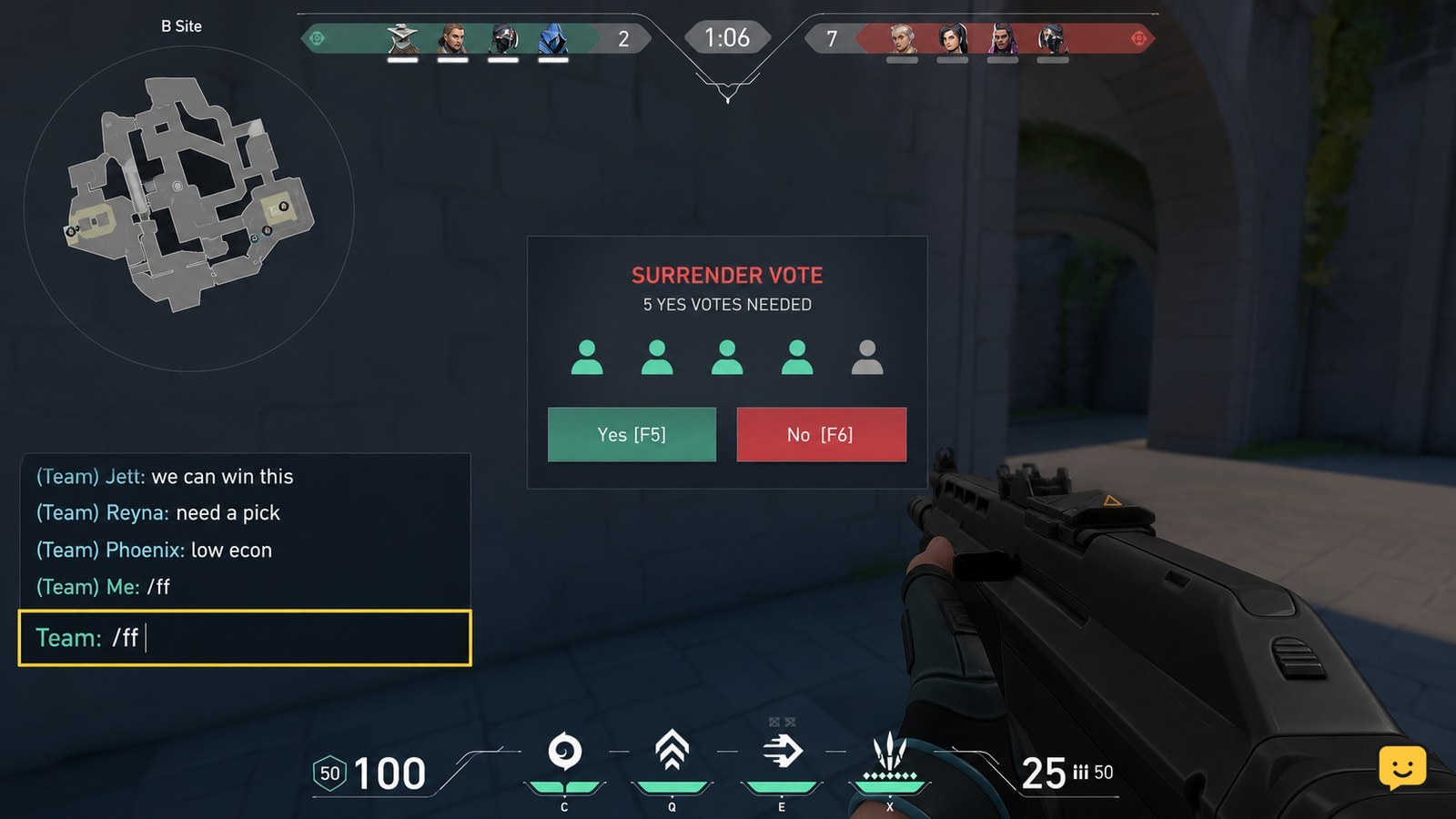
VALORANT starts a surrender request from the in-match chat box rather than from the Settings menu.
- Press Enter to open chat.
- Choose Team chat if channel selection is available.
- Type /ff and press Enter.
- Wait for the surrender vote panel to appear for your team.
A historical guide from Shacknews documents /ff as a surrender command, along with longer alternatives such as /concede and /surrender. Use /ff first because it is the shortest command. VALORANT’s live client is the final check: if it accepts the command, it will display the vote interface.
Verification: you should see an on-screen surrender vote instead of a normal chat message alone. If no vote panel appears, do not repeatedly spam the command; check the availability conditions below.
Vote when the surrender prompt appears
VALORANT requires the team to respond to the surrender prompt before it can end the match.
- Read the vote prompt when it appears on screen.
- Select the displayed option to approve or reject the surrender.
- Wait until the vote resolves; the game will show whether the surrender passed or failed.
The required number of approvals can depend on the current mode, team state, and live-game rules. Do not assume that sending /ff ends the match by itself. The visible vote result is the only reliable confirmation.
Verification: a successful vote moves the match toward its end screen. If the prompt closes and play resumes, the vote did not pass.
Check why the surrender command is unavailable
VALORANT can refuse a surrender request when the match has not reached the point where that mode allows a vote, or when a vote is already restricted by the current match state.
If /ff does not produce a vote panel, take these steps:
- Make sure you entered the command during an active round or between rounds, not while viewing the main menu or post-match results.
- Confirm that the text was sent as /ff, including the forward slash.
- Wait and continue playing if the client does not yet allow a surrender request.
- Try once more later only if the match continues and the client has not shown a message preventing another request.
Mode-specific rules and timing can change in live-service games. Avoid relying on old round-count or vote-threshold claims when the current client gives a different result.
Stop condition: if VALORANT explicitly reports that surrendering is unavailable, there is no settings change that can force it on for that match.
What to do when the surrender vote fails
A failed VALORANT surrender vote means the match remains active and every connected player should continue playing normally.
Do not disconnect, go AFK, or treat a rejected vote as permission to leave. A surrender request is a team decision, while leaving an active match is a separate action with its own consequences under VALORANT’s rules.
If the match is difficult because a teammate is disruptive rather than because the score is unwinnable, use the scoreboard communication controls to reduce voice, text, or ping disruption instead of escalating the situation in chat.
Verification: if the next round begins, the surrender did not end the game. Focus on the current round, and only start another request when the client allows it.
Frequently asked questions
What command surrenders in VALORANT?
Use /ff in the in-match chat box to request a surrender vote. Longer commands have been documented historically, but /ff is the shortest option to try. A vote panel must appear for the request to proceed; sending the command alone does not automatically end the match.
Can one player surrender a VALORANT match?
No. One player can request the surrender vote, but the match only ends if the required teammates approve it. The exact requirement can vary with the current mode and match state, so use the result shown by the live client rather than assuming a fixed vote threshold.
Why can’t I surrender in VALORANT yet?
The surrender option may be unavailable because the match has not reached that mode’s allowed point for a vote, or because the current match state limits another request. Continue playing and try again later only if the client permits it. There is no settings toggle that overrides an unavailable vote.
Does losing a surrender vote end the match?
No. A failed surrender vote leaves the match active, and play resumes normally. Stay connected and continue playing instead of leaving the match. If the problem is hostile communications, reduce the disruption with the scoreboard’s mute controls rather than abandoning the game.