If an Evrima mutation appears selected but has no effect, first confirm that it is unlocked—not merely displayed—and check its tooltip for prerequisites or incompatible choices. Reach the required growth milestone, relog safely, and test the result again. If the problem affects every mutation, verify Steam files and check whether the server disabled mutation rolls. Legacy does not use the current Evrima mutation system.
1. Confirm Evrima and identify the symptom
Mutation troubleshooting starts with the game branch. Evrima and Legacy are separate branches with different mechanics, so a guide or video made for one may not describe the other. The current mutation references in the supplied gameplay guides and troubleshooting reports concern Evrima.
- Check the branch selected in Steam before launching.
- Open the mutation screen and write down whether the mutation is shown as available, selected, unlocked, or locked.
- Describe the failure precisely: the choice disappears, the effect never appears, the tooltip remains locked, or the effect is active but has no obvious animation.
A passive benefit may change a value or condition without creating a new icon, sound, attack, or body animation. Test the documented behavior rather than looking only for a visual change.
2. Check whether the mutation is selected or actually unlocked
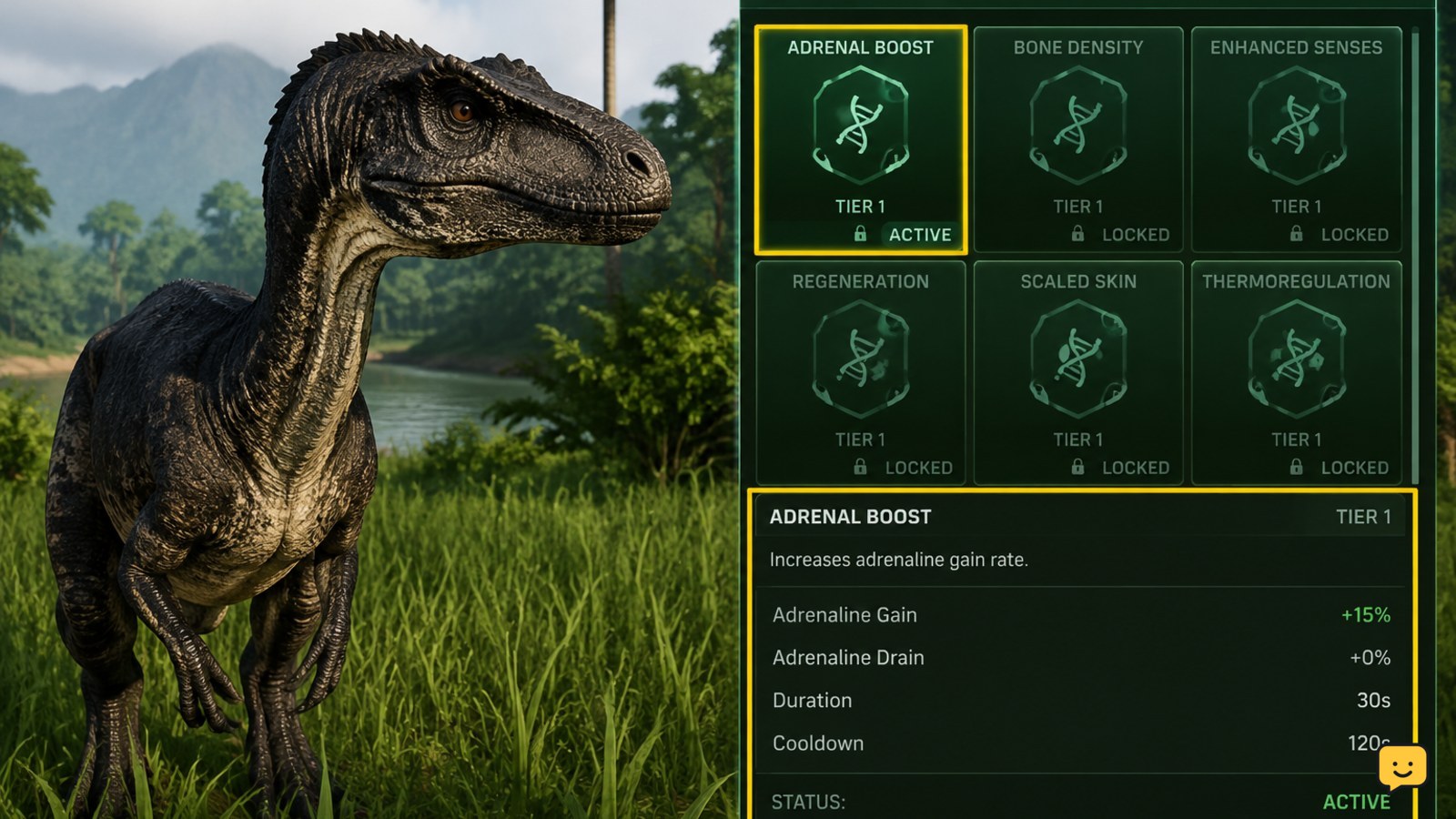
A mutation shown in the menu is not necessarily active. Some varieties must be unlocked through a special in-game action or requirement before they can be chosen. A selected option can also be confused with a preview, an available slot, or a choice that still needs confirmation.
- Read the full mutation tooltip, including the requirement and any restriction.
- Complete the stated requirement before expecting the effect to work.
- Reopen the mutation screen and confirm that the choice is marked as active or unlocked, not merely highlighted.
- Take a screenshot or note the wording if the menu skips the initial mutation choice or presents a locked option as selectable.
Do not assume that reaching a particular growth percentage unlocks every mutation. Growth milestones may provide the opportunity to roll or select a mutation, while the individual variety can have its own condition.
3. Wait for the correct growth milestone
Mutations are tied to growth progression. If you choose a mutation after the relevant checkpoint, or expect an effect before the game applies the checkpoint, the menu and the character can appear out of sync.
- Check your current growth and compare it with the milestone associated with the mutation choice.
- Complete the selection and allow the menu to close normally.
- Remain alive and undisturbed until the growth update finishes.
- Leave the server through the normal logout process, then reconnect and inspect the mutation screen again.
Use a safe hiding place before logging out. If the mutation becomes visible after reconnecting, the issue was likely a delayed state update rather than a permanently inactive effect. If the choice never appears at the expected checkpoint, continue with the server and file checks below.
4. Check stacking limits and incompatible choices
Do not assume that two mutations with similar effects stack. Mutation slots, prerequisites, and incompatibilities can prevent a combination from applying, and the exact rules may change between game versions or dinosaurs.
- Compare the tooltips for both mutations and look for wording about slots, exclusivity, prerequisites, or replacing an earlier choice.
- Test one mutation at a time when possible. Record the result before selecting a second effect.
- Remove the assumption that a second visual indicator should appear; some effects can coexist without separate icons, while others may replace or block a choice.
- If the menu allows a combination but the result contradicts its tooltip, capture the screen and report the two mutation names together.
There is no reliable universal stacking rule to apply to every Evrima dinosaur. Use the current tooltip and server rules as the authority for that character instead of copying a Legacy build or an older video.
5. Test for a missing visual effect
Many mutation effects are passive or conditional. A missing glow, icon, sound, or animation does not by itself prove that the effect failed. Verify the relevant outcome under controlled conditions.
- Move to a safe area and note the starting condition, such as stamina, health recovery, food requirement, or another value named by the tooltip.
- Trigger the condition described by the mutation without combining it with another buff, injury, combat state, or environmental change.
- Repeat the test once after the character has fully updated or after reconnecting.
- Compare the result with the tooltip, not with a streamer’s interface, a different dinosaur, or a Legacy screenshot.
If the effect is numerical and the game provides no readable value, label the result unconfirmed rather than calling it broken. This avoids confusing a subtle passive effect with a client display bug.
6. Relog, verify files, and check the server
A clean reconnect is the safest first technical fix for a mutation state that looks stuck. Community troubleshooting references also report file verification helping with mutation glitches, while a dedicated-server guide states that server settings can disable mutation rolls at future growth milestones.
- Move to cover, stop moving, and use the current safe logout command. Wait until the game confirms that logout is complete.
- Close and relaunch The Isle, then reconnect to the same server and check the mutation state.
- In Steam, open The Isle’s Properties, choose Installed Files, and run “Verify integrity of game files.” Let the check finish before launching again.
- Test the same mutation on the same character after the repair.
- If the issue affects only one community server, ask its administrator whether mutations are enabled and whether a recent configuration change affects future rolls. A server setting cannot retroactively repair a choice already saved to a character.
If every mutation fails across multiple servers after a clean reconnect and file verification, record the game branch, dinosaur, mutation, growth stage, server type, and exact reproduction steps for a bug report. Do not reinstall repeatedly or erase progress without a confirmed instruction from the game’s support channel.
Frequently asked questions
Do mutations work in The Isle Legacy?
No, do not apply the current Evrima mutation guide to Legacy. Evrima and Legacy are separate branches with different mechanics and progression systems. Confirm the selected branch in Steam before troubleshooting a mutation.
Why did The Isle Evrima skip my initial mutation choice?
The initial choice may have failed to display because of a delayed state update, an unmet unlock condition, or a server-side mutation setting. Relog safely, reconnect, and check the tooltip again. If the menu still skips the choice, record the dinosaur, growth stage, server, and mutation screen behavior.
Can Evrima mutations stack?
Some combinations may be restricted, replaced, or limited by mutation slots and prerequisites. There is no dependable universal stacking rule for every dinosaur and version. Read both current tooltips, test one effect at a time, and treat a missing visual indicator as inconclusive.
What is the safest first fix for an inactive mutation?
Safely log out, close the game, reconnect to the same server, and inspect the mutation state again. This can clear a delayed character or menu update without deleting progress. Verify Steam files next if the issue continues.
Can a server disable mutations in The Isle Evrima?
Yes, dedicated-server configuration can control whether mutation rolls occur at future growth milestones. If the problem appears only on one community server, check its rules or contact its administrator. Server settings do not automatically prove that an already selected mutation is defective.