If The Isle Evrima crashes as soon as you press Play, first confirm you are launching the intended Steam branch, then verify files and reset only Evrima’s local Config folder. Test with overlays off, then repair the bundled anti-cheat component if present. If it still fails, keep the crash report and stop changing files before contacting support.
Confirm that you are testing Evrima, not Legacy
The Isle has had separate Evrima and Legacy builds. Their installed files, branch choices, and local settings can differ, so a fix that helped a Legacy player is not automatically an Evrima fix. This guide is for an Evrima startup crash.
- Open Steam, right-click The Isle, and select Properties.
- Check the Betas area and note the branch currently selected. Do not switch branches just to troubleshoot unless you deliberately intend to test that other build.
- Start the same build you normally use, then note whether the crash happens before a game window appears, on a black screen, or after an anti-cheat message.
Verify: You can identify the branch you launched and reproduce the same startup symptom. If Legacy starts but Evrima does not, keep troubleshooting Evrima rather than copying Legacy configuration files into it.
Verify The Isle files in Steam
Damaged or missing files are the safest first repair to rule out. A Steam Community discussion about Evrima startup crashes specifically recommends verification before other changes.
- In Steam, open Library, right-click The Isle, then choose Properties.
- Select Installed Files.
- Choose Verify integrity of game files and let Steam finish without launching the game.
- Restart Steam after verification, then try Evrima once.
Verify: Steam completes the check and reports its result. If it reacquires files, test the game before moving to another step. If Evrima launches, stop here.
Reset Evrima’s local configuration safely
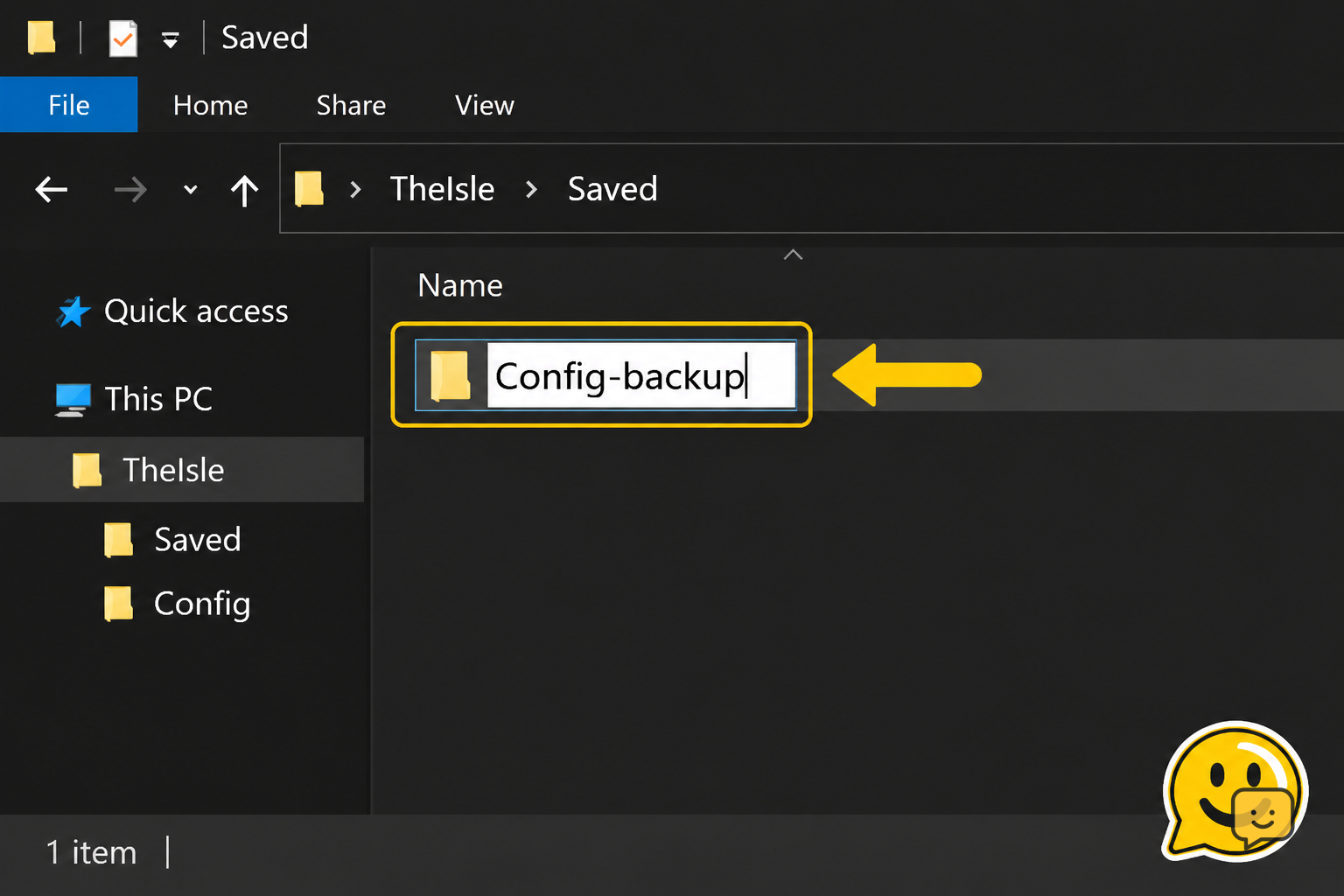
A broken graphics, display, or input setting can make an Unreal Engine game fail before it reaches the menu. Community troubleshooting for The Isle recommends resetting the Config folder after a major update or version change. Renaming it is reversible and safer than deleting it.
- Press Windows + R, enter
%LOCALAPPDATA%\TheIsle\Saved, and select OK. - Find the folder named
Config. - Rename it to
Config-backup. Do not rename the entireSavedfolder. - Launch Evrima. The game should create a fresh Config folder if it gets far enough to write settings.
Verify: Check whether a new Config folder appears and whether the game gets farther than before. Your display and control preferences may return to defaults. If the crash is unchanged, close the game and continue. If the reset makes a different problem worse, delete the new Config folder and rename Config-backup back to Config.
Test without overlays and background hooks
Overlays and monitoring utilities can attach to a game while it starts. Test one clean launch rather than uninstalling anything immediately.
- Turn off the Steam Overlay for The Isle in Steam’s game properties.
- Fully exit optional overlays, FPS counters, capture tools, RGB-control tools, and GPU tuning utilities that are running.
- Restart the PC if you are unsure whether an overlay is still active.
- Launch Evrima from Steam and test it once.
Verify: If the game starts normally, re-enable tools one at a time and launch after each change. The first tool that brings back the crash is the conflict; leave it off for The Isle and stop troubleshooting.
Repair the bundled anti-cheat only when it is available
Some player reports link immediate launch failures with Easy Anti-Cheat. This is community-reported troubleshooting, not proof that anti-cheat is the cause of every crash.
- In Steam, open The Isle’s Installed Files page and choose Browse.
- Look for an Easy Anti-Cheat folder or setup program supplied inside the current game installation.
- If a supplied setup program offers Repair, select Repair for The Isle, then restart Windows.
- Launch the same Evrima branch again.
Verify: A successful repair completes without an error and the next launch gets farther than before. If there is no bundled setup program, skip this step. Never obtain anti-cheat executables from file-sharing sites or replace game files manually.
Update the system, then collect useful crash evidence
If the crash persists after the clean tests, update Windows and install a stable graphics driver from NVIDIA, AMD, or Intel. Restart after the update. Avoid changing several driver settings at once, because that makes the result hard to identify.
Then collect evidence before trying a full reinstall. Check %LOCALAPPDATA%\TheIsle\Saved\Crashes for a newly dated crash folder. Record the crash time, the Steam branch, whether verification found files, and any visible error text. A screenshot of the error and the crash folder contents is useful for an official support request.
When to reinstall: Reinstall only after verification, the Config reset, and the clean-overlay test fail. Uninstall through Steam, remove only remaining game-installation files if Steam leaves them behind, reinstall, and test once before restoring optional tools or old configuration files.
Stop condition: If a fresh install still crashes at the same point, do not repeatedly reinstall or alter random Windows files. Send the recorded symptom and crash evidence to The Isle’s official support route.
Frequently asked questions
Why does The Isle Evrima crash after I verify the files?
Because verification repairs the installed game files, not every local setting, overlay conflict, driver issue, or anti-cheat problem. Reset the reversible Config folder next, then test one launch with overlays and monitoring tools fully closed.
Will resetting The Isle Config folder delete my dinosaur or progression?
Usually no. Renaming only the local Config folder is intended to reset settings such as graphics and controls, not remove server-side character data. Rename rather than delete it so you can put the original folder back if needed.
Should I switch to Legacy if Evrima crashes on startup?
No, not as a repair step. Legacy and Evrima are different builds, so Legacy launching does not fix Evrima. Confirm your intended Steam branch, troubleshoot Evrima’s files and local settings, and avoid transferring configuration folders between builds.
Can an overlay make The Isle crash before the menu?
Yes, it can. Steam Overlay, capture software, performance counters, RGB utilities, and GPU tuning tools can interact with a game at launch. Disable or exit them for one clean test, then add them back individually if the game starts.
What files should I send with a The Isle crash report?
Send the exact time of the crash, your selected Steam branch, any visible error text, and the newest files or folder details from %LOCALAPPDATA%\TheIsle\Saved\Crashes. Also state whether Steam verification and a Config reset changed the symptom.
Planning your next route? Use the The Isle Evrima map to find key locations before you move.