
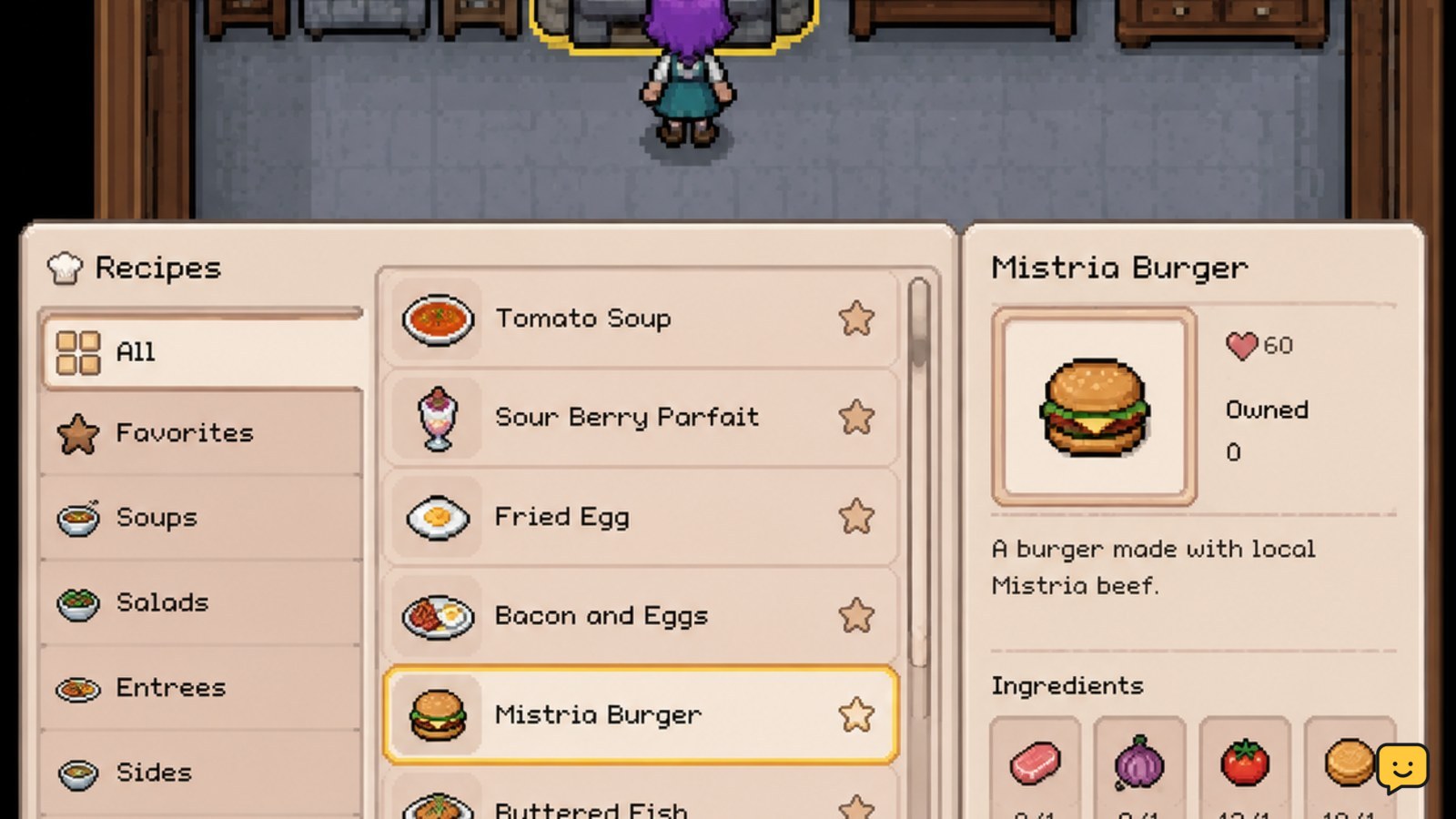
Approach a cooking station and interact with it; on PC, the documented control is E. Select an unlocked recipe category, confirm the ingredient requirements, and cook only after checking what the dish is needed for. Use prepared food for stamina or health, gifts, or collection progress. Recipe lists and ingredients can change between Early Access updates, so verify the current in-game recipe screen before relying on a static checklist.
Browse more Fields of Mistria guides
Check the current recipe list before gathering ingredients
Fields of Mistria is in Early Access, so recipe collections and requirements should be treated as version-dependent. Community checklists can help you identify dishes to investigate, but they are not a substitute for the current recipe interface. One community checklist specifically identifies its coverage as version 0.13.2, which makes its version boundary important.
Use an external list as a planning aid only. Before gathering or spending materials, open the cooking station and confirm the dish name, category, ingredient requirements, and any displayed effect. If the game screen disagrees with a checklist, follow the game screen and record the version shown by your client.
Cook a dish at the cooking station
- Approach the cooking station.
- Interact with it. The documented PC control is E; other platforms may use a different interaction button.
- Choose the recipe category that contains the dish you want.
- Select an unlocked recipe and inspect every required ingredient.
- Confirm the cooking action only when the displayed requirements are satisfied.
Cooking guides describe the station as the place where the available meal categories and recipes appear. If the recipe cannot be selected, first check whether an ingredient is missing or whether the dish has not been unlocked. Do not repeatedly confirm the action while troubleshooting, because an available recipe may consume ingredients immediately.
Success is visible in the station interface: the dish should be created and added to your inventory or otherwise shown as completed by the game. If no item appears, check your inventory before trying again.
Unlock recipes by checking what the game reveals
Recipe discovery is not limited to buying a single permanent cookbook. Available evidence describes dozens of dishes and an in-game list that expands as recipes are discovered or unlocked. That means a missing recipe is not automatically a missing ingredient problem.
When a dish is absent, inspect every recipe category at the station and look for locked entries, discovery hints, or progression requirements shown by the current interface. Then continue normal activities that may reveal recipes rather than spending ingredients on an unrelated substitute. Avoid treating a third-party list as proof that your character should already have a dish.
Keep a simple checklist with three states: seen, unlocked, and cooked. This prevents a recipe from being mistaken for one you have already prepared, especially when a static list includes dishes from a different update.
Choose dishes for stamina, health, gifts, or progress
Cook with a purpose instead of turning every ingredient into food immediately. Reported uses for cooked dishes include restoring stamina, restoring health, giving gifts, and contributing to recipe or collection progress.
- Stamina: keep suitable meals for workdays involving farming, gathering, fishing, or mining.
- Health: reserve food for situations where recovering health matters more than extending a routine activity.
- Gifts: hold back dishes when you are preparing a planned NPC interaction. Confirm the recipient’s preference in the current game before using a meal this way.
- Collection progress: cook newly available dishes at least once when your goal is to expand your recipe record or completion progress.
The durable rule is to compare the dish’s displayed effect and your immediate objective before confirming. A meal that is useful for stamina may be less valuable as a gift or collection entry. If the interface does not show the expected effect, do not infer it from a guide written for another update.
Fix missing recipes, unavailable ingredients, or failed results
No cooking prompt: move close to the station and try the interaction control again. If the prompt still does not appear, leave the area, return after the screen has loaded, and verify that you are using a cooking station rather than another crafting point.
The recipe is missing: check all categories, look for a locked entry or discovery requirement, and compare your game version with the source you are using. Do not assume the recipe was removed unless current in-game information confirms it.
The recipe is unavailable: reread the displayed ingredient list and check quantities in your inventory. Similar-looking crops, forage, fish, or prepared items should not be treated as interchangeable without an explicit in-game allowance.
The dish does not appear after cooking: stop before repeating the action. Search the inventory for the dish, check whether the cooking screen marked the recipe as completed, and confirm that the ingredients were actually consumed. If the game state remains unclear, reload from a safe point before spending more materials.
Frequently asked questions
How do you start cooking in Fields of Mistria?
Approach a cooking station and interact with it. On PC, the documented control is E. The station opens recipe categories and shows which dishes are available. Select a recipe, check its current ingredient requirements, and confirm only when you are ready to consume those materials.
Why is a cooking recipe missing in Fields of Mistria?
A missing recipe may still be locked or undiscovered, or the external list may describe another Early Access version. Check every category at the cooking station and inspect any locked-entry text or progression hint. Use the current in-game list as the deciding source.
What are cooked dishes used for in Fields of Mistria?
Cooked dishes can be used for stamina recovery, health recovery, gifts, and recipe or collection progress. Check the current dish information before choosing its use, and keep ingredients separate when they may be needed for quests, donations, gifts, or another planned recipe.
Should you cook every recipe as soon as it becomes available?
No. Cook immediately when you need the dish for progress or a planned use; otherwise, compare its displayed purpose with your ingredient supply. Preserve materials that are difficult to replace or already reserved for a quest, gift, museum donation, or another recipe.


