
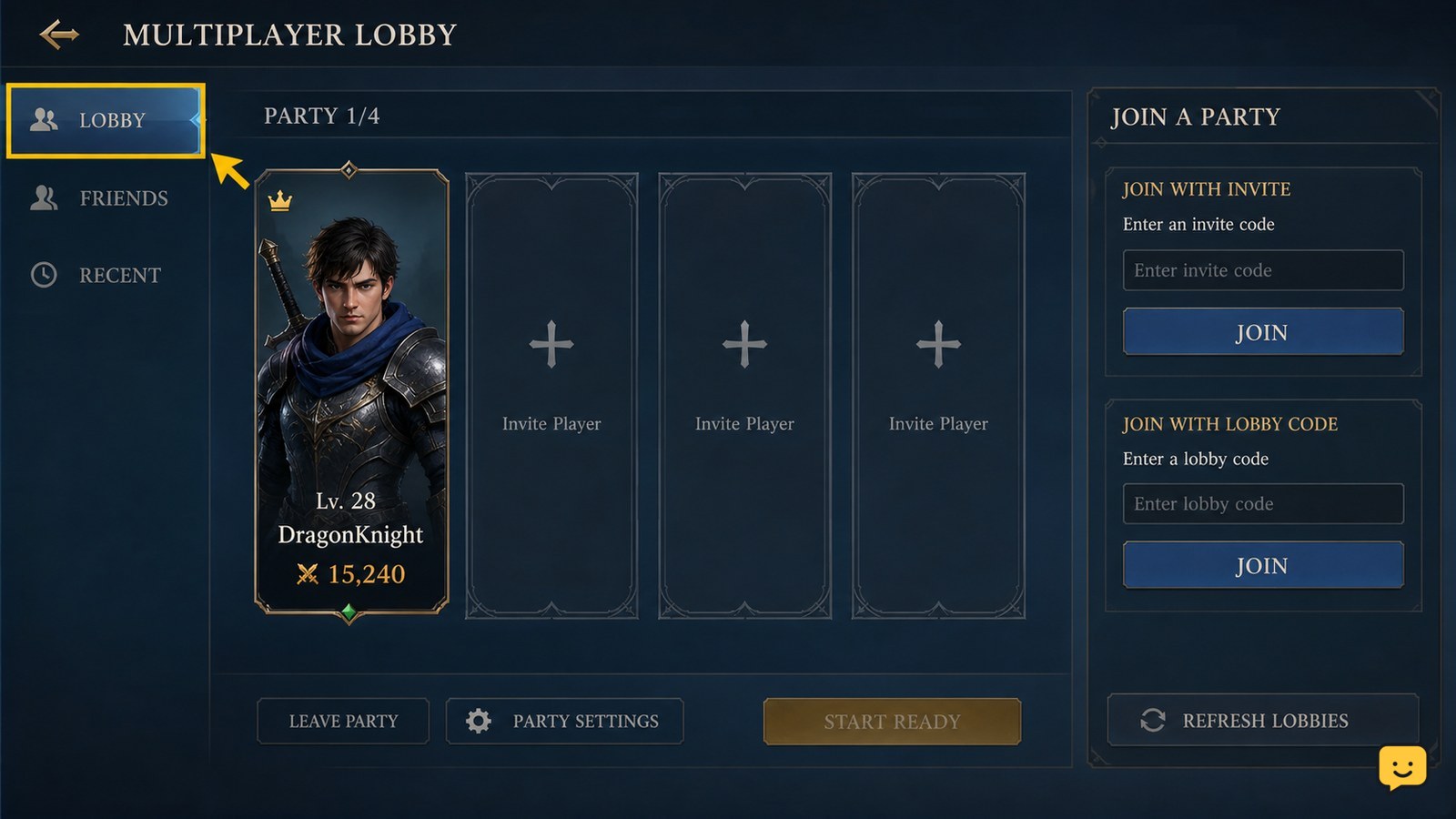
To join a party in Dragon Sword Awakening, open the multiplayer lobby and use the invitation or lobby-code method provided by the party leader. Accept the invite if it appears, or enter the shared code in the lobby screen. Confirm that your name appears in the same lobby before the leader starts the activity. Menu labels may vary by platform or build.
Browse more DragonSword: Awakening guides
Check the multiplayer lobby before joining
Dragon Sword Awakening uses the multiplayer lobby as the confirmed entry point for playing with other people. Open the game’s multiplayer area and look for the party, lobby, invitation, or join controls shown on your current build.
The available evidence confirms a multiplayer lobby with an Invite Friends option and a lobby-code method, but it does not verify one universal public-party browser or one exact Join Party label across every platform. If you do not see a join control, do not assume the feature is removed; check whether you are still in a solo screen or an earlier progression state.
Use the player-group feature here rather than a hero roster or combat formation screen. A group of players and a team of playable heroes are separate systems.
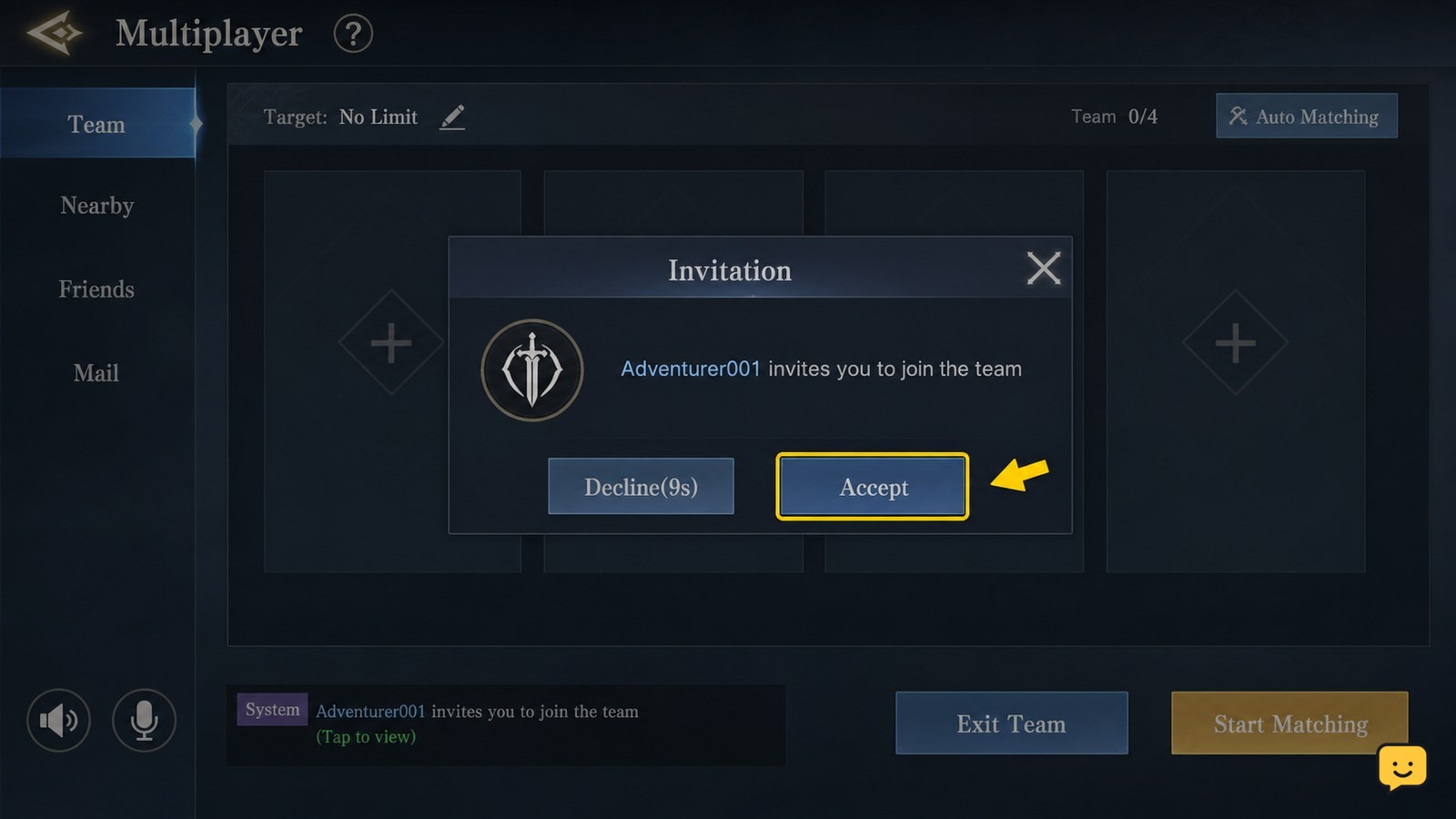
Join with a party invitation
Dragon Sword Awakening adds you to a party when you accept a valid invitation from the party leader through the multiplayer interface.
- Ask the leader to open the multiplayer lobby and send an invitation.
- Remain in the multiplayer screen and watch for the incoming party or lobby request.
- Choose the visible accept or join action.
- Wait for the lobby to refresh before opening another menu.
Success is visible when your player name or character appears in the same lobby roster as the leader. If no invitation appears, confirm that the leader sent it to the correct account or in-game name, then have the leader resend it once. Repeatedly switching between screens can make a pending request harder to identify.
Join with a shared lobby code
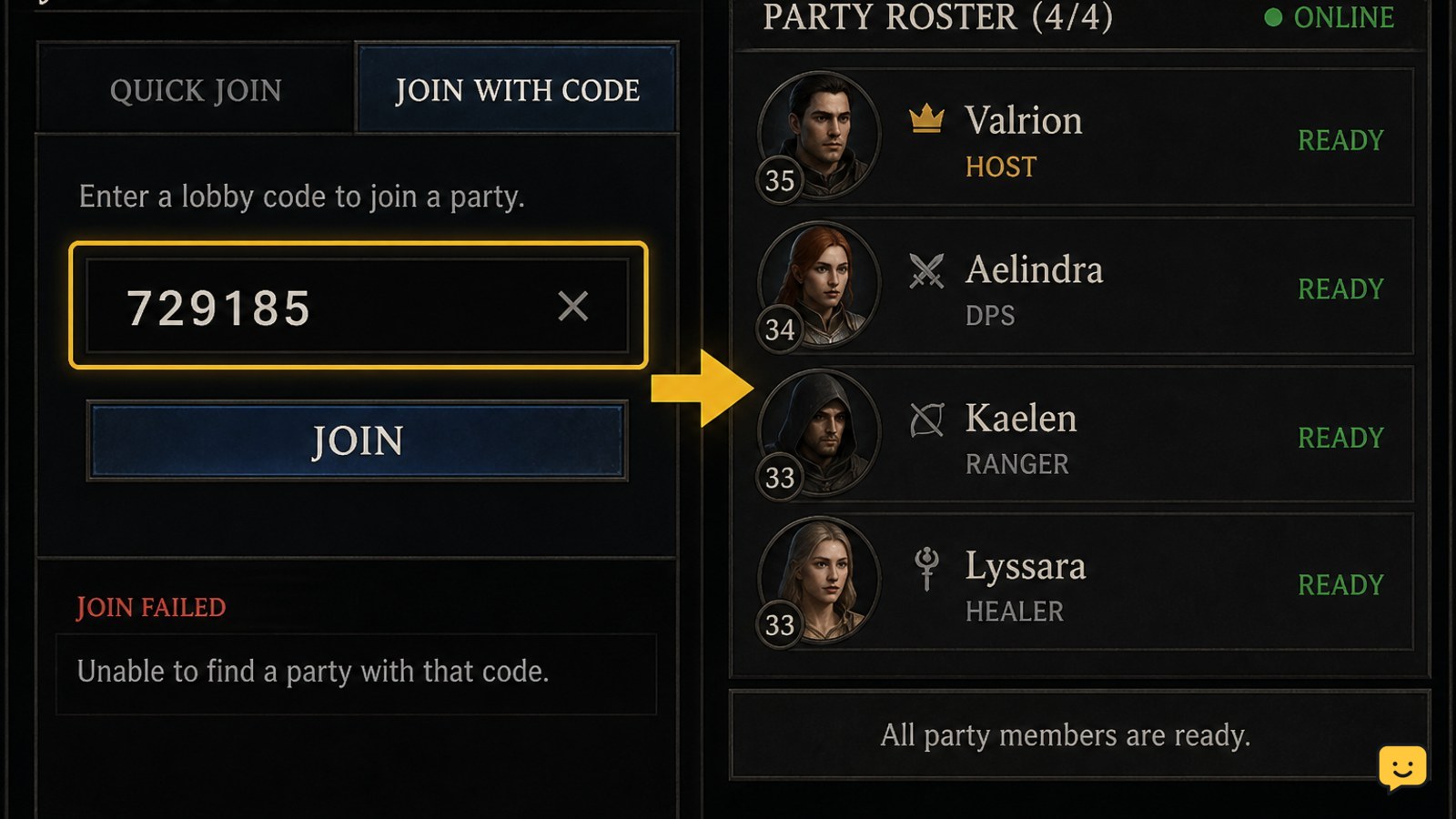
Dragon Sword Awakening lets players use a lobby code when a direct friend invitation is unavailable or does not arrive.
- Ask the party leader to display or copy the current lobby code.
- Open the multiplayer lobby on your account.
- Choose the control for entering, searching, or joining a lobby, if that control is shown.
- Enter the code exactly as provided and submit it.
- Wait for the party roster to load.
A successful join places you in the leader’s lobby rather than starting an unrelated solo session. If the code is rejected, ask for a newly displayed code. A code can fail when it contains a typing mistake, belongs to a closed lobby, or is no longer active. Do not treat a failed code as proof that your account is blocked.
Find players when nobody has invited you
Dragon Sword Awakening players can find a party by contacting someone who is already hosting a multiplayer lobby and requesting an invitation or current lobby code.
Use the visible chat control in the multiplayer screen when available, and ask for the activity, region, required level, and joining method before accepting. This reduces failed joins caused by incompatible activities or a lobby that is already full. You can also arrange the group with people you know outside the game, then have the leader create the lobby and send the invite.
If the game shows a public matchmaking or party-list option on your version, use its displayed filters and select a listing that matches your activity. Because the supplied sources do not verify a consistent public-party browser, do not rely on a specific menu name that is absent from your build.
Verify the party before starting an activity
Dragon Sword Awakening has successfully grouped you with other players when the same lobby roster shows your account and the expected party members before the activity begins.
- Check that your own name or character is listed.
- Confirm that the leader and intended players are visible in the same roster.
- Check the activity, region, or other lobby details shown on the screen.
- Tell the leader you are ready through the available chat or communication channel.
- Wait for the leader to start the activity.
If you can see the lobby but not the activity, the group may still be waiting for the host to launch it. If the roster changes immediately after joining, ask the leader to pause before starting and confirm that every player has loaded into the same session.
Fix a missing or failed party join
When Dragon Sword Awakening does not show the expected party, identify whether the failure is an invitation problem, a code problem, or a lobby-state problem before trying another method.
| What you see | Likely cause | Safest next action |
|---|---|---|
| No invitation appears | The request was sent to the wrong account or did not register | Confirm the account name and ask the leader to resend the invite |
| The code is rejected | The code was mistyped, replaced, or expired | Request the current code and enter it again carefully |
| The lobby cannot be entered | The lobby may be full, closed, or unavailable | Ask the leader to create or reopen a lobby |
| You join but cannot start | The leader controls launch or the activity has requirements | Check the lobby details and wait for the host’s action |
Restarting the game should be a later step, not the first one. First leave the failed lobby, return to the multiplayer screen, and try a fresh invitation or code. If every lobby method fails, check for a game update or service issue before changing unrelated settings.
Frequently asked questions
Can I join a Dragon Sword Awakening party without being friends with the host?
Yes, if the host can provide a working lobby code or another join method shown by your current multiplayer interface. A direct friend invitation is not the only confirmed route described for the multiplayer lobby. The host still needs to keep the lobby active and available.
Why does my Dragon Sword Awakening party invite not appear?
The invite may have been sent to the wrong account, failed to register, or been missed while you were outside the multiplayer screen. Confirm the in-game name, return to the multiplayer lobby, and ask the host to resend the request once. If it still does not appear, use the current lobby code instead.
What should I do if my lobby code does not work?
Ask the host for a newly displayed code and enter it exactly in the multiplayer lobby. The previous code may be mistyped, expired, replaced, or tied to a lobby that is no longer open. If the new code also fails, confirm that the lobby is not full or restricted.
How do I know I actually joined the party?
You joined successfully when your player name or character appears in the same multiplayer lobby roster as the host and other intended players. Seeing a lobby screen by itself is not enough if your name is absent. Wait for the roster to refresh before the host starts the activity.
Is a party the same as a hero team in Dragon Sword Awakening?
No. A party is a group of players sharing a multiplayer lobby, while a hero team is the set of characters arranged for combat. You join a player party through multiplayer controls; you manage hero teams through the game’s character or formation screens.


