
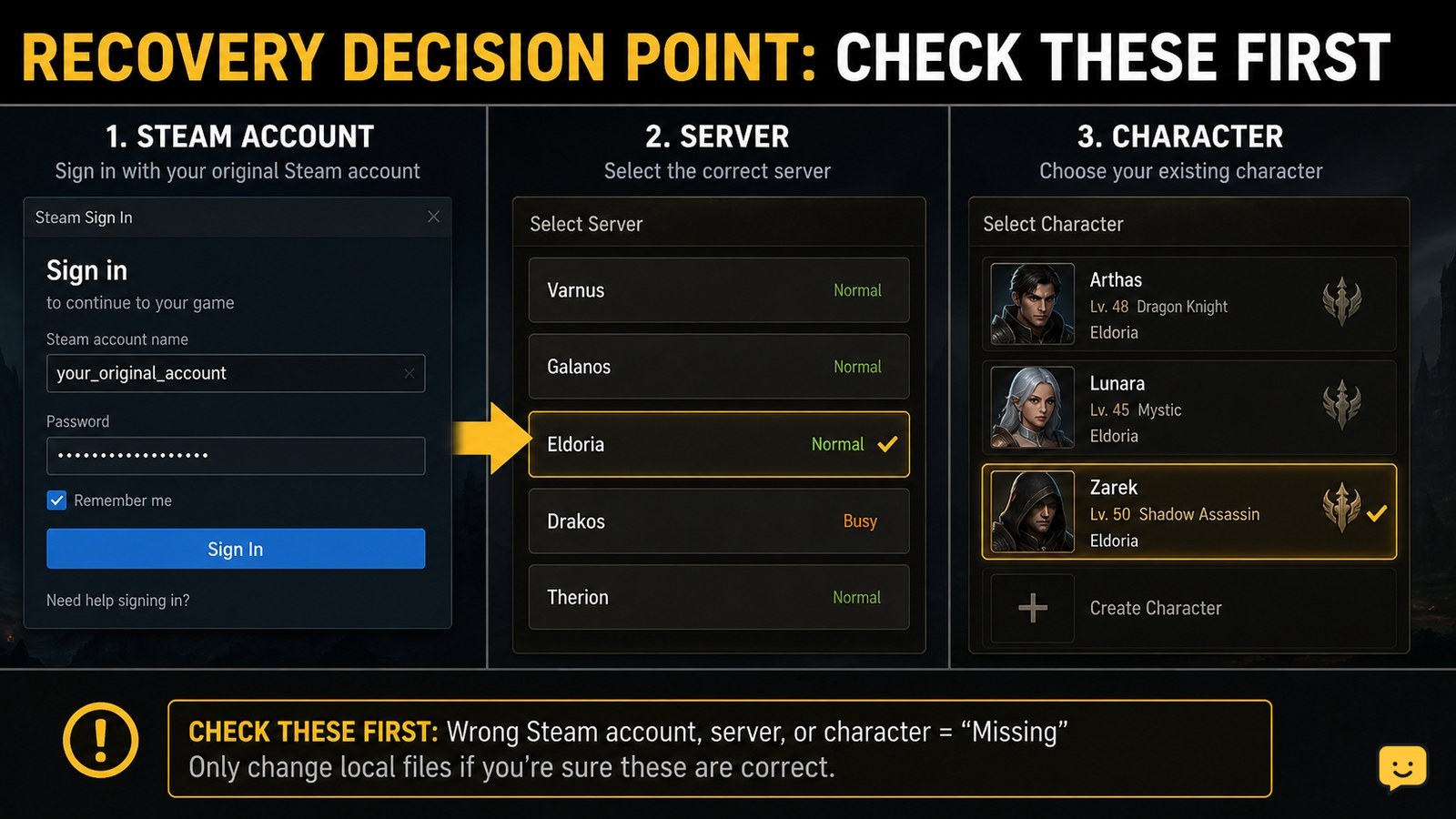
Start by signing in to the same Steam account and checking the game’s server or character selection before changing files. Confirm any linked account or binding shown in the game, then inspect local saves only as a backup step. If progress is still missing, contact the game’s official support with your Steam ID, character details, server, receipts, and screenshots. Never share passwords or verification codes.
For more help with this topic, use the DragonSword: Awakening guides.
Confirm the original Steam account before changing the game
DragonSword: Awakening access should first be checked through the Steam account that originally launched the game. Open Steam, verify the account name in the client, and launch the game from that library rather than from a shortcut or a different Windows profile.
- Sign out of Steam only if you are unsure which account is active.
- Sign back in through the normal Steam login page or client.
- Check that DragonSword: Awakening is present in the same library and that Steam is online.
- Launch the game once and record the exact message, such as a failed login, a new-player screen, or an empty character list.
If Steam itself is inaccessible, use Steam’s official account-recovery process before troubleshooting the game. A successful game launch from a different Steam account does not prove that the original progress was deleted.
Check the server and character selection for missing progress
Dragon Sword: Awakening progress can appear to be missing when the game opens the wrong server, region, channel, or character slot. At the first screen that lists servers or characters, look for the last server you used instead of immediately creating a new character.
- Compare every visible server or region with the one you remember.
- Check alternate character slots if the game provides them.
- Look for the original character name, level, class, guild, or last-known location.
- Take a screenshot of an empty list or incorrect server before closing the game.
Do not select a reset, delete, overwrite, or new-character option while investigating. The supplied evidence does not verify a current Dragon Sword: Awakening server-transfer or account-merge feature, so do not assume that progress can move between servers.
Use the same linked account or binding shown in-game
If DragonSword: Awakening displays an account, bind, or linked-provider option, choose the same provider originally used for the character. Do not create a new binding while trying to recover an old one.
- Open only the game’s visible account or settings screen after signing in correctly.
- Note whether the screen identifies Steam, an email, or another supported provider.
- Sign in through that provider’s normal authentication page.
- Return to the game and check whether the original character and progress load.
The available evidence does not confirm the current names or location of these menus, so treat any different labels as version-dependent. If the game shows no linked-account option, skip this step rather than guessing at an unsupported account combination.
Back up local saves without treating them as cloud recovery
A Steam community discussion reports a possible local path through Steam’s “Browse local files” command: the game’s DS folder may contain Saved, followed by SaveGames. This is community evidence, not confirmation that the current game stores account progress locally or that copying a save restores an online character.
- In Steam, open the game’s Properties and use the installed-files option to browse local files.
- If the
DS\Saved\SaveGamesfolders exist, close the game first. - Copy the entire relevant folder to a separate backup location and keep the original unchanged.
- Record the file names and modification dates without opening or editing the files.
Use this step to preserve evidence or protect an existing local game state, not to bypass account ownership or force an online restore. Never delete saves, rename profiles, or replace files with downloads from another player.
Send support a complete ownership and progress report
Official game support is the safest next step when the correct Steam account, server, and linked provider still do not show the original character. Use the developer’s official support channel linked from the game, its Steam page, or its verified community channels.
Include the facts support may need to locate the record:
- Steam account name and Steam ID, without your password
- Character name, class, approximate level, guild, and last known server
- Approximate last successful login and when the progress disappeared
- Purchase receipts or Steam transaction IDs, with payment details redacted
- Device and operating-system details, exact error text, and screenshots
- Whether you reinstalled the game, changed Steam accounts, or saw a new-player screen
Keep the ticket focused on one account and one character. Reply only through the official ticket or support domain, and verify that any request for proof does not ask for credentials or authentication codes.
Verify the recovered character before resuming play
Recovery is successful only when the expected character, server, and recognizable progress appear after a normal launch. Check the character name, level, inventory, quest state, guild membership, and any other details you recorded before making changes.
- Exit the game normally after the correct profile appears.
- Relaunch it from the same Steam account.
- Confirm that the same character loads again.
- Make a fresh backup of any local save folder only after the correct state is visible.
If a new character appears instead, stop playing on that profile and return to the server and account checks. Do not overwrite it with copied files unless official support gives a specific, version-appropriate instruction.
Once your original character is visible again, use the Dragon Sword guild guide to check guild access and membership safely: Dragon Sword guild guide
Frequently asked questions
Can I recover Dragon Sword: Awakening progress after reinstalling Steam?
Usually, begin by signing into the original Steam account and checking every available server and character slot. Reinstalling does not by itself prove that progress was erased, but local files may have changed. If the character remains missing, preserve any remaining save folders and contact official support with your Steam ID, character details, and purchase information.
What should I do if Dragon Sword: Awakening starts me with a new character?
Do not continue playing, delete the new character, or overwrite files. Exit the game, verify the Steam account, inspect each server or region, and check alternate character slots. Capture the new-player screen and send it to official support if the original character does not appear.
Does the SaveGames folder restore my Dragon Sword account?
Not necessarily. A Steam community discussion describes a possible DS\Saved\SaveGames path, but that does not establish that current account progress is stored there or that copying files restores an online character. Back up the folder without editing it, then ask official support before replacing any files.
What information will game support ask for?
Support may request your Steam ID, character name, server, level, class, last successful login, screenshots, error text, device details, and purchase or transaction records. Provide only non-sensitive proof of ownership. Never send your password, one-time code, recovery code, or complete payment-card details.


