
In Dragon Sword: Awakening, progress through the early Orbis request chain and accept the Guild-related requests described by current beginner guides. When the Guild entry becomes available, compare requirements, activity expectations, and rewards before joining. If no Guild menu or request appears in your build, stop rather than following instructions from another game or an older version.
Browse more DragonSword: Awakening guides
Check when the Guild system becomes available
Dragon Sword: Awakening appears to introduce Guild access through the early Orbis request chain rather than from the opening screen. Whisper of the House’s beginner guide specifically advises reaching Orbis and accepting both Guild-related requests. Because the source does not establish a permanent quest name, level requirement, or universal unlock time, use the visible request list in your own build as the authority.
- Reach Orbis through the story.
- Open the active request or quest list.
- Accept every request that clearly refers to the Guild.
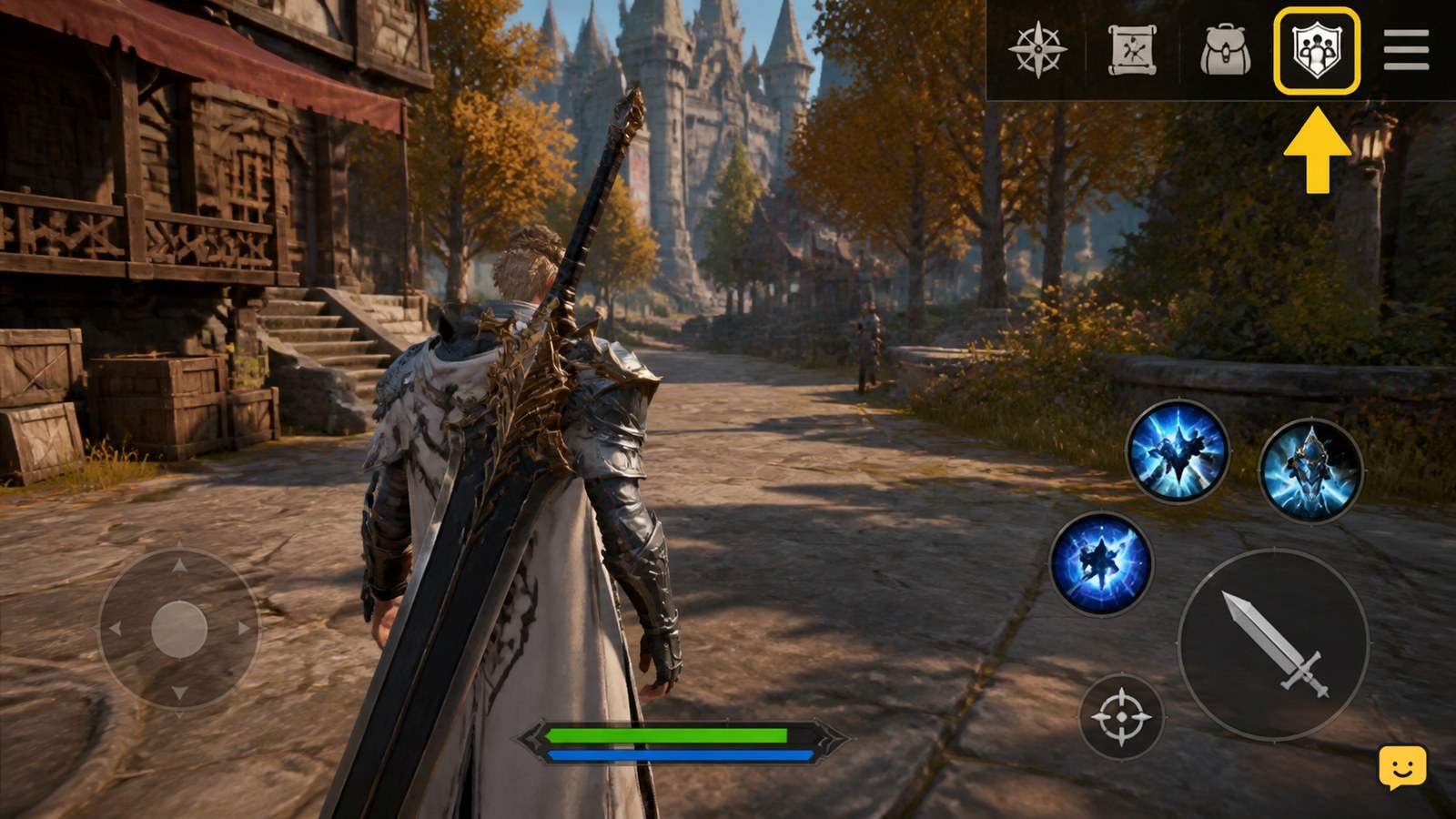
- Return to the main menu or social features and look for the Guild entry.
Success means a Guild screen opens and shows either a list of groups, a search option, or a create/join choice. If the requests do not appear, check that the story objective is complete and relog once. If the entry remains absent, stop; the feature may be gated, disabled, or different in your build.
Choose a Guild by requirements and activity
Dragon Sword: Awakening Guild membership is a commitment to the group’s requirements, so inspect the listing before selecting Join. The available evidence does not verify fixed Guild ranks, minimum power values, or universal contribution prices; treat any number shown in a third-party guide as version-dependent.
- Open a Guild listing or search result.
- Read the displayed member limit, approval rule, activity requirement, and contribution information.
- Check whether the Guild is accepting members immediately or requires approval.
- Choose a group whose schedule and participation expectations match yours.
- Send the join request or confirm immediate membership only after reviewing the displayed terms.
A casual player should favor clear activity rules and no unexplained payment request. A progression-focused player can consider an active group, but only when its current benefits and costs are visible in-game. Do not join solely because of a high ranking if the Guild is inactive or demands resources you cannot replace.
Verify membership before spending resources
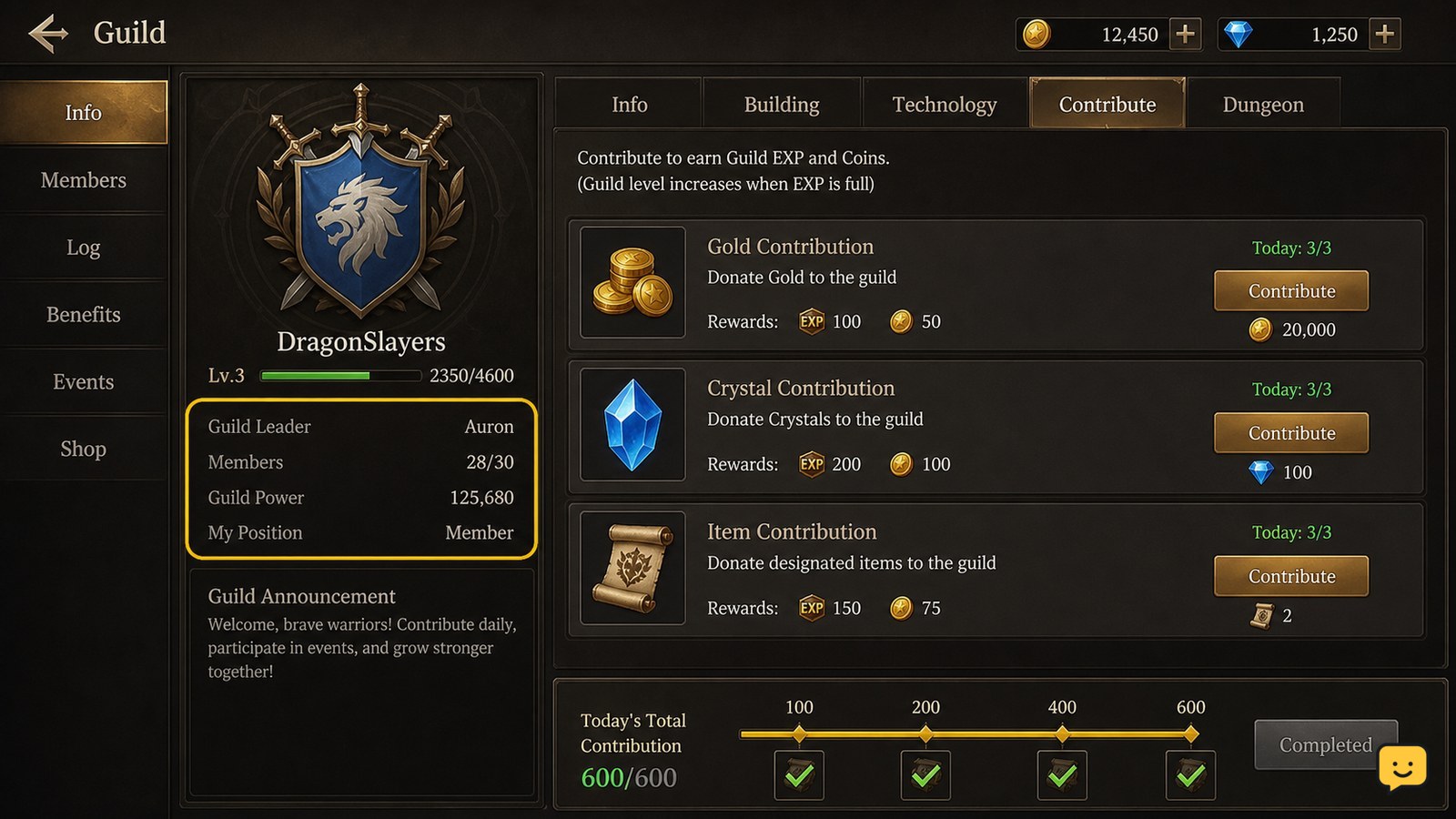
After joining a Guild in Dragon Sword: Awakening, verify that your account is listed as a member before making any contribution. Look for your character name, a member status, a Guild currency or contribution total, and an enabled contribution control.
- Close and reopen the Guild page if the first screen does not refresh.
- Confirm that the selected Guild name matches the group you intended to join.
- Open the contribution, donation, task, or development area only if it is visible in the current interface.
- Record the resource and amount requested before confirming.
The expected result is an updated contribution total or a visible progress change after confirmation. If the button is greyed out, first check membership approval, daily limits, inventory, and server connection. Do not repeatedly press a delayed control or spend materials without a displayed result.
Use contributions only when the reward is clear
Guild contributions in Dragon Sword: Awakening should be treated as an exchange: you provide the resource shown by the Guild screen and receive the progress, currency, item, or access that the same screen identifies. Current evidence confirms Guild participation as part of the game’s broader progression loop, but it does not verify a permanent list of donation materials, upgrade levels, or reward values.
- Compare the requested resource with your near-term upgrade needs.
- Contribute low-risk surplus items first when the interface allows a choice.
- Check the progress bar or reward preview before confirming larger contributions.
- Review any daily or weekly limit so you do not waste a second attempt.
- Reopen the Guild page and confirm the total changed.
Prioritize benefits that remain available outside a temporary event, such as clearly listed Guild progression, permanent shop access, routine task rewards, or member information. Do not assume that an event badge, limited exchange, or ranking reward is permanent. If the reward preview is blank or only says that an event is required, stop and keep the resource.
Use the member features your build actually shows
Dragon Sword: Awakening Guild functions can vary by build, server state, and account progress, so use only the controls currently visible after membership. Confirmed evidence supports checking Guild access and completing Guild-related requests, but it does not support claiming fixed features such as Guild raids, territory control, shared storage, or automatic combat bonuses.
Inspect the Guild page for these possible functions without assuming they exist:
- Member list: check activity, roles, and available contact options.
- Guild tasks or requests: complete only tasks with a visible objective and reward.
- Contribution or development: compare the cost with the displayed progress.
- Shop or exchange: confirm that the item is obtainable by current members and note any reset timer.
- Announcements or chat: use them for group coordination, not for sharing passwords, payment details, or account-recovery codes.
If a feature is locked, read its in-game requirement instead of copying a menu path from another title. The safest interpretation is that a locked control is unavailable until the game provides a verified unlock condition.
Fix missing Guild access without importing old instructions
If the Guild system does not appear in Dragon Sword: Awakening, identify whether the problem is story access, membership state, server availability, or outdated guidance before changing anything.
| What you see | Likely explanation | Safest action |
|---|---|---|
| No Guild request in Orbis | The request chain is incomplete, gated, or changed | Finish the visible story objectives and recheck the request list |
| Join request stays pending | The Guild requires approval or has reached its limit | Wait for the displayed status or choose another accepting Guild |
| Contribution control is disabled | Missing resource, limit, role restriction, or connection delay | Read the control’s requirement and do not spend anything blindly |
| Reward does not update | Delayed refresh or server-side processing | Reopen the Guild page once, then stop if the total is unchanged |
Games.GG’s beginner coverage presents Guild participation as part of the game’s wider early progression, while the more specific Orbis access detail comes from Whisper of the House. Neither source verifies an Evrima or Legacy branch for this game. If your interface conflicts with both the current in-game labels and these limited references, trust the live interface and treat the feature as unverified for your build.
Frequently asked questions
How do I unlock Guild access in Dragon Sword: Awakening?
Reach Orbis and inspect the active request list for the Guild-related requests described by current beginner coverage. Accept those requests, then check the main or social menu for the Guild entry. The exact request names and unlock timing are not verified, so stop if your current build does not show the feature.
Should I join the highest-ranked Guild?
No. Choose a Guild based on its displayed activity requirements, approval status, member capacity, and contribution expectations. A highly ranked group is only useful if you can meet its participation rules and its current benefits are visible in your version.
What should I contribute to my Guild first?
Start with resources the Guild screen identifies as accepted and that you can replace easily. Check the exact cost, progress increase, reward, and any daily limit before confirming. Do not spend rare upgrade materials when the reward preview is missing or event-dependent.
Why is the Guild button missing?
The story request chain may be incomplete, the feature may be gated or disabled, or your guide may describe an older build. Reach Orbis, finish visible Guild-related requests, refresh the menu once, and stop if no current Guild entry appears.


