
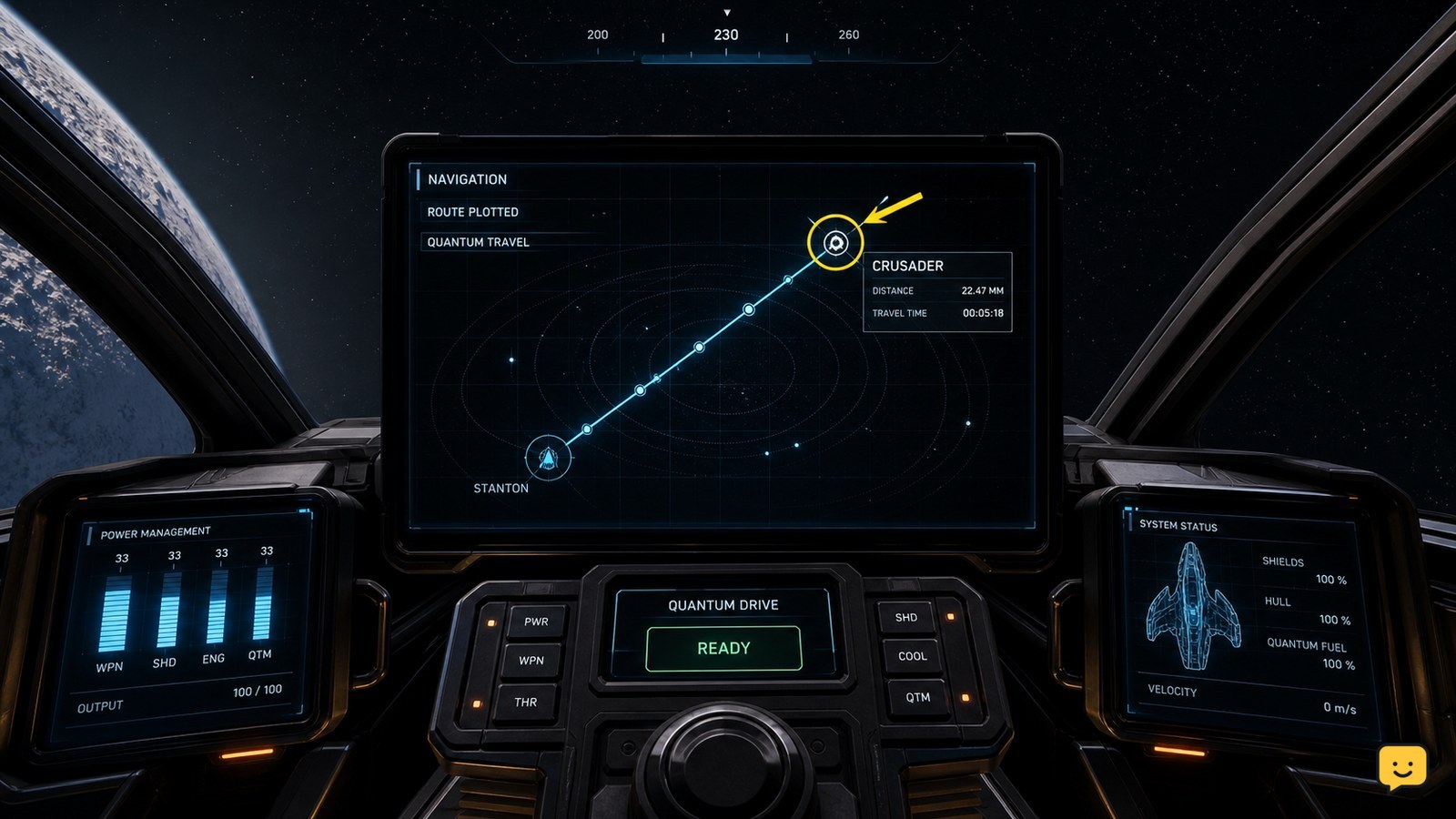
To use quantum travel in Star Citizen, open mobiGlas and set your destination, then return to the cockpit and switch your ship from combat mode into navigation quantum mode by holding B. Align with the plotted route until the quantum-travel prompt appears, activate it, and confirm the destination marker changes to an arrival state.
Browse more Star Citizen guides
Set the destination in mobiGlas before entering quantum mode
Star Citizen uses mobiGlas to select the distant location that quantum travel should reach. Open mobiGlas, choose the intended destination, and set the route. The official Roberts Space Industries quantum-travel guide identifies destination selection through mobiGlas as the first step; the Star Citizen Wiki also documents a visible “Set Route” control for plotting the trip.
- Open mobiGlas from the cockpit.
- Find the destination you want to reach.
- Select it and choose the route-setting control shown by your current interface.
- Close mobiGlas and return to the cockpit.
Verify the route before continuing: the destination should be selected, and the cockpit navigation display should point toward that location. If no route appears, clear the selection and plot it again. Do not continue while a different location is selected.
Switch from combat mode to navigation quantum mode
Star Citizen requires the ship to use its navigation or quantum-travel mode before the quantum-drive alignment prompt can appear. A current gameplay reference describes switching from the default combat mode by holding B, but the exact binding can vary with your control settings.
- Return to the cockpit after plotting the route.
- Hold B to switch the ship into navigation quantum mode.
- Watch the mode indicator or flight display for the navigation/quantum state.
Holding the control is the important distinction in the supplied reference. If the ship stays in combat mode, release the key, check the in-game key bindings, and try the assigned mode-switch control once. Stop if the display does not clearly confirm navigation quantum mode.
Align with the route and start quantum travel
Quantum travel starts only after the ship is in the correct navigation mode and aligned with the plotted destination. With the route active, point the ship toward the destination marker and wait for the quantum-travel activation prompt or alignment state.
- Keep the route visible on the cockpit display.
- Turn toward the plotted destination until the alignment indicator settles.
- Activate quantum travel using the control shown on your current HUD.
Successful activation should change the ship from normal flight into a quantum-travel sequence and move the destination marker along with the trip state. If the prompt never appears, confirm the route is still active, confirm navigation quantum mode, and realign with the marker. If either the destination or route is ambiguous, stop and replot it through mobiGlas.
Verify arrival and restore normal flight
Arrival is confirmed when the quantum-travel sequence ends and the ship returns to ordinary flight near the selected destination. Check that the destination marker, navigation display, and surrounding space match the location you selected before leaving mobiGlas.
After arrival, switch back to the flight mode needed for the next action if your ship remains in navigation quantum mode. Use normal flight to approach a station, planet, or other local point; quantum travel is for the plotted long-distance route, not a substitute for the final approach.
If the ship exits quantum travel but the wrong location is shown, do not continue toward it. Open mobiGlas, select the intended destination again, and set a fresh route.
Fix a missing route, prompt, or mode change
A missing quantum-travel prompt in Star Citizen usually means the destination route, ship mode, or alignment state is incomplete rather than proving that the quantum drive is unusable.
| What you see | Check first | Safe next action |
|---|---|---|
| No destination marker | The route was not set or was cleared | Return to mobiGlas and select the destination again |
| Ship stays in combat mode | The mode-switch control or binding | Check the current in-game binding, then hold the assigned control |
| Destination is selected but no activation prompt appears | Navigation quantum mode and alignment | Confirm the mode, then point at the plotted marker again |
| Quantum travel ends at an unexpected place | The selected destination and active route | Stop, reselect the intended destination, and plot a new route |
The RSI support reference establishes the mobiGlas-first workflow, while the supplied gameplay reference supports holding B for the mode change. Because the accessible Star Citizen Wiki page is flagged as outdated, use its “Set Route” wording as an interface reference only and follow the labels shown in the current LIVE client.
Frequently asked questions
Why can’t I quantum travel to my selected destination in Star Citizen?
First check that the destination is actually plotted through mobiGlas, not merely highlighted. Then confirm that the ship is in navigation quantum mode and aligned with the route marker. If the marker or prompt remains absent, clear the route, select the destination again, and replot it. Check your current key bindings if the mode does not change.
Do I need to hold B to use quantum travel in Star Citizen?
The supplied current gameplay reference identifies holding B as the mode-switch action from combat mode to navigation quantum mode. Bindings can differ, so verify the control in the LIVE client if B does nothing. The required result is not the key itself but a confirmed navigation or quantum-mode state on the ship display.
How do I know quantum travel started successfully?
A successful start changes the ship from ordinary flight into a quantum-travel sequence and advances the plotted destination route. If the ship remains in normal flight, the route, mode, or alignment is incomplete. Recheck those three states before trying the activation control again.
Can quantum travel take me all the way to a station or planet landing area?
Quantum travel handles the plotted long-distance trip, but you still need normal flight for the final approach and landing sequence. After the quantum sequence ends, verify the destination marker and then approach the station, planet, or local point manually.


