
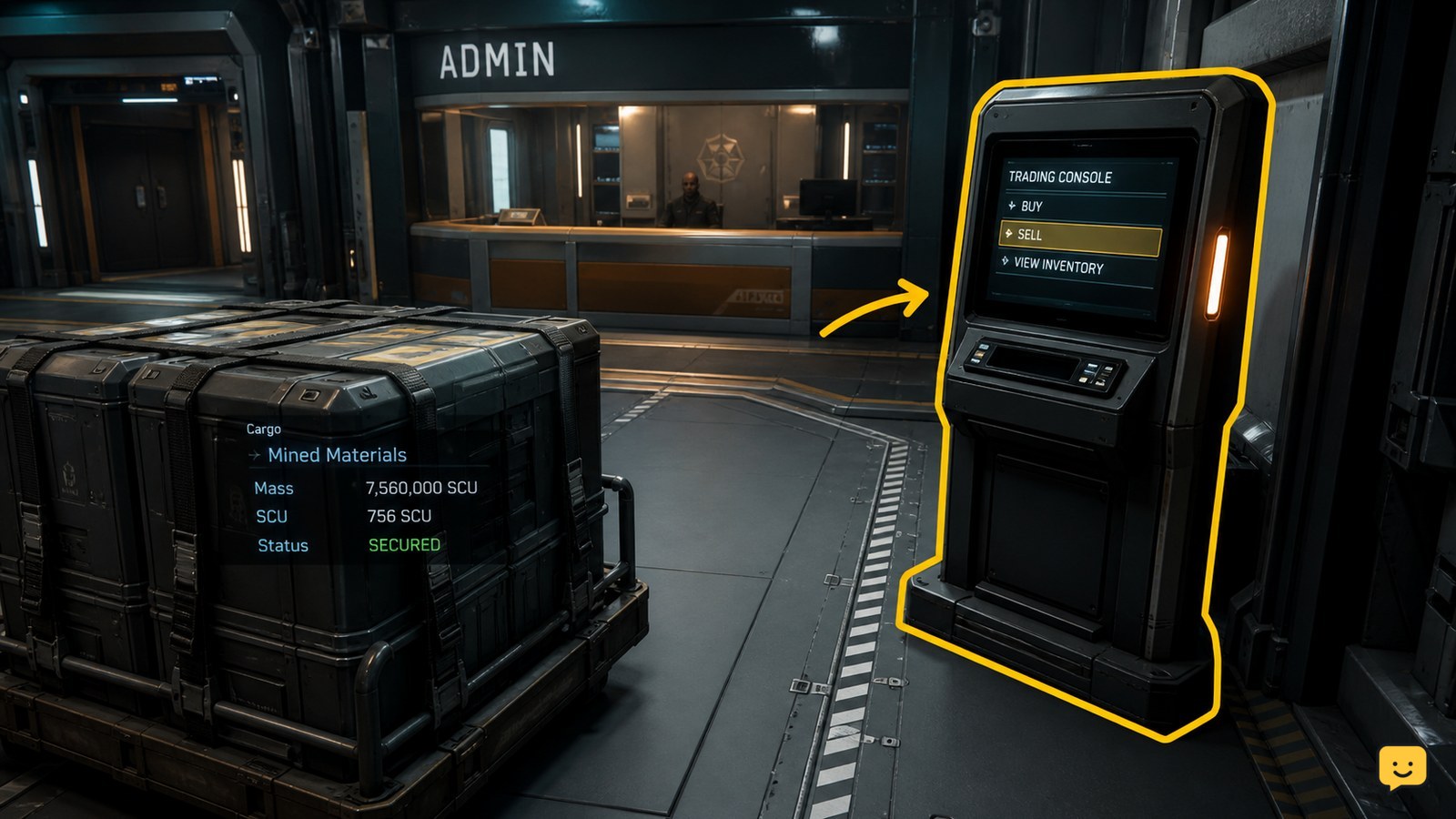
To sell mined materials in Star Citizen, first make sure the material is stored in a form the destination can recognize. Loose harvestable minerals can be sold through a trading kiosk, while mineral-filled crates can be taken to an Admin counter. Open the location’s trading interface, select the listed material, enter the quantity, confirm the sale, and verify the balance change before leaving.
Browse more Star Citizen guides
Identify the material format before you travel
Star Citizen uses the material’s storage format to determine which sales point can recognize it. Loose harvestable minerals, such as gems collected during hand mining, are handled differently from mineral-filled crates and refined cargo.
- Loose harvestables: plan to use a trading kiosk that lists the material.
- Mineral-filled crates: take the physical crate to the Admin counter, which the Star Citizen Wiki identifies as a sales route for crates containing minerals.
- Refined cargo: use a trading interface that recognizes the refined load. The exact listing can depend on the destination and the material.
If you are hand mining, the ShowU guide on using a Greycat Multi-Tool with an OreBit attachment covers the extraction setup. This guide begins after the material has been collected.
Move the load to a location that can sell it
Star Citizen requires the mined material to be available at a compatible settlement, station, or other trading location before a sale can be created.
- Travel to the destination with the material still secured in the relevant inventory, vehicle, or crate.
- Park or land safely before unloading physical cargo. If you need clearance, request Landing Services through the ship’s Commlink rather than attempting to use a pad without permission.
- For loose material, locate the trading kiosk and interact with it.
- For a mineral-filled crate, carry or move the crate to the Admin counter and place it where the counter can inspect it.
The maintained Star Citizen Wiki describes direct sales through a trading kiosk and mineral crates being placed at an Admin counter. Treat the visible interaction prompt and listed material as the final applicability check because station services can vary.
Sell loose mined material at the trading kiosk
A Star Citizen trading kiosk sells loose mined material only when the destination recognizes the stored load and displays it in the transaction list.
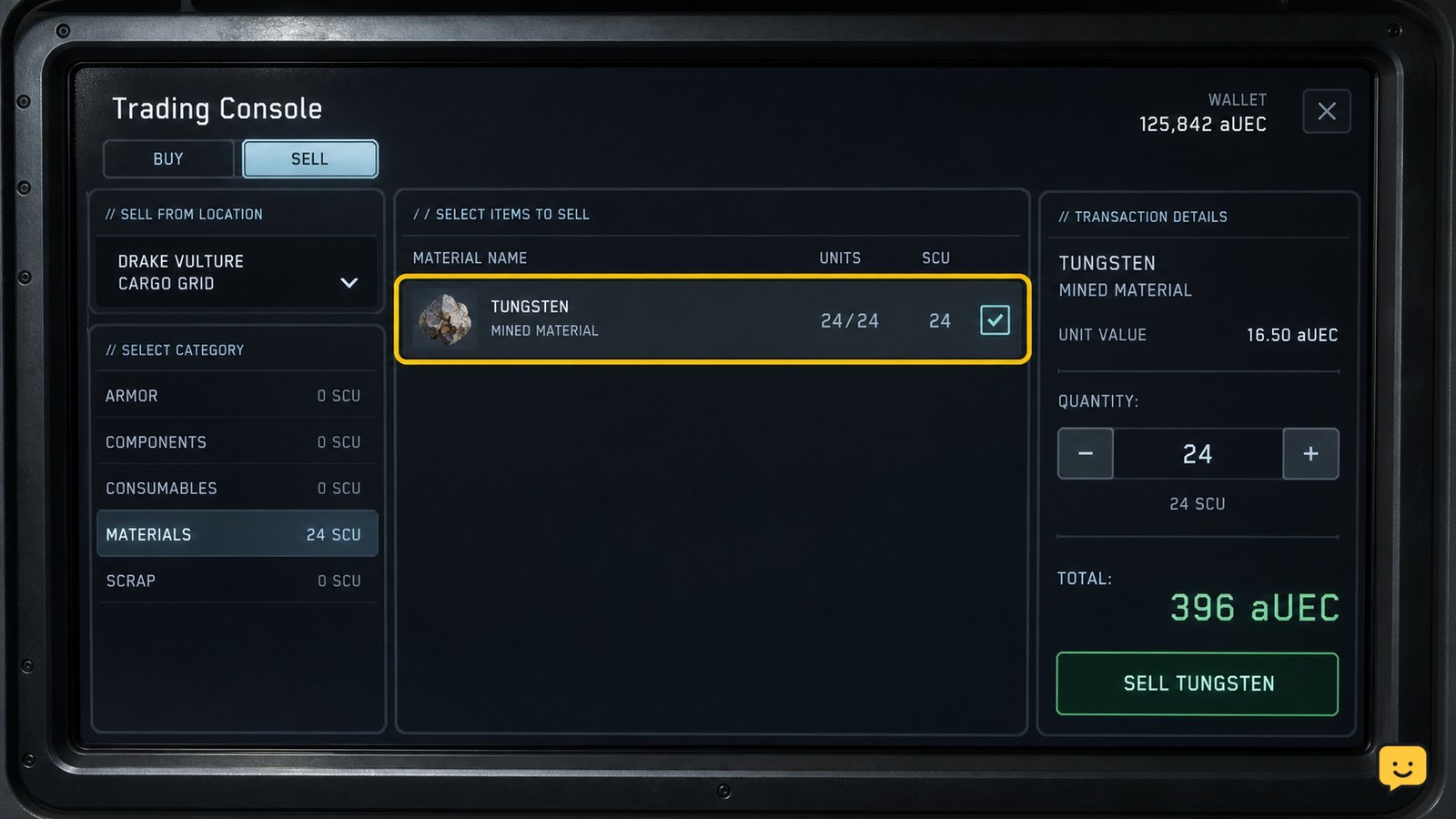
- Open the trading kiosk at the destination.
- Choose the sell side of the interface.
- Find the mined material by its displayed name.
- Set the quantity or amount you want to sell.
- Review the payout and confirm the transaction.
Success means the selected quantity is removed from the available load and the payout is reflected in your aUEC balance or transaction result. Take a screenshot or note the quantity first if you are selling a valuable haul, then verify both values after confirmation.
If the material is absent, do not sell a substitute item or assume the kiosk has accepted the load. Confirm that the material is not still inside the ROC, ship, personal inventory, or an unsecured physical container, then check the destination’s Admin counter if the material is crate-based.
Sell mineral-filled crates at an Admin counter
A mineral-filled crate is a physical cargo item, so an Admin counter may be the correct sales point instead of a standard trading kiosk.
- Bring the crate into the Admin area without losing the cargo grid or physical container.
- Place the crate on the counter as the location requires.
- Wait for the counter to recognize the crate and display its contents or sale action.
- Review the material, quantity, and payout before confirming.
- Check that the crate and its contents are no longer listed as unsold cargo after the transaction.
If the counter does not recognize the crate, remove it and check that it is intact and positioned correctly. If it still produces no sale option, stop rather than dropping the crate in a public area; return it to secure storage and try a different supported Admin location.
Verify the payout before leaving
The sale is complete only after Star Citizen shows a confirmed transaction and the mined load is reduced by the amount sold.
- Reopen the sell list or inventory and confirm the sold quantity is gone.
- Check your aUEC balance or the transaction confirmation for the expected payout.
- Confirm that any unsold remainder is still stored safely.
- Leave the location only after both the cargo state and payment state are correct.
When a mining vehicle’s material never appears at either a refinery or selling kiosk, community reports show that storage recognition can be the underlying issue. That is a troubleshooting clue, not proof of a universal bug: verify the material’s actual container and use the visible supported sales route before abandoning the run.
Frequently asked questions
Can I sell raw mined ore directly in Star Citizen?
Sometimes, but the material must be recognized by the destination’s trading system. Loose harvestables can appear at a trading kiosk, while mineral-filled crates may require an Admin counter. If raw ore is missing from both interfaces, confirm that it has been transferred into a recognized inventory or crate before trying another sale location.
Where do I sell mineral crates in Star Citizen?
Take mineral-filled crates to an Admin counter at a location that supports the transaction. Place the physical crate where the counter can recognize it, then check the displayed contents and payout. If no sale action appears, secure the crate and try another supported Admin location rather than leaving it unattended.
Why is my mined material not showing at the kiosk?
The load may still be inside the mining vehicle, stored in an unsupported container, or unsuitable for that destination’s sales interface. Check the material’s exact storage location first. Then try the appropriate route: a trading kiosk for recognized loose harvestables or an Admin counter for mineral-filled crates.
Should I refine mined material before selling it?
Refining is a separate decision from selling. Sell directly when the material is already recognized and you want a simple payout. Refine only when your load and destination support the refining workflow and you have confirmed the refined result can be sold. If the material is not visible, fix storage recognition before refining or selling.


