
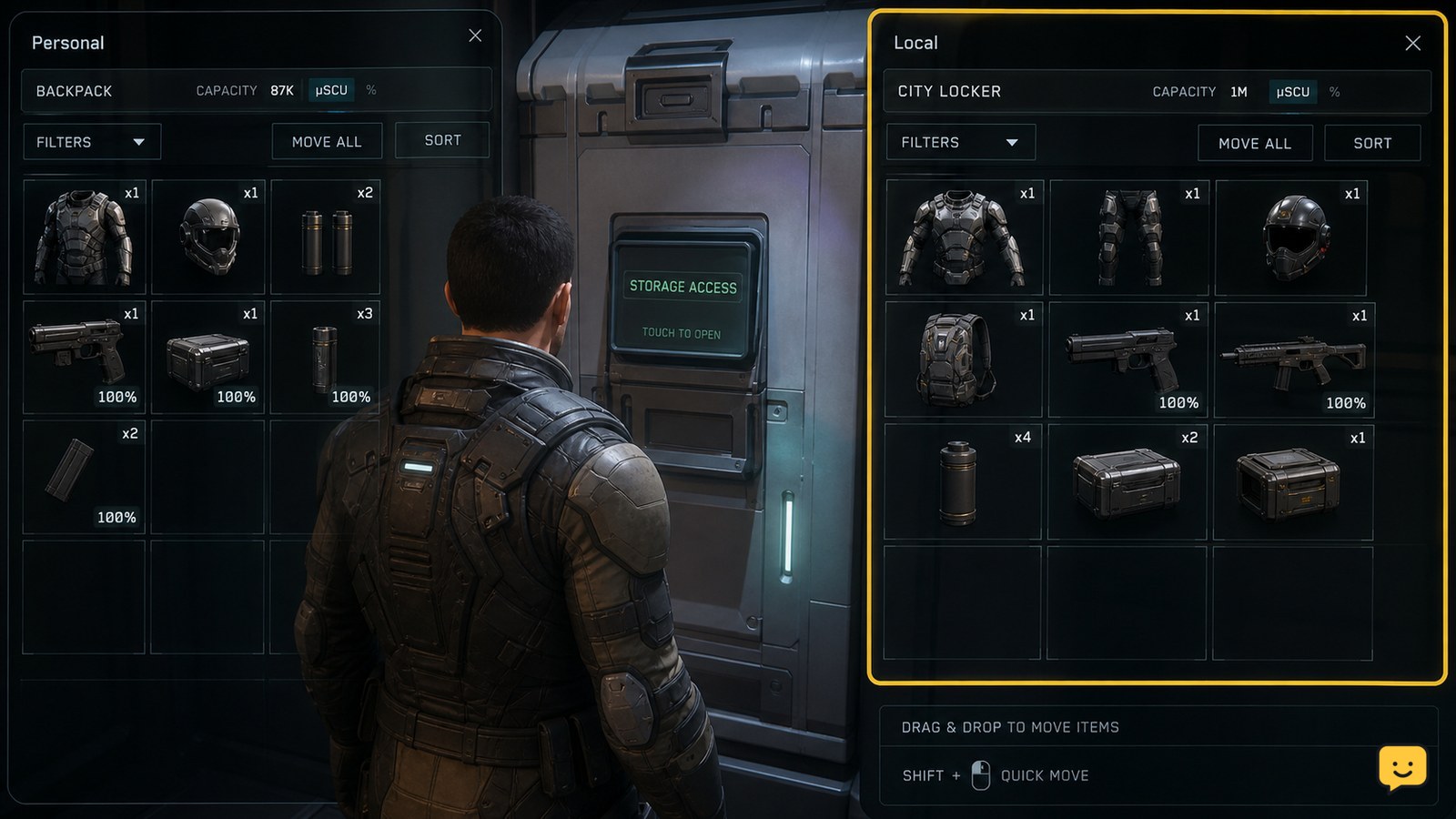
To store items in Star Citizen local inventory, go to a location with accessible storage, such as a city locker, habitation room, or outpost storage terminal. Press I to open the inventory screen, move the item from your personal inventory into the Local storage pane, and wait for the transfer to complete before leaving.
Browse more Star Citizen guides
Open local storage at your current location
Star Citizen local inventory is tied to the location where the storage access point is available, so first enter a usable storage area. Current inventory references identify city lockers, habitation rooms, and outpost storage terminals as examples of local storage. Day One Citizen also distinguishes Local storage from Personal and Ship storage: an item placed in Local remains at that specific location.
Once you are inside the storage area, press I to open the inventory screen. If the screen does not open, stand closer to the locker, terminal, or habitation storage interaction and try again. The correct result is an inventory view showing your carried or personal items alongside the storage destination available at that location.
Move carried equipment into the Local pane
To store an item, select it in the personal inventory side of the screen and transfer it to the pane labeled Local. Depending on the current interface layout, this may use drag-and-drop or the transfer control shown when the item is selected. Move one item first rather than transferring your entire load.
Armor pieces, weapons, ammunition, and other carried equipment must be placed into the storage location separately from anything already equipped. If the item is inside a backpack or container, open that container in the inventory view and transfer the item from the correct level. The transfer is complete only when the item appears under Local and is no longer listed in the original personal location.
A current ShowU inventory guide describes the same location-based workflow for moving equipment between Local and Ship storage: the item must be located first, and the destination must be available at the same location. That distinction matters here because opening a ship’s inventory will not place an item into the city or outpost’s Local storage.
Verify the item stays in local inventory
After moving an item, verify Star Citizen shows it in the Local pane with its normal icon, name, and quantity. Close and reopen the inventory screen while remaining at the same storage access point. The item should still be listed under Local, while the personal inventory should show the reduced quantity or no entry for that item.
For valuable equipment, perform this check before travelling, storing a ship, or logging out. Local storage is location-specific, so the item will not necessarily appear when you open inventory somewhere else. Day One Citizen describes Local storage as persistent at a specific location but separate from Ship storage; use the same city, outpost, locker, or habitation access point when checking the result.
What to do if Local storage is missing or the transfer fails
If Star Citizen does not show a Local pane, you are probably not within a valid local-storage interaction or the location’s inventory interface has not loaded correctly. Move directly beside the locker, terminal, or habitation storage point, close the inventory screen, and reopen it with I. If the destination still does not appear, leave and return to the same access point once rather than dropping the item.
If the item remains in Personal after an attempted transfer, check whether it is equipped, inside a container, or already assigned to another storage location. Unequip it or open the containing backpack, then retry with a single item. If the item vanishes from both panes, wait for the interface to refresh and reopen it. Do not make further transfers until the item reappears.
When the inventory screen repeatedly fails to save the move, stop using that storage point for valuable gear and try another valid local-storage access point at the same location. If the item is still absent after reopening the interface, treat the transfer as unconfirmed and avoid travelling until the game displays it in Local again.
Frequently asked questions
Can I access Star Citizen local inventory from anywhere?
No. Local inventory is tied to a specific location and is accessed through storage available there, such as a city locker, habitation room, or outpost storage terminal. An item stored in one location may not appear when you open inventory somewhere else.
Why does my item not appear in Local storage?
The item may still be equipped, inside a backpack or container, or you may be using a storage interface that exposes Personal or Ship storage instead. Check the item’s current container, move close to the local storage access point, then close and reopen the inventory screen.
Does local inventory transfer items to my ship?
No. Local and Ship storage are separate destinations. To move an item from Local into a retrieved ship, use the ship’s applicable cargo or freight-elevator workflow at the same location rather than relying on the normal Local pane.
Will local inventory remain after I leave the area?
The item remains associated with the location where it was stored, according to current inventory references. It is not automatically carried with you or copied to another city, outpost, ship, or locker. Return to the same local storage location to retrieve it.


