
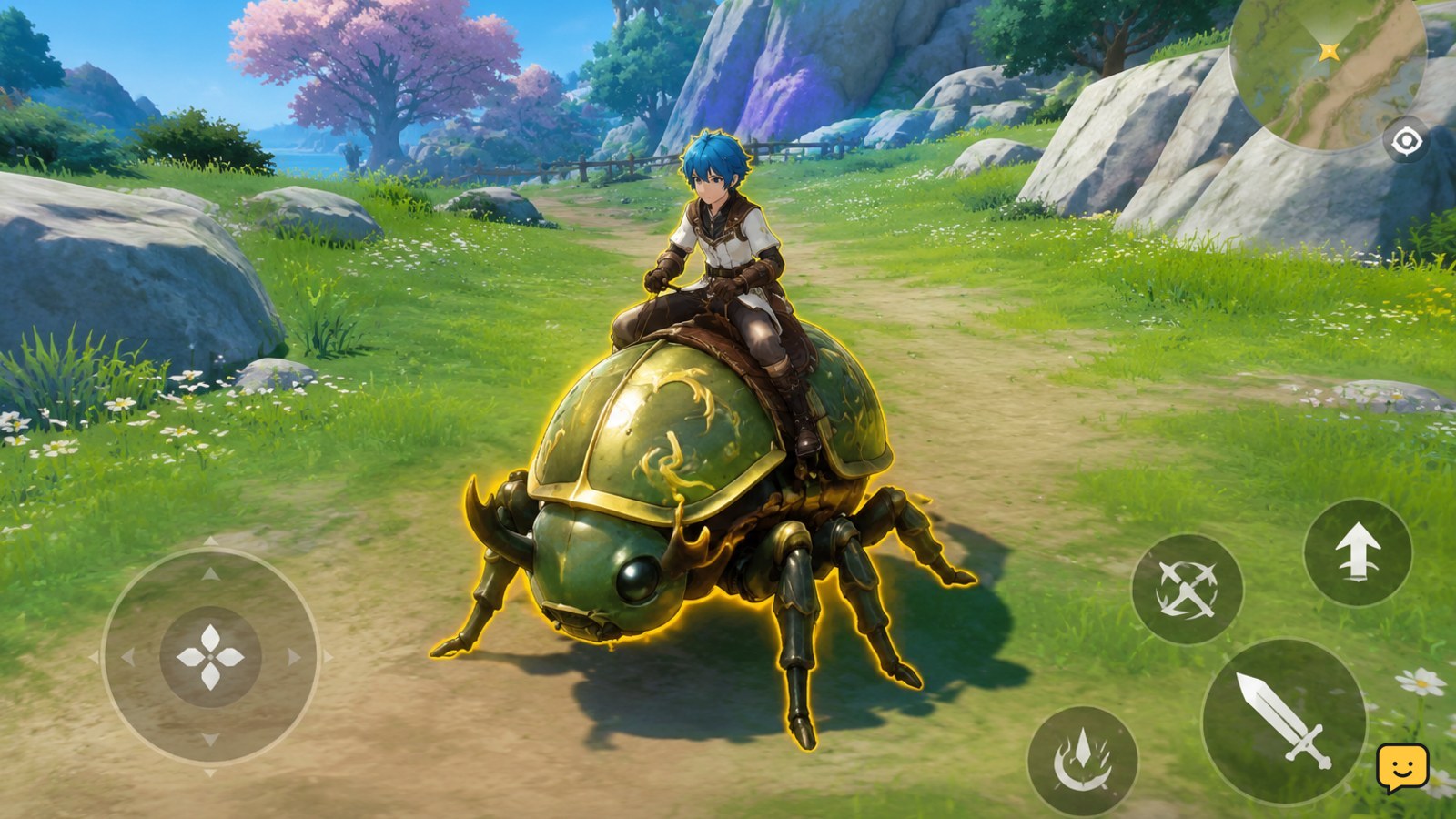
To unlock mounts in Dragon Sword Awakening, continue the early main story until you reach the first major regional hub in Orbis. The Beetle mount unlocks automatically during this progression rather than through a separate purchase. Open the mount or familiar menu, equip the Beetle, then use the on-screen summon or ride command. If it is missing, finish the current story objective and revisit the hub.
Browse more DragonSword: Awakening guides
Does Evrima or Legacy apply?
No. Evrima and Legacy are branch names associated with The Isle, not Dragon Sword Awakening. This guide covers Dragon Sword Awakening’s mount system, where mounts are also described as familiars. Do not apply The Isle’s branch-specific mechanics, controls, or unlock advice here.
Reach the first major hub in Orbis
The first confirmed mount unlock is tied to early main-story progress. Continue the opening quests until you reach the first major regional hub in Orbis. The available gameplay reference identifies the Beetle as unlocking automatically during this part of the main story.
- Follow the main-story marker through the opening areas.
- Complete required conversations, travel objectives, and nearby combat tasks.
- Enter the first major regional hub in Orbis and allow the story objective to update.
- Check for an unlock notification, new mount or familiar entry, or a newly available summon prompt.
You do not need to begin with a separate mount hunt based on the available evidence. If the hub is visible but the story objective has not advanced, complete the remaining marked objective first.
Confirm that the Beetle is unlocked
After the story trigger completes, open the character, mount, or familiar interface—the exact menu label may vary by version or platform. Look for the Beetle in the available mount list and confirm that it is marked as unlocked rather than locked, unavailable, or preview-only.
- Open the relevant menu from the game’s current interface.
- Select the mount or familiar category.
- Highlight the Beetle entry.
- Choose the available equip, activate, or set-active option.
Verification: the Beetle should show an active or equipped state, and the game should expose a summon or ride prompt when you return to a usable area.
Summon and use your mount
Return to the world after equipping the Beetle. Use the summon or mount command shown by the game. Because controls can change between keyboard layouts, controller profiles, and updates, follow the displayed prompt or confirm the binding in Settings rather than relying on an unverified key.
- Move to an open area where mounting is permitted.
- Use the displayed summon command.
- Wait for the Beetle to appear, then use the displayed ride or interact command.
- Ride through a short, safe route to confirm movement and dismount behavior.
Mounts are useful for routine travel and may offer traversal-related abilities or passives, but do not assume every mount has the same movement options. Test each unlocked familiar in a safe area before using it during difficult progression.
What to do if the mount is missing
If the Beetle does not appear, check the unlock trigger before changing settings or searching for hidden items.
- Confirm that you reached the first major regional hub in Orbis, not just an earlier settlement or waypoint.
- Review the main-story journal and finish any objective still marked as active in the hub.
- Leave and re-enter the relevant area, then check the mount or familiar menu again.
- Verify that the Beetle is equipped rather than merely visible in the collection.
- Check the current control binding and try an open area outside combat or another restricted activity.
- Restart the game only after saving or reaching a safe point, then recheck the menu.
If the Beetle remains locked after the story objective clearly completes, record the quest name, location, platform, and game version before checking current patch notes or the game’s support channels. Do not spend currency on an unconfirmed duplicate unlock.
Unlocking additional mounts
The available references confirm the early Beetle unlock but do not provide a complete, reliable list of every mount, quest, reward, or purchase requirement. Treat later mount requirements as version-sensitive. Use the same safe process: follow the relevant story or activity objective, confirm the mount appears in the familiar menu, equip it, and test its traversal ability in a low-risk area.
Do not assume that a mount shown in a video is available on every account, platform, edition, or game version. Deluxe-edition, event, and promotional mounts may follow different rules and require separate confirmation.
Frequently asked questions
When do you unlock your first mount in Dragon Sword Awakening?
You unlock the first confirmed mount, the Beetle, during the early main story after reaching the first major regional hub in Orbis. The unlock is described as automatic, so continue the marked story objectives instead of looking for a separate mount vendor.
What is the first mount in Dragon Sword Awakening?
The first confirmed mount is the Beetle. It is also discussed as a familiar, and it becomes available through early main-story progression in Orbis.
How do you equip a mount in Dragon Sword Awakening?
Open the game’s mount or familiar interface, select the unlocked Beetle, and choose the available equip, activate, or set-active option. Return to an area where mounting is allowed and use the on-screen summon or ride prompt.
Why is my Beetle mount still locked?
The most likely cause is incomplete early-story progression. Confirm that you reached the first major regional hub in Orbis, complete every remaining marked objective there, and check the familiar menu again. If it remains locked after the objective completes, verify the game version and consult current support information.
Can you summon a mount everywhere in Dragon Sword Awakening?
Not necessarily. Mounting may be unavailable during combat, inside restricted activities, or in locations where the game does not show a summon prompt. Move to an open, safe area and follow the current on-screen control instruction.


