
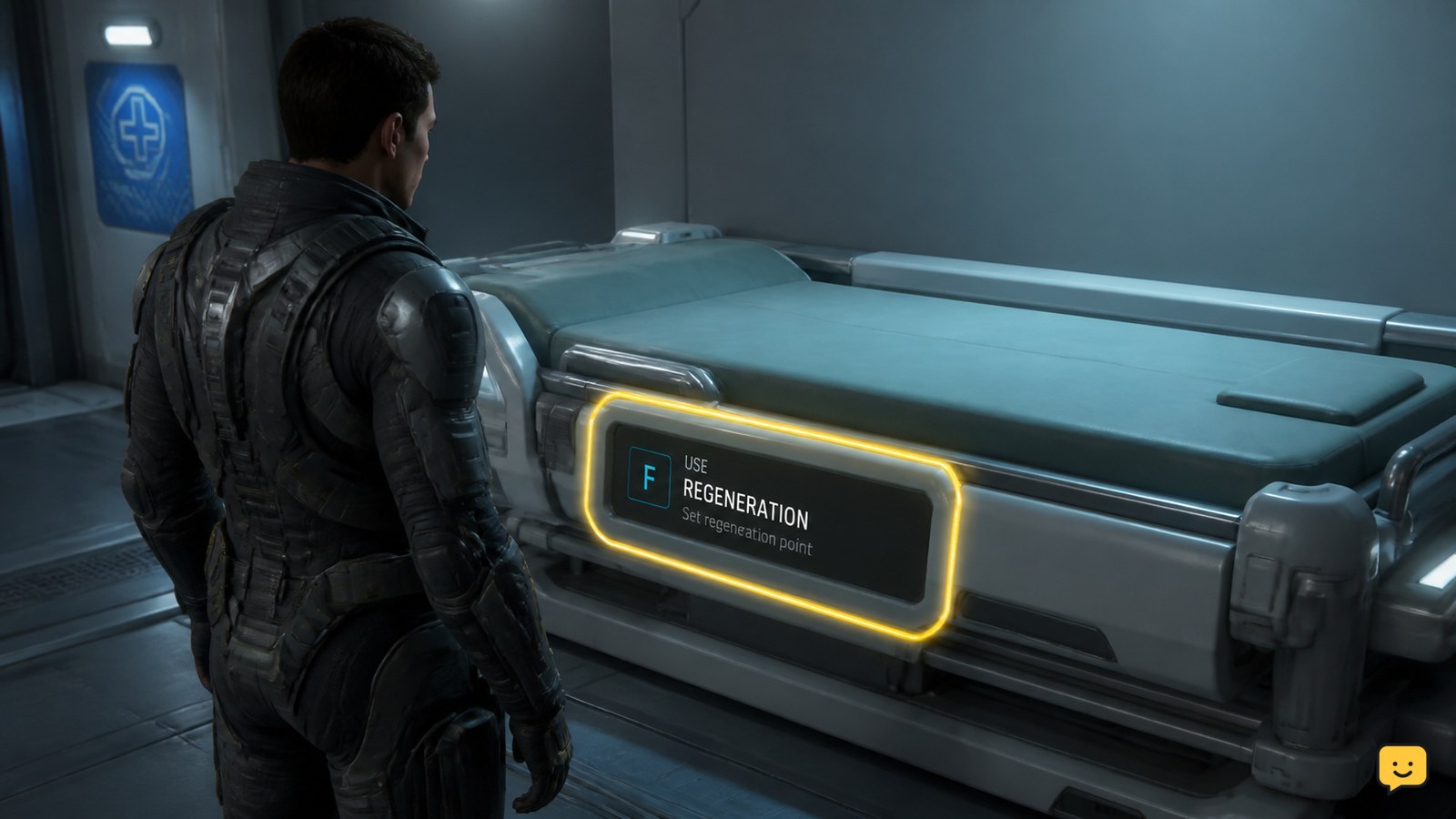
To set your spawn point in Star Citizen, use a medical bed at a hospital, clinic, or compatible ship, then activate the bed’s regeneration interaction. Choose Set Regeneration Point, Set Preferred ICU, or the equivalent prompt shown by your build. Wait for the confirmation, then verify the listed regeneration location before leaving.
Browse more Star Citizen guides
Find a medical bed that supports regeneration
In Star Citizen, a reliable spawn point is established through a medical bed rather than a normal bed or a landing-pad interaction. Hospitals and clinics are the safest places to begin because they are designed around medical treatment and regeneration.
Compatible ship-based medical beds can also work, but support depends on the vehicle and the current game build. The RSI Community Hub tutorial specifically demonstrates setting a respawn point through a medical bed, while a Star Citizen Spectrum community report describes using a Nursa bed as a regeneration location. Treat ship beds as build-dependent until the game confirms the setting.
Applicability: Star Citizen does not use The Isle’s Evrima and Legacy branches. Those version labels do not apply to this procedure.
Use the bed to set your regeneration point
To set your Star Citizen spawn point, approach the medical bed and use the interaction prompt attached to the bed. Depending on the build and interface wording, look for an option such as Set Regeneration Point, Set Preferred ICU, or a closely related regeneration command.
- Stand beside the medical bed or enter it if the prompt requires you to lie down.
- Open the bed interaction menu.
- Select the regeneration or preferred-ICU option.
- Wait for the confirmation instead of immediately walking away or logging out.
The action works because the medical bed records where your character should regenerate after death. A normal bunk, seat, or bed without a medical interaction does not provide the same confirmation.
Verify the active location before leaving
Star Citizen has successfully changed your spawn point only when the medical interface confirms the new regeneration location. Look for a confirmation message, changed status, or an active location that names the facility or ship containing the bed.
After the confirmation appears, leave the bed and reopen the interaction if necessary to check that the regeneration option now reflects the selected location. This verification matters because a bed can be occupied, unsupported, out of range, or affected by a temporary interaction bug without visibly saving the change.
Do not deliberately die just to test the point if the game has not displayed a confirmation. The safer checkpoint is the visible regeneration status; once it is confirmed, continue with your planned travel.
What to do if the regeneration prompt is missing
If Star Citizen does not show a regeneration option, the bed or current game state has not provided a usable spawn-point interaction. First move to the center or side of the medical bed and try the interaction again from a different angle.
- Leave the bed interaction and approach it again.
- Try another medical bed in the same hospital or clinic.
- Check whether the bed is occupied, damaged, inaccessible, or part of a ship that does not support regeneration.
- Reconnect to the game if the bed still shows no regeneration prompt.
If another bed confirms the location, use that one and verify the saved status. If no bed offers the option, do not treat the location as active. The RSI Spectrum report about a Nursa bed is evidence of a community-observed setup in an earlier test environment, not a guarantee that every ship bed will work in every current build.
Fix the wrong spawn location after death
If Star Citizen sends you to an older location after death, the intended regeneration point was not saved, was reset, or was unavailable when the game processed the death.
Return to a hospital or clinic, use a clearly supported medical bed, and wait for a new confirmation. Avoid changing beds repeatedly without checking the active status because that makes it harder to identify which location the game accepted.
If the confirmed location still fails after reconnecting, treat the result as a game-state or patch issue rather than a missed control. Record the facility, ship, and confirmation state, then submit the problem through the official support or issue-reporting route. Stop using the unverified bed as your only recovery plan until the setting works again.
Frequently asked questions
Can I set my spawn point in a Star Citizen hospital?
Yes. A hospital or clinic medical bed is the safest place to set a regeneration point. Use the bed interaction and select the regeneration or preferred-ICU option, then wait for a confirmation. If the prompt is missing, try another bed rather than assuming the hospital has saved your location.
Can a ship medical bed become my spawn point in Star Citizen?
Sometimes. Compatible ship medical beds can provide a regeneration location, but support varies by ship and game build. Use the bed’s regeneration interaction and continue only after the game confirms the location. A normal ship bunk does not provide that same confirmation.
Why did I respawn at my old location in Star Citizen?
You probably left before the new bed confirmed the change, used a bed without regeneration support, or encountered a temporary game-state problem. Return to a hospital or clinic, set the point again, verify the active location, and reconnect if the confirmation does not persist.


