
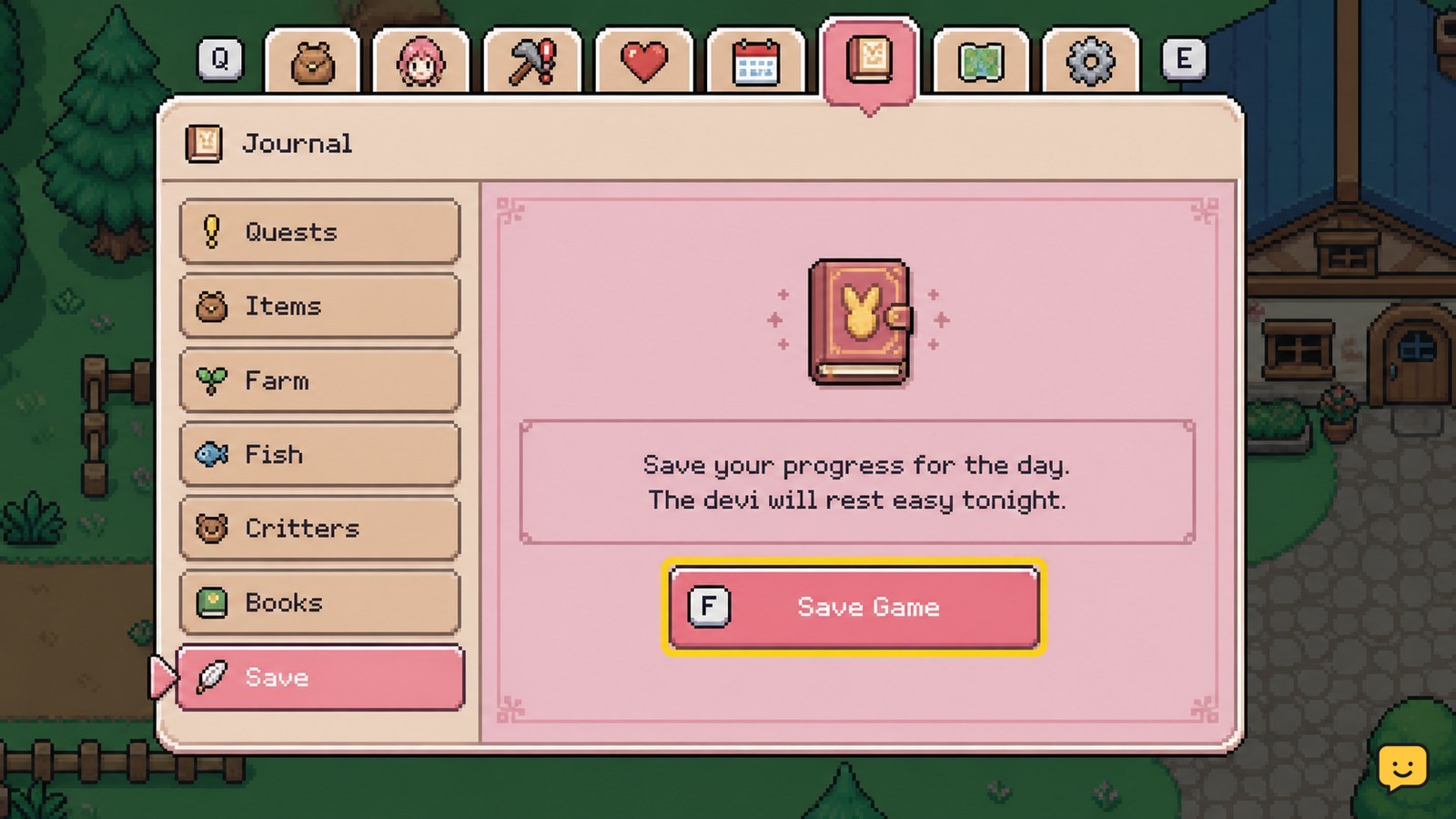
In Fields of Mistria, open your Journal during the day and use its save option when you need to preserve progress before quitting. The game also saves after you sleep and complete the night transition. Before closing the game, confirm that the save action finishes or that the next day begins; otherwise, you may lose that day’s activities.
For more help with this topic, use the Fields of Mistria guides.
Save during the day from the Journal
Fields of Mistria can save progress during the day through the Journal, according to a Steam community discussion about the game’s save options. This is the safest choice when you want to quit before the current day ends.
- Open the Journal while your character is in control.
- Look through the Journal options for the save command.
- Select save and wait for the action or confirmation to finish.
- Only quit after the save action has completed.
The available evidence does not establish one universal keyboard or controller button for every platform. Use the on-screen prompt in your version. If the save command is missing, do not assume the day is protected; use the day-end method below instead.
Complete the night cycle to save the full day
Fields of Mistria also saves when the day ends after you sleep. The same Steam discussion reports that the game saves after going to sleep for the night, with the character also passing out at 2 a.m. if the night continues that long.
- Return to your home before you want the day to finish.
- Choose the option that starts the night or sleep sequence.
- Wait for the transition to complete and the next day to load.
- Keep the game open until you regain control on the new day.
This method records the completed day as part of the normal daily cycle. It is useful after farming, mining, gathering, gifts, quests, or other activities that you do not want to repeat.
Verify that your progress was saved
The clearest verification is to load the game and check both the in-game date and a recent change you made. A successful save should return you to the same day or to the next day if you completed the night transition.
- Save from the Journal, or finish the night cycle.
- Exit through the game’s normal menu instead of force-closing it.
- Reopen Fields of Mistria and load the same save.
- Check the date, inventory, money, quest state, or another change made before saving.
Do not use only your character’s location as proof. A location can be easy to misremember, while a dated quest update, newly collected item, or changed inventory gives you a stronger checkpoint.
Avoid losing a day of farming or exploration
Fields of Mistria players should treat the Journal save and the completed night transition as separate checkpoints, not as permission to quit at any moment. A Reddit question about autosaving shows that players commonly look for an automatic nightly save, while the available Steam report specifically identifies sleeping and the Journal as save options.
- Before a risky trip: save from the Journal if the option is available.
- Before closing for the day: finish the night cycle and wait for the next day.
- After a rare find: save before continuing, then verify the item remains in your inventory.
- After a long session: use the normal exit flow only after a confirmed checkpoint.
Rare museum finds are a good reason to create a checkpoint before continuing. If you are collecting items for donations, you can also review the Fields of Mistria museum donation guide before deciding what to keep.
Rare finds are easier to protect when you check the museum donation guide before submitting them: museum donation guide
What to do if the save does not appear
If Fields of Mistria does not show a Journal save option or your latest progress is missing after reopening, use the least destructive recovery path first.
- Return to the game and check whether the Journal is open during active daytime control.
- If the Journal option is still unavailable, complete the night cycle instead.
- Wait until the next day has fully loaded before exiting.
- Reopen the same save and compare the date and a specific inventory or quest change.
If the result still rolls back, avoid repeated force-closes and do not start a new game over the existing file. Record your platform, game version, the save method used, and the exact progress that disappeared before seeking platform-specific support. The supplied evidence does not confirm a universal recovery method for damaged or overwritten saves.
Frequently asked questions
Can you save Fields of Mistria during the day?
Yes. Community reports indicate that Fields of Mistria offers a save option in the Journal during the day. Open the Journal, select the save command shown in your version, and wait for it to finish before quitting. If the option is unavailable, complete the night cycle instead.
Does Fields of Mistria autosave every night?
Fields of Mistria saves after you sleep and the night transition completes, according to a Steam community discussion. The available evidence does not confirm every possible autosave trigger, so do not quit immediately after an activity. Wait until the next day loads or use the Journal save option.
How do you avoid losing a full day in Fields of Mistria?
Use the Journal save before quitting during the day, or finish the night cycle and wait until the next day begins. Verify the date and a recent inventory, quest, or collection change after loading. Do not rely on your character’s location alone as proof that the latest progress was saved.
What should you do if Fields of Mistria loads an older save?
First, return to the game and complete the night cycle without force-closing it. Reopen the same save only after the next day has loaded, then check a specific missing item or quest change. If progress still rolls back, stop experimenting with the file and record your platform and version for support.


