
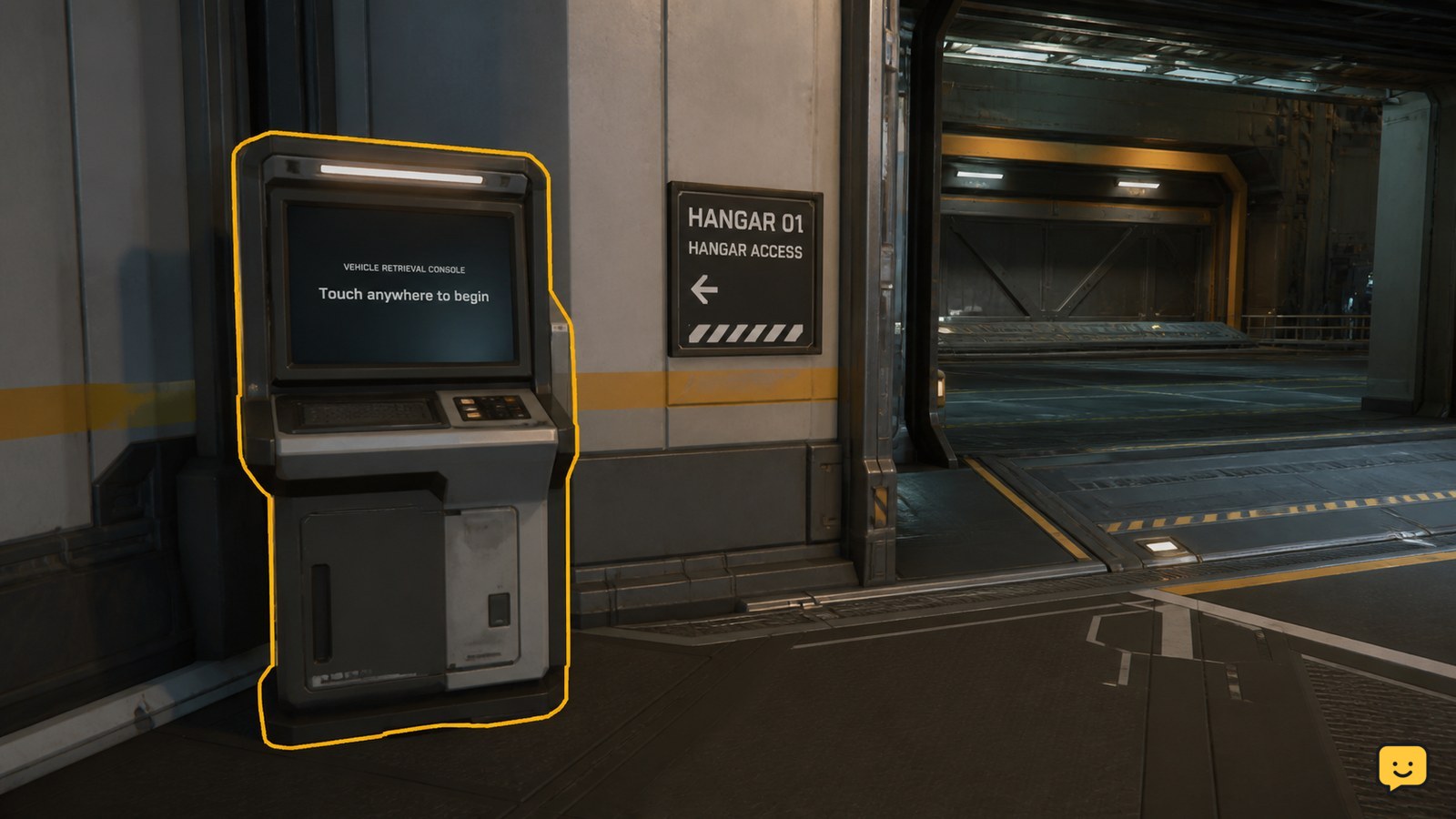
To retrieve a ship in Star Citizen, find an ASOP or Vehicle Retrieval Terminal at your current spaceport or station, interact with it, select the stored ship, and choose the available retrieve or spawn action. Wait for the terminal to confirm the request, then follow the displayed hangar or vehicle-bay location. Button names can vary.
Browse more Star Citizen guides
Find an ASOP or Vehicle Retrieval Terminal
Star Citizen places ASOP and Vehicle Retrieval Terminals near the hangar, ship-elevator, or vehicle-bay areas of supported spaceport facilities. Walk through the facility and look for a freestanding interactive screen or a clearly labelled terminal rather than a regular shop, kiosk, or elevator control.
RSI Community Hub guides identify both ASOP terminals and Vehicle Retrieval Terminals as the points used to summon owned ships. The exact room and signage can change by location, so use the terminal label and nearby hangar traffic as the checkpoint.
Verify: the interaction prompt should identify the terminal before you select it. If no prompt appears, move closer, face the screen directly, and try another terminal in the same facility.
Select the stored ship and submit retrieval
The ASOP terminal’s ship list is where you choose the stored vessel you want to bring out. Interact with the terminal, locate the ship by its displayed name, select it, and use the available action for retrieving, spawning, or requesting the vehicle.
- Open the ship list on the terminal.
- Select the ship you want to use.
- Check that the ship’s status allows retrieval.
- Choose the on-screen retrieve or spawn action and wait for the request to process.
Community Hub guides describe this action as summoning or spawning a ship from ASOP. Because interface wording can change, follow the action shown for the selected ship instead of relying on a fixed button name.
Success looks like: the terminal accepts the request and displays a hangar, pad, bay, or other retrieval location. Do not leave for an assumed hangar until the terminal provides that result.
Follow the displayed hangar or bay location
After a successful retrieval request, use the location shown by the terminal to reach your ship. Depending on the facility, that may mean entering a hangar, taking a ship elevator, or following signs toward a vehicle bay.
A Star Citizen Community Hub quick guide specifically covers summoning a ship from an ASOP or Vehicle Retrieval Terminal and finding the assigned hangar afterward. Treat the displayed location as the checkpoint: if the hangar door, elevator, or bay indicator does not match the terminal result, return to the terminal and confirm the request rather than searching randomly.
Once you reach the assigned area, verify that the ship model and name match your selection before boarding. If the location is empty, wait briefly for the retrieval state to update, then check the terminal again.
Fix a missing ship or unavailable retrieve action
A ship missing from the ASOP list, showing an unavailable status, or failing to produce a location usually indicates a retrieval-state or terminal-state problem rather than proof that the ship has been permanently lost.
| What you see | Safest next action |
|---|---|
| The ship is not listed | Confirm that you are using an owned ship terminal and that the list has finished loading. Reopen the terminal once. |
| Retrieve is unavailable | Read the ship’s status. If it says claim, repair, destroyed, or another non-retrievable state, stop using Retrieve and follow the displayed recovery option. |
| The request is accepted but no location appears | Wait for the terminal response, then close and reopen the interface once. Check the assigned hangar or bay again. |
| The terminal has no interaction prompt | Move to the screen’s interaction point or try another terminal at the same facility. Stop if every terminal fails to load. |
These recovery steps are conservative troubleshooting actions because the supplied current gameplay references confirm the terminal flow but do not establish one universal error message or reset procedure for every LIVE location.
Frequently asked questions
Where are ASOP terminals located in Star Citizen?
ASOP terminals are generally found near hangars, ship elevators, vehicle bays, or other ship-retrieval areas in supported spaceports and stations. Some locations label them Vehicle Retrieval Terminals instead, so check the signage around the facility’s hangar access points.
Why is my ship not showing on the ASOP terminal?
A ship may be absent because the terminal list has not loaded, the ship is already active or assigned elsewhere, or the ship is in a claim or recovery state. Reopen the terminal once and check the displayed status. If the terminal requests a claim, stop using retrieval.
What should I do after retrieving a ship?
Follow the hangar, pad, or vehicle-bay location shown by the terminal. Confirm the ship’s displayed name and model before boarding. If the assigned area is empty, wait for the retrieval state to update and check the terminal again.
Is an ASOP terminal the same as a Vehicle Retrieval Terminal?
They serve the same basic purpose in the documented flow: selecting an owned vehicle and requesting its retrieval. The name and interface wording can differ by facility, so use whichever supported vehicle terminal is available at your location.


