
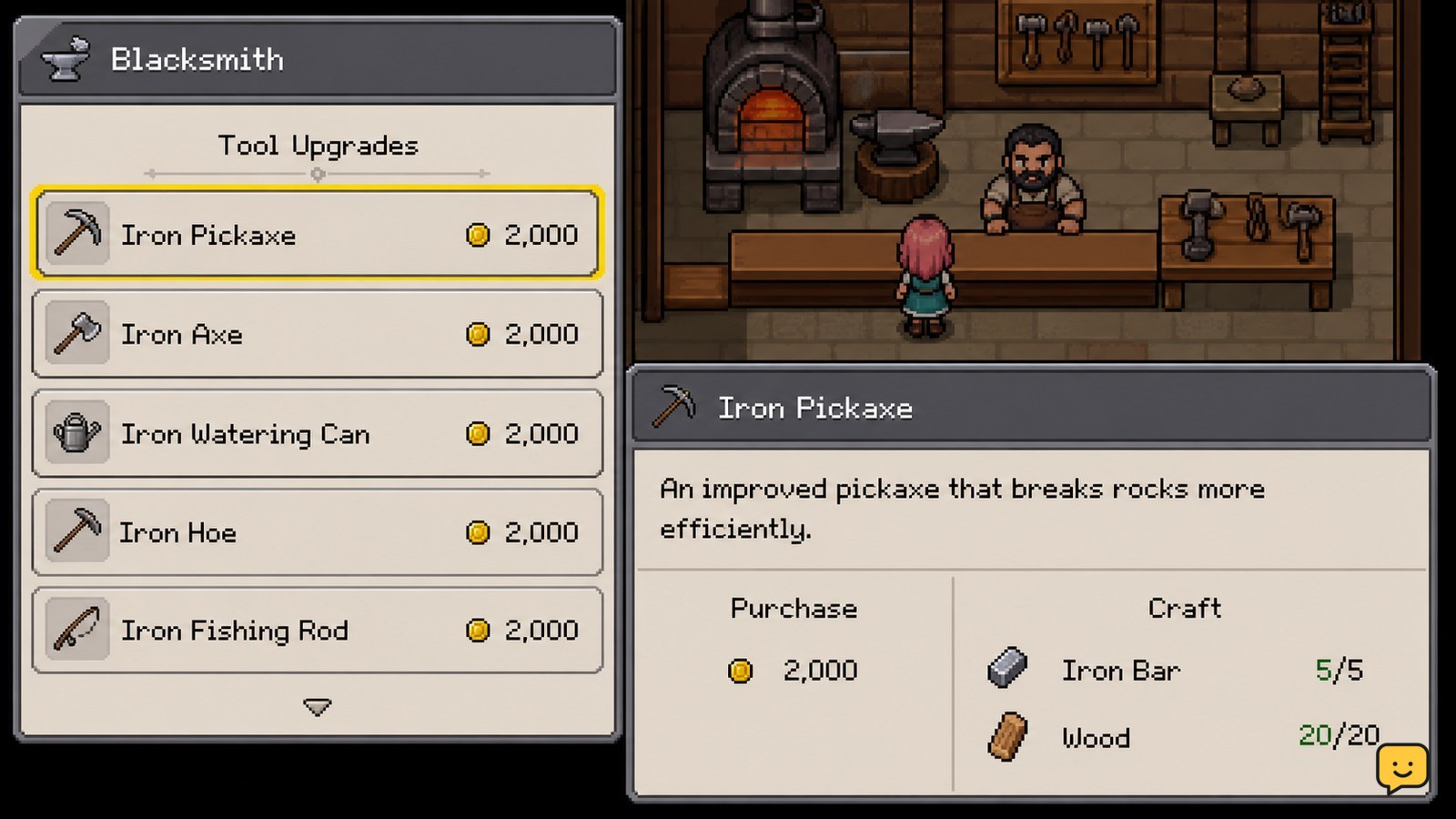
Upgrade tools in Fields of Mistria through the blacksmith shop. You can usually buy a stronger version with money or craft an upgrade with the raw materials shown by the game. Check the displayed requirements first, complete the purchase or crafting action, then equip the new tool and test it on the same farm task to confirm the improvement.
Browse more Fields of Mistria guides
Find the blacksmith shop tool-upgrade options
Fields of Mistria handles tool upgrades through the blacksmith shop rather than through the farm itself. Open the shop interface and look for the tool purchase or crafting entries that are available for your current progression. Bonus Action’s tool guide describes two routes: buying a stronger version from the blacksmith or crafting an improved version from raw materials.
The available tier can change as your save progresses, so do not rely on a fixed list of prices or materials. The correct requirement is the one shown beside the specific tool in your current game. If no improved version appears, the tier may not yet be available in your save.
Choose between buying and crafting the upgrade
Choose the blacksmith purchase when you have enough money and want the most direct route. The Escapist reports that buying the improved tool is the easiest option when the version is available. Select the tool, review the displayed cost, and confirm only when the required currency is present.
Choose crafting when you already have the listed raw materials or want to reserve money for seeds, buildings, or other farm expenses. The crafting route is not automatically cheaper: compare the requirements shown for both options before committing. Exact prices and material quantities can vary by tool tier, so this guide does not substitute unverified numbers.
Prepare the displayed money or materials
The blacksmith requirement panel is the preparation checklist for each upgrade. For a purchase, confirm the currency requirement is met. For a crafted version, collect every material listed by the crafting screen, then return to the blacksmith with those items in your inventory.
Do not assume that having a related ore or resource is enough. A tool recipe may require a particular processed or additional material, and the game’s displayed recipe is the authoritative check for your current save. If the action remains unavailable, read the missing-item indicator instead of repeatedly selecting the button.
Complete the tool upgrade and equip the result
After the requirements are satisfied, confirm the purchase or crafting action for the selected tool. Check your inventory immediately afterward and place the upgraded version on the hotbar if it is not equipped automatically.
Fields of Mistria’s tool-selection controls determine which item is used, so selecting the old tool can make a successful upgrade appear ineffective. If you need help switching between the watering can, pickaxe, axe, or another equipped item, verify the highlighted hotbar slot before using it.
Verify what the upgraded tool changes on the farm
An upgraded tool should be tested against the same type of farm or gathering task you used before upgrading. Check the observable result: whether the tool now interacts with a previously resistant target, completes the task with fewer actions, or provides the improved behavior shown by that tier.
Tool effects are not identical across every item or tier. Do not assume that an upgraded pickaxe changes watering, hoeing, or chopping in the same way. If the result looks unchanged, first confirm that the upgraded item is selected and that you are using it on a target affected by that tier.
What to do if the upgrade is missing or seems ineffective
If no upgrade appears, return to the blacksmith after advancing the requirements connected to your current progression. Community reports and gameplay guides discuss later tool tiers becoming available alongside broader progression, but the supplied evidence does not establish one universal trigger for every tier.
If the upgrade is listed but cannot be confirmed, compare the missing requirement with your inventory and currency. If the transaction succeeds but the tool does not appear, close and reopen the inventory or shop interface, then check the hotbar and inventory again. Do not discard the old tool or spend replacement materials until the improved version is visible.
Frequently asked questions
Where do you upgrade tools in Fields of Mistria?
You upgrade tools through the blacksmith shop. Open the shop’s available tool entries and choose either a stronger version to buy or a crafting option that lists the materials required for your current progression.
Is it better to buy or craft tool upgrades?
Neither route is always better. Buying is the direct option when you have enough money, while crafting is useful when you already possess the listed materials. Compare the exact cost and requirements shown for the tool tier in your save.
Why can’t I see the next tool upgrade?
The next tier may not yet be available in your current progression. Check whether the blacksmith lists the tool at all, then continue the relevant progression instead of assuming the shop is malfunctioning. The supplied guides do not confirm one universal unlock trigger for every tier.
How can I tell whether a tool upgrade worked?
Equip the new tool and repeat the same farm or gathering action. Confirm that the upgraded version is highlighted on the hotbar, then compare the interaction with the earlier tool. Effects vary by tool and tier, so use the result shown in your game rather than assuming every tool gains the same benefit.


