
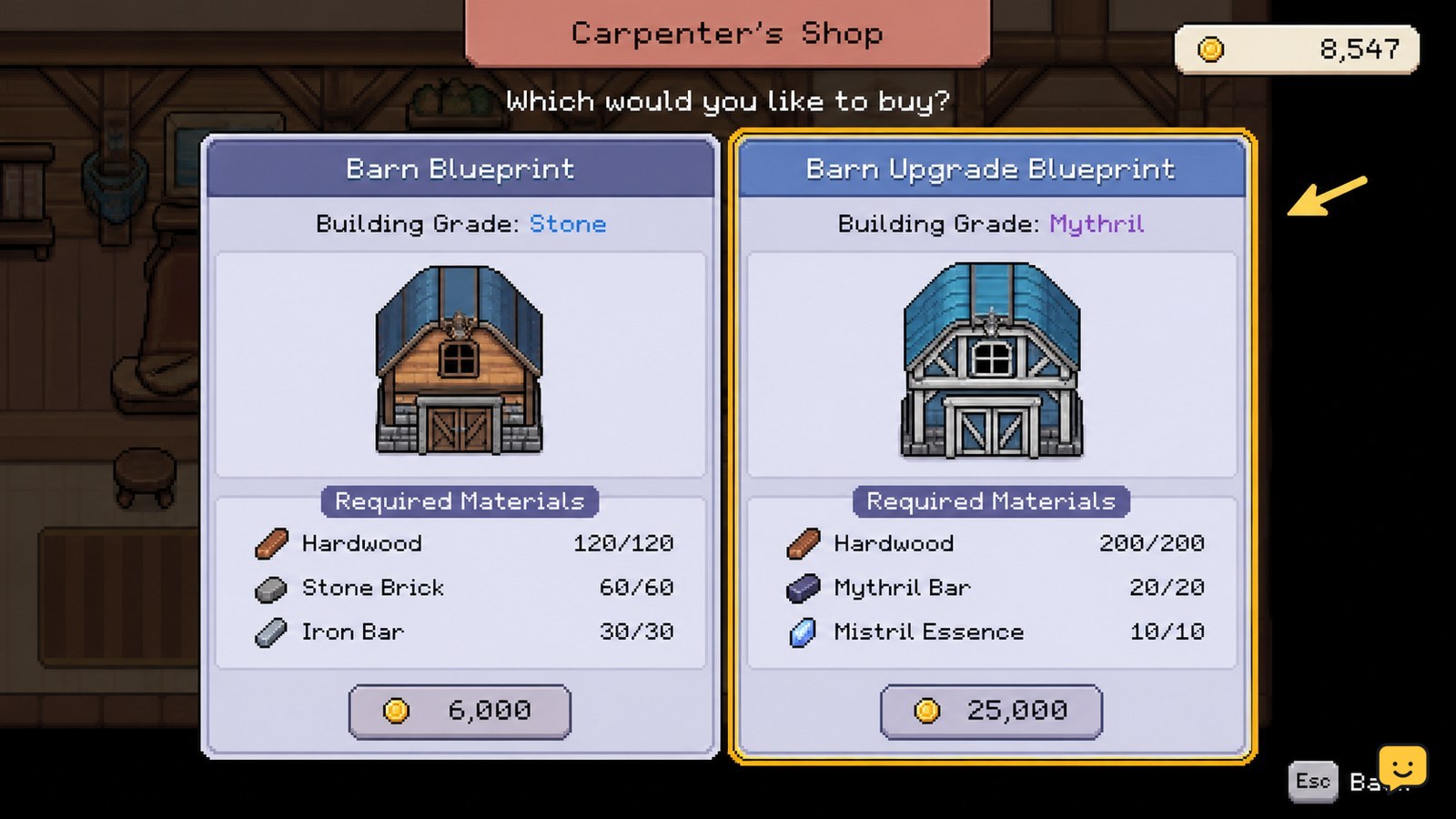
In Fields of Mistria, barn and coop upgrades are handled through higher-grade building blueprints at the Carpenter’s Shop. Check which tier is available, confirm the displayed money and material requirements, buy the blueprint, then place the upgraded building on your farm. The game’s current blueprint screen is the safest source for exact costs because requirements can change between updates.
Browse more Fields of Mistria guides
Check the available barn or coop tier
The first step for upgrading a Fields of Mistria barn or coop is checking which higher-grade blueprint the Carpenter’s Shop currently offers. The maintained Fields of Mistria Wiki identifies barns and coops as separate farm buildings, with barns used for animals such as cows, sheep, horses, and alpacas, while coops house animals such as chickens, ducks, rabbits, and capybaras.
- Go to the Carpenter’s Shop.
- Open the building purchase menu and select the barn or coop category.
- Compare the available building grades with the building already on your farm.
- Read the displayed price, material list, footprint, and capacity information before buying.
Do not assume that a larger building is available immediately. The supplied evidence confirms that higher-grade barns and coops are progression-dependent, but it does not establish one universal requirement for every current build.
Prepare money, materials, and farm space
Preparing the resources shown by the Carpenter’s Shop blueprint prevents the most common failed upgrade attempt: buying or selecting a building without enough money, materials, or placement space.
- Record the exact requirements displayed for the selected tier.
- Gather the missing materials and keep the required money available.
- Clear a large enough area on the farm for the new footprint.
- Keep paths and access points open so you can continue entering the building and caring for animals afterward.
Exact costs should be taken from your current blueprint screen rather than copied from an older guide. The available evidence does not provide a reliable, complete cost table for every barn and coop grade, so this guide does not list fixed numbers.
Use the separate move workflow only when you want a different location. The Fields of Mistria Wiki states that moving a barn or coop requires removing the building and then placing its blueprint again. That is different from a confirmed upgrade path and can create unnecessary risk to your layout.
Buy and place the upgraded building
To upgrade the building, purchase the desired higher-grade barn or coop blueprint from the Carpenter’s Shop and place it through the normal farm-building placement flow.
- Select the higher-grade barn or coop blueprint.
- Confirm that the displayed requirements are satisfied.
- Purchase the blueprint if the game enables the purchase option.
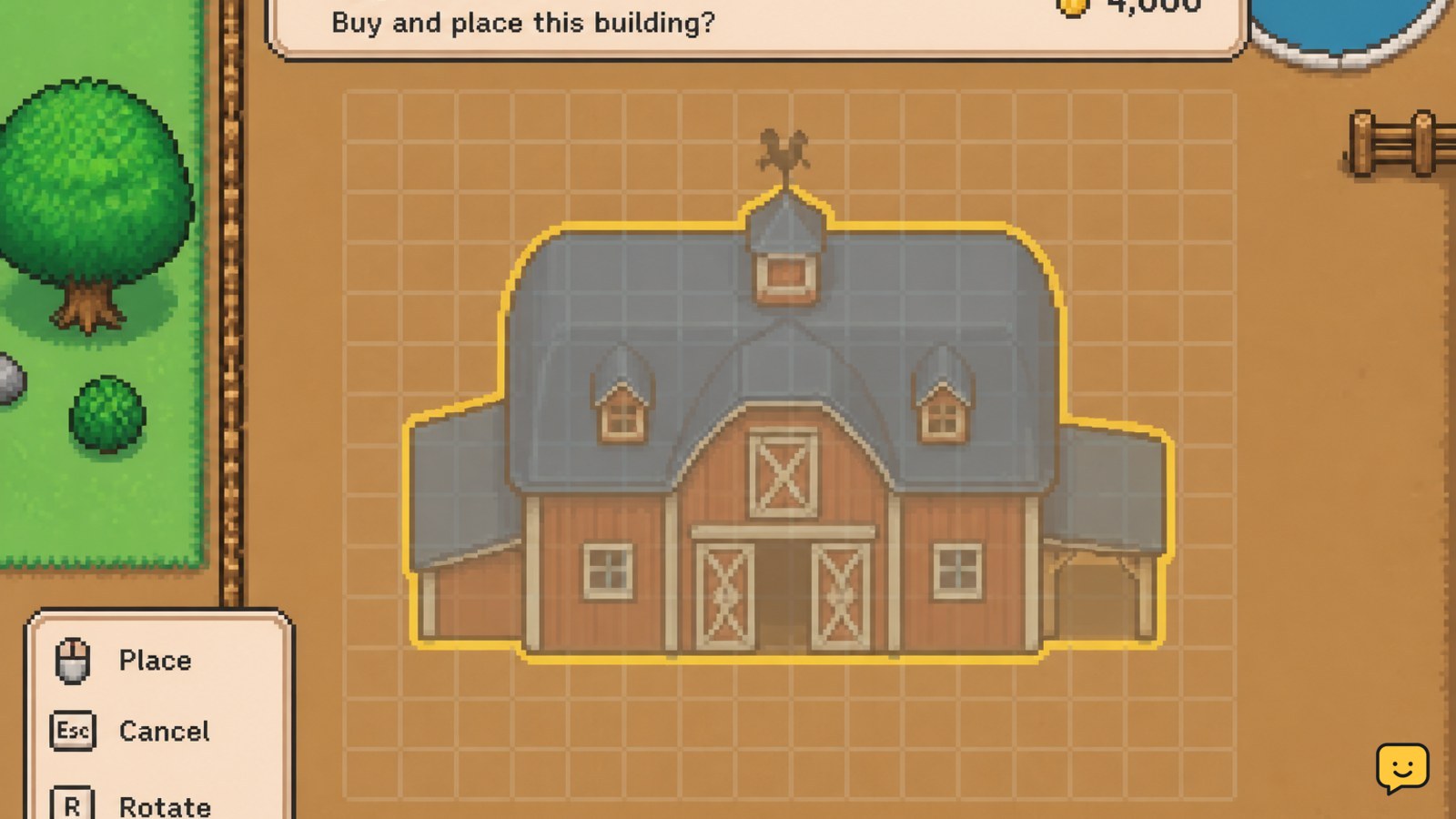
- Return to your farm and position the building’s footprint in the cleared area.
- Check the full outline for blocked tiles or an invalid placement warning.
- Confirm only when the building is in the intended location.
Destructoid’s guide snippet confirms the general building flow: purchase a blueprint at the Carpenter’s Shop, then place the building footprint on the farm. The available evidence does not confirm that every tier replaces an existing structure in place, so follow the action the current game screen presents rather than deleting the old building first.
Verify capacity and animal access
After placement, verify that the new barn or coop exists at the selected location and that its animal capacity or grade has increased before treating the upgrade as complete.
- Approach the building and enter it.
- Check the interior, animal list, and available spaces.
- Confirm that the building’s appearance or displayed grade matches the blueprint you purchased.
- Check that feed placement and animal interaction still work normally.
A successful result is an upgraded building that remains usable for its correct animal type and shows the expected capacity or tier. For daily feeding and product collection, use the building’s feed area and inspect each animal as normal; the published animal-care guide covers those maintenance checks.
Fix a missing blueprint or failed placement
If the upgrade does not appear, first separate an unavailable blueprint from a resource problem or a placement problem.
| What you see | Likely cause | Safest next action |
|---|---|---|
| The higher-grade option is absent | The tier is not currently available in your progression or shop state. | Leave the menu without buying anything and check the Carpenter’s Shop again after confirmed progression milestones. |
| The purchase option is unavailable | You are missing money or one of the displayed materials. | Compare your inventory with the current blueprint requirements and gather only the missing items. |
| The footprint cannot be placed | The selected area contains blocked tiles or is too small for the new footprint. | Cancel placement, clear more space, and reopen the blueprint. |
| The building is gone after removal | You used the moving or rebuilding workflow rather than a confirmed upgrade action. | Stop removing additional buildings. Reopen the Carpenter’s Shop and use the correct higher-grade blueprint flow. |
If the game screen conflicts with an older guide, follow the current in-game requirements and do not spend resources until the tier, cost, and placement result are clear.
Frequently asked questions
Do I need to buy a medium barn or coop before a larger one in Fields of Mistria?
The supplied evidence does not confirm one universal prerequisite rule for every building tier. Check the Carpenter’s Shop in your current save: if the larger blueprint is listed, read its requirements directly; if it is absent, do not assume that buying an intermediate tier will automatically unlock it.
Where do you upgrade barns and coops in Fields of Mistria?
Use the Carpenter’s Shop. Select the barn or coop category, choose the available higher-grade blueprint, and check its current price and material requirements. The exact menu wording and available tiers should be verified against your current game build.
Can barns and coops be moved after upgrading?
Yes, the Fields of Mistria Wiki states that moving either building requires removing it first and then placing the blueprint again. Treat that as a relocation process, not a required upgrade step, and avoid removing a building unless you intend to rebuild it elsewhere.
What animals use the barn and coop?
Barns are used for barn animals such as cows, sheep, horses, and alpacas. Coops are used for coop animals such as chickens, ducks, rabbits, and capybaras. The exact animal roster can change with game updates, so check the current building or animal menu if a species does not appear.


