
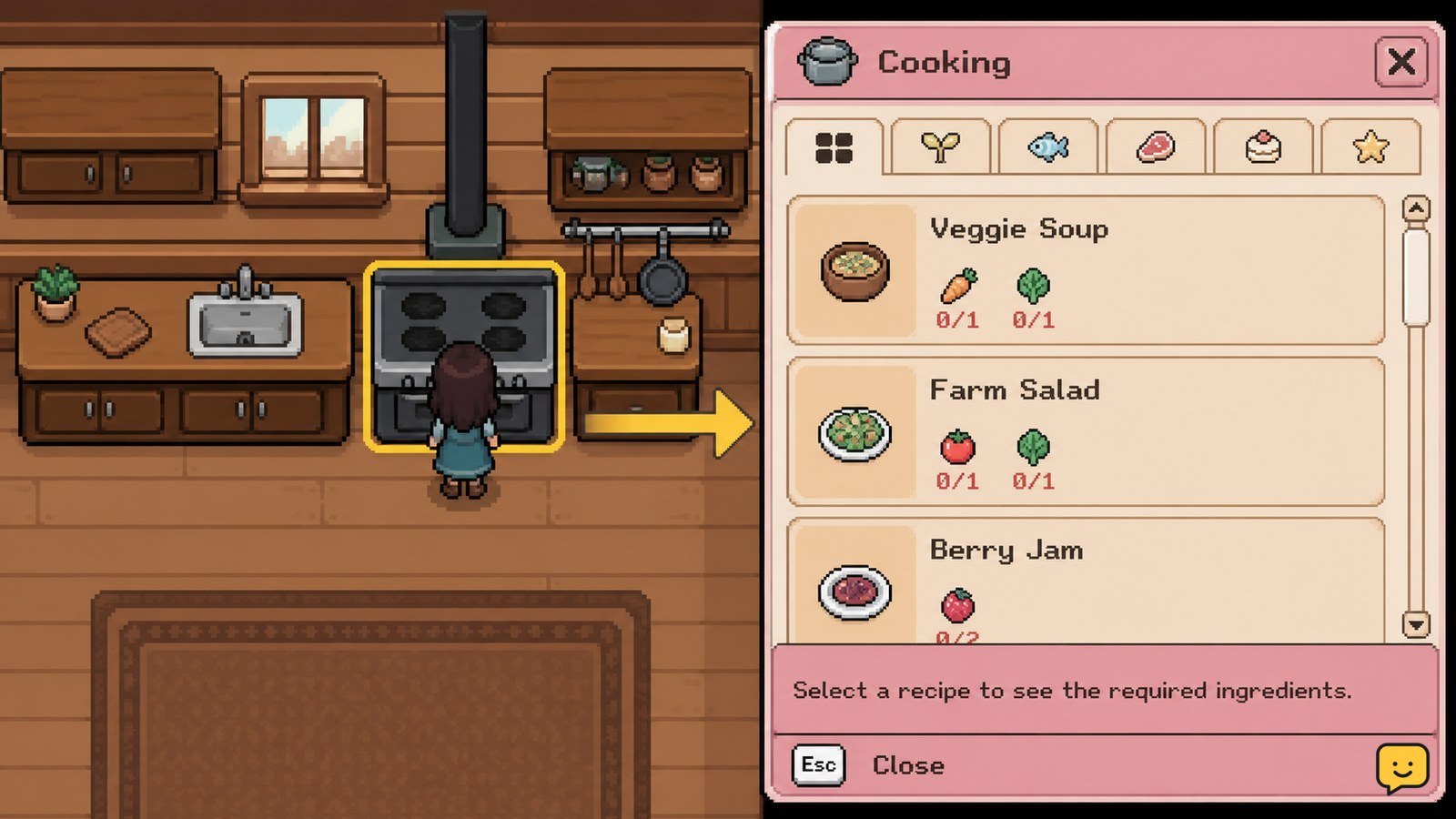
To cook food in Fields of Mistria, purchase the Kitchen upgrade, approach the stove, and use the interact button to open the cooking menu. Select a recipe that you have learned and check its ingredient list. Cooking only starts when every required ingredient is available, so gather missing items before confirming the meal.
Browse more Fields of Mistria guides
Buy the Kitchen before trying to cook
Fields of Mistria requires the Kitchen upgrade before the stove can be used for normal meal preparation. If you approach the cooking station before purchasing it, you may be able to interact with the furniture without seeing the complete recipe menu.
Purchase the Kitchen through the game’s available home-upgrade process, then return to the house and confirm that the stove has been added. GameRant’s cooking guide identifies buying the Kitchen as the starting requirement for cooking, while Bonus Action’s cooking guide also treats the Kitchen as the gateway to the recipe system.
Verify the upgrade: the stove should be present in your Kitchen, and interacting with it should open a cooking or recipe screen. Stop here if the upgrade is unavailable in your current progression instead of searching for a separate temporary cooking station.
Open the cooking menu at the stove
In Fields of Mistria, interact with the stove in the Kitchen to open the cooking and recipes menu. Stand close to the stove until the game’s interact prompt appears, then press the button shown for your platform.
- Enter the room containing the Kitchen.
- Face the stove at the cooking station.
- Press the displayed interact button.
- Wait for the recipe menu to open before moving away.
GameRant describes the stove as the point where the cooking and recipe menu appears. If the prompt does not appear, reposition your character around the front or side of the stove and try again. If there is still no menu, confirm that the Kitchen upgrade was actually purchased and that the game saved after the upgrade.
Choose a learned recipe with available ingredients
The Fields of Mistria cooking menu shows which recipes you can select and which ingredients each meal requires. Choose a recipe you have learned, then compare its ingredient list with the items currently in your inventory.
- Move through the recipes in the cooking menu.
- Select a recipe that is not locked.
- Read every required ingredient and quantity.
- Confirm that all listed items are available in your inventory.
A recipe can remain unavailable even when you have suitable food items because cooking checks the specific ingredients listed on that recipe. Do not substitute visually similar crops, fish, forage, or prepared items unless the recipe screen explicitly accepts them.
Expected result: the cooking option becomes usable once the recipe is learned and every required ingredient is present.
Confirm the meal and check the result
Fields of Mistria creates the meal after you confirm an eligible recipe in the cooking menu. Before confirming, check the ingredient requirements one more time because the listed materials are consumed when the dish is prepared.
- Highlight the selected recipe.
- Review the ingredient checklist.
- Confirm the cooking action shown on screen.
- Open your inventory after the preparation finishes.
The finished meal should appear as a food item in your inventory, while the required ingredients should no longer be available in their previous quantities. This inventory check is the quickest way to verify that cooking completed successfully rather than merely opening the recipe screen.
If the meal does not appear, do not repeat the action immediately. First check whether the ingredients were consumed, then reload the save only if the cooking result and inventory state do not match.
Fix a missing recipe or inactive cook button
A missing recipe or inactive cooking option in Fields of Mistria usually points to one of three conditions: the Kitchen is not installed, the recipe has not been learned, or at least one required ingredient is missing.
| What you see | Likely cause | Safest next action |
|---|---|---|
| No cooking menu | The Kitchen upgrade is missing or the stove interaction did not register. | Confirm the upgrade, move closer to the stove, and try the interact prompt again. |
| Recipe appears locked | The recipe has not been learned. | Use the recipe’s stated unlock path; do not assume ingredients will unlock it. |
| Recipe is visible but cannot be confirmed | An ingredient or required quantity is missing. | Gather the exact listed items and reopen the recipe. |
| Ingredients disappear but no meal appears | The result may not have displayed correctly. | Check inventory and the save state before attempting another dish. |
Community questions about the Kitchen commonly come from interacting with the station but not knowing where the recipe controls appear. The expected behavior is that the cooking section opens from the stove interaction; if that does not happen after the upgrade is installed, treat it as a setup or save-state problem rather than an ingredient problem.
Frequently asked questions
Do I need a Kitchen to cook in Fields of Mistria?
Yes. You need to purchase the Kitchen upgrade before the stove provides the normal cooking and recipe menu. After installation, interact with the stove and confirm that the recipe screen opens. If the stove has no usable cooking option, verify that the upgrade was completed and saved.
Why can’t I cook a recipe in Fields of Mistria?
You cannot cook a recipe if it is locked, unlearned, or missing one of its listed ingredients. Open the recipe menu, check each required item and quantity, and gather the exact materials shown. Similar-looking ingredients do not count unless the recipe screen accepts them.
Where do you open the cooking menu in Fields of Mistria?
Open the cooking menu by approaching the stove in your Kitchen and pressing the interact button shown on screen. If no prompt appears, reposition your character around the stove, confirm the Kitchen upgrade is installed, and try again after re-entering the room.
How can I tell whether cooking worked?
Check your inventory after confirming the recipe. A successful cooking action adds the finished meal and removes the required ingredients in the listed quantities. If ingredients were consumed but the meal is missing, check the inventory again and reload the save only when the result still does not match.
Can I use any food item as a recipe ingredient?
No. Cooking uses the exact ingredients shown on the selected recipe. Crops, fish, forage, and prepared foods are not interchangeable unless the recipe specifically lists them as valid requirements. Read the full ingredient checklist before confirming the meal.


