
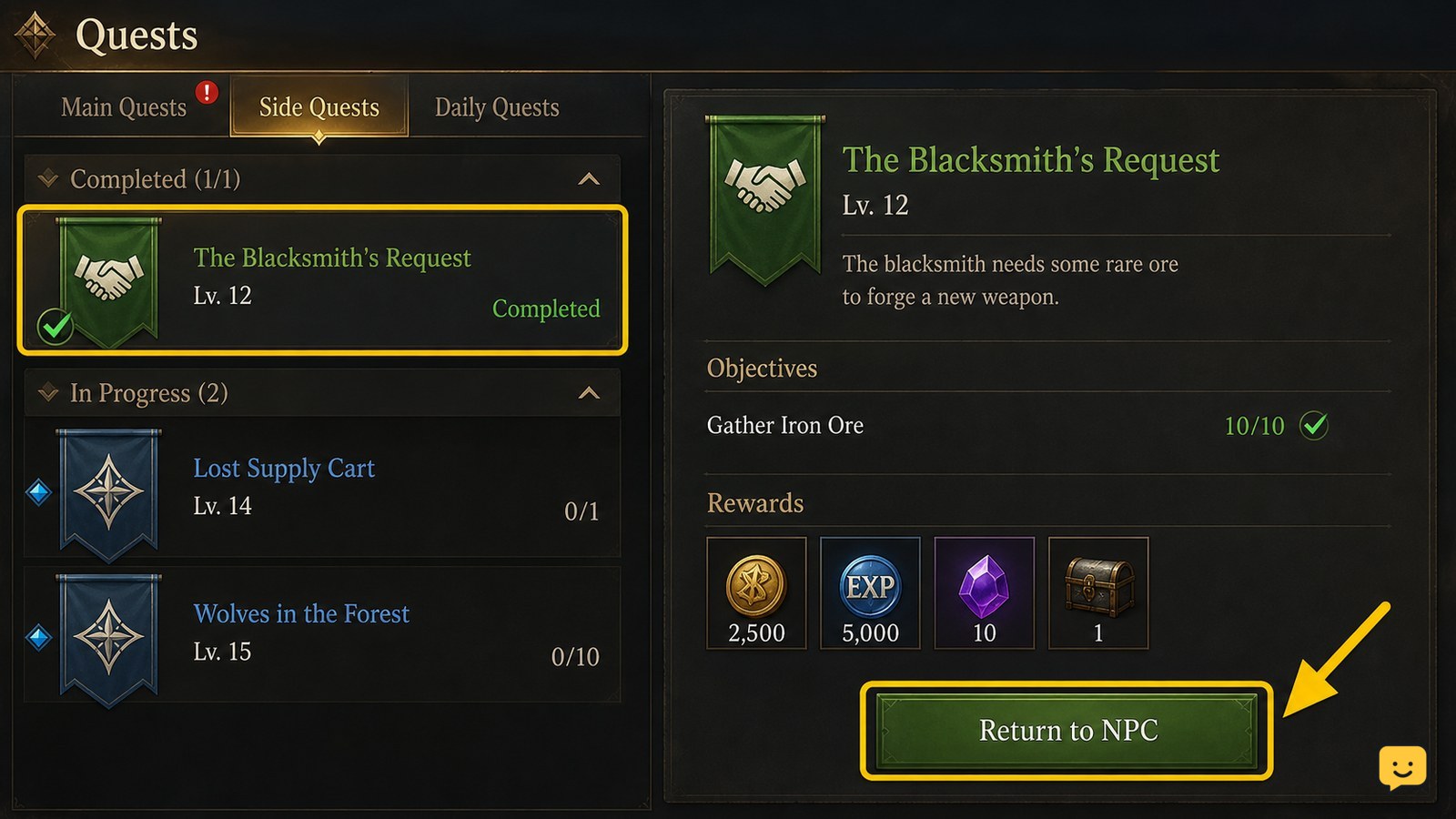
To claim a completed Dragon Sword Awakening quest reward, open the Quest Log and identify the entry whose objectives are finished. Follow its return or hand-in instruction, then interact with the quest NPC and choose the available completion or reward option. Verify that the quest status changes and the listed reward appears before leaving.
Browse more DragonSword: Awakening guides
Check whether the quest is actually complete
Dragon Sword Awakening marks a quest as ready for hand-in only after its listed objectives are finished, so begin in the Quest Log rather than returning to an NPC immediately.
- Open the Quest Log.
- Review the quest’s objective list and compare each requirement with your current progress.
- Look for a completed state or a new instruction to return to a character or location.
The available quest database lists many separate quest types, including tutorial quests, world-boss quests, and quests obtained from specific activities. That makes the quest name and objective text important: two completed-looking activities may use different hand-in steps.
ShowU’s Quest Log guide also identifies the log as the place to select objectives, track progression, and find quest NPCs. If one objective is still active, finish that requirement first and do not treat the quest as reward-ready.
Follow the completed quest’s return instruction
Dragon Sword Awakening uses the completed quest entry to identify the next hand-in step, but the supplied evidence does not confirm one universal NPC, menu label, or control for every quest.
- Select the completed quest in the Quest Log.
- Read the updated objective or return instruction instead of relying on the original quest location.
- Travel to the named NPC or location and interact with the relevant character or quest object.
For quests that direct you back to an NPC, the reward screen should appear only after the interaction is accepted. If the game shows a completion or reward choice, review the listed items before confirming. Do not claim a reward from an unrelated NPC simply because that character has another available quest.
Verify that the reward was delivered
Dragon Sword Awakening has completed the hand-in only when both the quest state and the reward result change.
- Confirm that the completion interaction closes or changes the quest entry.
- Check the inventory, currency total, character-progression screen, or other destination named by the reward preview.
- Compare the received item, currency, ticket, title, or progression value with the reward shown before confirmation.
Some progression rewards may appear outside the normal inventory. A beginner guide for DragonSword: Awakening specifically describes Hero Quests as rewarding additional tickets and hero-linked Exclusive Karma, so check the relevant progression screen if an item does not appear in your bag.
Stop once the quest is no longer waiting for hand-in and the expected reward destination shows the change. That is the safest confirmation that the reward was collected.
What to do if a completed reward is missing
If Dragon Sword Awakening shows a finished objective but no reward option, first separate an unfinished hand-in from a delivery problem.
- Reopen the Quest Log and make sure the quest is not still asking for another objective, location, or NPC.
- Interact with the exact character named by the completed entry again.
- Check every likely reward destination, including inventory, currency, tickets, titles, and hero-specific progression.
- Leave the area or change screens, then reopen the quest entry and check its status again.
- If the reward is still absent, restart the game session and repeat the status check once.
A Steam community bug report describes missing promotion rewards after a promotion quest was completed. That report is evidence of a possible issue, not proof that every missing reward has the same cause. If the problem persists, save the quest name, platform, character, completion state, and missing reward details before contacting official support.
Frequently asked questions
How can I tell whether a Dragon Sword Awakening quest is ready to claim?
A quest is ready when all listed objectives are finished and the Quest Log shows a completion or return instruction. If one requirement still displays active progress, the quest is not ready for its reward yet.
Do I always claim Dragon Sword Awakening rewards from the Quest Log?
No. The Quest Log identifies progress and the next hand-in step, but a completed quest may require an interaction with a named NPC or quest object. Use the completed entry’s instruction rather than assuming every reward uses the same screen.
Where should I look if a quest reward is not in my inventory?
Check the destination described by the reward. Currency, tickets, titles, and hero-linked progression may appear outside the standard inventory. Recheck the Quest Log and the relevant progression screen before treating the reward as missing.
What should I do if the quest stays completed but cannot be claimed?
Revisit the exact NPC named by the completed quest, check for an overlooked return objective, change screens, and restart the game once. If the claim option remains absent, record the quest and platform details for official support.


