
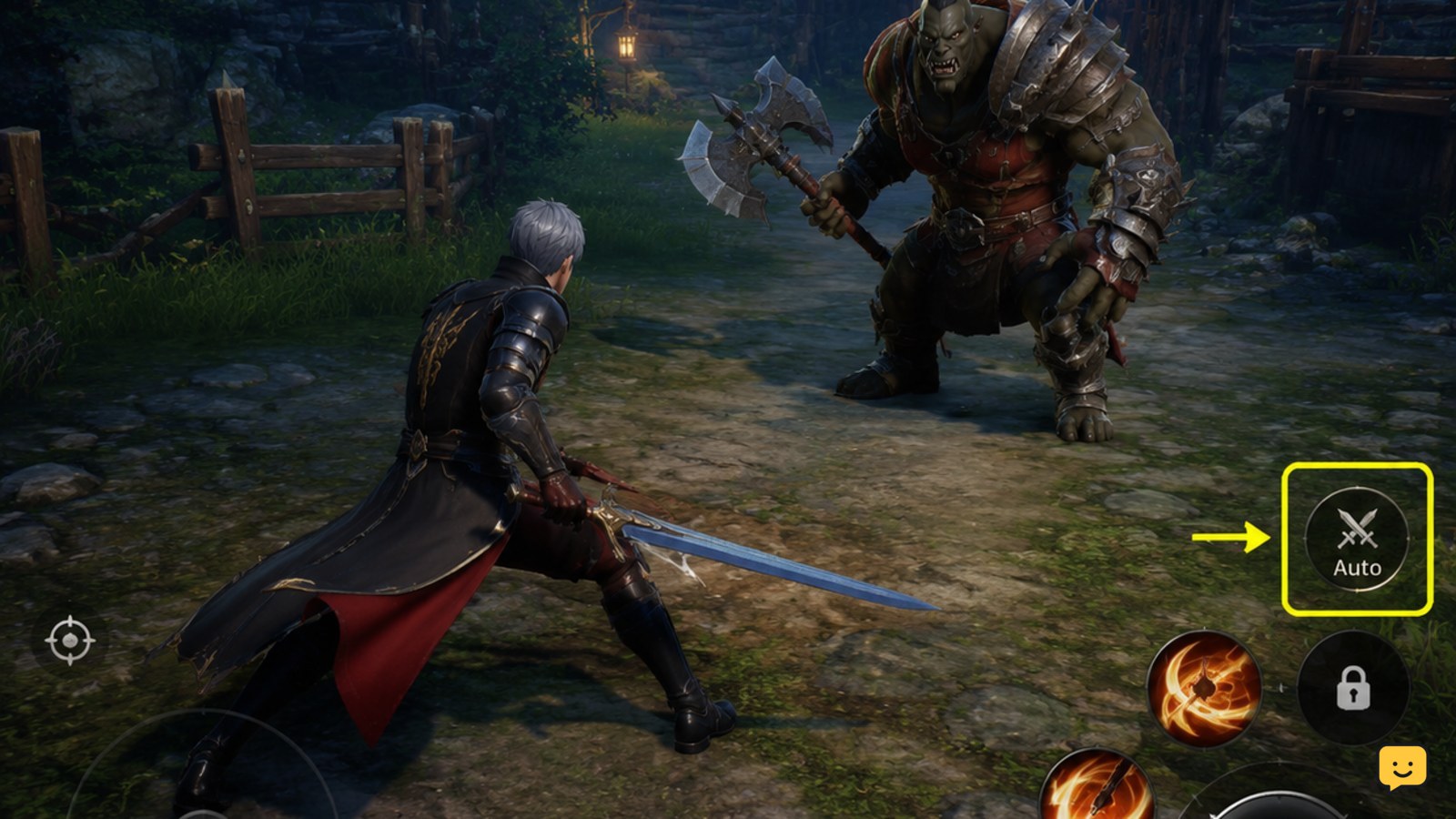
Use only the in-game auto-battle control shown by your current Dragon Sword Awakening build. Before leaving a fight running, choose a team that survives without manual timing, confirm skills and healing are available, test one low-risk encounter, and watch the first complete battle. If the control or expected result is missing, stop rather than relying on external tools or unverified menu instructions.
Browse more DragonSword: Awakening guides
Check whether your current build has Auto Battle
Start in a normal combat encounter and inspect the visible combat controls, status area, or battle settings for an official auto-battle option. The evidence available for Dragon Sword Awakening confirms automated combat is discussed by community guides, but it does not establish one permanent button name or location for every build.
- Enter a low-risk fight.
- Pause only if the game provides an in-game combat settings screen.
- Look for a control explicitly associated with automatic combat, repeated attacks, or battle behavior.
- Activate it once and confirm that your characters begin taking actions without repeated manual commands.
If no official control appears, do not treat a missing button as a keyboard problem. The feature may be unavailable in that activity, locked behind progression, moved after an update, or absent from your version.
Choose a team that survives without manual timing
Auto battle works best when the party can clear ordinary enemies without precise dodges, perfect skill timing, or constant target changes. Build around reliable damage and survivability rather than a rotation that only works when you control every action.
- Use characters whose passive effects and regular skills remain useful when selected automatically.
- Keep at least one dependable source of recovery, mitigation, control, or another defensive effect if your roster provides it.
- Prefer a team that can handle the encounter’s normal status effects and poise demands without waiting for a manual response.
- Check that the selected skills are available and not disabled by a mode-specific restriction.
Dragon Sword Awakening combat references describe tag-team play, status ailments, poise breaking, and Signal Skills as meaningful combat systems. That makes a balanced team safer for auto battle than a damage-only setup that depends on manually chaining those mechanics.
Test one complete fight before farming
Run a complete ordinary encounter before using auto battle for repeated rewards. The first few seconds can look successful even when the party later misses targets, fails a poise check, or runs out of recovery.
- Start auto battle at full or near-full health.
- Watch the first target selection and confirm attacks reach the intended enemy.
- Check whether the party changes characters or uses available skills as expected.
- Observe health, status effects, cooldowns, and resource consumption through the middle of the fight.
- Wait for the victory screen, reward result, or other normal completion state.
Consider the test successful only when the encounter completes, the expected rewards or progress register, and no character remains trapped in an idle or repeated-action state. If any of those checks fail, disable the feature and troubleshoot before repeating the activity.
Fix Auto Battle that will not start or stops early
Match the symptom to the smallest safe check instead of changing several settings at once.
- No control appears: leave the encounter and test a normal battle. If the option is still absent, check whether the current activity or progression state supports it. Do not rely on a guide showing a different build.
- The control appears but does nothing: confirm the fight has started, the character is not defeated or disabled, and the game has not opened a target-selection or confirmation overlay.
- Combat starts then stops: check for a defeated party member, an empty resource, a failed recovery loop, a status effect, or an encounter mechanic requiring a manual response.
- Characters attack the wrong target: stop the run and test a simpler encounter. If target selection cannot be controlled in the current mode, auto battle is not suitable for that fight.
- The game does not record completion: wait for the normal result screen. If it never appears, restart the game normally and verify the activity status before spending another entry.
After each change, repeat one low-risk fight. Stop troubleshooting when the official control is unavailable, the same failure returns after a clean restart, or the activity clearly requires manual play.
Disable Auto Battle for mechanics it cannot handle
Auto battle is a convenience option, not a replacement for every combat decision. Switch to manual control when an encounter includes a boss phase, strict target priority, dangerous area attacks, timed interactions, unusual status effects, or a poise requirement your team keeps missing.
Keep manual control for any run where failure consumes a limited entry, valuable consumables, or progress. Return to auto battle only after a lower-risk test shows that the same team handles the relevant mechanic consistently. If the party survives but takes excessive damage, treats that as a failed setup rather than a successful farm.
Frequently asked questions
Why can’t I find Auto Battle in Dragon Sword Awakening?
The option may be unavailable in the current activity, locked by progression, moved in a newer build, or missing from your version. Test a normal low-risk battle and inspect the official combat controls. If no in-game option appears there, stop rather than using external input tools or assuming a third-party menu path still applies.
Is Auto Battle safe to use in dungeons?
Use it in a dungeon only after one complete low-risk test confirms that your team survives and the run records correctly. Dungeon mechanics, limited entries, bosses, target priorities, and reward conditions can make automatic combat unsuitable. Disable it when the party needs manual positioning or repeatedly fails a required mechanic.
What team is best for Dragon Sword Awakening Auto Battle?
There is no evidence here for one universal best team. Use a balanced group with dependable damage, useful passive effects, and enough recovery or mitigation to survive without precise manual timing. Test the team in ordinary combat and judge it by completion, health loss, resource use, and correct reward registration.
Why does my party stop fighting during Auto Battle?
Check whether a character was defeated, a resource was exhausted, a status effect disabled actions, the target became invalid, or the encounter requires manual input. Leave the fight, restart with a simpler encounter, and change one factor at a time. Stop if the same failure returns after a normal restart.


