
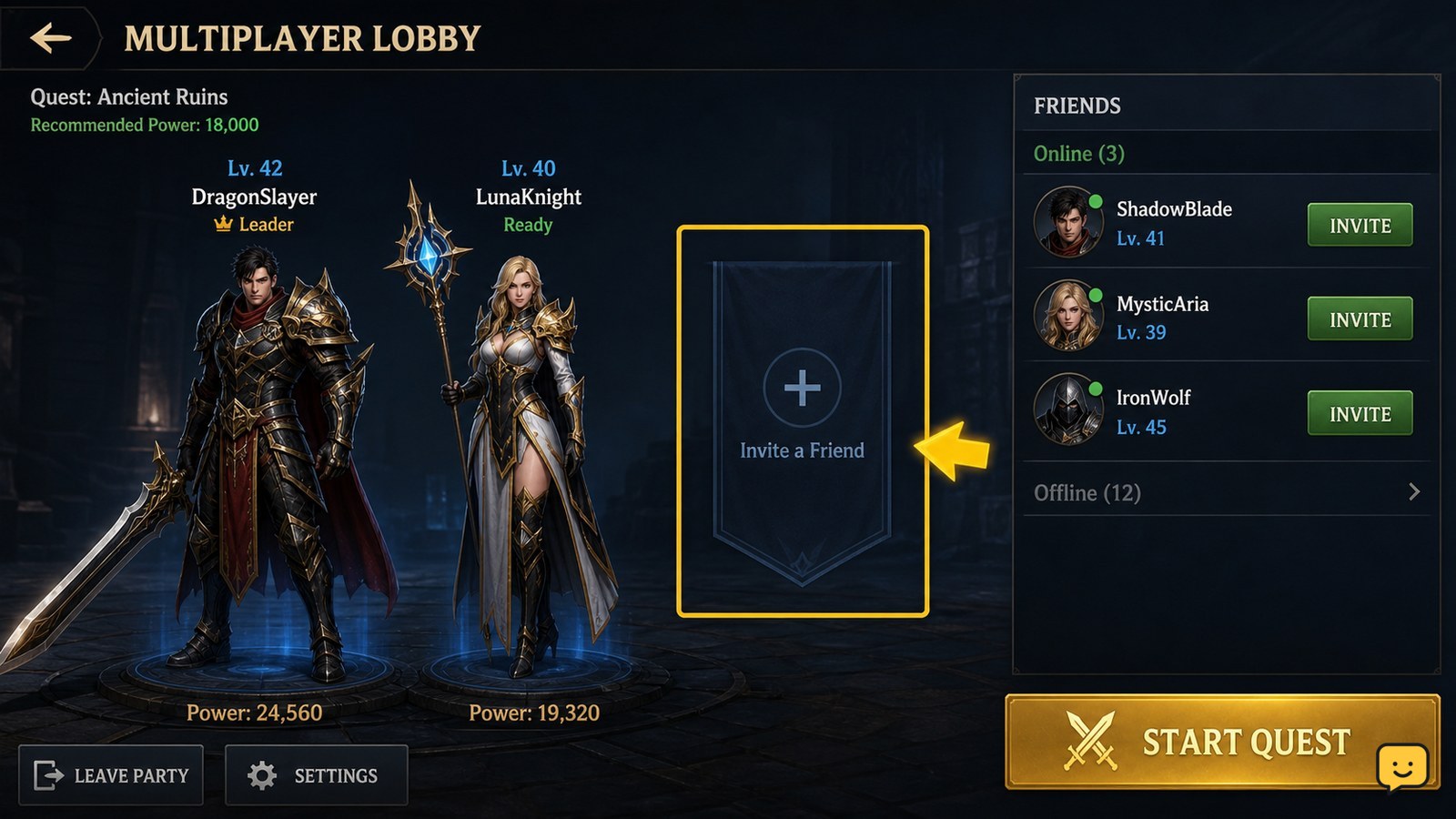
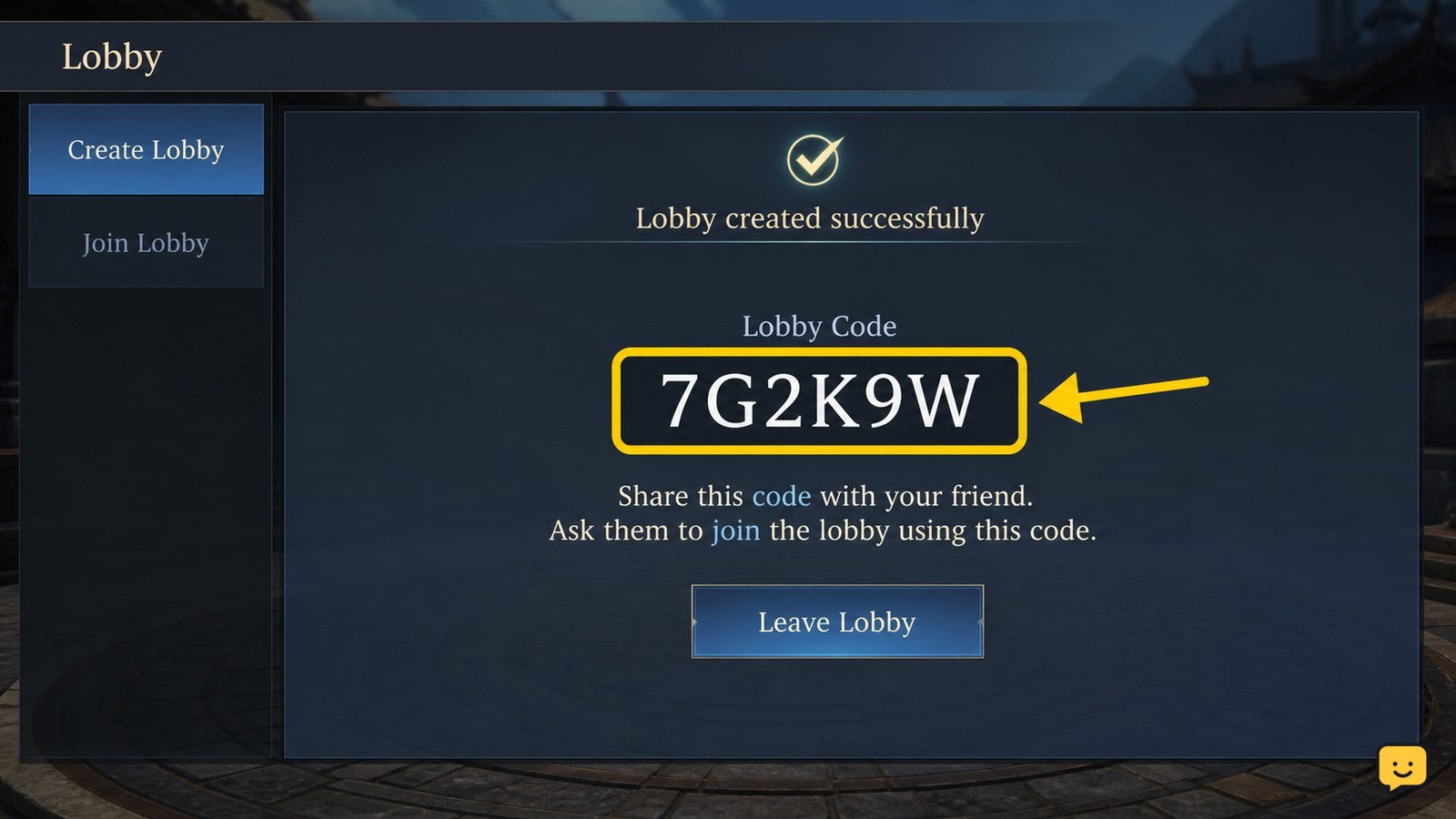
To add or invite a friend in Dragon Sword Awakening, open the multiplayer lobby and choose Invite Friends when the option is available. If direct invites do not appear, select Create Lobby, copy the Lobby Code, and send it to the other player. They can use that code to join your session. The available menu may vary by platform or game version.
Browse more DragonSword: Awakening guides
Find the multiplayer lobby and friend controls
Dragon Sword Awakening handles friend play from the multiplayer lobby, not from the character or combat screen. Open the game’s multiplayer entry, then look for a friend-list or Invite Friends control. Current gameplay guides identify the lobby screen as the starting point for inviting another player, although the exact label and location can vary by platform or version.
If you only see solo activities, leave that screen and return to the main multiplayer or lobby interface. Do not treat an in-game party or guild list as a permanent friend list; those systems can show players without offering a friend request.
Send an invite through Invite Friends
Dragon Sword Awakening adds a player to the current multiplayer session when you select Invite Friends and choose the intended player from the available list.
- Open the multiplayer lobby.
- Select Invite Friends or the visible friend-list control.
- Choose the player you want to join.
- Send the invite and keep the lobby open while they respond.
Successful delivery is shown by a pending invite, a player appearing in the lobby roster, or the other player joining the session. If the player is not listed, confirm that they are online and using the account or platform identity visible to the game.
Use a Create Lobby code when direct invites are missing
A lobby code is the fallback when Dragon Sword Awakening does not display the other player in the invite list. The KeenGamer co-op guide documents this route: choose Create Lobby, copy the generated code, and send it to the person you want to play with.
- Select Create Lobby from the multiplayer screen.
- Copy the displayed Lobby Code.
- Send the code privately to your friend.
- Ask them to enter the code through the game’s join-lobby option.
Verify the result in the lobby roster. The friend should appear as a joined player before you start the activity. If the code is rejected, generate a new lobby code rather than repeatedly sharing one that may have expired or become invalid.
Check the lobby roster before starting
Dragon Sword Awakening has successfully connected the players when the invited person appears in the lobby roster and is no longer shown as waiting or offline.
Use the roster as the final checkpoint: confirm the correct player name, check that the player has joined the intended lobby, and only then launch the co-op activity. If the friend accepts an invite but does not appear, return to the lobby instead of assuming the party formed successfully.
Fix a missing friend or failed invite
If Dragon Sword Awakening cannot find or invite the other player, first check account visibility, online status, and the lobby path before changing unrelated settings.
- Player not listed: confirm both players are online, signed in, and using the expected platform or account identity.
- Invite control missing: return to the multiplayer lobby and create a lobby; the invite option may not be available from solo screens.
- Code does not work: create a fresh lobby, copy the new code carefully, and send it privately again.
- Player accepts but does not join: verify the lobby roster, then have the friend leave and retry from the join-lobby screen.
- Neither method works: stop and check the game’s current service status or platform restrictions before repeating the process.
Available evidence confirms the lobby-invite and lobby-code methods, but it does not establish a separate, universal permanent-friend-request menu for every platform. Do not assume a missing friend button is a bug until the multiplayer lobby and code route have both been checked.
Frequently asked questions
Can I add a friend in Dragon Sword Awakening without using a lobby?
The available co-op instructions point to the multiplayer lobby as the supported place to invite another player. If a separate permanent friend-request menu is not visible, use Invite Friends from the lobby or create a lobby and share its code.
Where do I find the Dragon Sword Awakening lobby code?
Choose Create Lobby from the multiplayer screen. The game should display a Lobby Code that you can copy and send to the intended player. Confirm their name appears in the roster after they use it.
Why is my friend not appearing in the invite list?
Check that both players are online, signed in, and visible through the same supported platform or account service. If the player remains missing, create a lobby and share its code instead of relying on the friend list.
How do I know my friend actually joined?
Check the multiplayer lobby roster. Your friend should appear by name as a joined player rather than waiting or offline. Do not start the co-op activity until that roster check succeeds.


