
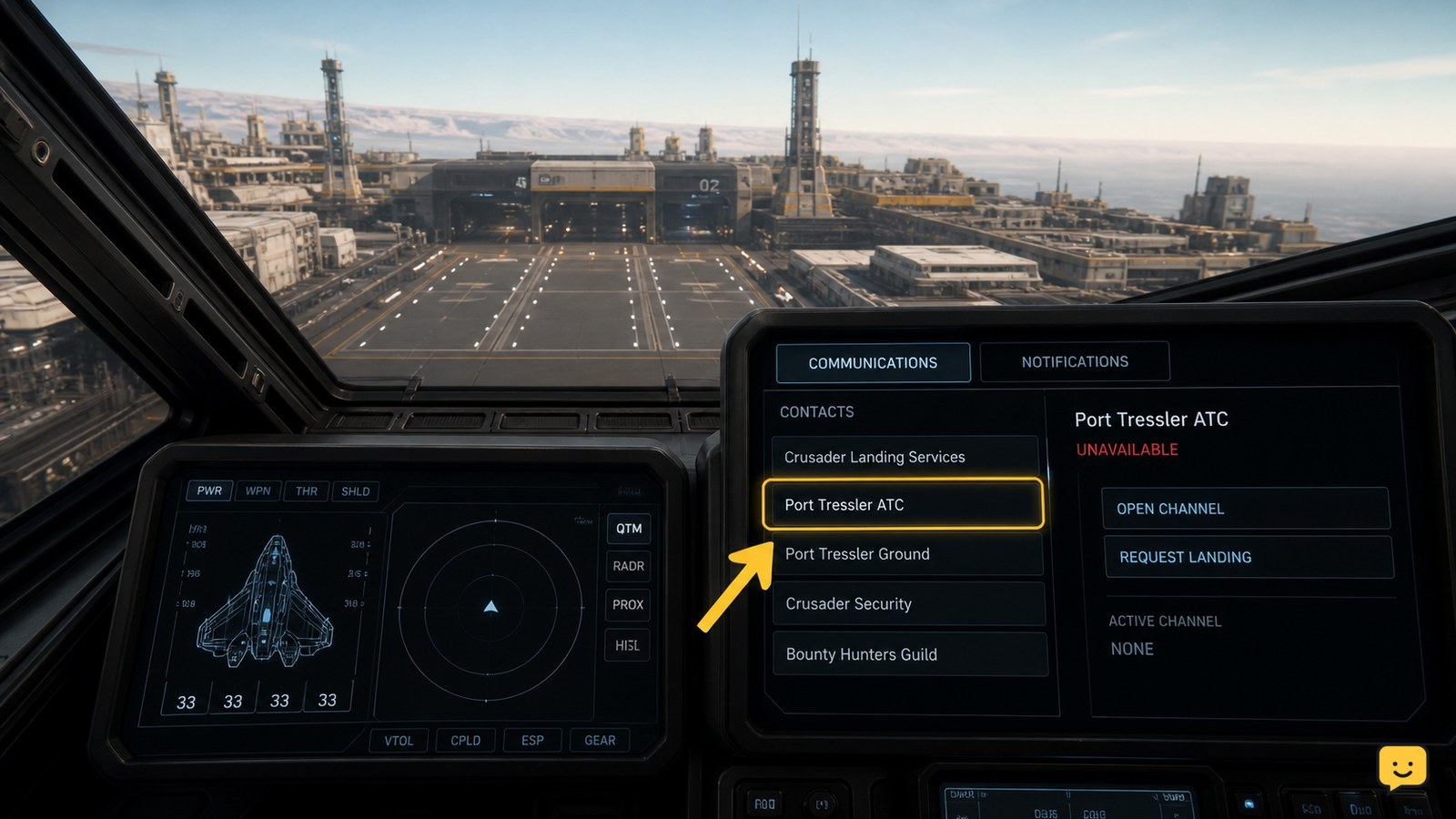
To request landing permission in Star Citizen, open your ship’s Communications MFD, select the destination’s ATC or landing-services contact, and send the landing request. You can also open mobiGlas, view the Friends list, and choose the location’s traffic-control contact. Wait for a clearance response before entering the assigned landing area.
Browse more Star Citizen guides
Choose the correct landing facility before contacting ATC
Star Citizen landing permission applies to the orbital station, spaceport, city, or ground facility you are approaching, so select the contact for that destination rather than a general player or ship contact.
For a station, line up your approach toward the station’s landing area. For a city or ground port, remain outside the landing zone while you look for the facility’s traffic-control or ATC entry. The exact contact name and interface can vary between game updates and locations.
Do not treat a visible pad as permission to land. The official Roberts Space Industries landing guidance describes the process as contacting ATC through the ship’s Communications MFD or through the mobiGlas Friends list.
Request landing permission through the Communications MFD
Your ship’s Communications MFD is the primary route for contacting a nearby landing facility in Star Citizen.
- Open the ship’s Communications MFD.
- Find the entry for the destination’s ATC, Landing Services, or traffic-control contact.
- Select that contact and choose the available landing-request option.
- Keep the ship clear of the pad or landing approach while the request is processed.
A successful request should produce an acknowledgement, clearance, or other landing guidance. The exact wording and resulting pad information can differ by location and current game build, so verify the communication rather than relying on a fixed voice line or menu label.
Use mobiGlas when the ship contact is difficult to find
If the destination does not appear clearly in the Communications MFD, open mobiGlas and use the Friends list to locate the facility’s ATC or traffic-control contact.
- Open mobiGlas.
- Open the Friends list.
- Find the destination or location traffic-control entry.
- Select it and send the landing request.
This alternate path is documented in the Roberts Space Industries landing instructions. Community references also describe the location traffic-control entry as the contact used for takeoff and landing requests, but the label can change with interface updates.
Verification: return your attention to the approach and confirm that the facility has acknowledged the request before moving into the landing area.
Verify clearance before entering the landing area
Landing permission is confirmed only when you receive an ATC response or clear landing guidance from the facility.
Look for an audible acknowledgement, a visible communication response, or updated landing instructions. If the facility assigns or identifies a pad, approach that pad carefully and keep your ship under control. If no response appears, do not assume that silence means approval.
For large stations and city ports, continue watching your position relative to the facility while waiting. A slow approach gives you time to react if the request is rejected, expires, or points you toward a different landing location.
Fix a landing request that does not respond
A silent landing request usually means the wrong facility entry was selected, the request did not register, or the location’s services are temporarily unavailable.
| What you see | Likely explanation | Safest next action |
|---|---|---|
| No ATC contact appears | The destination entry is not loaded or the approach location is incorrect. | Move closer to the intended facility without entering its pad area, then check the Communications MFD and mobiGlas Friends list again. |
| The request button does nothing | The communication may not have registered or the interface may be in a stale state. | Close and reopen the communication view, select the facility again, and send one new request. |
| You hear no acknowledgement | The request may be pending, rejected, or affected by a temporary service problem. | Hold position outside the landing area and wait briefly. If nothing changes, try the alternate mobiGlas route. |
| The facility remains unusable | The location may be unavailable in the current session or the service contact may be malfunctioning. | Divert to another usable landing facility instead of forcing entry into the original pad area. |
These failure causes are practical troubleshooting inferences rather than a published diagnosis for every build. If both communication routes fail, leave the approach corridor, avoid landing without clearance, and use another facility or reconnect through the normal game-session options.
Check ship services after landing permission succeeds
Once you have landed and your ship is safely positioned, verify that the landing state has completed before requesting refuel, rearm, repair, or other services.
Star Citizen’s service interactions can fail separately from the landing request. If maintenance is your next task, use the ship-service checks in Star Citizen how do I refuel and rearm my ship rather than repeatedly sending ATC requests.
Frequently asked questions
Can you request landing permission without the Communications MFD?
Yes. Open mobiGlas, go to the Friends list, and select the destination’s ATC or traffic-control contact. The exact contact name can vary by facility and game update.
What should you do if ATC does not appear in Star Citizen?
Remain outside the landing area, move closer to the intended facility, and check both the Communications MFD and mobiGlas Friends list. If the contact is still missing, use another landing facility.
Is it safe to land when the ATC request gets no response?
No. Treat an unanswered request as unconfirmed permission. Hold outside the pad or restricted approach, retry once through the alternate communication route, and divert if the facility remains silent.
Does every Star Citizen location use the same landing-request menu?
No. Stations, cities, and ground facilities can expose different contact names or service entries, and interface labels may change between updates. Look for ATC, Landing Services, or traffic-control wording.


