
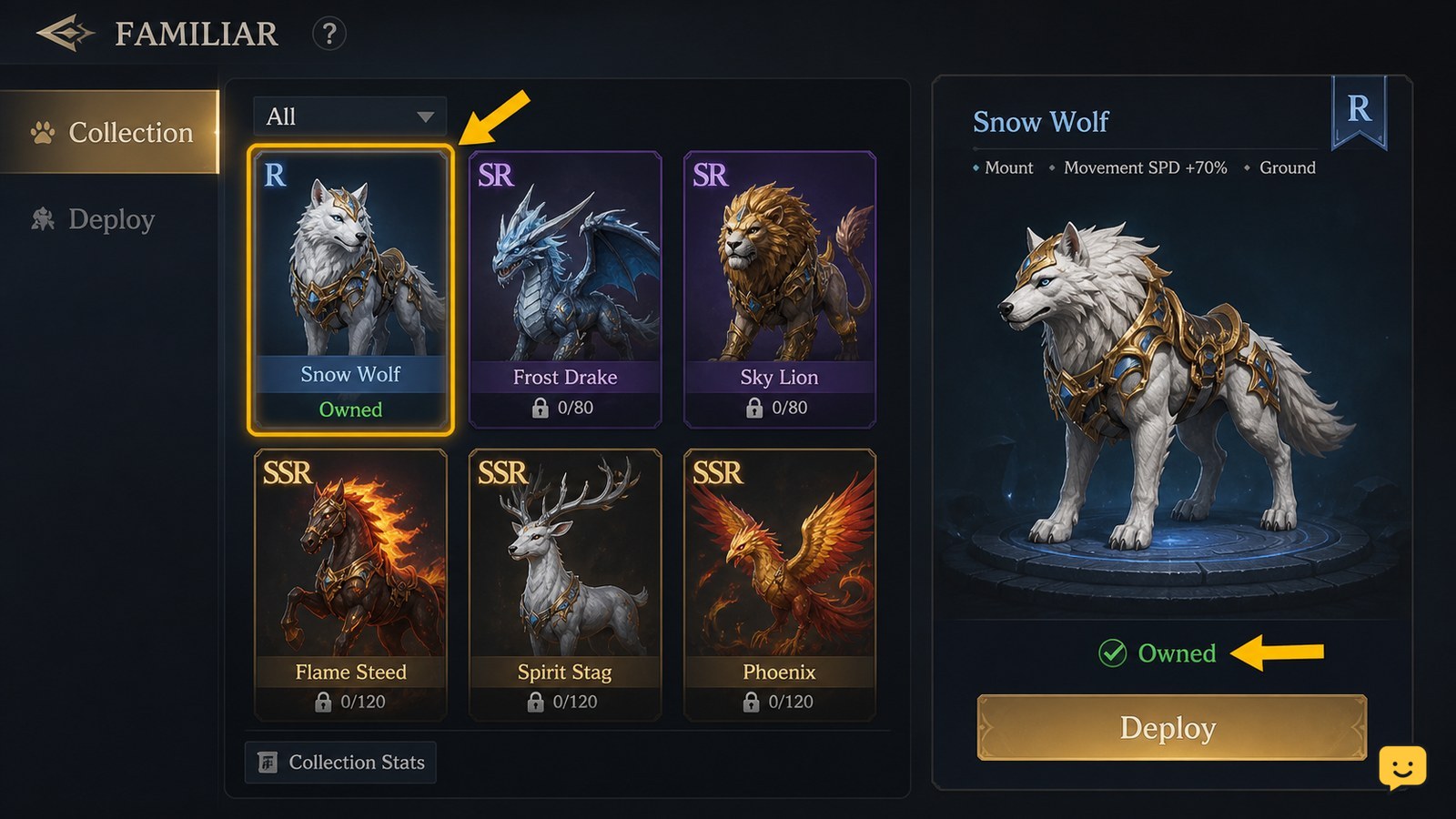
In Dragon Sword Awakening, pets are called Familiars and function as mounts. Progress the early story until you have joined Johnny’s Mercenaries, then claim the available Familiar through the Familiar menu. Other Familiars come from their own listed tasks. Confirm ownership and selection in that menu before attempting to use a Familiar as a mount.
Browse more DragonSword: Awakening guides
Check when the Familiar system becomes available
Dragon Sword Awakening makes the Familiar system available shortly after the story has you join Johnny’s Mercenaries, according to Games.gg’s Familiar guide. Until that story point is complete, searching every menu for a pet option is unlikely to help.
- Continue the main story until the game confirms that you have joined Johnny’s Mercenaries.
- Open the game menu and look for the Familiar menu or a similarly named Familiar collection screen.
- Check for a claimable entry rather than assuming the Familiar is added automatically.
Verify: You have reached the correct point when the Familiar screen is available and displays at least one entry that can be claimed, owned, or reviewed.
If it is missing: Return to the main quest log and complete the next required story objective. Do not rely on level alone, since the cited access condition is tied to story progression.
Claim your first available Familiar from its menu
Dragon Sword Awakening uses the Familiar menu as the place to claim the early Familiar after its story access condition is met. Open the menu, select the available entry, and use the claim control shown on that screen.
- Select the Familiar entry marked as available or claimable.
- Read the confirmation screen before accepting it, especially if the game shows a requirement or reward notice.
- Complete the claim, then reopen or refresh the Familiar list if the entry does not immediately change state.
Verify: The Familiar should no longer be shown only as an unclaimed reward. Look for an owned state, an available selection state, or a usable mount-related action attached to that Familiar.
If claiming fails: Check whether an unfinished main-story objective, a prerequisite task, or an uncollected reward is still listed. If no condition is shown, leave the menu, complete the current story step, and check again rather than repeatedly selecting the same inactive control.
Get additional Familiars by completing their listed tasks
Each additional Dragon Sword Awakening Familiar is tied to a specific task rather than a single universal pet shop or capture method. GameRant’s Familiar overview describes Familiars as mounts obtained by completing particular tasks.
Use the individual Familiar entry as your starting point. Its requirement is more useful than a broad checklist because it tells you whether that Familiar is currently obtainable on your save.
| What the Familiar entry shows | What to do |
|---|---|
| A task or objective requirement | Track and complete that requirement before trying to claim the Familiar. |
| An unavailable or locked state | Continue story or prerequisite content, then return to the same entry to check for a changed status. |
| An owned state | Move on to selecting it and checking its mount-use option. |
Do not treat a guide’s full Familiar list as proof that every option is available now. Requirements, menu wording, and availability can differ with progress or later updates. The status displayed by your game is the final checkpoint.
Select a Familiar and verify its mount function
Dragon Sword Awakening Familiars are mounts, so using one begins by selecting an owned Familiar and then using the mount-related action the game presents. The available evidence does not establish that Familiars independently fight beside you, so do not spend resources expecting a combat-pet system unless your own Familiar screen explicitly says so.
- Open the Familiar menu and choose an owned Familiar.
- Look for a selected, equipped, active, or mount-related status on that entry.
- Exit the menu and use the mount control or contextual prompt currently shown by the game.
- Return to the Familiar screen if the wrong Familiar appears or no mount action is available.
Verify: Success is visible in two places: the menu identifies the Familiar as owned and selected, and gameplay presents that Familiar through the game’s mount function.
If it does not appear: First confirm that you did not only preview the Familiar. Then check for an on-screen restriction, such as a location or activity where mounting is unavailable. If there is no restriction and the entry remains selected but unusable, stop changing Familiar choices and revisit the current quest state or current game support information.
Manage Familiars without confusing previews and ownership
Dragon Sword Awakening’s Familiar screen is the safest place to manage your collection because it separates an unlock requirement from an owned Familiar. Check the status shown on each entry before making progression decisions.
- Claimable: You have met the condition but still need to collect the Familiar from the menu.
- Locked or requirement shown: The Familiar is visible as a future option, not ready for use.
- Owned but inactive: The Familiar is in your collection but may need to be selected for mount use.
Use this order every time: check the entry’s status, satisfy its stated requirement, claim it, then confirm the selected state. It prevents the common mistake of treating a visible collection entry as a pet that is already usable.
Frequently asked questions
Are pets and Familiars the same thing in Dragon Sword Awakening?
Yes. Guides covering the system refer to these pet-like companions as Familiars and identify them as mounts. When looking for pet access, use the Familiar menu and its individual collection entries rather than searching for a separate pet-capture system.
Can Familiars fight with me in Dragon Sword Awakening?
Do not assume that they can. The available sources describe Familiars as mounts, not confirmed independent combat companions. Check the details shown on the specific Familiar in your game before investing items or planning a build around pet damage or pet skills.
Why can I see a Familiar but cannot use it?
A visible Familiar may be a preview or a locked collection entry rather than an owned mount. Open its entry and check for a listed task, an unclaimed reward state, or an inactive selection status. Complete the displayed requirement before trying to mount it.
Do I need to find every Familiar before using mounts?
No. You only need an owned Familiar that the game allows you to select and use as a mount. Other Familiar entries can remain locked while you progress through their separate tasks and requirements.


