
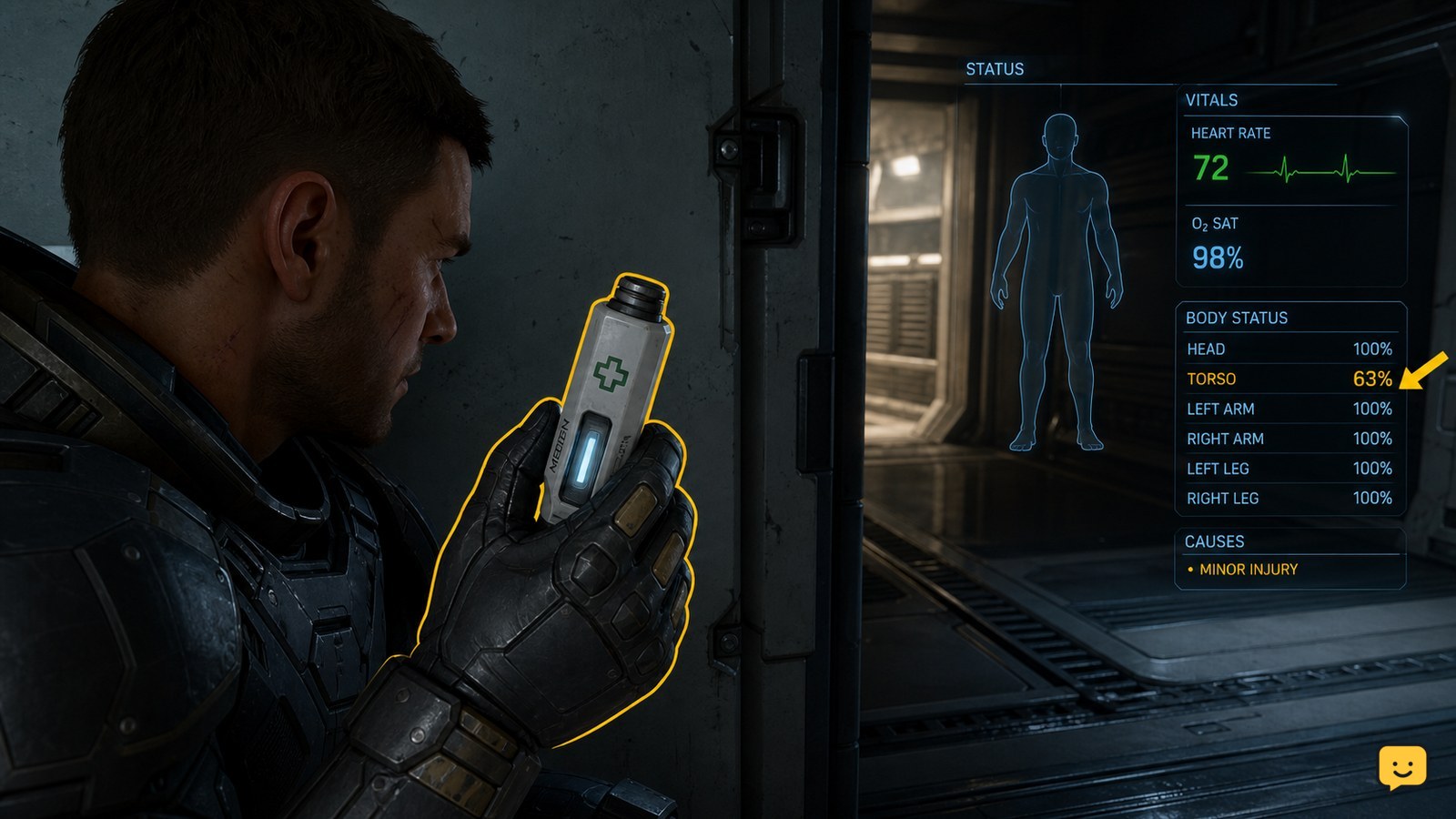
To heal with a MedPen, keep one in your personal inventory, use it through the current LIVE interaction shown for the item or your assigned medical-item action, and confirm that your health rises. A MedPen restores health; stop and seek a medical bed or medic if an injury, incapacitation state, or other condition remains.
Browse more Star Citizen guides
Check that a MedPen is the right treatment
A MedPen is the quick self-treatment option for missing health, so use it when your character is hurt but still conscious and able to interact. It is not the safe answer for every medical state: persistent injury indicators, severe movement problems, incapacitation, and continued environmental damage need a medical bed, a medic, or removal from danger first.
Before consuming one, open your vitals display and identify the immediate problem. If your health is below normal after combat, a fall, or another hit, a MedPen is the appropriate first item to try. If the health value is normal but a condition remains, preserve the pen and change treatment instead.
Use the MedPen from your carried inventory
Use a MedPen only after it is in your character’s personal inventory or another location the LIVE client marks as accessible to your character. An item left in ship storage, a container, or a distant inventory cannot be used until you move it to accessible storage.
- Get to cover and stop taking damage.
- Open your personal inventory and find the item named MedPen.
- Select its available use, equip, or carry interaction. If your current keybind setup provides a medical-item action, use the binding shown in the game’s keybind menu instead of relying on an older community keybind.
- Complete the use animation or interaction prompt without switching items or opening another interaction.
The maintained Star Citizen Wiki MedPen entry identifies the MedPen as a medical consumable. Exact interaction presentation and bindings can change between LIVE updates, so the in-game item action is the reliable checkpoint rather than a fixed keyboard instruction from an older guide.
Verify that the treatment restored health
A successful MedPen use should produce an observable health recovery in your vitals after the item is consumed or its use action completes. Check the health reading before returning to combat, flying, or moving through a hazardous area.
If health rises and you can move normally, store any spare MedPens and continue cautiously. If health rises only partly, do not repeatedly use pens without checking for another active problem. Find a safe medical location when practical, especially before a mission that could leave you without access to treatment.
Switch treatment when the MedPen does not solve the problem
If a MedPen does not raise health, the issue is usually not a simple missing-health case, the item was not actually used, or the client has not registered the interaction. Treat the symptom you can observe instead of spending your remaining supplies.
| What you see | Likely next action |
|---|---|
| No health increase and the MedPen remains in inventory | Reopen the item and use the current interaction shown by the LIVE client. Confirm it completes before trying again. |
| No health increase and the MedPen was consumed | Stop consuming more. Move to a medical bed or ask a player with a medical device for help. |
| Health is restored but an injury or impaired movement remains | Use a medical bed or obtain medical assistance; do not assume another pen will remove the condition. |
| You are unconscious or incapacitated | Do not attempt self-treatment. Request rescue or wait for another player to provide medical assistance. |
| You are still being shot, suffocating, or exposed to a hazard | Leave the source of damage first. A MedPen cannot keep pace with an active lethal threat. |
Keep MedPens accessible before high-risk activities
Keep MedPens in personal inventory before leaving a station, beginning a bunker mission, hand mining, or boarding another ship. This matters because the treatment only helps when the item is accessible while you are conscious and able to use it.
Carry a small reserve rather than moving every medical consumable into temporary ship storage. After using one, replace it at the next safe opportunity and check that the replacement appears in the inventory location you expect. If the LIVE item interaction is missing after a session change, treat that as an inventory or client-state problem and use a medical facility instead of risking a dangerous activity without a confirmed treatment option.
Frequently asked questions
Where should I keep MedPens in Star Citizen?
Keep MedPens in your character’s personal inventory or another storage location the current LIVE client shows as directly accessible. A MedPen stored only in a ship or container may not be available when you need it. Confirm accessibility before leaving a station or starting a risky activity.
Why did my MedPen not heal me?
A MedPen may not help if it was not actually activated, your health was already full, an injury is causing the remaining problem, or the client did not register the use. Check whether the item was consumed and whether your health value changed. If it was consumed without recovery, stop using more and seek medical treatment.
Can a MedPen fix a Star Citizen injury?
Not reliably. A MedPen is the immediate option for restoring lost health, while persistent injury effects or impaired movement call for a medical bed or a player using appropriate medical equipment. Check your vitals after use rather than judging only by the character animation.
Can I use a MedPen while incapacitated?
No. Self-treatment requires your character to be conscious and able to interact with the item. If you are incapacitated, use the available rescue or medical-assistance options and avoid giving up until you have assessed whether another player can reach you.


