
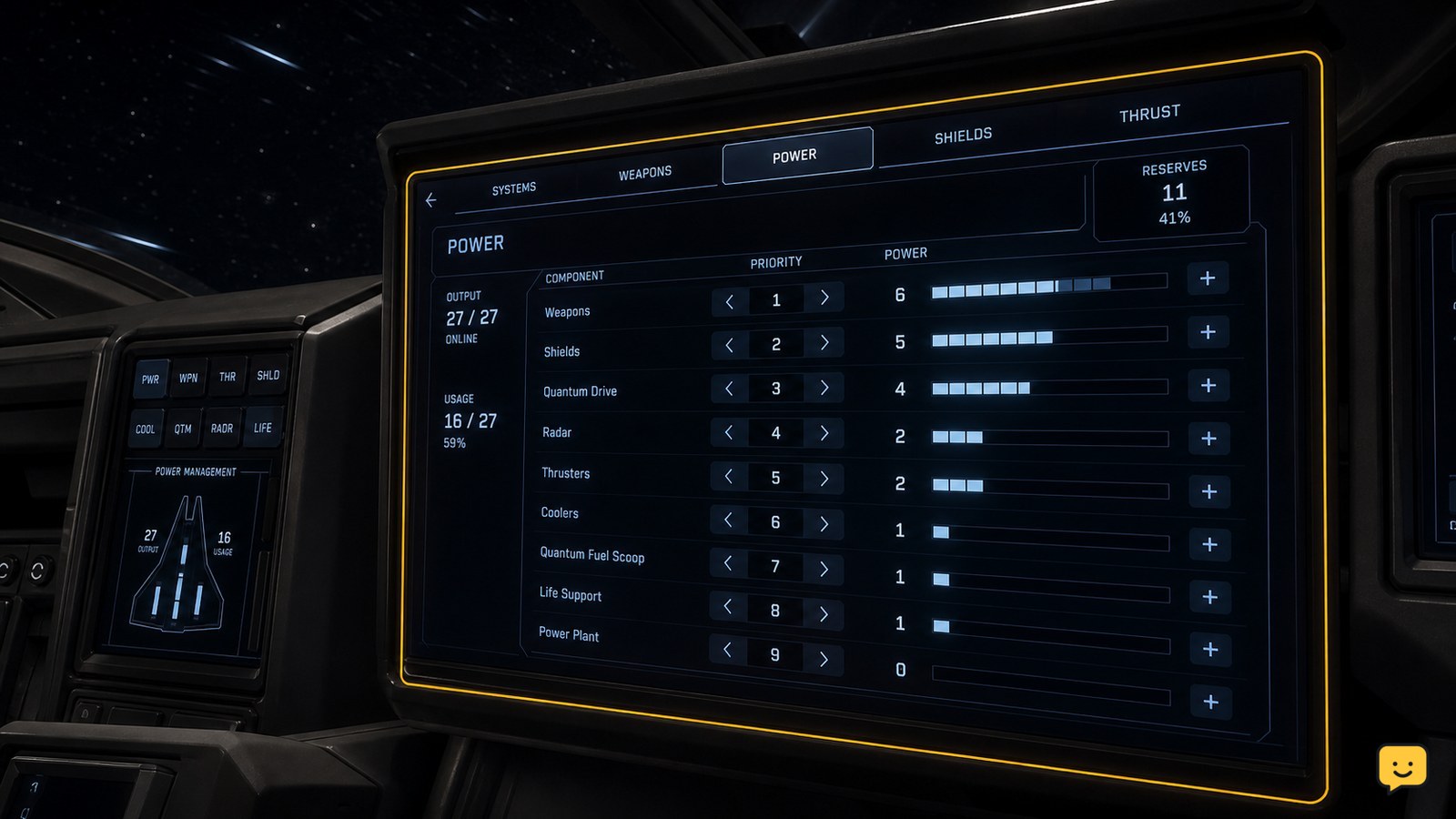
Manage ship power from a ship MFD’s Power display rather than using the older weapons-shields-engines power triangle. Check which components are online, turn off nonessential equipment when supply is limited, and give essential flight, shield, or combat components a higher priority. Confirm the change through each component’s active state and available-power readout.
Browse more Star Citizen guides
Open the ship’s Power display from an MFD
Enter the pilot seat, then interact with an available vehicle MFD and select its Power page. The exact MFD position and interface layout differ between ships, but the goal is the same: find the page that lists onboard components and their power state.
Do this before a fight or while stationary if possible. Power changes can remove power from a system you currently need, and it is easier to identify the result when the ship is not taking damage.
Check which components are online and drawing power
Read the component list before changing priorities. Look for items that are active, inactive, damaged, or unable to receive enough power. A component shown as inactive will not contribute its normal function until it is enabled and able to receive power.
Start with the systems that keep the ship controllable: the power plant, flight-critical equipment, and any defenses or weapons needed for the situation. The available list is vehicle-specific, so do not expect every ship to show the same equipment.
Verification: after opening the page, you should be able to identify individual systems rather than a single three-way weapons, shields, and engines allocation control. The current power-management approach is component-based.
Reduce demand before raising a system’s priority
If your ship does not have enough available output, turn off equipment you do not need for the next task. For example, equipment used for a different activity can be left offline while you travel, escape, or focus on combat-critical systems.
Then set a higher priority for the components that need to stay powered. Priority tells the ship which systems should receive power first when demand exceeds available supply; it does not create extra generation capacity.
Avoid switching off several unknown systems at once. Make one change, watch the component state, then make the next adjustment. That makes it clear which action caused a shield, weapon, or other system to change behavior.
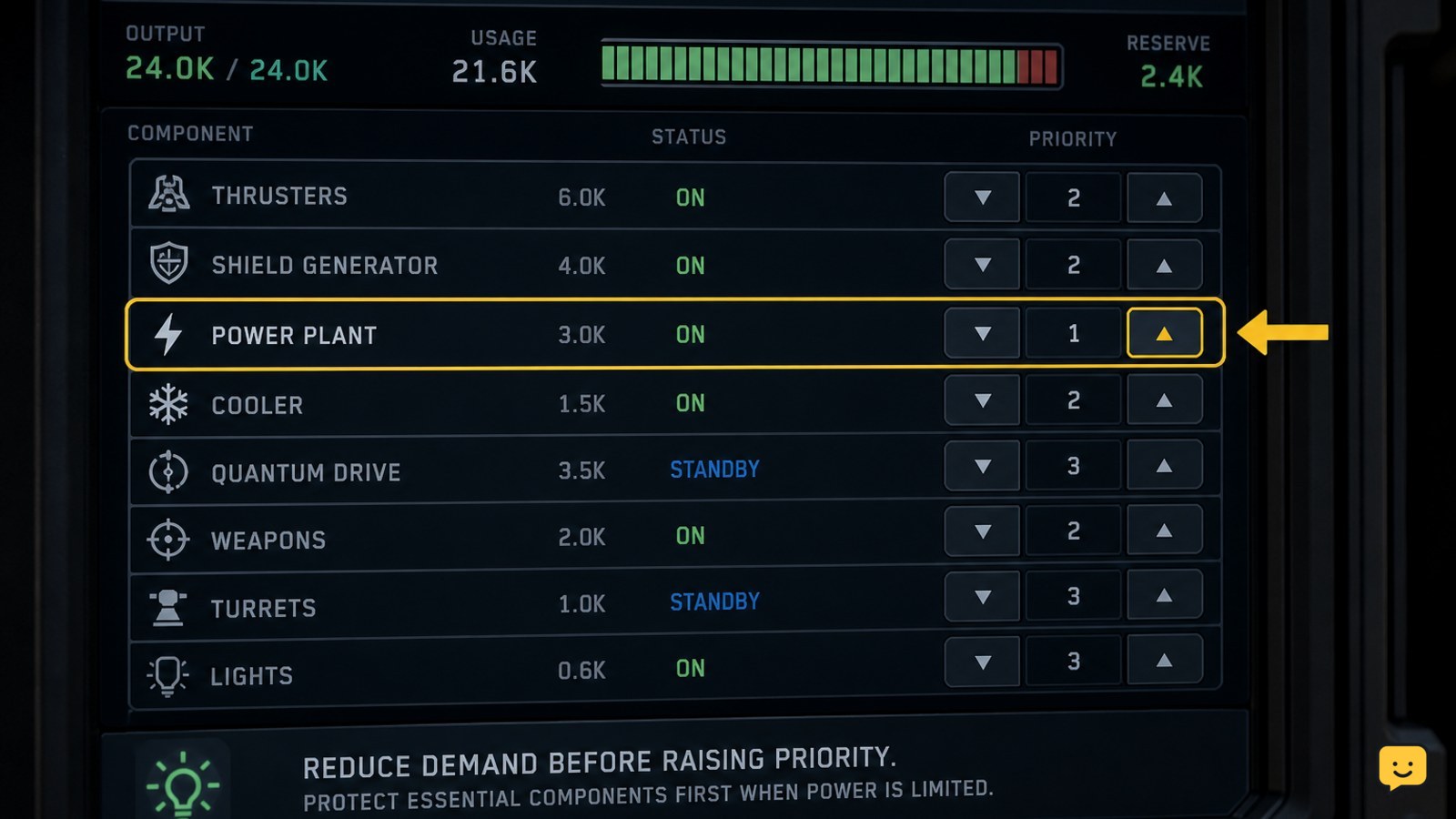
Use priorities for the situation you are in
There is no single best power layout for every ship or activity. Use the Power page to protect the systems that matter right now.
- Travel or escape: keep flight-critical systems powered and remove demand from equipment you will not use.
- Combat: keep the defensive and offensive components you rely on online, then reduce lower-value demand if the ship is short on power.
- Damage control: identify whether the problem is a disabled or damaged component before repeatedly changing priorities.
Older references to moving a triangle between weapons, shields, and engines may describe an earlier interface. On the current component-management system, use component state and priority instead of looking for that retired allocation workflow.
Confirm that the new power order worked
After each adjustment, remain on the Power page long enough to check the observable result. The component you protected should remain online, while lower-priority or manually disabled equipment may no longer be active when supply is constrained.
Also check the relevant ship behavior: a powered defensive system should resume its normal status indication, and an enabled combat component should no longer appear unavailable solely because it lacks power. If the system remains unavailable, do not assume priority is the cause.
Success looks like: essential components stay active without the power display showing them dropped offline as demand changes.
Fix a Power page that will not solve the problem
If the display shows sufficient power but a component still fails, inspect the component’s state. Damage, destruction, a missing item, overheating, or a separate vehicle issue can prevent normal operation even when its priority is high.
If the MFD does not react, try another available MFD or leave and re-enter the seat when it is safe. If controls remain unavailable, stop altering ship systems during flight and land or seek a safe location before trying again.
If a change leaves the ship less controllable, return the affected essential component to its prior state first. Do not continue experimenting while you cannot maintain safe flight.
Remember what power priorities cannot do
Power priorities distribute limited output; they do not repair components, replace a failed power plant, or permanently improve a ship’s performance. A ship with damaged equipment or insufficient generation may still need repair, replacement, or a reduced active load.
Keep this distinction in mind when diagnosing a failure. If a component is visibly damaged or absent from the list, stop treating it as a cockpit allocation issue and address the underlying ship condition instead.
Frequently asked questions
Can I still move power directly between weapons, shields, and engines?
No, the current component-management approach is not the older three-way power-triangle workflow. Use the ship’s Power display to check individual components, enable or disable equipment, and set priorities when available output is limited.
Why does a high-priority component stay offline?
A higher priority cannot fix every failure. The component may be damaged, destroyed, missing, manually disabled, or affected by another ship problem. Check its listed status and the ship’s available power before changing priorities again.
Does raising a power priority make a ship system stronger?
No. Priority decides which component is served first when the ship cannot power everything at once. It does not add generator output, repair damage, or raise a component above its normal performance limits.
Should I change power settings during combat?
Only make a small, deliberate change if you know which nonessential component can be taken offline. If changing the display could leave propulsion, shields, or controls unavailable, prioritize escaping or stabilizing the ship before further adjustments.


