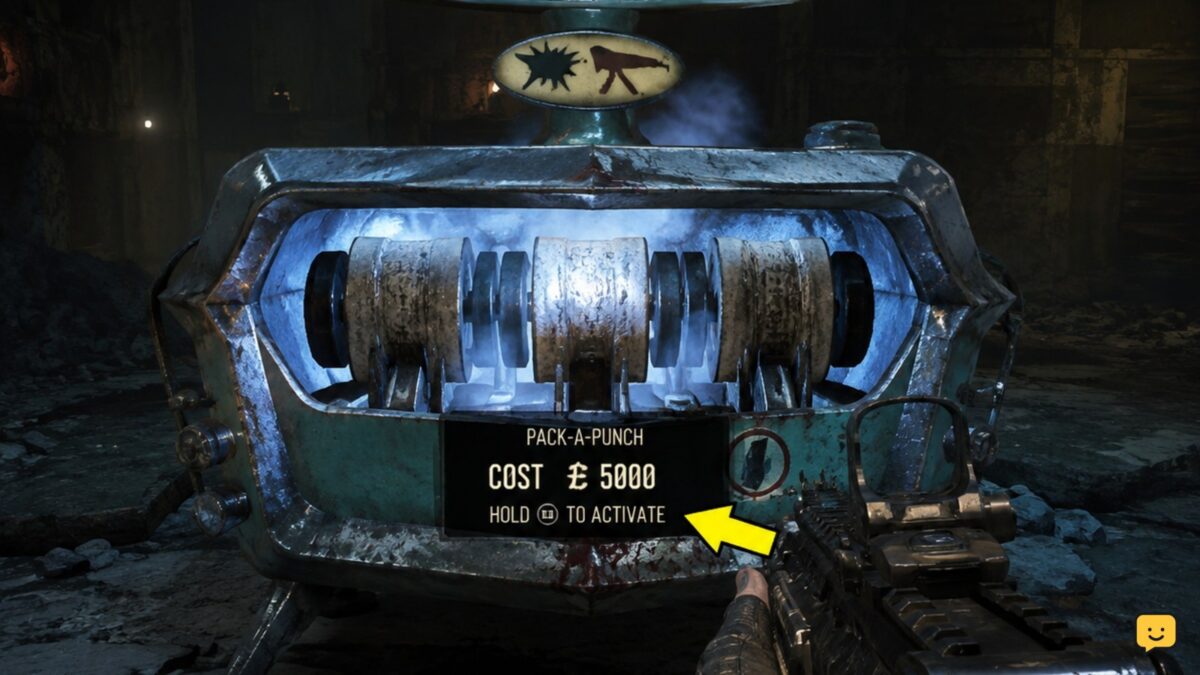
To Pack-a-Punch in Black Ops 7 Zombies, follow the main access objective for the map you loaded, reach the active Pack-a-Punch machine, and interact while holding the weapon to upgrade. Spend the Essence cost displayed on the prompt, then check the weapon’s updated name and stats before leaving the machine.
Browse more Call of Duty: Black Ops 7 guides
Check which Zombies map you loaded
Pack-a-Punch is a match objective, not a single universal route. Black Ops 7 Zombies maps can use different locations and access sequences. Confirm the map name from the match HUD or pause menu before following any objective steps.
For example, available guides identify separate Pack-a-Punch routes for Ashes of the Damned, Paradox Junction, and Kowakujo. A route that begins at a Server Room will not necessarily apply to every map.
Verification: You are on the right path when the game’s current objective marker leads to an interactable story or power-related task rather than a closed door with no prompt.
Complete Pack-a-Punch access on Ashes of the Damned
On Ashes of the Damned, begin by investigating the Server Room. The documented access route then sends you to Blackwater Lake to restore power before progressing onward to Ashwood.
- Follow the objective to the Server Room and complete the available investigation interaction.
- Travel to Blackwater Lake when the objective updates.
- Restore power there using the prompted objective actions.
- Continue following the updated in-game objective toward Ashwood and subsequent Pack-a-Punch access steps.
Do not rely on a memorized route after an objective changes. Open the objective display and follow its current marker, especially if a teammate completed an interaction while you were elsewhere.
Success check: The access chain is complete only when you can physically reach the Pack-a-Punch machine and it displays an interaction prompt for your equipped weapon.
If the next marker does not appear: Return to the last named objective area and look for an unfinished interaction, power task, or required enemy encounter. If you are on another map, use that map’s own objective route instead.
Equip the weapon you want to upgrade
Switch to the exact gun you intend to improve before using the machine. Pack-a-Punch applies to the weapon currently in your hands, so check your weapon HUD rather than assuming the machine will upgrade the gun you used most recently.
Keep an escape route open before interacting. The upgrade screen can leave you exposed if zombies are close, particularly when another player is using the same area as a training route.
Stop here if you accidentally equip the wrong weapon. Back away, swap weapons, and confirm the correct one is visible before spending Essence.
Buy the Pack-a-Punch upgrade with Essence
Stand at the active machine, face its interaction point, and use the on-screen interact control. Review the displayed Essence price and purchase the upgrade only when the machine identifies the weapon you are holding.
The game may offer additional upgrades after the first purchase. Treat each displayed cost as the current requirement rather than assuming a fixed price across every weapon, map, or future game update.
If the purchase option is unavailable, check the message on screen. The usual practical causes are insufficient Essence, an inactive machine, holding the wrong item, or a map objective that has not been completed.
Verify that the weapon was Pack-a-Punched
After the purchase, check the weapon information on your HUD and in the machine prompt. A successful upgrade is indicated by the game recognizing the weapon as upgraded and offering the next available action or cost where applicable.
Fire a brief test burst only after moving to a safe position. This confirms that you still have the intended weapon equipped and avoids wasting time in the machine area while enemies close in.
If your Essence was not deducted and the weapon display did not change, the purchase did not complete. Interact again only after reading the machine prompt and ensuring the area is safe.
Fix a Pack-a-Punch machine that will not work
- Check the map objective: If the machine has no usable prompt, reopen the objective tracker and complete the remaining access task.
- Check your Essence: The displayed cost must be available before the purchase can complete.
- Switch from equipment to a weapon: Hold a normal upgradeable weapon, then approach the interaction point again.
- Clear the immediate area: Move away from attacking zombies and return when you can interact without being interrupted.
- Let the host objective update finish: In co-op, wait briefly after a teammate completes an objective, then check for the refreshed marker or machine prompt.
If the machine remains inaccessible after the objective chain appears complete, do not spend the rest of the round searching unrelated areas. Re-check the current objective text first; it is the most reliable indicator of the task still blocking access.
Frequently asked questions
Do I need to turn on power before using Pack-a-Punch in Black Ops 7 Zombies?
On Ashes of the Damned, restoring power at Blackwater Lake is part of the documented Pack-a-Punch access route. Other Zombies maps may use a different prerequisite, so follow the objective marker for your loaded map rather than assuming the same power step applies everywhere.
Can I Pack-a-Punch more than one weapon?
Yes, you can upgrade another eligible weapon by equipping it and interacting with an active Pack-a-Punch machine again, provided you have enough Essence for the displayed cost. Confirm the weapon in your hands before purchasing so you do not upgrade the wrong gun.
Why is Pack-a-Punch not showing an interaction prompt?
The machine is usually still locked behind an unfinished map objective, or you do not have an eligible weapon equipped. Check the objective tracker, return to the last required task, then approach the machine again with a weapon in hand.
What happens if I do not have enough Essence for Pack-a-Punch?
The upgrade will not complete until you have the amount shown on the machine prompt. Keep the weapon equipped, earn more Essence through normal gameplay, and return when you can safely interact without being trapped by nearby zombies.