

To refine mined ore in Star Citizen, keep the material inside a mining pod attached to the mining ship, then use a refinery facility to submit a refining job. Choose the available processing options, confirm the order, and return after completion to collect the refined material. If the refinery cannot see the ore, stop and verify the pod is attached before storing or moving the ship.
Browse more Star Citizen guides
Confirm the ore is inside an attached mining pod
Refining starts with the correct storage state: the mined material must be in a mining pod attached to the ship. The available evidence does not support refining ore directly from ordinary local inventory, personal inventory, or a loose cargo container.
Before leaving the mining area, open the ship or mining equipment view and confirm that the pod is physically attached and contains the material you want to process. Note the ore type and approximate quantity so you can compare it with the refinery listing.
If the pod is detached, reattach it before storing the ship. A community refining report specifically identifies attached pods as the required source for the refinery and describes reattaching the pod before storing as a workaround for recognition problems.
Bring the mining ship to a working refinery
Travel to a refinery facility that is available in your current LIVE session. The supplied references confirm the refining workflow but do not establish one permanent facility name or one universal route for every current build, so use the destination that your session and current navigation data expose.
Park safely, complete any required landing or access step, and keep the ship available while you check the refinery. Do not detach the mining pod during this transition. The goal is to preserve the storage relationship that lets the refinery read the mined material.
Success at this checkpoint means you can access a refining interface and the interface can identify the ship, pod, or stored material. If the facility loads but shows no eligible material, do not submit an empty order; continue to the troubleshooting check below.
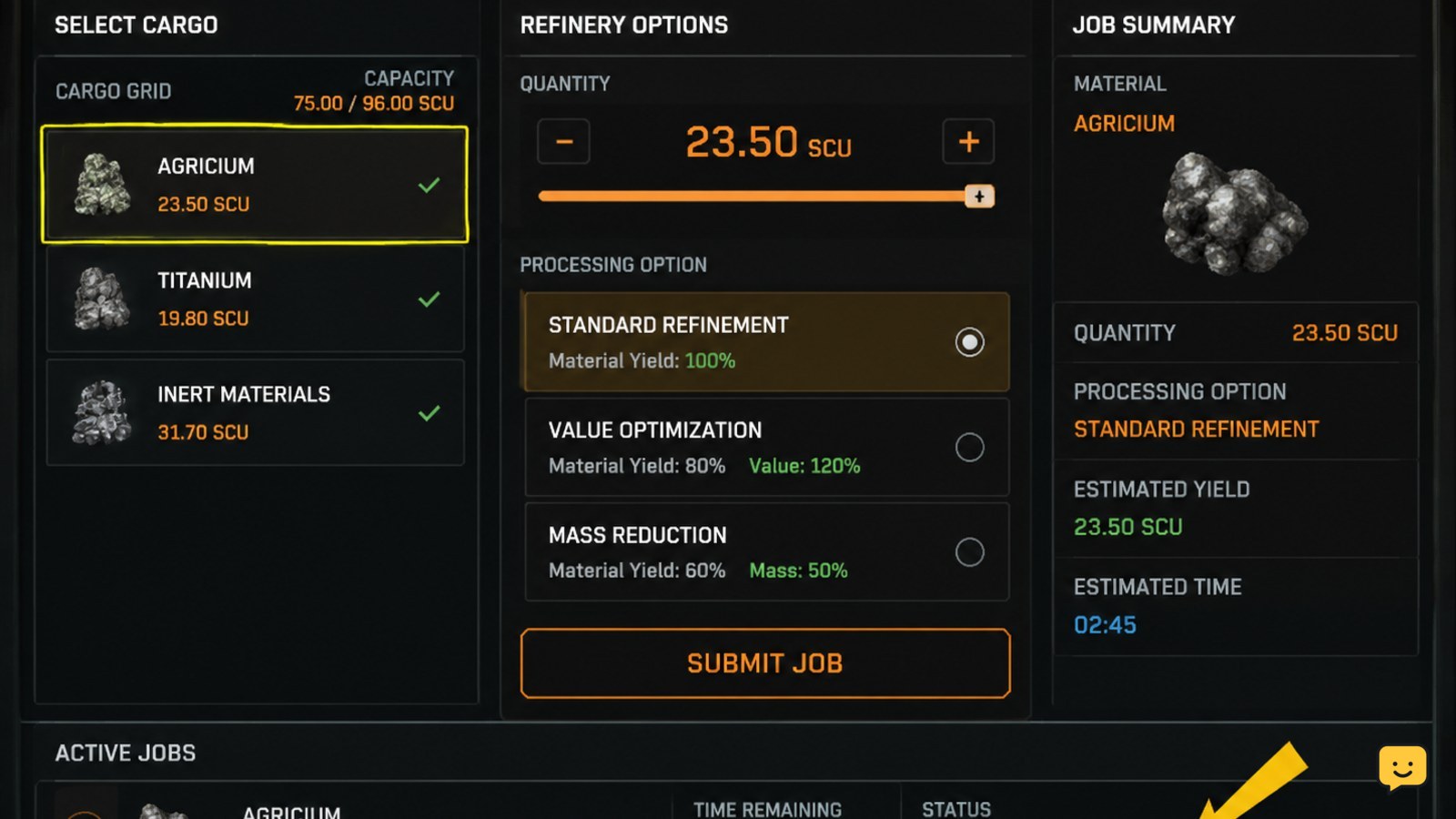
Open the refinery interface and submit the ore
- Open the refinery interface at the facility.
- Look for the mining pod or its available mined contents.
- Select the ore and quantity you want to process.
- Choose from the processing methods or job options shown by the current interface.
- Review the displayed output, duration, and any stated cost or material loss.
- Confirm the refining job only after the source material and result are visible.
The exact labels and available methods can vary with the current game interface. Do not use a remembered menu path when the screen presents different choices. A valid submission should create a visible job, queue entry, or other confirmation that the ore has left the unprocessed state.
Verify the job before leaving the station
After confirming the order, check for an observable processing state: a job entry, progress indicator, completion estimate, or equivalent confirmation. Record the ore type and the refinery destination if the interface provides them.
If no job appears, the order was not confirmed even if the screen changed. Recheck the source pod, selected quantity, and any required field. If the job appears but the source remains available at its original quantity, avoid submitting a duplicate order until the interface refreshes or the current session is stable.
Leave only when the refinery shows the order as accepted or queued. This checkpoint protects against confusing a preview screen with a submitted job.
Collect the refined material after completion
Return to the same refinery workflow after the displayed processing period has ended. Open the completed job and use the collection or transfer action shown by the interface. The finished material should move into the destination selected by the current system, such as ship cargo or another supported storage location.
Verify the result by checking the completed job and then checking the destination inventory. Confirm the refined material type and quantity rather than relying only on a notification.
If the job is marked complete but the cargo is missing, refresh the relevant inventory view and check the ship storage state before moving the vessel. Do not detach or sell the source pod until the result is visible. If the job and cargo remain absent after checking the refinery and relogging, stop treating the order as recoverable through repeated submissions and use the current support route.
Fix a refinery that cannot see the mined ore
Use the symptom to narrow the failure:
- No pod or ore is listed: confirm the mining pod is attached to the ship and still contains the material. Reattach it if necessary, then store and retrieve the ship only if the current session supports that recovery without risking the cargo.
- The ship is listed but the quantity is wrong: compare the refinery value with the pod contents and refresh the interface. Do not submit a job until the displayed source quantity is credible.
- The refinery opens but no job can be confirmed: check that an ore, quantity, and processing option are selected. If the interface still provides no confirmation, leave the screen without submitting.
- The job completed but the result is not visible: inspect the selected destination and ship inventory, refresh both views, and check again before moving or selling anything.
Stop when the pod remains unrecognized after reattachment and a safe refresh, or when the game shows conflicting quantities. Those states are not reliable enough for a new refining order.
Frequently asked questions
Can Star Citizen refine ore from local inventory?
No reliable workflow in the supplied evidence supports refining ore directly from local or personal inventory. The documented community workaround requires the mined material to remain in a mining pod attached to the ship. If the refinery cannot list your ore, check the pod connection before moving the material between storage locations.
Why does the refinery not show my mined ore?
The first check is the mining pod. The pod must be attached to the ship and recognized by the refinery. Reattach it, preserve the ship-and-pod relationship, and refresh the refinery interface. If the pod still does not appear or the quantity conflicts with the contents, stop before submitting a job.
How do I know that refining actually started?
A successful submission should create a visible refinery job, queue entry, progress state, or equivalent confirmation. A preview of the output is not enough. Compare the source quantity before and after submission, then confirm that the job remains listed before leaving the facility.
Where does the refined ore go?
The destination depends on the options shown by the current refinery interface and the storage state of your ship. After completion, open the job and use its available collection or transfer action, then verify the refined material in the displayed destination inventory.


