
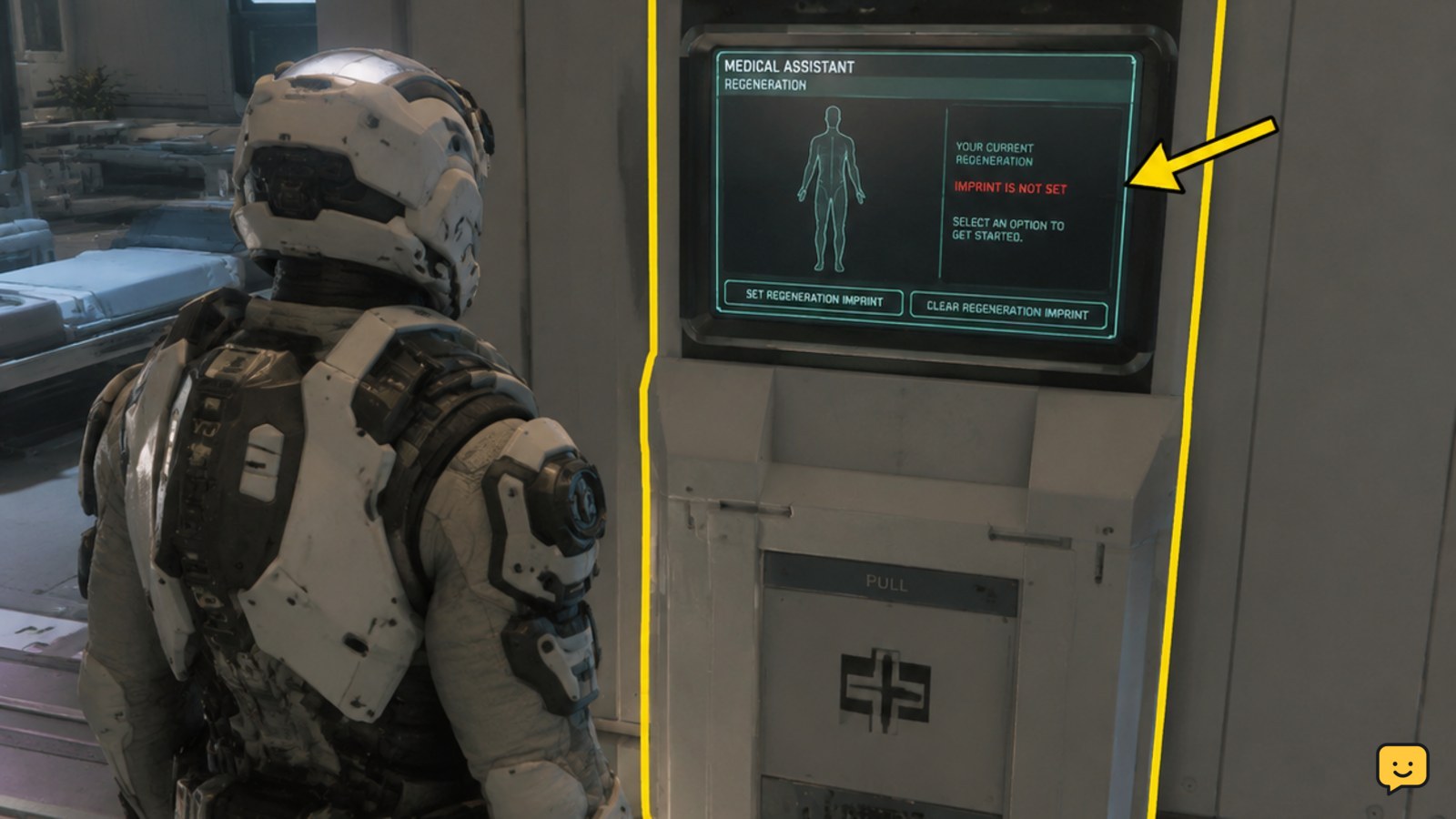
Visit a hospital, clinic, or ship medical bed that supports regeneration. Open its regeneration interface, choose the option to transfer your imprint, and wait for confirmation. Before leaving, reopen the interface and confirm that the intended facility is shown as your active regeneration location. Do not take mission gear into danger if that confirmation is missing.
Browse more Star Citizen guides
Check whether the medical location supports regeneration
Medical treatment and medical regeneration are related but separate capabilities. A bed may heal injuries without accepting your regeneration imprint, so the presence of a medical room alone is not proof that you can bind there.
Look for a regeneration terminal, an insurance or imprint interface, or a medical-bed screen that offers an imprint-transfer action. Hospitals and station clinics are the safer choice when you need a dependable fixed location. Ship binding applies only when the installed medical facility supports regeneration.
If you can open treatment controls but cannot find any regeneration or imprint option, stop. Do not assume the bed has silently changed your respawn location.
Bind your imprint at a hospital or station clinic
- Enter the medical facility. Follow the hospital or clinic signs rather than stopping at a pharmacy or ordinary information kiosk.
- Find the regeneration interface. Depending on the facility layout, this may be a dedicated terminal or part of the medical interaction area.
- Open the regeneration page. Read the displayed destination before selecting anything.
- Choose the imprint-transfer action. The wording may refer to transferring or updating your regeneration imprint.
- Wait for the interface to finish. Do not walk away while the terminal is processing the request.
A successful transfer makes this facility your active medical regeneration point. Star Citizen uses one active imprint, so binding at a different valid facility replaces the previous choice rather than creating a list of interchangeable respawn points.
Use a compatible ship medical bed only when it will remain available
Some ship medical facilities can accept a regeneration imprint. Enter or lie on the supported bed, open its medical interface, move to the regeneration controls, and select the imprint-transfer option. Wait for the confirmation before leaving the bed.
A ship point carries more conditions than a fixed clinic. The ship and its medical facility must still be usable when regeneration is needed. Position, availability, access, storage state, and destruction can prevent the intended ship bed from serving as the destination.
Choose a ship bed when you understand those dependencies and need a nearby field destination. Choose a hospital or station clinic when losing access to the ship would create an unacceptable detour.
Verify the active imprint before taking mission gear
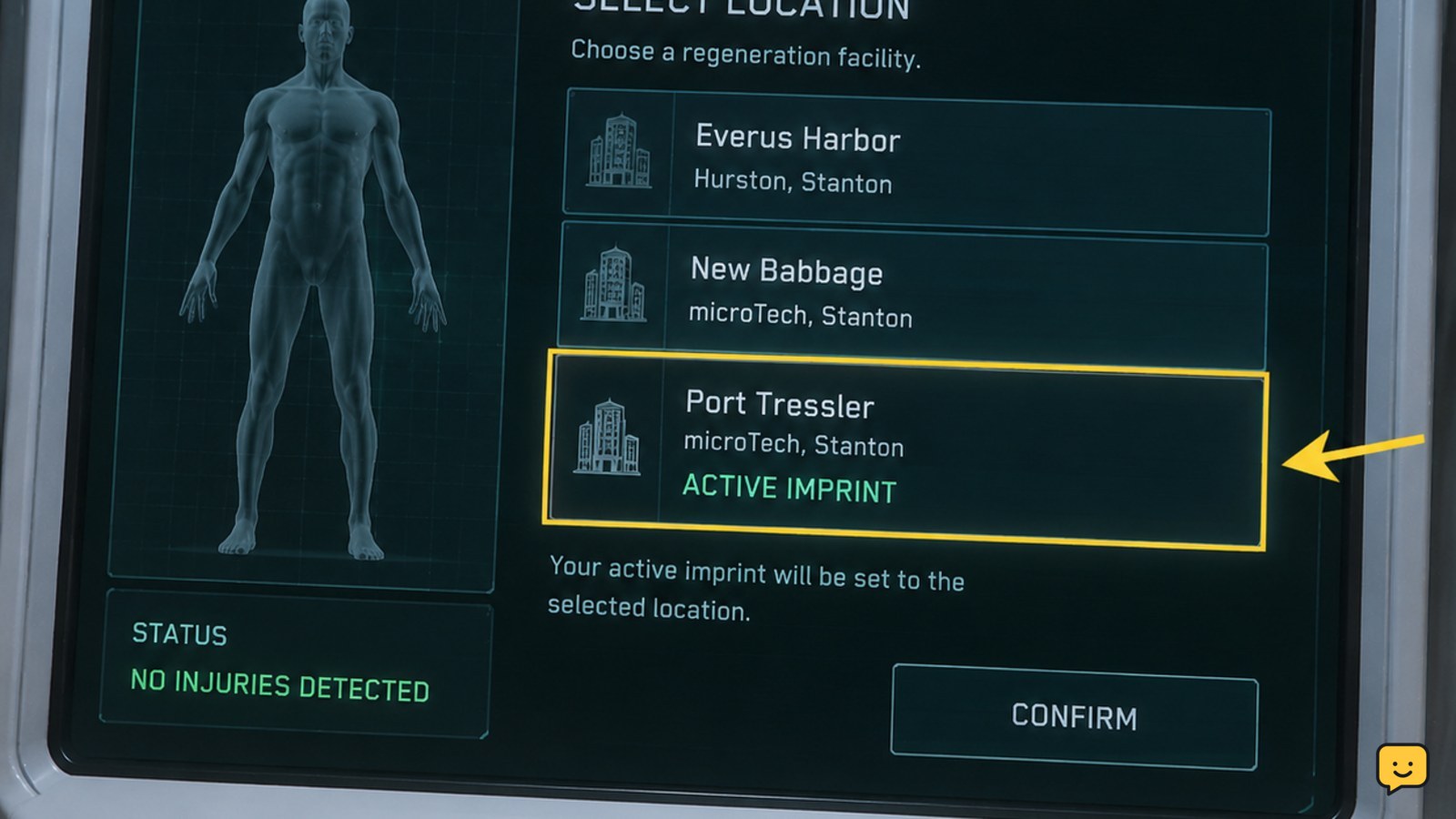
Do not treat a button press as proof that the transfer succeeded. Reopen the regeneration interface after the completion message disappears and inspect the location or status shown on the regeneration page.
- Confirm that the interface identifies the intended hospital, clinic, vehicle, or bed as the current destination.
- Check that the page no longer offers to transfer the imprint as though the location were unbound.
- If you used a ship bed, leave and reopen the bed interface once to make sure the status persists.
Success means the intended facility is visibly presented as the current or active regeneration location. Once you see that state, you can leave without intentionally dying to run a test.
Fix a missing transfer option or an imprint that does not update
If the expected control or confirmation does not appear, use the symptom to choose the next action.
- No regeneration page appears: Make sure you are using a regeneration terminal or supported medical bed, not a pharmacy, check-in screen, treatment-only bed, or decorative console.
- The interaction prompt is missing: Step away, approach the screen again, and try a different interaction angle. If the terminal remains unresponsive, use another terminal in the same facility.
- The transfer control is unavailable: Exit the interface completely, wait for the area to finish loading, and reopen it. On a ship, confirm that the medical bed and ship systems are powered.
- The transfer completes but the old point remains: Repeat the transfer once and reopen the page. If the old location is still shown, move to another functioning terminal or fixed clinic.
- Every terminal at the facility fails: Leave the area and return, or reconnect to a fresh game session. Recheck the active imprint before starting the planned activity.
Stop troubleshooting that particular bed if it never exposes regeneration controls. Healing capability does not guarantee regeneration support.
Know when a ship respawn point may not be used
Binding to a ship does not make the destination unconditional. If the ship or bed is destroyed, stored, inaccessible, or otherwise unavailable when your character needs regeneration, the game may send you to another valid medical destination instead.
The same caution applies when travelling far from a ship-based point. Supported regeneration behavior can depend on the medical facility and the ship’s current availability, so avoid assuming that a successful transfer guarantees recovery at any distance or under every server state.
Before a high-risk mission, verify the imprint again if the ship has been reclaimed, stored, replaced, moved by another player, or recovered after a server interruption. If the destination matters more than proximity, rebind at a permanent clinic.
Confirm the setup again after changing medical locations
Transferring your imprint at another valid medical facility replaces the earlier active point. Recheck the displayed destination whenever you use a different hospital, station clinic, or supported ship bed.
You should also verify after a long interruption or any event that changed the state of a ship carrying your medical bed. The safe checkpoint is simple: the regeneration interface must show the location you intend to use. If it does not, stop preparing for the risky activity and bind again at a functioning facility.
Frequently asked questions
Can I set more than one medical respawn point in Star Citizen?
No. Your character has one active regeneration imprint. Transferring it at another hospital, clinic, or supported ship bed replaces the previous destination rather than adding a second choice.
Can every medical bed be used as a respawn point?
No. Some beds provide treatment without supporting regeneration. Open the bed’s interface and look for an imprint-transfer or regeneration control. If that control is absent, use a hospital, station clinic, or another bed with confirmed regeneration support.
Do I need to die to check whether the respawn point worked?
No. Reopen the regeneration interface and confirm that it identifies the intended facility as your active destination. Deliberately dying is unnecessary and risks losing equipment if the transfer did not register.
Why did I respawn somewhere other than my ship medical bed?
The ship destination may have been unavailable. A destroyed, stored, inaccessible, unsupported, or otherwise unusable ship medical facility may not accept regeneration at the moment of death. Use a permanent clinic when you need a less conditional destination.
Does healing at a clinic automatically set my respawn point?
No. Receiving treatment does not by itself transfer your regeneration imprint. You must use the facility’s regeneration interface and complete the imprint-transfer action, then verify the displayed active location.


