If The Isle Evrima server browser shows no servers, first confirm that Steam is launching Evrima rather than Legacy. Then clear the name, region, capacity, and gameplay filters, refresh the list, and restart Steam. If the list is still empty, raise Steam’s server-browser ping limit, test another region, and wait after a server restart or outage.
Confirm you are running Evrima, not Legacy
The Isle has separate Legacy and Evrima builds. Their server populations and browser results are not interchangeable. A server that exists in Legacy will not appear in the Evrima list, and an Evrima server will not appear when the Legacy build is running.
- Open Steam and go to Library.
- Right-click The Isle, select Properties, and open the Betas tab if your Steam layout shows it.
- Confirm that the selected branch is the one used by the server you want. Do not assume that the default branch means Evrima.
- Close the Properties window and let Steam finish any download or update.
- Start the game and check that the in-game browser is listing Evrima servers.
Verify: Search for a known Evrima server name or ask a friend currently playing Evrima whether the server is visible. If the known server appears, the branch was the cause.
Failure path: If the branch is correct but the browser is empty, continue without switching repeatedly between Legacy and Evrima. Each switch can trigger another update and make the result harder to diagnose.
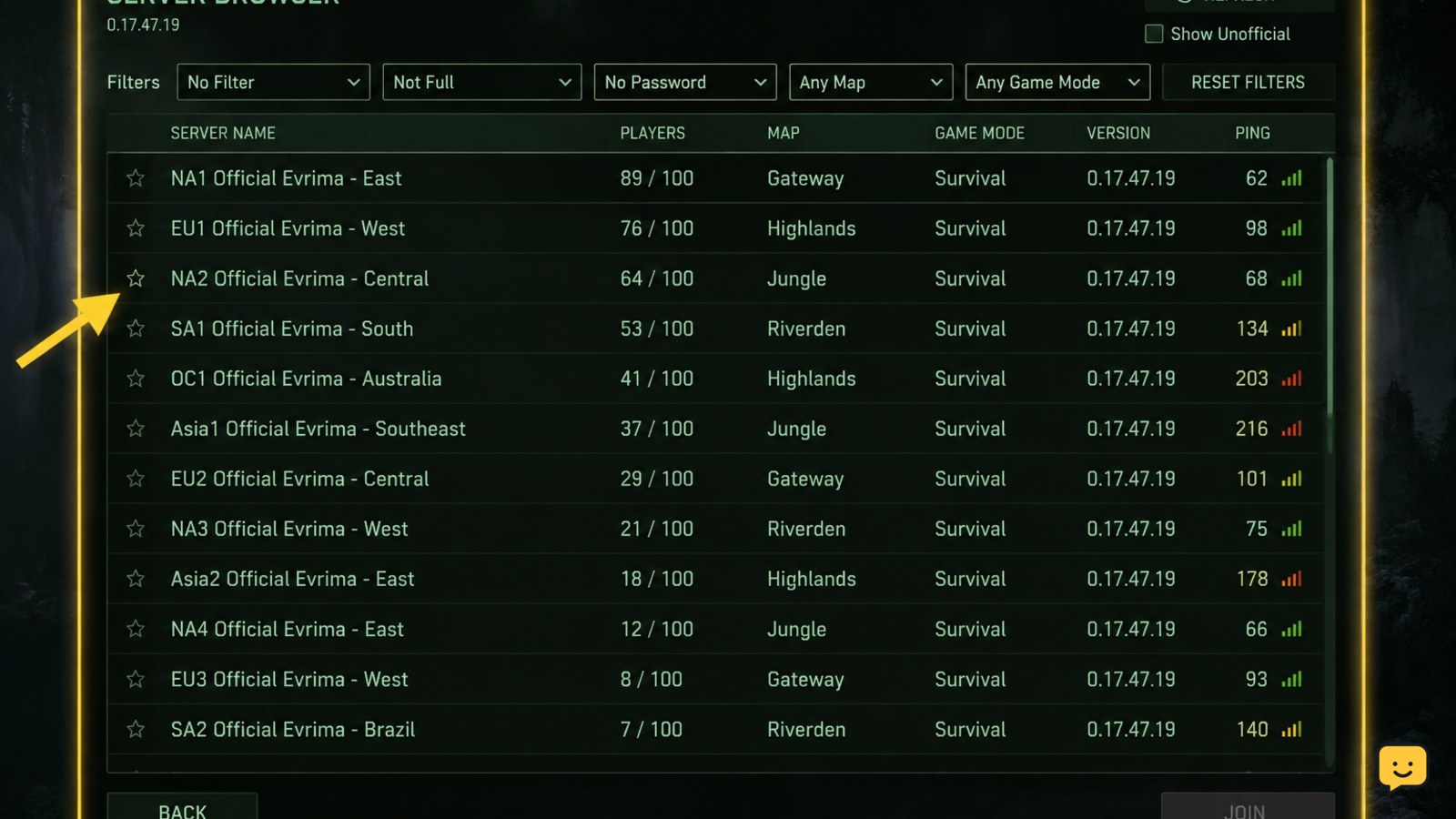
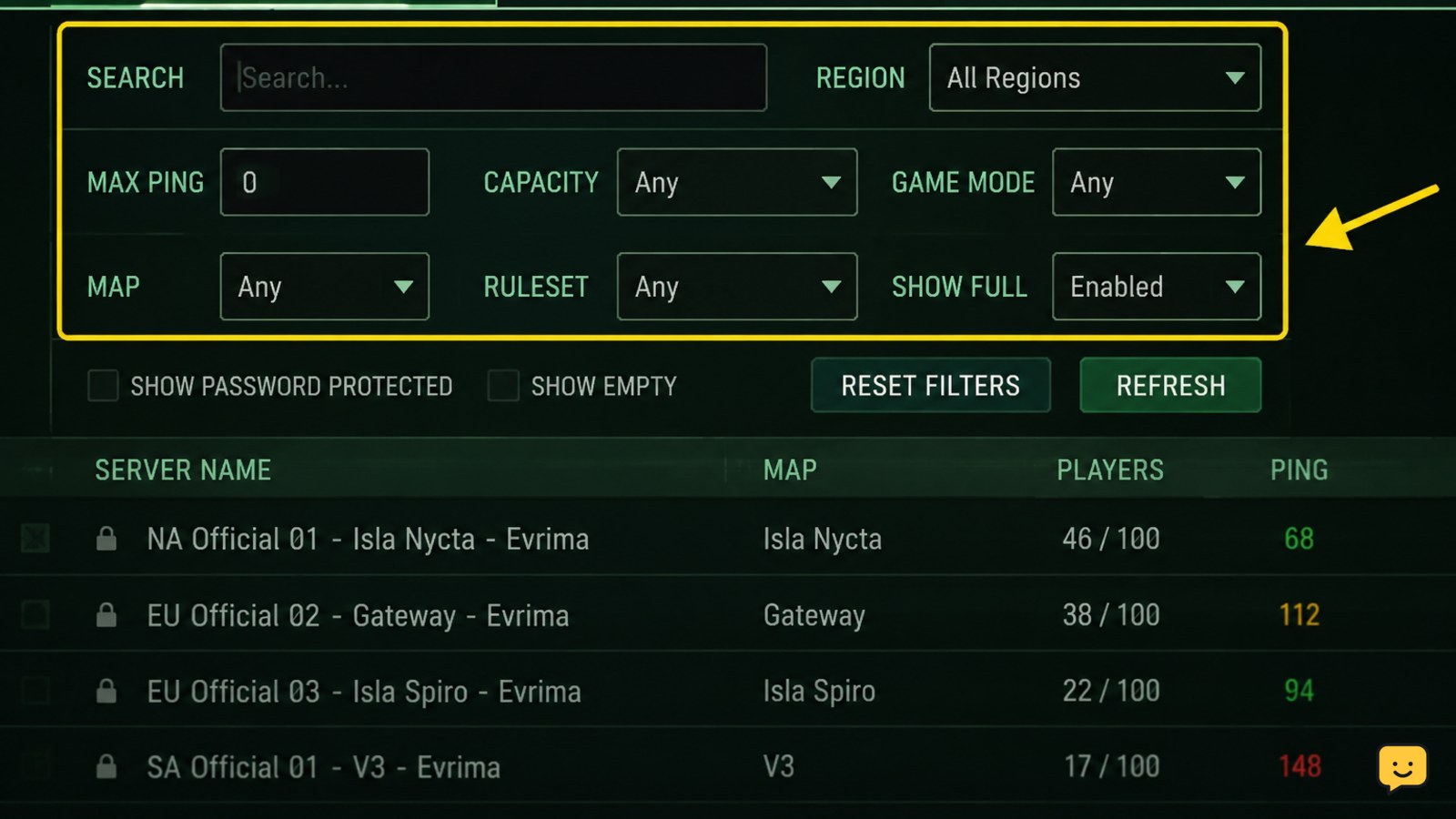
Clear every server-browser filter
A saved filter can hide the entire list. This is especially likely after searching for a server by name, selecting a region, limiting player counts, or enabling options that the available servers do not meet.
For the related task, Unable to Join a Server in The Isle Evrima covers the next checks separately.
- Open the Evrima server browser.
- Delete any text in the server-name or search field.
- Set the region to All or the broadest available option.
- Remove limits for empty, full, or password-protected servers temporarily.
- Clear map, game-mode, ping, player-count, and other custom filters if those controls are present.
- Apply the changes, then use the browser’s refresh or reload control.
Do not test with a narrow search first. Begin with the broadest list, confirm that any server appears, and only then reapply one filter at a time.
Verify: The unfiltered list should show at least some servers. If one filter makes the list disappear, that filter is excluding the available results rather than proving that the servers are offline.
Refresh the list and restart Steam cleanly
The browser can retain an old or incomplete result set. A normal refresh is the quickest test, but a full Steam restart is useful when the list remains blank after an update or connection change.
- Refresh the server list and wait for it to finish loading before clicking another menu.
- Exit The Isle.
- Exit Steam from the Steam menu rather than only closing the window.
- Wait several seconds, reopen Steam, and allow downloads or updates to complete.
- Launch The Isle again and open the Evrima browser with all filters cleared.
When a particular server has just restarted, give it several minutes to register again before treating it as missing. A community server guide reports a typical two-to-five-minute registration delay after a restart; treat that timing as an estimate, not a guarantee.
Failure path: If only one named server is missing but other servers load, do not reinstall the game yet. The missing server may be restarting, full, misconfigured, or unavailable to your region.
Check Steam connectivity and server-browser ping settings
The Isle relies on Steam connectivity for multiplayer discovery. A Steam outage, a stalled client connection, or a restrictive server-browser ping setting can make the in-game list appear empty or incomplete.
- Confirm that Steam shows you as online and that other Steam community or multiplayer features load normally.
- Open Steam Settings and find the in-game or server-browser ping setting. Increase the allowed ping frequency from a very low value, if it has been reduced.
- Restart Steam after changing that setting.
- Return to The Isle and refresh the Evrima browser.
- If possible, test once with a wired connection or a different network to separate a local network problem from a game-browser problem.
A Reddit troubleshooting report specifically recommends changing Steam’s server-browsing ping setting and verifying game files. The exact menu wording can change with Steam updates, so use the current setting that controls how often Steam checks servers.
Verify: If the Steam server browser can find The Isle servers while the game’s list cannot, use that result as a diagnostic clue and continue with file verification and branch checks. Do not treat a third-party server listing as proof that a server is joinable.
Verify The Isle’s files
Damaged or incomplete files can follow an interrupted update and may prevent the client from displaying or joining servers correctly.
- Exit The Isle.
- In Steam Library, right-click The Isle and choose Properties.
- Open Installed Files or the equivalent tab in your Steam version.
- Select Verify integrity of game files.
- Wait until Steam finishes, then restart Steam and launch the correct Evrima branch.
Steam may replace files or report that no problems were found. Either result is useful: a repair confirms that the local installation needed correction, while a clean result points more strongly toward filters, Steam discovery, the selected branch, or server-side availability.
Stop condition: Do not repeatedly verify files after a clean result. Move to the regional and server-side checks instead.
Rule out regional, capacity, and server-side causes
Some servers may be hidden by region, unavailable during maintenance, full, or slow to reappear after a restart. Regional server directories can help you check whether a named server is being reported as active, but they are not a replacement for the in-game browser.
- Search the exact server name in a community server directory or the server owner’s status channel.
- Ask a player in another region whether the server appears for them.
- Test the browser with a different region or with all regions selected.
- Try a second known Evrima server. If it appears, your original server is the likely problem.
- If no servers appear for anyone, wait for a Steam, game, or server-provider incident to clear.
Do not confuse a Legacy server listing with an Evrima result. Confirm the branch and version before comparing reports.
Final verification: The issue is likely local when other Evrima servers appear after clearing filters, restarting Steam, or verifying files. It is likely regional or server-side when only one server is absent or players in multiple regions see the same outage.
Frequently asked questions
Why is The Isle Evrima server list empty?
The most common causes are running the wrong branch, a saved browser filter, a Steam discovery problem, or a temporary server or service outage. Select the Evrima branch, clear every filter, refresh the list, restart Steam, and test more than one known Evrima server.
How do I tell whether I am playing Legacy or Evrima?
Check The Isle’s selected Steam branch in the game’s Properties window, then compare the result with the server or friend you are trying to reach. Legacy and Evrima use separate server populations, so a server visible in one branch will not necessarily appear in the other.
Can Steam’s ping setting hide The Isle servers?
Yes, a low server-browser ping frequency can contribute to incomplete discovery. Open Steam Settings, find the setting that controls server-browser ping checks, increase it if necessary, restart Steam, and refresh The Isle. If the list remains empty, also verify the game files.
Why can my friend see an Evrima server when I cannot?
Your filters, region selection, Steam connection, or game branch may differ from your friend’s. Match the Evrima branch, clear the search and region filters, restart Steam, and search for the exact server name. If it remains invisible only to you, test another network or verify files.
How long should I wait after an Evrima server restart?
Wait several minutes and refresh again. One community server guide reports roughly two to five minutes for registration after a restart, but this is only an estimate. If the server remains absent after that period, check its owner’s status information and compare it with another Evrima server.